
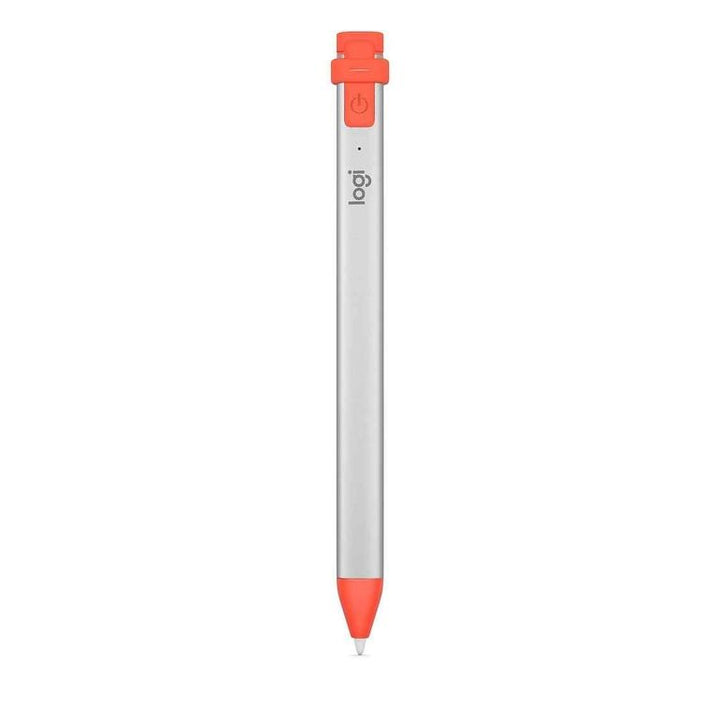


Logitech Crayon For iPad Lightning
PRODUCT DESCRIPTION
Logitech Crayon For iPad Lightning (914-000035) - 1 Year Limited Hardware Warranty
Pixel-Precise Digital Pencil for iPad with Apple Pencil Technology
The Logitech Crayon for iPad (914-000035) is a digital pencil built on Apple Pencil technology, designed for students, educators and professionals who write, sketch and annotate on iPad. It works instantly with the hundreds of iPad apps that support Apple Pencil, with no pairing required — switch it on and start writing. This is the Lightning-charging version of the Crayon.
Instant, Pairing-Free Writing for Shared iPads
Because Crayon uses Apple Pencil technology, there is no Bluetooth pairing process — it connects to a compatible iPad the moment you turn it on. Palm rejection lets you rest your hand naturally on the screen, and tilt support adjusts line weight as you angle the tip. Logitech states clearly that Crayon is not pressure sensitive; there is no need to press down hard. For classroom and meeting-room iPads passed between users all day, the absence of pairing is the whole point.
Built to Survive Classroom and Site Use
The anodised aluminium tube resists knocks and Logitech rates it for falls of up to 1.2 m (4 ft). A silicone rubber cap protects the Lightning charging port and the PC+ABS skirt shields the writing end. The flat profile stops it rolling off desks and lecture benches — a small detail that prevents most of the drops in the first place.
7.5 Hours of Writing with a Two-Minute Rescue Charge
A single charge delivers up to 7.5 hours of writing time, and a full 0–100% charge takes approximately 30 minutes. A quick two-minute top-up adds around 30 minutes of writing. Crayon powers itself off automatically after 30 minutes of idle time, and an LED shows green above 10% charge, red below 10% and blinking red below 5%.
Logitech Crayon Datasheet — Technical Specifications
General
| Product Name | Logitech Crayon (Lightning) |
| Part Number | 914-000035 |
| Product Type | Digital pencil / iPad stylus |
| Warranty | 1 Year Limited Hardware Warranty, honoured locally in Singapore by SourceIT |
Writing & Input
| Technology | Apple Pencil technology |
| Palm Rejection | Yes — ignores stray touches while writing |
| Tilt Sensitivity | Yes — dynamic line weight from tilt angle |
| Pressure Sensitivity | Not supported. Logitech states Crayon is not pressure sensitive; there is no need to press down hard |
| Pairing | None required — switch on and write |
| Tip | Replaceable |
Battery & Charging
| Battery Type | Rechargeable lithium battery |
| Writing Time | Up to 7.5 hours of writing on a single charge |
| Charging Port | Lightning — charges with an iPad Lightning cable |
| Full Charge Time | Approximately 30 minutes from 0 to 100% |
| Fast Charge | 2-minute charging boost provides approximately 30 minutes of writing time |
| Auto Power-Off | Powers off automatically after 30 minutes of idle time |
| Battery Indicator | Green above 10%; red below 10%; blinking red below 5% |
Design & Physical
| Dimensions | 163.7 × 12.4 × 7.7 mm |
| Weight | 20 g |
| Materials | Aluminium tube; silicone rubber cap; PC+ABS skirt |
| Shape | Flat anti-roll profile |
| Drop Resistance | Withstands falls of up to 1.2 m (4 ft) |
Compatibility & Software Support
Supported iPad Models
Logitech's current published statement for the Crayon is “compatible with iPads 2018 and later”. Its most complete enumerated list for the Lightning model is:
| iPad Pro 12.9-inch | 3rd, 4th & 5th generation |
| iPad Pro 11-inch | 1st, 2nd & 3rd generation |
| iPad | 6th, 7th, 8th & 9th generation (Logitech's iPad solution brief extends this to 10th generation) |
| iPad Air | 3rd & 4th generation |
| iPad mini | 5th generation |
Logitech has published several compatibility lists of differing vintage for the Lightning Crayon and has not consolidated them. If you need written confirmation for a specific iPad model before ordering in volume, contact SourceIT and we will confirm with Logitech.
Charging Cable Note
This version charges over Lightning. On USB-C iPads (10th generation onward) the Crayon still writes normally, but you will need a Lightning cable to charge it. If you would rather carry a single USB-C cable, order the Crayon with USB-C (914-000073) instead.
Operating System and Software
iPadOS. Crayon works with any iPad app supporting Apple Pencil input — Notes, Notability, GoodNotes, Procreate, Microsoft OneNote and PDF markup tools among hundreds of others. No driver, app or licence is required, and Logi Options+ does not apply.
Package Contents & Crayon Ordering Information
In the Box
- Logitech Crayon
- User documentation
A Lightning charging cable is not included.
Logitech Crayon Range at SourceIT
Logitech Crayon for iPad (Lightning) — 914-000035 (this listing)
| Logitech Crayon Digital Pencil with USB-C | 914-000073 — View product |
| Logitech Crayon for iPad (Lightning) | 914-000035 — View product |
Regional Part Numbers and Colour
914-000035 is the Asia-Pacific SKU, confirmed on Logitech's Singapore store. Logitech's Americas listings use 914-000033 (Orange) and 914-000034 (Grey) for the same product, and its education channel uses 914-000031. Logitech does not publish a SKU-to-colour table for the Asia-Pacific number, so SourceIT does not state a colour for this listing — contact us to confirm current stock colour before ordering.
Storage
The Logitech Slim Folio includes a holder sized for the Crayon.
Datasheet & Downloads
Frequently Asked Questions — Logitech Crayon
Lightning or USB-C — which Crayon should I buy?
This is the Lightning-charging version. If your other devices have moved to USB-C, the Crayon with USB-C (914-000073) lets you charge from the same cable as a modern iPad. The writing experience is identical — the difference is only which cable you carry.
Is it pressure sensitive?
No. Logitech states plainly that Crayon is not pressure sensitive — line weight comes from tilt, not from how hard you press. That is fine for handwriting, note-taking, annotation and mark-up. For pressure-variable digital painting, an Apple Pencil is the right tool.
Does it need pairing on a shared classroom iPad?
No. There is no Bluetooth pairing at all. Switch it on and it writes on any compatible iPad. This is the main reason schools choose Crayon over pairing-based styluses for shared and trolley-based iPad fleets.
How long does it last, and how fast does it charge?
Up to 7.5 hours of writing per charge, with a full 0–100% charge in about 30 minutes. A two-minute emergency top-up gives roughly 30 minutes of writing. It also powers itself off after 30 minutes idle, so it rarely goes flat in a bag.
How durable is it?
Logitech rates the anodised aluminium body for falls of up to 1.2 m (4 ft). The flat anti-roll profile keeps it on the desk, and the tip cover and cap are replaceable wear parts rather than failure points.
What colour is it?
Logitech publishes colour names for its Americas SKUs (Orange and Grey) but does not publish a colour table for the Asia-Pacific part number 914-000035, so we do not state one here rather than guess. Contact SourceIT to confirm the colour of current stock before ordering.
Does this come with a Singapore warranty and GST invoice?
Yes. Every Crayon sold by SourceIT comes with a 1-year limited hardware warranty honoured locally in Singapore and a GST invoice.


