
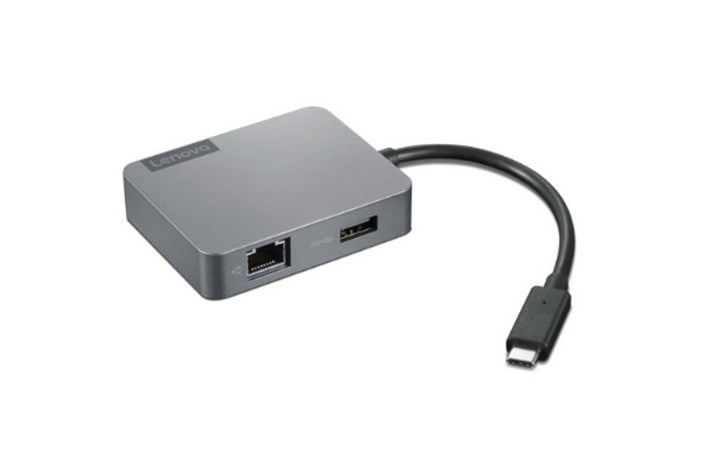
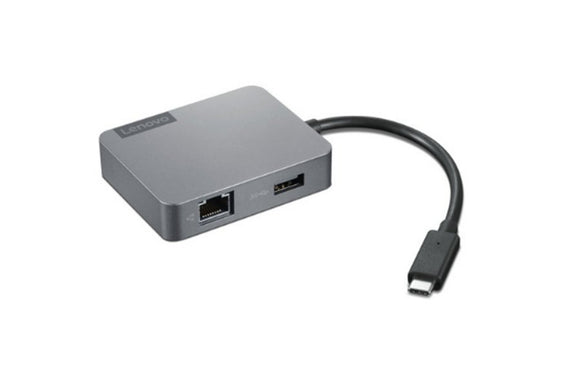


Lenovo USB-C Travel Hub Gen2
PRODUCT DESCRIPTION
Lenovo USB-C Travel Hub Gen 2 (4X91A30366) - Local Warranty
Four Ports in a 70-Gram Body: HDMI, VGA, Ethernet and USB-A
The Lenovo USB-C Travel Hub Gen 2 is the smallest of Lenovo's travel hubs — 73 x 58 x 16.5 mm and 70 grams — carrying HDMI, VGA, gigabit Ethernet and a USB-A port on a 155 mm captive USB-C cable. It fits in a shirt pocket and covers the four things a presenter usually needs.
Read This First: It Has No Power Pass-Through At All
This is the thing that surprises people and it is the reason the section is here rather than in the specification table. The Gen 2 has no USB-C power input. It occupies your laptop's USB-C port and gives you nothing back — so if that is the port your laptop charges through, your laptop will not charge while the hub is connected. On a machine with one USB-C port, that is a genuine limitation to plan around.
"Gen 2" Does Not Mean Better
Compared with the Powered USB-C Travel Hub in the ordering table, this one uses HDMI 1.4 at 4K 30 Hz instead of HDMI 2.0 at 60 Hz, has one USB-A port instead of two, and has no power pass-through. It is smaller, lighter and cheaper. It is a different product for a different priority, not a newer and better one.
Please Note: Lenovo Marks This End of Life
Lenovo's own US storefront states End Of Life for this part number. We are selling remaining stock rather than a current product. If you need something supportable for years, ask us and we will point you at what Lenovo is currently shipping.
Lenovo USB-C Travel Hub Gen 2 Datasheet — Technical Specifications
General
| Product | Lenovo USB-C Travel Hub Gen 2 |
| Part Number | 4X91A30366 |
| Type | Bus-powered USB-C travel hub |
| Manufacturer Warranty | 1 year |
| Local Warranty (Singapore) | Included with every SourceIT purchase, with GST invoice |
Lifecycle
| Status | Lenovo's US storefront marks this part number End Of Life. That is Lenovo's own statement, not our inference |
| What That Means | Remaining stock rather than a current product. Firmware and support will follow the usual end-of-life curve |
| Before You Order | For one traveller it may be exactly the right buy at the right price. For a fleet standard, ask us and we will recommend a current alternative |
Connection
| Host | USB-C, on a captive 155 mm cable |
| Supported Hosts | USB-C, USB4, Thunderbolt 3 and Thunderbolt 4 laptops |
| Bus Power Requirement | 5 V / 3 A from the host |
Ports (4-in-1)
| HDMI | 1 x HDMI 1.4, up to 3840 x 2160 at 30 Hz |
| VGA | 1 x VGA, 1080p at 60 Hz |
| Maximum Displays | Not published by Lenovo for this part number |
| USB Type-A | 1 x USB 3.2 Gen 1 |
| Ethernet | 1 x RJ45, gigabit |
| USB-C Power Input | None. There is no power port on this hub — it cannot pass charge to the laptop |
Power
| Pass-Through to the Laptop | None. This hub has no power input at all |
| Hub's Own Consumption | 15 W, drawn from the host over bus power |
| Power Adapter | Not applicable — there is nowhere to connect one |
Management Features
| Network Manageability | Lenovo states "easy and secure network manageability with selected ThinkPad laptops" and does not publish which features or which models. If PXE boot, Wake-on-LAN or MAC address pass-through matter to you, ask us to confirm |
Physical
| Dimensions | 73 x 58 x 16.5 mm (2.87 x 2.28 x 0.65 in) |
| Weight | From 70 g (0.15 lb) |
| Related Part Number | GX91A34575 |
Compatibility & Fit
The charging problem, spelled out. Many current laptops charge over USB-C. This hub takes a USB-C port and gives back no way to charge. On a machine with a single USB-C port you must choose between the hub and the charger; on a machine with two, you will use both. Before you buy, count the USB-C ports on the actual laptop. If the answer is one, buy the Powered USB-C Travel Hub instead — it passes 52 W through and is in the ordering table above.
4K at 30 Hz is fine for a slide deck and unpleasant for anything else. HDMI 1.4 caps this hub at 30 Hz when driving a 4K display. Static content looks identical to 60 Hz; mouse movement, scrolling and video do not. At 1080p the question does not arise. If the hub will regularly drive a 4K screen for actual work, the Powered hub's HDMI 2.0 at 60 Hz is the one to have.
What it is genuinely good at. Seventy grams, pocket-sized, and it covers HDMI, VGA, Ethernet and USB-A — the four connections a travelling presenter most often needs, in one object that weighs nothing. For someone who presents in rooms they have never seen, and who has a laptop with a spare USB-C port, it does its job well.
And the end-of-life note. Lenovo states End Of Life on its own storefront for this part number. We would rather tell you that up front than have you standardise a fleet on it. Ask us and we will tell you what Lenovo is currently shipping in this category.
Package Contents & Lenovo Accessory Ordering Information
In the box, per Lenovo PSREF:
- Lenovo USB-C Travel Hub
- Warranty poster
Lenovo Cables, Adapters and Security Ordering Information
| 4X90S92381 | Lenovo Powered USB-C Travel Hub — HDMI 4K60, VGA, GbE, 2 x USB-A, 52 W pass-through |
| 4X91A30366 (this listing) | Lenovo USB-C Travel Hub Gen 2 — HDMI, VGA, GbE, USB-A — no power pass-through |
| 4X90V55523 | Lenovo USB-C 7-in-1 Hub — HDMI, 3 x USB-A, SD and microSD, charging — no Ethernet |
| 4X90S91831 | Lenovo USB-C to Ethernet Adapter — Gigabit Ethernet from a USB-C port, PXE boot and Wake-on-LAN |
| 0B47069 | Lenovo HDMI to VGA Monitor Adapter — HDMI to VGA at 1080p60, 20 cm — video only, no audio |
| 4X20M26276 | Lenovo 65W Standard AC Adapter USB Type-C — 65 W USB-C PD 3.0 replacement charger, UK plug |
| 40AW0065WW | Lenovo 65W USB-C AC Travel Adapter — 65 W with four interchangeable plugs and a pouch |
| 4XE1F30276 | Lenovo NanoSaver Essential Cable Lock — Keyed, 2 keys, 1.5 m x 4.5 mm — Nano slot only |
| 4XE1F30277 | Lenovo NanoSaver Combination Cable Lock — 4-dial combination, 1.8 m x 5 mm — Nano slot only |
Datasheet & Downloads
Lenovo publishes a datasheet for this hub on its own accessory CDN, linked above, and it is the source for every figure on this page. Note that the "15 W" figure in Lenovo's docking brochure is the hub's own consumption from the host, not a charging figure — this hub cannot charge a laptop.
Frequently Asked Questions — Lenovo USB-C Travel Hub Gen 2
Will my laptop charge while this hub is plugged in?
No. The Gen 2 has no power input of any kind, so it cannot pass charge to the laptop. If your laptop charges over USB-C and has only one USB-C port, you will have to choose between the hub and the charger. The Powered USB-C Travel Hub in the ordering table passes up to 52 W through and is the model to buy if that matters.
Is the Gen 2 better than the Powered USB-C Travel Hub?
No — it is smaller and cheaper. The Powered hub has HDMI 2.0 at 4K 60 Hz against this one's HDMI 1.4 at 4K 30 Hz, two USB-A ports against one, and 52 W power pass-through against none. "Gen 2" here denotes a different product line, not a newer generation of the same one.
What resolution will it drive?
Up to 3840 x 2160 at 30 Hz over HDMI 1.4, or 1080p at 60 Hz over VGA. The 30 Hz limit is fine for presentations and noticeably poor for video or general desktop work.
Is it discontinued?
Yes — Lenovo's own US storefront marks this part number End Of Life. We are selling remaining stock. For one traveller at the right price that may be a good buy; for a fleet standard, ask us for a current alternative.
Does VGA carry sound?
No. VGA is video only and has no audio pins, and this hub has no audio output. Plan on a separate audio cable or the laptop's own speakers.
What warranty applies in Singapore?
Lenovo publishes a 1-year warranty. Every unit SourceIT sells also carries local Singapore warranty support and a GST invoice.


