
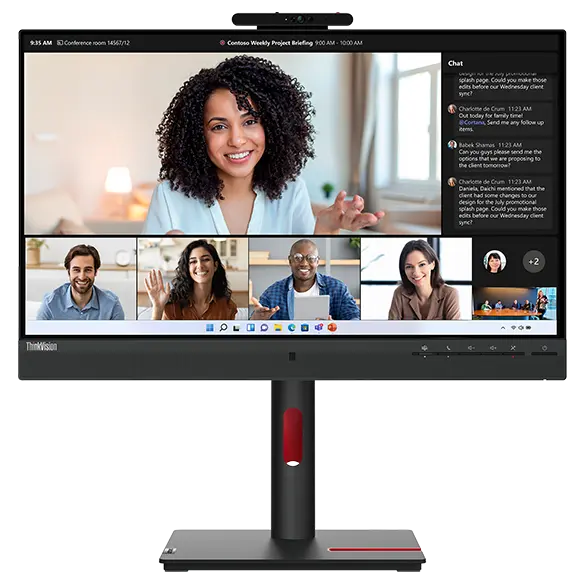


Lenovo ThinkVision T24mv-30 23.8-inch FHD USB-C Video Conferencing Monitor
Prices in SGD, excluding 9% GST.
PRODUCT DESCRIPTION
Lenovo ThinkVision T24mv-30 Monitor (63D7UAR3WW) - 3 Years Warranty, Singapore Local Warranty
Your Meeting Room in One Screen
The ThinkVision T24mv-30 combines a 23.8-inch Full HD IPS display with a 5MP IR + RGB camera (1080p at 30 fps), integrated microphone and 5 W x 2 speakers. It is Microsoft Teams certified, and the IR camera supports Windows Hello.
One Cable to Your Laptop
Its USB-C 3.2 Gen 1 port carries DisplayPort 1.4 video, data and up to 90 W of charging to compatible laptops, turning the monitor into a desk dock.
Dock-Class Connectivity
Add four USB 3.2 Gen 1 ports, Gigabit Ethernet (RJ-45), HDMI 2.1 and DisplayPort 1.4 inputs, a DisplayPort out for a second screen and a 3.5 mm audio combo jack.
Smart and Comfortable
Smart sensors handle ambient light and human detection, Smart Power manages power to connected devices, and the stand offers 155 mm lift, tilt, swivel and pivot with Eyesafe 2.0 and TÜV hardware Low Blue Light certification.
Lenovo ThinkVision T24mv-30 Monitor Datasheet — Technical Specifications
General
| Product | Lenovo ThinkVision T24mv-30 Monitor |
| Part Number | 63D7UAR3WW |
| Screen Size | 23.8-inch |
| Colour | Raven Black |
| Manufacturer Warranty | 3-year limited warranty |
| Local Warranty (Singapore) | Included with every SourceIT purchase, with GST invoice |
Panel & Image
| Panel Type | In-Plane Switching (IPS) |
| Resolution | 1920 x 1080 (Full HD), 16:9 |
| Viewable Area | 527 x 296.5 mm |
| Pixel Pitch | 0.274 x 0.274 mm (93 ppi) |
| Brightness | 250 cd/m² |
| Contrast Ratio | 1000:1 static; 3,000,000:1 dynamic |
| Viewing Angle (H/V) | 178° / 178° |
| Refresh Rate | 75Hz |
| Response Time | 4 ms (Extreme) / 6 ms (Normal) |
| Colour Depth | 8-bit (6-bit + FRC), 16.7 million colours |
| Colour Gamut | 99% sRGB |
Connectivity
| USB-C | 1x USB-C 3.2 Gen 1 upstream (DisplayPort 1.4 Alt Mode, up to 90 W power delivery) |
| Video Inputs | 1x HDMI 2.1, 1x DisplayPort 1.4 |
| Video Output | 1x DisplayPort out |
| USB Downstream | 4x USB 3.2 Gen 1 |
| Ethernet | RJ-45, 10/100/1000 Mbps |
| Audio | 1x 3.5 mm audio combo (in/out) |
| Camera | 5.0MP IR + RGB, 2592 x 1944, 1080p @ 30 fps, 80° diagonal FOV |
| Microphone | Integrated |
| Speakers | Integrated, 5 W x 2 |
| Smart Features | Smart Power; ambient light and human detection sensors |
Stand & Ergonomics
| Stand | Tilt, swivel, pivot and height-adjustable |
| Tilt | -5° to +23.5° |
| Swivel | 45° left / right |
| Pivot | 90° |
| Height Adjustment | 155 mm |
| VESA Mount | 100 mm |
Power & Certifications
| Power Input | AC 100-240 V, 50/60 Hz |
| Power Consumption (Typical / Max) | 24.5 W / 160 W |
| Sleep / Off Mode | <0.5 W; switch-off <0.3 W |
| Collaboration | Microsoft Teams certification |
| Eye Comfort | Eyesafe Display 2.0; TÜV Rheinland Eye Comfort, Flicker Free and Low Blue Light (hardware solution) |
| Environmental | ENERGY STAR, EPEAT Gold, TCO Certified 9.0, TCO Edge 2.0, RoHS |
Physical
| Dimensions with Stand (W x D x H) | 539.8 x 199.7 x 387.8 mm (lowest) / 542.8 mm (highest) |
| Dimensions Head Only | 539.8 x 53.9 x 363.3 mm |
| Weight with Stand | 6.5 kg |
| Weight Head Only | 4.5 kg |
| Bezel (Side / Top / Bottom) | 2.1 mm / 2.1 mm / 41.4 mm |
Compatibility & Fit
USB-C Laptops: One-Cable Docking
Laptops whose USB-C port supports DisplayPort Alt Mode and USB Power Delivery get video, USB, Ethernet and up to 90 W charging over the included USB-C cable. Lenovo notes actual charging can vary with the connected device, attached USB devices and brightness.
Laptops Needing More Than 90 W
High-power mobile workstations may charge slowly or need their own adapter. Check your laptop's charging requirement before relying on the monitor alone.
Desktops and Non-USB-C Laptops
Use HDMI 2.1 or DisplayPort 1.4 for video. To use the camera, microphone, USB ports and Ethernet, the PC must also be connected through the USB-C upstream port.
Package Contents & Lenovo Ordering Information
In the box:
- ThinkVision T24mv-30 monitor with stand
- USB-C to USB-C cable (1.8 m)
- Power cable (1.8 m)
- Quick setup guide
Lenovo Monitors Ordering Information
| 63DDKAR6WW | Lenovo C27-40 27" FHD VA monitor, HDMI/VGA, tilt stand |
| 63EBMAR2WW | ThinkVision E22-30 21.5" FHD IPS monitor, speakers, full ergonomic stand |
| 63FCKARBWW | ThinkVision S22i-30 21.5" FHD IPS monitor, HDMI/VGA, tilt stand |
| 63D8MAR3WW | ThinkVision T24v-30 23.8" FHD IPS monitor, 2MP IR camera, USB hub |
| 63D7UAR3WW (this listing) | ThinkVision T24mv-30 23.8" FHD IPS monitor, 5MP IR camera, USB-C 90W, RJ-45 |
| 11JHRAR1MY | ThinkCentre Tiny-In-One 27 27" QHD IPS monitor for ThinkCentre Tiny/Nano |
| 63E5GAR2MY | ThinkVision P32pz-30 31.5" 4K Mini-LED monitor, USB4 140W, RJ-45 |
| 62F0KNTAMY | ThinkVision T86 86" 4K interactive large format display with ThinkPlus MD80 |
Datasheet & Downloads
- Lenovo PSREF specifications — ThinkVision T24mv-30
- Lenovo Support — ThinkVision T24mv-30 (Type 63D7) drivers and manuals
Lenovo's PSREF sheet and support page carry the full specifications, user guide and latest drivers for this display.
Frequently Asked Questions — Lenovo ThinkVision T24mv-30 Monitor
How much power does the USB-C port deliver?
Up to 90 W to compatible USB-C devices; actual output depends on the device, connected USB peripherals and brightness.
Is it certified for Microsoft Teams?
Yes, Lenovo lists Microsoft Teams certification for the T24mv-30.
Does it have wired Ethernet?
Yes, a Gigabit RJ-45 port is available to the PC connected over USB-C.
Can I add a second monitor?
Yes, the DisplayPort out port connects a second display.
What camera does it have?
A 5MP IR + RGB camera with 1080p at 30 fps video, an 80° diagonal field of view and Windows Hello support.
We Also Recommend


Lenovo ThinkStation P8 TWR AMD Ryzen 7995WX /512GB /1TB+2TB /W7900
Lenovo ThinkStation P8 TWR AMD Ryzen 7985WX / 512GB /1TB+2TB /W7900


Lenovo ThinkStation P8 TWR Ryzen 7985WX /512GB /512GB /RTX5000


