
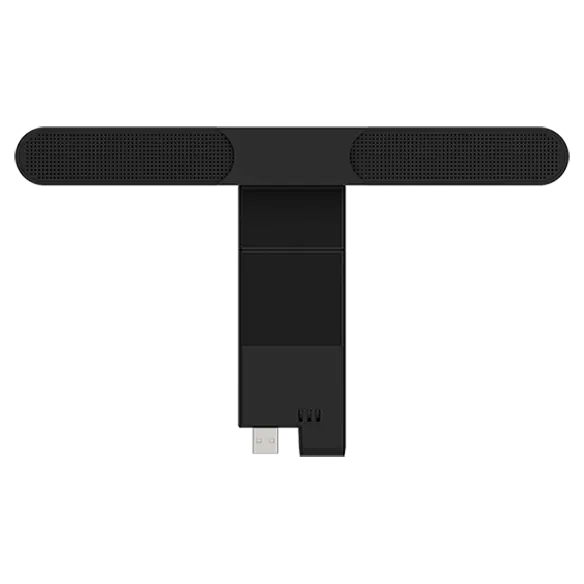


Lenovo ThinkVision MS30 (S) Monitor Soundbar
Prices in SGD, excluding 9% GST.
PRODUCT DESCRIPTION
Lenovo ThinkVision MS30 (S) Monitor Soundbar (4XD1K97400) - Singapore Local Warranty
Clear Front-Facing Sound for Your Monitor
The ThinkVision MS30 (S) Monitor Soundbar delivers crystal-clear sound from front-facing 2 x 2W speakers, an economical upgrade for virtual meetings, online classes and everyday audio.
Modular, Cable-Free Design
At less than 30 mm high, the sleek modular soundbar connects through a USB-A connector on compatible ThinkVision P and T Series monitors, keeping the desk free of cable clutter.
Secure and Simple
A built-in Security Lock keeps it safe from theft once connected, and Lenovo Display Control Center / ThinkColour software gives convenient control.
Build a Complete VoIP Stack
Use it alone for audio-only meetings or stack it with the ThinkVision MC60 Monitor Webcam for full video calls from a single monitor connection.
Lenovo ThinkVision MS30 (S) Monitor Soundbar Datasheet — Technical Specifications
General
| Product | ThinkVision MS30 (S) Monitor Soundbar |
| Part Number | 4XD1K97400 |
| Product Type | Modular monitor soundbar (ThinkVision VoIP Stack) |
| Manufacturer Warranty | Not published by Lenovo |
| Local Warranty (Singapore) | Included with every SourceIT purchase, with GST invoice |
Audio
| Power Output | 2 x 2W |
| Speaker Orientation | Front-facing |
Connection & Software
| Interface | USB-A I/O connector |
| Lift Expansion | Yes |
| Software | Lenovo Display Control Center / ThinkColour |
Security
| Security Lock | Yes |
Physical
| Dimensions (without stand) | 256 x 35 x 39 mm |
| Dimensions (with stand) | 256 x 35 x 148 mm |
| Weight | 101 g without stand; 141 g with stand |
| Colour | Raven Black |
Compatibility & Fit
Which ThinkVision Monitors
Lenovo designs the MS30 for ThinkVision P and T Series monitors. Its VoIP Stack compatibility list names the P32p-30, T32p-30, P27h-30, T27p-30, P27q-30, T32h-30, T27h-30 and T27i-30, and Lenovo PSREF lists optional MS30 soundbar support on monitors such as the T27i-30, T34w-30 and P24h-30.
MS30 or MS30 (S)?
Lenovo sells two MS30 part numbers: the MS30 (4XD1J05151) and the MS30 (S) (4XD1K97400). Lenovo does not publish a clear model-by-model split on its product pages, so please confirm your monitor model with Lenovo SmartFind or send it to us before ordering.
Connection
The soundbar takes its connection and power from the monitor's USB-A port, so the monitor must be connected to your computer by USB for audio to play through it.
Package Contents & Lenovo Ordering Information
In the box:
- ThinkVision MS30 (S) Monitor Soundbar
- Documentation
Lenovo ThinkVision Monitor Soundbar Ordering Information
| 4XD1J05151 | ThinkVision MS30 Monitor Soundbar (ThinkVision VoIP Stack) |
| 4XD1K97400 (this listing) | ThinkVision MS30 (S) Monitor Soundbar |
| 4XC1J05150 | ThinkVision MC60 Monitor Webcam (stacks with MS30) |
| 4XC1K97399 | ThinkVision MC60 (S) Monitor Webcam |
Datasheet & Downloads
- Lenovo ThinkVision Stack Modular VoIP datasheet (PDF)
- Lenovo ThinkVision VoIP monitors and accessories datasheets (PDF)
- Lenovo product page — ThinkVision MS30 (S) Monitor Soundbar (4XD1K97400)
- Lenovo Accessories SmartFind — compatibility checker (4XD1K97400)
Check Lenovo SmartFind or send us your PC or monitor model to confirm the right accessory before ordering.
Frequently Asked Questions — Lenovo ThinkVision MS30 (S) Monitor Soundbar
Which monitors does the ThinkVision MS30 (S) Monitor Soundbar fit?
It is designed for ThinkVision P and T Series monitors that support the VoIP Stack, including the P32p-30, T32p-30, P27h-30, T27p-30, P27q-30, T32h-30, T27h-30 and T27i-30. Please confirm your exact monitor model with us before ordering.
What is the difference between the MS30 and MS30 (S)?
They are two Lenovo part numbers for the MS30 soundbar (4XD1J05151 and 4XD1K97400). Lenovo does not publish the model split on its product pages, so tell us your monitor and we will confirm the right version.
How powerful is it?
It has front-facing 2 x 2W speakers, tuned for clear voice in meetings and classes.
Can I use it with the MC60 webcam?
Yes. The MS30 and MC60 stack together to form Lenovo's ThinkVision VoIP Stack, or each can be used on its own.
Does it need its own power adapter?
No. It connects through the monitor's USB-A port, with no separate cable on the desk.
We Also Recommend


Lenovo ThinkStation P8 TWR AMD Ryzen 7995WX /512GB /1TB+2TB /W7900
Lenovo ThinkStation P8 TWR AMD Ryzen 7985WX / 512GB /1TB+2TB /W7900


Lenovo ThinkStation P8 TWR Ryzen 7985WX /512GB /512GB /RTX5000


