
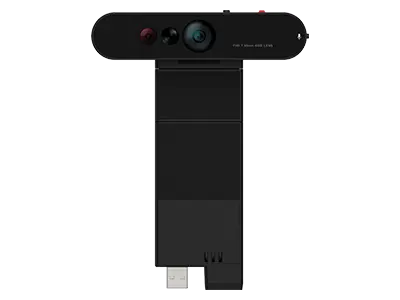


Lenovo ThinkVision MC60 Monitor Webcam
Prices in SGD, excluding 9% GST.
PRODUCT DESCRIPTION
Lenovo ThinkVision MC60 Monitor Webcam (4XC1J05150) - Singapore Local Warranty
A Webcam That Becomes Part of Your Monitor
The ThinkVision MC60 Monitor Webcam is part of Lenovo's ThinkVision VoIP Stack. It plugs directly into the USB-A port on compatible ThinkVision monitors using a lift expansion structure - no extra cable on the desk.
1080p with Autofocus and Three Fields of View
A large 1/2.9-inch sensor records 1080p at 30 fps with autofocus and 4x digital zoom. Choose a 65°, 78° or 90° field of view to frame just yourself or include the people beside you.
Private or Conference Audio Modes
Dual high-sensitivity microphones capture voice from up to 2 m. Directional signal transmission cuts ambient noise, and the Audio Mode Switch selects Off, Private or Conference.
Privacy, Security and Status at a Glance
A physical shutter blinds the lens, the anti-theft function secures the camera with a physical key, and the Smart Traffic Light warns people nearby that you are on a call. Stack it with the ThinkVision MS30 Monitor Soundbar for a complete VoIP setup.
Lenovo ThinkVision MC60 Monitor Webcam Datasheet — Technical Specifications
General
| Product | ThinkVision MC60 Monitor Webcam |
| Part Number | 4XC1J05150 |
| Product Type | Modular monitor webcam (ThinkVision VoIP Stack) |
| Manufacturer Warranty | Not published by Lenovo |
| Local Warranty (Singapore) | Included with every SourceIT purchase, with GST invoice |
Video
| Resolution / Frame Rate | 1080p at 30 fps |
| Image Sensor | 1/2.9-inch RGB |
| Field of View (diagonal) | Selectable 65° / 78° / 90° |
| Zoom | 4x digital |
| Focus | Autofocus |
| Tilt | -25° to +25° |
Audio
| Microphones | Dual high-sensitivity, with noise cancellation |
| Voice Pick-up Distance | Up to 2 m |
| Microphone Switch | Off / Conference / Private |
Privacy & Security
| Privacy | Built-in physical privacy shutter |
| Meeting Indicator | Smart Traffic Light |
| Anti-Theft | Secured with a physical key |
Connection & Software
| Connection | Plugs into the monitor's USB-A port (lift expansion structure) |
| Software | Lenovo Display Control Center / ThinkColour |
Physical
| Dimensions (without stand) | 120.0 x 40.0 x 49.0 mm |
| Dimensions (with stand) | 120.0 x 40.0 x 158.0 mm |
| Weight | 70 g without stand; 111 g with stand |
| Colour | Raven Black |
Compatibility & Fit
Which ThinkVision Monitors
Lenovo's ThinkVision VoIP Stack compatibility list for the MC60 / MS30 names P32p-30, T32p-30, P27h-30, T27p-30, P27q-30, T32h-30, T27h-30 and T27i-30. Lenovo's PSREF specifications for the T34w-30, P24h-30 and P49w-30 also list MC60 webcam support.
MC60 or MC60 (S)?
Lenovo sells two MC60 part numbers: the MC60 (4XC1J05150) and the MC60 (S) (4XC1K97399). Lenovo does not publish a model-by-model split between the two on its product pages, so please confirm your exact monitor model with Lenovo SmartFind or send it to us before ordering and we will match the right version.
Connection
The MC60 connects to the monitor's USB-A port rather than to your PC directly, so the monitor must be connected to your computer by USB for the camera and microphones to work.
Stack with the MS30 Soundbar
The MC60 can be used on its own for video calls or stacked with the ThinkVision MS30 Monitor Soundbar for audio. Use the matching soundbar version for your monitor - MS30 (4XD1J05151) or MS30 (S) (4XD1K97400).
Package Contents & Lenovo Ordering Information
In the box:
- ThinkVision MC60 Monitor Webcam
- Documentation
Lenovo Webcams Ordering Information
| 4XC1Q25246 | Lenovo 4K Pro Webcam |
| 4XC1Q25245 | Lenovo QHD Webcam |
| 4XC1D66055 | Lenovo Performance FHD Webcam |
| 4XC1Q44952 | Lenovo FHD Webcam |
| 4XC1B34802 | Lenovo Essential FHD Webcam |
| 4XC1S15018 | Lenovo Essential FHD Webcam Gen 2 |
| 4XC1D66056 | ThinkVision MC50 Monitor Webcam (selected ThinkVision P and T -20 series monitors) |
| 4XC1J05150 (this listing) | ThinkVision MC60 Monitor Webcam (ThinkVision VoIP Stack) |
| 4XC1K97399 | ThinkVision MC60 (S) Monitor Webcam |
Datasheet & Downloads
- Lenovo ThinkVision Stack Modular VoIP datasheet (PDF)
- Lenovo ThinkVision VoIP monitors and accessories datasheets (PDF)
- Lenovo product page — ThinkVision MC60 Monitor Webcam (4XC1J05150)
- Lenovo Accessories SmartFind — compatibility checker (4XC1J05150)
Check Lenovo SmartFind or send us your PC or monitor model to confirm the right accessory before ordering.
Frequently Asked Questions — Lenovo ThinkVision MC60 Monitor Webcam
Which monitors does the ThinkVision MC60 Monitor Webcam work with?
It is designed for ThinkVision monitors that support the VoIP Stack. Lenovo's list includes the P32p-30, T32p-30, P27h-30, T27p-30, P27q-30, T32h-30, T27h-30 and T27i-30, and Lenovo PSREF also lists MC60 support on the T34w-30, P24h-30 and P49w-30. Please confirm your monitor model with us before ordering.
What is the difference between the MC60 and the MC60 (S)?
They are two Lenovo part numbers for the MC60 webcam: 4XC1J05150 and 4XC1K97399 (S). Lenovo does not publish the model split on its product pages, so tell us your monitor model and we will confirm the right one.
Can I use it with a non-ThinkVision monitor or directly on my laptop?
It is designed to plug into the USB-A port of compatible ThinkVision monitors. For other screens, a clip-on webcam such as the Lenovo QHD Webcam (4XC1Q25245) is a better fit.
Does it have privacy and anti-theft features?
Yes - a physical privacy shutter and an anti-theft function that secures the camera with a physical key.
Can I switch the microphones off?
Yes. The Audio Mode Switch selects Off, Private or Conference mode.
We Also Recommend


Lenovo ThinkStation P8 TWR AMD Ryzen 7995WX /512GB /1TB+2TB /W7900
Lenovo ThinkStation P8 TWR AMD Ryzen 7985WX / 512GB /1TB+2TB /W7900


Lenovo ThinkStation P8 TWR Ryzen 7985WX /512GB /512GB /RTX5000


