
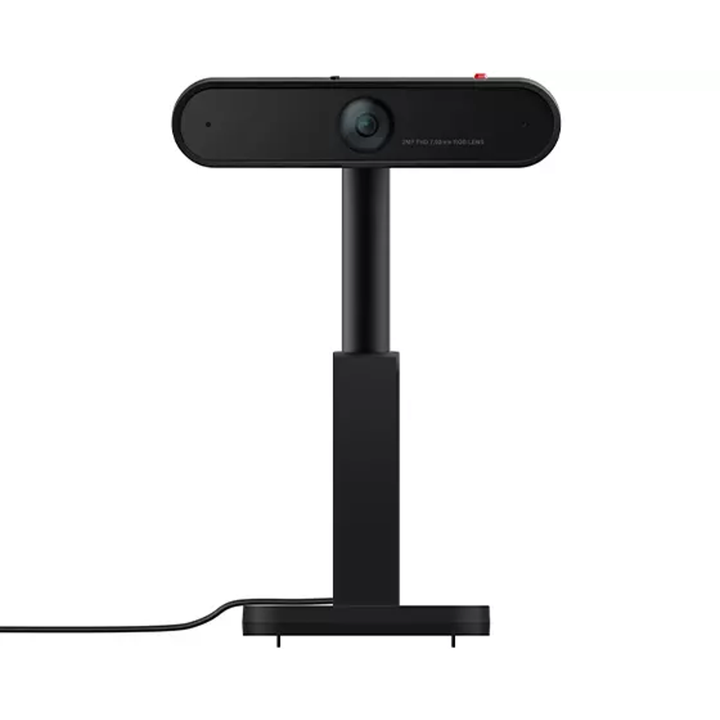


Lenovo ThinkVision MC50 Monitor Webcam
Prices in SGD, excluding 9% GST.
PRODUCT DESCRIPTION
Lenovo ThinkVision MC50 Monitor Webcam (4XC1D66056) - Singapore Local Warranty
Made for ThinkVision Monitors
The ThinkVision MC50 Monitor Webcam attaches to the grille on the back of selected ThinkVision P and T Series monitors, adding a 1080p conferencing camera without a separate clip-on mount.
1080p with a Wide View
Its 1/2.9-inch RGB sensor captures 1080p video with a 90° field of view. The camera swivels from -45° to 225° and tilts ±30°, so you can frame yourself, a whiteboard or a colleague.
Dual Noise-Cancelling Microphones
Built-in dual microphones with noise cancellation capture voice from up to 2 m away.
Privacy and Anti-Theft
Lenovo's Smart Traffic Light lights up automatically while you are in a meeting, a physical shutter blinds the lens, and an anti-theft lock anchors the camera to the monitor - it can only be removed with the physical key.
Lenovo ThinkVision MC50 Monitor Webcam Datasheet — Technical Specifications
General
| Product | ThinkVision MC50 Monitor Webcam |
| Part Number | 4XC1D66056 |
| Product Type | Monitor-mounted webcam |
| Manufacturer Warranty | Not published by Lenovo |
| Local Warranty (Singapore) | Included with every SourceIT purchase, with GST invoice |
Video
| Resolution | 1080p |
| Image Sensor | 1/2.9-inch RGB |
| Field of View | 90° |
| Swivel | -45° to 225° |
| Tilt | ±30° |
Audio
| Microphones | Dual, with noise cancellation |
| Voice Pick-up Distance | Up to 2 m |
Privacy & Security
| Privacy | Physical shutter |
| Meeting Indicator | Smart Traffic Light (turns on automatically during meetings) |
| Anti-Theft | Locks to the monitor; removed with a physical key |
Mounting & Compatibility
| Mounting | Attaches to the grille on the back of the monitor |
| Compatible Monitors (Lenovo list) | P40w-20, P34w-20, P32p-20, P27u-20, P27h-20, P27h-28, P27q-20, P24h-20, P24h-2L, P24q-20, T34w-20, T32p-20, T32h-20, T27h-20, T27h-2L, T27q-20, T24h-20, T24m-20 and T24t-20 |
Compatibility & Fit
Compatible ThinkVision Monitors
Lenovo lists the MC50 as compatible with ThinkVision P40w-20, P34w-20, P32p-20, P27u-20, P27h-20, P27h-28, P27q-20, P24h-20, P24h-2L, P24q-20, T34w-20, T32p-20, T32h-20, T27h-20, T27h-2L, T27q-20, T24h-20, T24m-20 and T24t-20. It is designed for these monitors' rear grille mount rather than as a general clip-on webcam.
Not for the -30 Series VoIP Stack
For newer ThinkVision -30 series monitors that support the VoIP Stack, choose the ThinkVision MC60 Monitor Webcam (4XC1J05150) instead.
Locking the Camera
The camera is locked when the red line aligns with either lock icon. The physical key is needed to unlock and remove the webcam.
Package Contents & Lenovo Ordering Information
In the box:
- ThinkVision MC50 Monitor Webcam
- Documentation
Lenovo Webcams Ordering Information
| 4XC1Q25246 | Lenovo 4K Pro Webcam |
| 4XC1Q25245 | Lenovo QHD Webcam |
| 4XC1D66055 | Lenovo Performance FHD Webcam |
| 4XC1Q44952 | Lenovo FHD Webcam |
| 4XC1B34802 | Lenovo Essential FHD Webcam |
| 4XC1S15018 | Lenovo Essential FHD Webcam Gen 2 |
| 4XC1D66056 (this listing) | ThinkVision MC50 Monitor Webcam (selected ThinkVision P and T -20 series monitors) |
| 4XC1J05150 | ThinkVision MC60 Monitor Webcam (ThinkVision VoIP Stack) |
| 4XC1K97399 | ThinkVision MC60 (S) Monitor Webcam |
Datasheet & Downloads
- Lenovo ThinkVision VoIP monitors and accessories datasheets (PDF)
- Lenovo product page — ThinkVision MC50 Monitor Webcam (4XC1D66056)
- Lenovo Support — ThinkVision MC50 Monitor Webcam
Check Lenovo SmartFind or send us your PC or monitor model to confirm the right accessory before ordering.
Frequently Asked Questions — Lenovo ThinkVision MC50 Monitor Webcam
Which monitors does the MC50 fit?
Lenovo lists ThinkVision P40w-20, P34w-20, P32p-20, P27u-20, P27h-20, P27h-28, P27q-20, P24h-20, P24h-2L, P24q-20, T34w-20, T32p-20, T32h-20, T27h-20, T27h-2L, T27q-20, T24h-20, T24m-20 and T24t-20.
Will it work on a ThinkVision T27i-30 or other -30 monitor?
Lenovo does not list -30 series monitors for the MC50. Those monitors support the ThinkVision MC60 Monitor Webcam (4XC1J05150).
Can the webcam be stolen off the monitor?
It has an anti-theft lock that anchors it to the monitor; it can only be removed with the physical key.
How do people know I am on a call?
The Smart Traffic Light turns on automatically during meetings.
Does it have a microphone?
Yes, dual noise-cancelling microphones with a pick-up range of up to 2 m.
We Also Recommend


Lenovo ThinkStation P8 TWR AMD Ryzen 7995WX /512GB /1TB+2TB /W7900
Lenovo ThinkStation P8 TWR AMD Ryzen 7985WX / 512GB /1TB+2TB /W7900


Lenovo ThinkStation P8 TWR Ryzen 7985WX /512GB /512GB /RTX5000


