
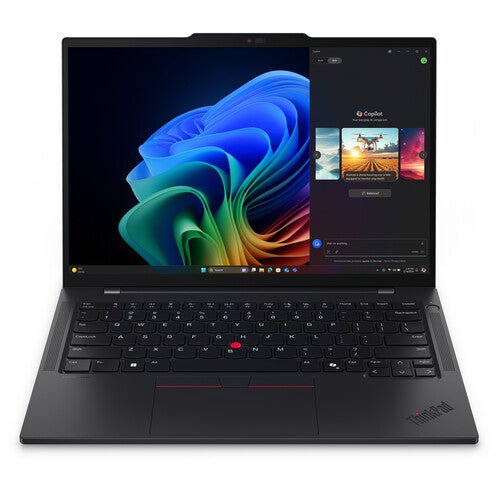


Lenovo ThinkPad T14S Gen 7 Touch Intel U7-356H/ 32GB RAM/ 512GB SSD
PRODUCT DESCRIPTION
Lenovo ThinkPad T14s Gen 7 (Intel) Touch, Intel Core Ultra 7 356H / 32 GB / 512 GB SSD (21YVSCTO1WW-T-512GB) - 3 Years Premier Support, Singapore Local Warranty
The thin one, with a touchscreen: T14s Gen 7 Touch
The ThinkPad T14s Gen 7 (Intel) is the thin 14-inch machine in Lenovo's T-series, and this listing is the touchscreen build of it — a 500-nit, 100% sRGB in-cell touch panel in the same chassis. The weight is still the reason to choose the T14s: Lenovo publishes a starting weight of 1.065 kg (2.35 lbs) for the model — "starting at" is Lenovo's figure for the lightest configuration, and Lenovo publishes no separate weight for the touch panel, so treat that as a floor rather than this unit's weight — in a chassis measuring 313 x 219.4 mm and 10.7 mm at the front rising to 15.85 mm at the rear, 18.56 mm at its thickest point. It carries a 58 Wh battery and charges over USB-C at 65 W, which is the only battery and the only adapter wattage Lenovo publishes for this model. Lenovo's runtime figures are given with the test named: up to 19.1 hours on MobileMark 30 at 250 nits, and up to 19.6 hours of video on JEITA-BAT 3.0 at 200 nits. Lenovo's wording for the environmental testing is "MIL-STD-810H military test passed", which is what this page says — a test result Lenovo publishes, not a certification.
What this exact configuration is
This listing is one fixed configuration: Intel Core Ultra 7 356H / 32 GB / 512 GB SSD. The distributor build sheet for part number 21YVSCTO1WW-T-512GB records the panel as 14" WUXGA (1920 x 1200), IPS, Anti-Glare, Touch, 100% sRGB, 500 nits, 60Hz, Low Power — the touchscreen is what the "T" in the part number and the "Touch" in the title refer to, and it is the only line on which this build sheet differs from our non-touch 21YVSCTO1WW-512GB listing; the camera as 5MP RGB+IR with Microphone and Privacy Shutter; the wireless as Intel Wi-Fi 7 BE211 2x2 BE and Bluetooth 5.4; the keyboard as backlit with a fingerprint reader; and the operating system as Windows 11 Pro 64. It also records two items that are easy to miss and easy to pay twice for: a 65W USB-C Slim GaN 3-pin UK adapter, and a USB-C to RJ45 Ethernet adapter, which matters because this machine has no built-in Ethernet port. One caution about the part number: it contains CTO1WW, Lenovo's configure-to-order bucket identifier for the machine type rather than a finished-goods part number for one fixed build, and Lenovo's public part-number lookup is not reachable from our side at present, so we could not confirm it against Lenovo's own database. Everything specific to this unit therefore comes from the build sheet reproduced below. If the exact build matters, please ask us to confirm it against the supplier's order record before you order.
Lenovo publishes two touch panels for this model and they are not the same thing. The build sheet for this part number reads "Touch, 100% sRGB, 500 nits, 60Hz, Low Power", which matches Lenovo's in-cell touch panel: 14-inch WUXGA 1920 x 1200 IPS, 500 nits, anti-glare, 1500:1, 100% sRGB, 60 Hz, Low Power, Eyesafe Certified 2.0. It is not the other touch option, the on-cell panel with ThinkPad Privacy Guard, so this machine has no built-in privacy screen — if you need one, that is a different build. Against the non-touch panel on our sibling listing, this one is brighter (500 nits against 400), higher contrast (1500:1 against 1000:1) and covers the full sRGB gamut where the non-touch panel covers 45% NTSC, which is why the S$120 difference between the two listings buys more than the touch layer alone. Lenovo's book lists no pen or stylus for this model, so this page does not claim pen support; the touch layer is for finger input. In-cell touch means the touch sensor sits inside the LCD cell rather than as a separate layer on top; that is how Lenovo's book distinguishes it from the on-cell Privacy Guard panel.
What the T14s gives up for the weight
Three things, and all three are worth knowing before you buy rather than after. The memory is soldered to the system board with no slots, so the 32 GB in this configuration is permanent — Lenovo's ceiling for the model is 64 GB and the capacity you buy is the capacity you keep for the life of the machine. There is no onboard Ethernet port, which is why the USB-C to RJ45 adapter on the build sheet matters. And Lenovo publishes no SD or microSD card reader for this model. What you get in exchange, besides the weight, is an unusually generous port set for a thin machine: three Thunderbolt 4 ports, each with USB Power Delivery 15-65 W and DisplayPort 2.1, plus an Always On USB-A port at 5 Gbps and HDMI 2.1 running to 4K at 60 Hz.
Why this page has two specification tables
Lenovo's PSREF book is the authority on the model, but it lists the panel, camera, fingerprint reader, keyboard backlight, wireless card, memory speed, drive, operating system edition and warranty term as OPTIONS across the whole model — it does not say which of them is fitted to any one part number. The distributor build sheet does say that, for this exact part number, and it is reproduced below word for word. We keep the two apart on purpose so you can see which source each figure comes from. Where they disagree, or where one is more specific than the other, we print both readings and say so rather than quietly picking one, and where neither states a figure we write "not stated" instead of estimating.
Warranty and service in Singapore
Lenovo's published base warranty options for this model are: 1-year courier or carry-in service; 1-year courier or carry-in with 2-year system board service (Korea only); 1-year limited onsite service; 3-year (1-yr battery) courier or carry-in service; 3-year (1-yr battery) limited onsite service; No base warranty. Lenovo does publish three-year base terms here, but every one of them is qualified "(1-yr battery)", and Lenovo lists no service level called Premier Support among them at all. The three years of Premier Support on this listing is the service level recorded on the distributor build sheet for this part number — a configured entitlement bought on top of Lenovo's base cover, and a materially higher level of service than the base terms above. Please ask us to confirm the exact registered entitlement, and the battery term inside it, before you order.
ThinkPad T14s Gen 7 (Intel) Datasheet — Technical Specifications
General
| Lenovo official model name | ThinkPad T14s Gen 7 (Intel) |
| Machine types | Lenovo's machine types for the T14s Gen 7 (Intel) are 21YU and 21YV. The PSREF specification book documents the model as a whole and does not print machine-type codes. |
| Lenovo part number | 21YVSCTO1WW-T-512GB |
| Our SKU on this listing | 21YVSCTO1WW-T-512GB-SC |
| Form factor | 14-inch thin business notebook |
| Warranty as sold | 3 Years Premier Support, Singapore local support |
| Part number type | The "-T" in our part number marks the touch-panel build; it is the distributor's suffix, not part of Lenovo's machine-type code. CTO1WW is Lenovo's configure-to-order bucket identifier for the machine type, not a finished-goods part number describing one fixed build. Lenovo publishes no single specification behind it, and Lenovo's part-number lookup service is not currently reachable from our side, so this part number is reported as unverified against Lenovo's database rather than as unrecognised by it. |
This Configuration — From the Distributor Build Sheet for 21YVSCTO1WW-T-512GB
| Processor | Intel Core Ultra 7 356H Processor (E-cores up to 3.50 GHz / P-cores up to 4.70 GHz) |
| Graphics | Integrated Graphics |
| Memory | 32 GB LPDDR5X-8533MT/s |
| Storage | 512 GB SSD M.2 2280 PCIe Gen4 TLC Opal |
| Display panel | 14" WUXGA (1920 x 1200), IPS, Anti-Glare, Touch, 100% sRGB, 500 nits, 60Hz, Low Power |
| Camera and biometrics | 5MP RGB+IR with Microphone and Privacy Shutter. Fingerprint Reader. |
| Battery and adapter | 3 Cell Rechargeable Li-ion 58Wh / 65W USB-C Slim GaN 90% PCC 3pin AC Adapter - UK |
| Wireless | Intel Wi-Fi 7 BE211 2x2 BE & Bluetooth 5.4 |
| Keyboard | Backlit, Black - English (US) |
| Operating system and platform | Windows 11 Pro 64 English (US) / English (UK). Enabled Discrete TPM2.0. Colour black. |
| Supplied accessory | USB-C to RJ45 Ethernet adapter. This machine has no built-in Ethernet port, so the adapter is how it reaches a wired network. |
| Weight | Starting at 1.065 kg (the build sheet repeats Lenovo's model-level starting weight; see the PSREF weight row below) |
| Warranty term on the build sheet | 3 Year Premier Support |
| NPU and AI classification | Lenovo publishes an NPU figure of up to 50 TOPS for the Core Ultra 7 356H, and its AI PC Category field for this model reads "Copilot+ PC". |
Where the Two Sources Differ
| Touch panel wording | The build sheet says "Touch, 100% sRGB, 500 nits, 60Hz, Low Power" and does not say whether the touch layer is in-cell or on-cell. Lenovo publishes two touch panels for this model, and only one of them is Low Power: the in-cell touch IPS 500 nits 1500:1 100% sRGB panel with Eyesafe 2.0. The other, the on-cell touch panel, carries ThinkPad Privacy Guard instead. The "Low Power" on the build sheet therefore identifies the in-cell panel, and this page reads it that way; the build sheet itself does not use the word. |
| SSD interface generation | The build sheet for this part number states a PCIe Gen 4 drive. Lenovo publishes the SLOT on this model as one M.2 2280 PCIe 5.0 x4, and offers drives in two families: PCIe 4.0 x4 in 256 GB, 512 GB and 1 TB, and PCIe 5.0 x4 "Performance" in 512 GB, 1 TB and 2 TB. A build sheet naming Gen 4 therefore describes the drive fitted, not the slot it sits in — the slot itself is Gen 5. Worth knowing: our 21YU000ASG listing, a non-touch 356H / 32 GB / 512 GB, records the PCIe 5.0 x4 Performance drive instead, and our non-touch 21YVSCTO1WW-512GB listing records the same Gen 4 drive as this one. |
| Memory speed | The build sheet states LPDDR5X-8533. Lenovo's book publishes both LPDDR5X-7467 and LPDDR5X-8533 for this model without mapping either speed to a capacity, so the build sheet is the more specific source here and this page follows it. |
| Camera wording | The build sheet reads "5MP RGB+IR with Microphone and Privacy Shutter". Lenovo's own wording for the equivalent option is "5.0MP + IR discrete, with privacy shutter, fixed focus, vHDR, Computer Vision on Image Signal Processor (ISP), temporal noise reduction" — it does not use "RGB", and it lists the microphones separately as a dual-microphone array with 360-degree far-field pickup and Elevoc Voice. The two describe the same hardware in different words. |
| Battery cell count | The build sheet says 3 cell. Lenovo publishes the capacity, 58 Wh, and does not state a cell count for this model. |
Chassis and Platform — From Lenovo PSREF
| Lenovo model name | ThinkPad T14s Gen 7 (Intel) |
| PSREF document date | 28 August 2026. The book carries no withdrawal marking. |
| Processor options published | Intel Core Ultra 5 325, Ultra 5 335, Ultra 7 355, Ultra 7 356H, Ultra 7 365 and Ultra 7 366H. Lenovo's wording for the platform is "Intel Core Ultra 5 / 7 Processor (Series 3)"; it does not print a codename for these parts anywhere in the book. |
| Core Ultra 7 356H, as published | 16 cores (4 P-cores + 8 E-cores + 4 LP E-cores), 16 threads. Base 1.9 GHz P-core, 1.5 GHz E-core, 1.5 GHz LP E-core. Maximum 4.7 GHz P-core, 3.5 GHz E-core, 3.3 GHz LP E-core. 18 MB Intel Smart Cache. |
| AI PC category, Lenovo's wording | "Copilot+ PC". Lenovo publishes an NPU figure of up to 50 TOPS for the Core Ultra 7 356H, and separately a graphics figure of up to 40 TOPS. Those are different measurements and this page does not add them together or present one as the other. Copilot+ features are delivered by Windows and by Microsoft, and which of them are available in Singapore at any given time is Microsoft's decision, not Lenovo's. |
| Graphics | Intel Graphics, integrated, shared memory, DirectX 12 Ultimate. Lenovo publishes no Intel Arc branding for the Core Ultra 7 356H in this book, so this page does not claim any. |
| Memory | Soldered to the system board, no slots, dual-channel, not upgradable. 16 / 32 / 64 GB. LPDDR5X-7467 and LPDDR5X-8533 are both published. |
| Storage | One M.2 2280 PCIe 5.0 x4 slot, one drive, up to 2 TB. Drives offered: PCIe 4.0 x4 NVMe in 256 GB, 512 GB and 1 TB with Opal 2.0; and PCIe 5.0 x4 NVMe "Performance" in 512 GB, 1 TB and 2 TB with Opal 2.0. |
| Display options published | Four panels, all 14-inch 16:10. WUXGA 1920x1200 non-touch IPS 400 nits anti-glare 1000:1 45% NTSC 60 Hz with 3M DBEF5 and Eyesafe Certified 2.0 — the panel on our non-touch sibling listing. WUXGA on-cell touch IPS 500 nits anti-glare 1500:1 100% sRGB 60 Hz with ThinkPad Privacy Guard and Eyesafe 2.0. WUXGA in-cell touch IPS 500 nits anti-glare 1500:1 100% sRGB 60 Hz Low Power with Eyesafe 2.0 — the panel on this configuration. And 2.8K 2880x1800 non-touch OLED 500 nits 100,000:1 100% DCI-P3 120 Hz VRR with DisplayHDR True Black 600, Dolby Vision and Eyesafe 2.0. |
| Camera options | 5.0 MP + IR discrete, with privacy shutter, fixed focus, vHDR, Computer Vision on the Image Signal Processor and temporal noise reduction; or 5.0 MP with privacy shutter, fixed focus and temporal noise reduction. |
| Microphones and audio | Dual-microphone array, 360-degree far-field, Elevoc Voice. Lenovo lists this separately from the camera. |
| Keyboard | 6-row, spill-resistant, multimedia Fn keys, 1.5 mm key travel (1.35 mm on the Fn row and G/H/B), Copilot key, LED backlight |
| Fingerprint reader | Touch-style reader integrated in the power button, match-on-chip, or none |
| Wireless options | Intel Wi-Fi 7 BE211, 802.11be 2x2 with Bluetooth 5.4; and a vPro variant of the same card which Lenovo notes is "Bluetooth 6.0 hardware ready". WWAN is offered as antenna-ready, or with a Rolling Wireless RW220-GL 4G, Snapdragon X12 LTE or Snapdragon X61 5G module, or no support at all. |
| Battery and adapter | 58 Wh rechargeable Li-ion, the only capacity published for this model, supporting Rapid Charge to 80% in one hour with the 65 W adapter. Every adapter offered is 65 W: USB-C 2-pin and 3-pin, USB-C nano GaN wall-mount in 2-pin and 3-pin, USB-C slim GaN in 2-pin and 3-pin, or no adapter. All support PD 3.0 at 100-240 V. |
| Published battery life | MobileMark 30 up to 19.1 hours at 250 nits; JEITA-BAT 3.0 up to 19.6 hours video and 36.2 hours idle at 200 nits; local video playback up to 34.0 hours at 150 nits. Lenovo publishes a second, lower set of figures for a different configuration of the model (MobileMark 25 up to 14.8 hours, JEITA video 15.4 hours, local playback 28.7 hours) without saying which panel or processor either set was measured on, so this page does not attribute either set to the touch panel. |
| Ports | 3x USB-C Thunderbolt 4 with USB PD 15-65 W and DisplayPort 2.1; 1x USB-A 5 Gbps Always On; 1x HDMI 2.1 up to 4K/60 Hz; 1x 3.5 mm headphone and microphone combo jack; Kensington Nano Security Slot; optional nano-SIM slot on WWAN models; optional smart card reader. |
| Not fitted, per Lenovo | No onboard Ethernet port, and no SD or microSD card reader. Lenovo notes Ethernet is reached through an optional USB-C adapter. |
| Dimensions | 313 x 219.4 x 10.7/15.85 mm front to rear, 18.56 mm at the maximum point (12.32 x 8.64 x 0.42/0.62 inches, 0.73 inches maximum) |
| Weight | Starting at 1.065 kg (2.35 lbs). Lenovo publishes one starting weight for the model and no per-panel weight, so the touch build may weigh more than this figure. |
| Security | Discrete TPM 2.0, TCG certified. A smart card reader supporting ISO 7816 and EMV, and NFC, are offered as options. |
| Lock slot | Kensington Nano Security Slot |
| Durability | Lenovo's exact wording is "MIL-STD-810H military test passed" |
| Operating system options | Windows 11 Pro, Windows 11 Home, Ubuntu Linux, Linux, or no preloaded operating system |
| Base warranty options published | 1-year courier or carry-in service; 1-year courier or carry-in with 2-year system board service (Korea only); 1-year limited onsite service; 3-year (1-yr battery) courier or carry-in service; 3-year (1-yr battery) limited onsite service; No base warranty |
Compatibility & Fit
What this machine works with
| Docking | 3x Thunderbolt 4 ports, each with USB PD 15-65 W and DisplayPort 2.1. Thunderbolt 4, USB4 and USB-C docks all attach. Three Thunderbolt ports on a machine this light is unusual and is one of the practical reasons to choose it. |
| Charging | 65 W USB-C. Lenovo publishes no other adapter wattage and no other battery capacity for this model. Rapid Charge reaches 80% in one hour with the 65 W adapter. |
| Memory upgrade | Not possible. Lenovo's memory field reads soldered to the system board with no slots, to a maximum of 64 GB across the model. This configuration has 32 GB and it cannot be increased later, so buy the capacity you will need for the life of the machine. |
| Storage upgrade | One M.2 2280 slot, published as PCIe 5.0 x4, up to 2 TB. The drive fitted to this configuration is a 512 GB PCIe Gen 4 unit per the build sheet; the slot itself will take a Gen 5 drive. |
| Ethernet | No onboard port. The build sheet for this part number records a USB-C to RJ45 adapter as supplied. A USB-C or Thunderbolt dock also provides a wired port. |
| External displays | Three Thunderbolt 4 ports carrying DisplayPort 2.1, plus HDMI 2.1 to 4K at 60 Hz. Lenovo does not publish a maximum independent-display count for this model, so this page does not state one. If a specific multi-monitor arrangement is the point of the purchase, ask us to confirm it against your dock before you order. |
| Security lock | Kensington Nano Security Slot. A standard Kensington lock does not fit a Nano slot; you need a Nano-head lock such as the Lenovo NanoSaver range. |
| Not fitted | No SD or microSD card reader, and no onboard Ethernet. |
| Optional, not standard | Smart card reader, NFC and the nano-SIM slot are options on this model, fitted at build time. The build sheet above is what this part number carries. |
| Pen and stylus | Lenovo's book lists no pen for this model. The touch panel is finger-touch; if pen input is the point of the purchase, ask us about the ThinkPad X1 2-in-1 range instead. |
Package Contents & ThinkPad Ordering Information
Lenovo does not publish an itemised box-contents list for this model in PSREF, so the list below is what the distributor build sheet for part number 21YVSCTO1WW-T-512GB records as supplied, plus the documentation Lenovo ships with every ThinkPad. If a bundled item is essential to your order, please confirm it with us in writing before you buy.
- The ThinkPad T14s Gen 7 notebook itself
- 65W USB-C Slim GaN 90% PCC 3pin AC Adapter - UK
- USB-C to RJ45 Ethernet adapter
- Lenovo setup and warranty documentation
Related ThinkPad T14s Gen 7 configurations we carry
| 21YU0008SG | Intel Core Ultra 5 325 / 16 GB / 512 GB SSD — non-touch — S$3,290.00 — 3 years Premier Support — PCIe 4.0 x4 drive |
| 21YVSCTO1WW-512GB | Intel Core Ultra 7 356H / 32 GB / 512 GB SSD — non-touch 400-nit 45% NTSC panel — S$3,210.00 — 3 years Premier Support — PCIe 4.0 x4 drive |
| 21YVSCTO1WW-T-512GB (this listing) | Intel Core Ultra 7 356H / 32 GB / 512 GB SSD — touch 500-nit 100% sRGB Low Power panel — S$3,330.00 — 3 years Premier Support — PCIe 4.0 x4 drive |
| 21YU000ASG | Intel Core Ultra 7 356H / 32 GB / 512 GB SSD — non-touch — S$4,850.00 — 3 years Premier Support — PCIe 5.0 x4 Performance drive |
| 21YU000BSG | Intel Core Ultra 7 356H / 32 GB / 1 TB SSD — non-touch — S$5,345.00 — 3 years Premier Support — PCIe 5.0 x4 Performance drive |
Part numbers link to the matching listing. Configurations, prices and availability change without notice; please confirm with us before ordering.
Datasheet & Downloads
The PSREF book below is Lenovo's own specification document for this model and is the source of every figure in the "Chassis and Platform" group above. Lenovo does not publish a per-part-number datasheet for ThinkPad, so there is no single PDF that describes this one configuration.
- Lenovo PSREF specification book (PDF) — ThinkPad T14s Gen 7 (Intel), 28 August 2026
- Lenovo Support — drivers, BIOS and warranty lookup by serial number
- Lenovo PSREF — ThinkPad product index
Warranty entitlement is registered against the machine's serial number. The Lenovo Support link above will return the exact entitlement and end date once you have the unit; we are happy to check it for you before delivery.
Frequently Asked Questions — ThinkPad T14s Gen 7 (Intel)
Is this a Copilot+ PC?
Yes. Lenovo's AI PC Category field for this model reads "Copilot+ PC", and Lenovo publishes an NPU figure of up to 50 TOPS for the Core Ultra 7 356H in this configuration. Lenovo also publishes a separate graphics figure of up to 40 TOPS; that is a different measurement and this page does not present it as an NPU figure or add the two together. The Copilot+ features themselves are delivered by Windows and by Microsoft, and their availability in Singapore is Microsoft's decision, not Lenovo's.
Can the memory be upgraded later?
No. Lenovo's memory-slots field for this model reads that the memory is soldered to the system board with no slots, so the 32 GB in this configuration is permanent. The model's published ceiling is 64 GB, chosen at build time. If you expect to need more than 32 GB within the life of the machine, the sister model ThinkPad T14 Gen 7 takes a replaceable LPCAMM2 memory module instead — it is a heavier machine, and that is the trade.
Does it have an Ethernet port?
Not built in. Lenovo publishes no onboard Ethernet for this model and reaches a wired network through a USB-C adapter instead. The distributor build sheet for this part number records a USB-C to RJ45 adapter as supplied with the machine, so you should not need to buy one separately — but please confirm it with us if a wired connection is essential to your deployment.
What does the touch version add over the non-touch T14s Gen 7?
Against our non-touch 21YVSCTO1WW-512GB listing, the build sheets differ on exactly one line: the panel. This one is Lenovo's in-cell touch panel — 500 nits, 1500:1, 100% sRGB, Low Power — where the non-touch listing carries the 400-nit, 1000:1, 45% NTSC panel. So the S$120 buys a brighter, higher-contrast, full-sRGB screen as well as touch. Processor, memory, drive, camera, wireless, adapter, the supplied RJ45 adapter and the Premier Support entitlement are identical on both sheets. Note that this is not the Privacy Guard touch panel; Lenovo offers that as a separate on-cell option and this build sheet does not record it.
Why is this listing cheaper than our 21YU000ASG with the same processor, memory and storage?
Two published differences. Our 21YU000ASG listing records a 512 GB PCIe 5.0 x4 "Performance" SSD where this configuration's build sheet records a PCIe Gen 4 drive — both sit in the same PCIe 5.0 x4 slot and both are Opal 2.0 self-encrypting drives — and 21YU000ASG carries the non-touch 400-nit panel where this one carries the 500-nit touch panel. On paper this listing has the better screen and the slower drive at the lower price. If the gap matters to your decision, ask us and we will confirm both builds against the supplier's order records before you commit.
What warranty does it actually come with?
Lenovo's published base warranty options for this model are: 1-year courier or carry-in service; 1-year courier or carry-in with 2-year system board service (Korea only); 1-year limited onsite service; 3-year (1-yr battery) courier or carry-in service; 3-year (1-yr battery) limited onsite service; No base warranty. Lenovo does publish three-year base terms, but every one is qualified "(1-yr battery)", and Lenovo lists no service level called Premier Support among them. The three years of Premier Support on this listing is the entitlement recorded on the distributor build sheet for this part number — bought on top of Lenovo's base cover, and a higher level of service than any of the base terms. Please ask us to confirm the exact registered entitlement, and the battery term inside it, before you order.
Is it a rugged laptop? Is it MIL-STD certified?
Lenovo's exact published wording for this model is "MIL-STD-810H military test passed". That is a test result Lenovo reports, not a certification, and it is not a promise that any particular drop or spill will be covered by warranty. We quote Lenovo's wording rather than upgrading it to "certified" or "rugged". Lenovo publishes no 180-degree or lay-flat hinge for this model either, so this page does not claim one — the touch panel does not make this a convertible or a tablet.


