
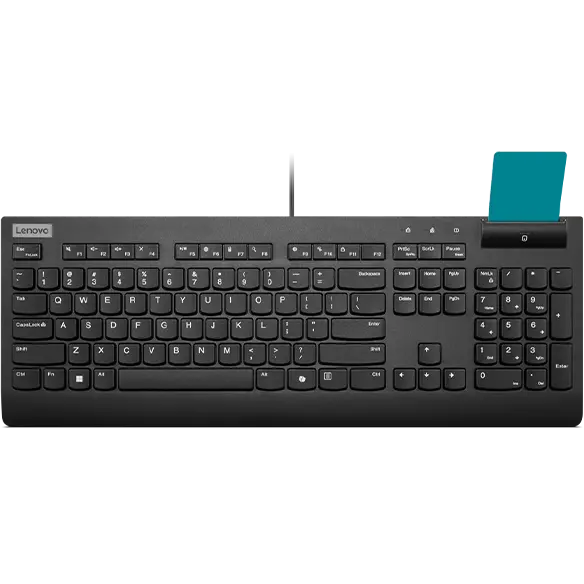


Lenovo Smartcard Wired Keyboard II with Copilot Key - US English
Prices in SGD, excluding 9% GST.
PRODUCT DESCRIPTION
Lenovo Smartcard Wired Keyboard II (4Y41R64685) - Singapore Local Warranty
Keyboard and Smart Card Reader in One
The Lenovo Smartcard Wired Keyboard II combines a full-size keyboard with an integrated smart card reader, so users can authenticate with their employee or security card directly at the keyboard — no separate reader cluttering the desk.
Built for Secure Workplaces
Purpose-built for organisations where sensitive information demands strong authentication, such as government, finance and healthcare environments that use card-based sign-in.
Wired USB Reliability
A wired USB connection means no batteries to manage and no wireless pairing — just plug in and work.
Dedicated Copilot Key
This updated version adds a dedicated Microsoft Copilot key for quick access to Copilot on Windows 11.
Lenovo Smartcard Wired Keyboard II Datasheet — Technical Specifications
General
| Product | Lenovo Smartcard Wired Keyboard II |
| Part Number | 4Y41R64685 |
| Product Type | Full-size wired keyboard with integrated smart card reader |
| Layout | US English |
| Manufacturer Warranty | Not published by Lenovo |
| Local Warranty (Singapore) | Included with every SourceIT purchase, with GST invoice |
Features
| Smart Card Reader | Integrated |
| Copilot Key | Yes, dedicated Microsoft Copilot key |
| Format | Full-size |
Connectivity
| Interface | Wired USB |
| Cable Length | Not published by Lenovo |
Physical
| Dimensions | Not published by Lenovo |
| Weight | Not published by Lenovo |
Compatibility & Fit
Check Your Card System
The reader is built into the keyboard, but card sign-in also depends on your organisation's smart card middleware and policies. Confirm with your IT team that the Lenovo Smartcard Wired Keyboard II is supported in your environment before a large rollout.
Copilot Key and Windows 11
The dedicated Copilot key launches Microsoft Copilot on Windows 11 PCs where Copilot is enabled. On other systems or where Copilot is disabled by your IT policy, the key may do nothing or behave differently.
US English Layout
This is the US English layout, the standard layout used in Singapore offices, with a horizontal Enter key and the US placement of symbols such as @ and ".
Package Contents & Lenovo Ordering Information
In the box:
- Lenovo Smartcard Wired Keyboard II
- Documentation
Lenovo Keyboards Ordering Information
| 4Y41K04031 | Lenovo Professional Wireless Rechargeable Keyboard - US English |
| 4X30H56841 | Lenovo Professional Wireless Keyboard - US English |
| 4Y41C33748 | Lenovo Go Wireless Split Keyboard - US English |
| 4Y41R64685 (this listing) | Lenovo Smartcard Wired Keyboard II with Copilot key - US English |
| 4Y41R64588 | Lenovo Preferred Pro II USB Keyboard with Copilot key - US English |
| 4Y41R64633 | Lenovo Essential Wired Keyboard with Copilot key (Black) - US English |
Datasheet & Downloads
- Lenovo product page — 4Y41R64685
- Lenovo Support — Smartcard Wired Keyboard II overview
- Lenovo Accessories SmartFind — compatibility checker
Use Lenovo SmartFind to confirm compatibility with your PC, and Lenovo Support for manuals and any software updates.
Frequently Asked Questions — Lenovo Smartcard Wired Keyboard II
Does it need a separate card reader?
No. The smart card reader is integrated into the keyboard.
Is it wireless?
No. It is a wired USB keyboard, so there are no batteries to charge or replace.
Does it have a Copilot key?
Yes. Lenovo specifies a dedicated Microsoft Copilot key on this keyboard, giving one-press access to Copilot in Windows 11 where Copilot is available.
Will it work with our company ID cards?
That depends on your card type and your organisation's smart card software. Please check with your IT team, or contact us with your card details before ordering in volume.
We Also Recommend


Lenovo ThinkStation P8 TWR AMD Ryzen 7995WX /512GB /1TB+2TB /W7900
Lenovo ThinkStation P8 TWR AMD Ryzen 7985WX / 512GB /1TB+2TB /W7900


Lenovo ThinkStation P8 TWR Ryzen 7985WX /512GB /512GB /RTX5000


