
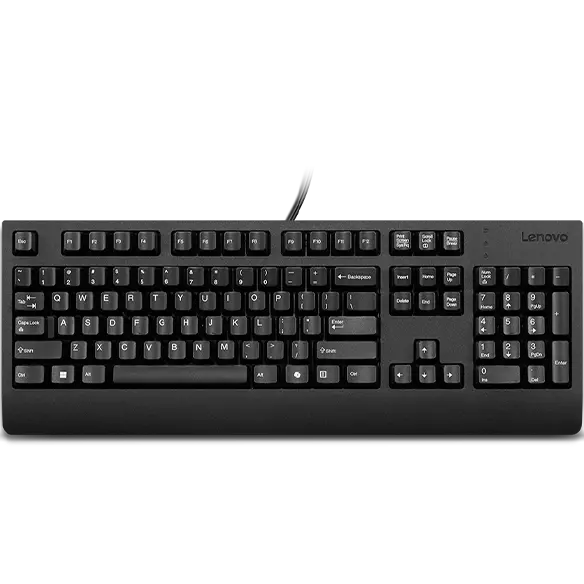


Lenovo Preferred Pro II USB Keyboard with Copilot Key - US English
Prices in SGD, excluding 9% GST.
PRODUCT DESCRIPTION
Lenovo Preferred Pro II USB Keyboard (4Y41R64588) - Singapore Local Warranty
The Think Keyboard Tradition
The Lenovo Preferred Pro II USB Keyboard continues the Think tradition of high-quality input devices — a durable, general-purpose wired keyboard for everyday office work.
Made for ThinkPad, ThinkCentre and ThinkStation
Lenovo designed it as the ideal companion for ThinkPad, ThinkCentre and ThinkStation PCs as well as docks — plug it into a USB port and start typing.
Keys Rated for 10 Million Clicks
Finger-friendly keys are rated for up to 10 million clicks under normal operation, so it keeps up with years of heavy daily use.
Dedicated Copilot Key
This updated version adds a Microsoft Copilot key for one-press access to Copilot on Windows 11.
Lenovo Preferred Pro II USB Keyboard Datasheet — Technical Specifications
General
| Product | Lenovo Preferred Pro II USB Keyboard |
| Part Number | 4Y41R64588 |
| Product Type | Wired USB keyboard |
| Layout | US English |
| Manufacturer Warranty | Not published by Lenovo |
| Local Warranty (Singapore) | Included with every SourceIT purchase, with GST invoice |
Keys
| Key Life | Up to 10 million clicks under normal operation |
| Copilot Key | Yes, dedicated Microsoft Copilot key |
Connectivity
| Interface | Wired USB |
| Cable Length | Not published by Lenovo |
Physical
| Dimensions | Not published by Lenovo |
| Weight | Not published by Lenovo |
Compatibility & Fit
Works With Think PCs and Docks
Lenovo positions the keyboard for ThinkPad, ThinkCentre and ThinkStation PCs and docks. It connects by wired USB, so check that your PC or dock has a free USB-A port.
Copilot Key and Windows 11
The dedicated Copilot key launches Microsoft Copilot on Windows 11 PCs where Copilot is enabled. On other systems or where Copilot is disabled by your IT policy, the key may do nothing or behave differently.
US English Layout
This is the US English layout, the standard layout used in Singapore offices, with a horizontal Enter key and the US placement of symbols such as @ and ".
Package Contents & Lenovo Ordering Information
In the box:
- Lenovo Preferred Pro II USB Keyboard
- Documentation
Lenovo Keyboards Ordering Information
| 4Y41K04031 | Lenovo Professional Wireless Rechargeable Keyboard - US English |
| 4X30H56841 | Lenovo Professional Wireless Keyboard - US English |
| 4Y41C33748 | Lenovo Go Wireless Split Keyboard - US English |
| 4Y41R64685 | Lenovo Smartcard Wired Keyboard II with Copilot key - US English |
| 4Y41R64588 (this listing) | Lenovo Preferred Pro II USB Keyboard with Copilot key - US English |
| 4Y41R64633 | Lenovo Essential Wired Keyboard with Copilot key (Black) - US English |
Datasheet & Downloads
- Lenovo product page — 4Y41R64588
- Lenovo Support — Preferred Pro II USB Keyboard overview
- Lenovo Accessories SmartFind — compatibility checker
Use Lenovo SmartFind to confirm compatibility with your PC, and Lenovo Support for manuals and any software updates.
Frequently Asked Questions — Lenovo Preferred Pro II USB Keyboard
Is this wired or wireless?
Wired USB — no batteries or pairing needed.
Does it have a Copilot key?
Yes. Lenovo specifies a dedicated Microsoft Copilot key on this keyboard, giving one-press access to Copilot in Windows 11 where Copilot is available.
How durable are the keys?
Lenovo rates the keys for up to 10 million clicks under normal operation.
Will it work with a ThinkPad dock?
Yes. Lenovo designed it as a companion for ThinkPad, ThinkCentre and ThinkStation PCs as well as docks; plug it into a free USB port on the dock.
We Also Recommend


Lenovo ThinkStation P8 TWR AMD Ryzen 7995WX /512GB /1TB+2TB /W7900
Lenovo ThinkStation P8 TWR AMD Ryzen 7985WX / 512GB /1TB+2TB /W7900


Lenovo ThinkStation P8 TWR Ryzen 7985WX /512GB /512GB /RTX5000


