
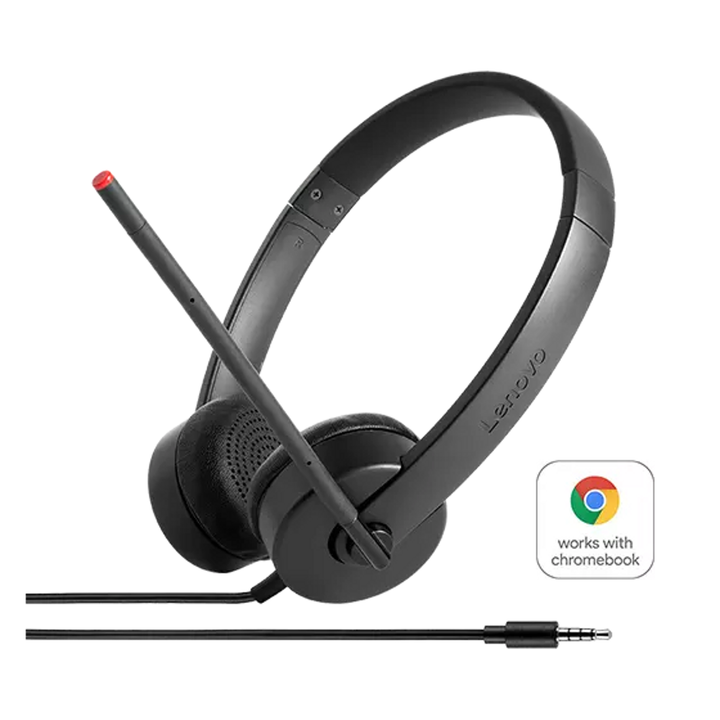


Lenovo Essential Stereo Analog Headset 3.5mm
PRODUCT DESCRIPTION
Lenovo Essential Stereo Analog Headset (4XD0K25030) - Singapore Local Warranty
Made for VoIP Calls
The Lenovo Essential Stereo Analog Headset is a simple, dependable headset made for VoIP calling, a cost-effective way to equip teams moving from desk phones to softphones and online meetings.
Easy-Swivel Boom Microphone
An easy-swivel boom microphone with 180-degree movement and an adjustable headband let you position the mic exactly where it works best.
Standard 3.5 mm Connection
It fits a standard 3.5 mm port on your laptop or workstation and works plug-and-play with most Lenovo PCs, with no software to install.
Lenovo Essential Stereo Analog Headset Datasheet — Technical Specifications
General
| Product | Lenovo Essential Stereo Analog Headset |
| Part Number | 4XD0K25030 |
| Type | Wired analogue stereo headset |
| Manufacturer Warranty | Not published by Lenovo |
| Local Warranty (Singapore) | Included with every SourceIT purchase, with GST invoice |
Microphone
| Microphone | Boom microphone, easy-swivel, 180 degrees |
Connectivity
| Connector | Standard 3.5 mm |
| Compatibility | Plug-and-play with most Lenovo PCs |
Physical
| Headband | Adjustable |
Compatibility & Fit
3.5 mm Audio Port
This headset connects to a 3.5 mm audio port, not USB. Most current laptops have a single 3.5 mm combo headphone/microphone jack. Some desktops have separate headphone and microphone jacks, and Lenovo does not publish the plug configuration, so check your PC's audio ports before ordering.
No 3.5 mm Port?
Many thin laptops and some docks have no 3.5 mm jack. In that case, choose a USB headset such as the Lenovo 100 Mono USB Headset (4XD1B61617) or the Lenovo USB-A Wired Stereo Headset Gen 2 (4XD1P83425).
Certification
Lenovo does not list a Microsoft Teams or Zoom certification for this model; it works as a standard analogue headset with any calling app that uses your PC's audio jack.
Package Contents & Lenovo Ordering Information
In the box:
- Lenovo Essential Stereo Analog Headset
- Documentation
Lenovo Headsets Ordering Information
| 4XD1M45627 | Lenovo Wired ANC Headset Gen 2 (Teams) — certified for Microsoft Teams |
| 4XD1M39029 | Lenovo Wired ANC Headset Gen 2 (UC) — certified for Zoom, optimised for other UC platforms |
| 4XD1M45626 | Lenovo Wired VoIP Headset (Teams) — certified for Microsoft Teams |
| 4XD1M39028 | Lenovo Wired VoIP Headset (UC) — certified for Zoom, optimised for other UC platforms |
| 4XD1P83425 | Lenovo USB-A Wired Stereo Headset Gen 2 — ENC microphone |
| 4XD1B61617 | Lenovo 100 Mono USB Headset — USB-A |
| 4XD0K25030 (this listing) | Lenovo Essential Stereo Analog Headset — 3.5 mm |
| 4XD1M80021 | Earcups for Lenovo Wireless VoIP Headset |
| 4XH1M80022 | Lenovo USB-A Bluetooth Audio Receiver Gen 2 |
Datasheet & Downloads
- Lenovo product page — Lenovo Essential Stereo Analog Headset (4XD0K25030)
- Lenovo Support — Lenovo Mono/Stereo Analog and USB Headsets overview and service parts (ACC100246)
- Lenovo Accessories SmartFind — 4XD0K25030
Use Lenovo SmartFind to confirm the headset suits your device before ordering.
Frequently Asked Questions — Lenovo Essential Stereo Analog Headset
Does it connect by USB?
No. It uses a standard 3.5 mm analogue connector. For USB, see the Lenovo 100 Mono USB Headset or the Lenovo USB-A Wired Stereo Headset Gen 2.
Will it work with my laptop?
It fits a standard 3.5 mm port and works plug-and-play with most Lenovo PCs. Check that your laptop or workstation has a 3.5 mm audio jack.
Can I adjust the microphone?
Yes. The boom microphone swivels easily through 180 degrees and the headband is adjustable.
Do I need drivers or software?
No. As an analogue headset it is plug-and-play and uses your PC's built-in audio.


