
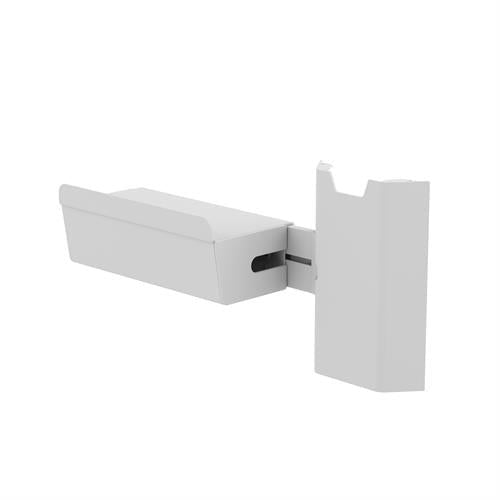


Ergotron Printer Bracket for Wall Track
PRODUCT DESCRIPTION
Ergotron Printer Bracket for Wall Track (98-578-251) - Local Warranty
Gets the Label Printer Off the Worksurface and Onto the Wall Track
Ergotron's description: discover more usable workspace and improve workflows to keep the focus on patients by mounting a printer to Ergotron's Wall Track. A label or wristband printer takes up more worksurface than almost anything else on a clinical workstation, and it does not need to be there.
Installs on Either Side of the Workstation
Ergotron's CareFit Combo datasheet describes the bracket as keeping the printer in reach to maximise time with patients, and notes it "installs on either side". Note the deliberate wording — the larger version is described differently.
Order the Large Version if the Printer Is Bigger
Ergotron makes a Printer Bracket for Wall Track, Large (98-647-251) for larger printers, and describes that one as installing anywhere on the Wall Track rather than on either side. If your printer is larger than a compact label unit, that is the part to ask about.
Ergotron Printer Bracket for Wall Track Datasheet — Technical Specifications
General
| Product | Ergotron Printer Bracket for Wall Track |
| Part Number | 98-578-251 |
| Ergotron Page Title | Wall Mount Printer Shelf |
| Type | CareFit Combo wall-mount system accessory |
| Ergotron Description | "Discover more usable workspace and improve workflows to keep the focus on patients by mounting a printer to Ergotron's Wall Track." |
| Warranty | Local warranty — see note below |
| Local Warranty (Singapore) | Included with every SourceIT purchase, with GST invoice |
Configuration Position
| Ergotron Configurator Step | Step 6 — select your wall-mounted printer bracket |
| Installation | Either side of the workstation |
| Mounts To | Ergotron Wall Track — the 34" Wall Track 31-018-216 in the CareFit Combo system |
| Large Version | Printer Bracket for Wall Track, Large 98-647-251 — installs anywhere on the Wall Track |
Host System Specification (the Combo system, not this accessory)
| Typical Display Size | Up to 27" |
| Display Weight Capacity | 8–22 lb (3.6–10 kg) |
| Worksurface Weight Capacity | 1.5 lb (0.68 kg) |
| Lift | 20" (51 cm) |
| Pan / Rotation | 180° / 180° |
| VESA | MIS-D — 100 x 100 mm and 75 x 75 mm |
| Host Warranty | 5 years on the CareFit Combo base units |
Published Specification Limits
| Accessory Dimensions and Weight | Not published by Ergotron |
| Load Capacity | Not published by Ergotron for this accessory |
| Materials and Colour Name | Not published by Ergotron |
| Box Contents | Not published by Ergotron |
Compatibility & Fit
This accessory belongs to the CareFit Combo system — Ergotron's modular wall-mount arm platform, mounted on a 34" Wall Track (part 31-018-216, which Ergotron states is required for the CareFit Combo Arm). The host products are the CareFit Combo Arm (45-621-251), Combo Arm with Worksurface (45-622-251), Combo System (45-618-251) and Combo System with Worksurface (45-619-251).
Ergotron publishes no shelf dimensions, printer weight capacity or supported printer models for this bracket. Since printers vary enormously in footprint and weight, send us the printer make and model before ordering and we will confirm the fit and the load with Ergotron.
Note Ergotron's own wording distinction between the two printer brackets: this one "installs on either side", while the Large version (98-647-251) "installs anywhere on Wall Track". Do not describe this bracket as mounting anywhere along the track — that is the larger part's capability.
Do not cross-order across CareFit platforms. Ergotron runs three separate CareFit lines and their accessories do not interchange: Combo (this wall-mount arm system), Enclosure (the folding wall-mount workstation 61-367), and CareFit Pro (the mobile medical cart C52-xxxx). A scanner bracket or shelf from one will not fit another.
Ergotron prints a warning worth repeating when you configure a Combo system: confirm that the combined weight of every product and accessory does not exceed the system's capacity, and check attachment points, because not all accessories can be used together in a single configuration. Send us your intended configuration and we will check it against the datasheet before you order.
Package Contents & CareFit Combo Ordering Information
Ergotron publishes no box-contents list for this accessory.
CareFit Combo Ordering Information
| 98-578-251 (this listing) | Printer Bracket for Wall Track — Discover more usable workspace and improve workflows to keep the focus on patients by mounting a printer to Ergotron's Wall Track |
Other CareFit Combo Accessories at SourceIT
| 98-547-251 | CareFit Combo Extender — adds 18.5" (47.1 cm) of reach |
| 98-548-251 | CareFit Combo CPU Tray — mini PC under the worksurface |
| 98-551-251 | CareFit Combo Scanner Bracket |
| 98-549-251 | CareFit Combo Wireless Scanner Bracket |
| 98-578-251 | Printer Bracket for Wall Track |
| 98-609-030 | CareFit Wall Track 34" Covers |
CareFit Combo Host Products (order on request)
| 45-618-251 | CareFit Combo System — white |
| 45-619-251 | CareFit Combo System with Worksurface — white |
| 45-621-251 | CareFit Combo Arm — white |
| 45-622-251 | CareFit Combo Arm with Worksurface — white |
| 31-018-216 | 34" Wall Track — required for the CareFit Combo Arm |
Datasheet & Downloads
- Ergotron Printer Bracket for Wall Track product page (98-578)
- Ergotron CareFit Combo System datasheet (PDF)
Ergotron publishes no standalone datasheet or installation guide for this accessory. The CareFit Combo System datasheet is the authoritative source for the host system's specification and for the accessory's place in the configurator.
Frequently Asked Questions — Ergotron Printer Bracket for Wall Track
Which printers does it take?
Ergotron publishes no printer model list, shelf dimensions or weight capacity. Send us the printer make and model and we will confirm with Ergotron.
Where on the Wall Track can it go?
Ergotron describes this bracket as installing on either side of the workstation. The Large version (98-647-251) is the one Ergotron describes as installing anywhere on the Wall Track.
What if my printer is large?
Ask us about the Printer Bracket for Wall Track, Large (98-647-251), which Ergotron makes for larger printers.
Do I need the Wall Track as well?
Yes — the bracket mounts to Ergotron's Wall Track. In the CareFit Combo system that is the 34" Wall Track, part 31-018-216, which Ergotron states is required for the Combo Arm.
Does it come with a warranty in Singapore?
Yes. Every Ergotron Printer Bracket for Wall Track sold by SourceIT comes with local Singapore warranty and a GST invoice. Ergotron's current warranty schedule covers carts, mounts, desks and power systems by category and has no category covering accessories — the 5-year term printed on the CareFit Combo datasheet belongs to the host product, not to this accessory — so we do not quote a manufacturer duration on this page; ask us and we will confirm the current term with Ergotron for your order.


