
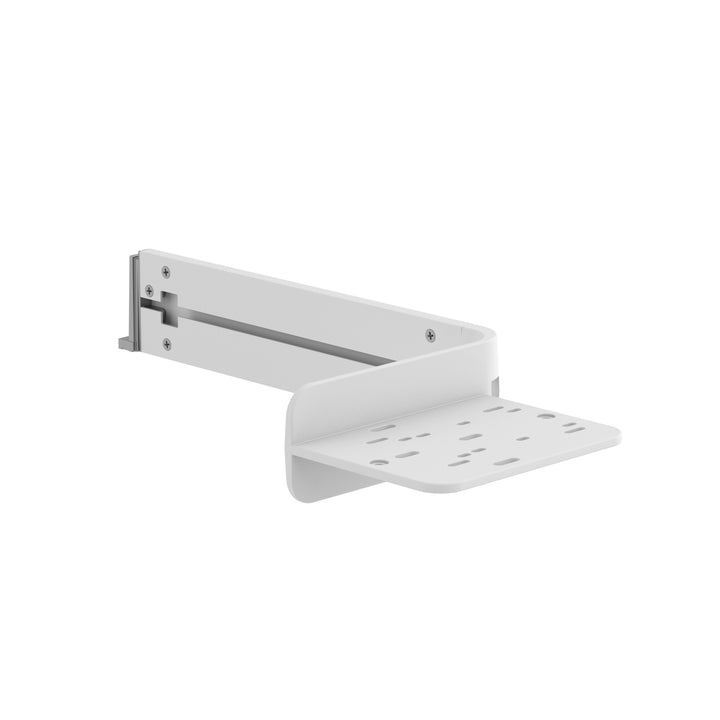


Ergotron CareFit™ Combo Wireless Scanner Bracket
PRODUCT DESCRIPTION
Ergotron CareFit Combo Wireless Scanner Bracket (98-549-251) - Local Warranty
A Home for the Cordless Scanner on a Wall-Mounted Workstation
Ergotron's description: support efficient workflows and easily access a wireless scanner. A cordless scanner has no cable to tether it, which is its advantage and its problem — without a fixed holder it ends up on a worksurface, in a drawer, or in another room.
Installs on Either Side, Chosen at Installation
Ergotron's Combo datasheet notes the bracket "supports efficient workflows with installation on either side", so the holder goes where the clinician's hand naturally falls rather than where the design happened to put it.
Specify Against the Scanner You Actually Own
Ergotron distinguishes this from the standard Combo Scanner Bracket (98-551-251) only by the word "wireless", and publishes no scanner model list or dimensions for either. Tell us your scanner model and whether its charging base needs mounting, and we will confirm which bracket you need.
Ergotron CareFit Combo Wireless Scanner Bracket Datasheet — Technical Specifications
General
| Product | Ergotron CareFit Combo Wireless Scanner Bracket |
| Part Number | 98-549-251 |
| Ergotron Page Title | CareFit Combo Wireless Scanner Bracket |
| Type | CareFit Combo wall-mount system accessory |
| Ergotron Description | "Support efficient workflows and easily access a wireless scanner." |
| Warranty | Local warranty — see note below |
| Local Warranty (Singapore) | Included with every SourceIT purchase, with GST invoice |
Configuration Position
| Ergotron Configurator Step | Step 5 — select your scanner holder |
| Installation | Either side of the workstation |
| Alternatives | Combo Scanner Bracket 98-551-251; Top-Mount Scanner Holder, VESA Attach 98-649-251 |
Host System Specification (the Combo system, not this accessory)
| Typical Display Size | Up to 27" |
| Display Weight Capacity | 8–22 lb (3.6–10 kg) |
| Worksurface Weight Capacity | 1.5 lb (0.68 kg) |
| Lift | 20" (51 cm) |
| Pan / Rotation | 180° / 180° |
| VESA | MIS-D — 100 x 100 mm and 75 x 75 mm |
| Host Warranty | 5 years on the CareFit Combo base units |
Published Specification Limits
| Accessory Dimensions and Weight | Not published by Ergotron |
| Load Capacity | Not published by Ergotron for this accessory |
| Materials and Colour Name | Not published by Ergotron |
| Box Contents | Not published by Ergotron |
Compatibility & Fit
This accessory belongs to the CareFit Combo system — Ergotron's modular wall-mount arm platform, mounted on a 34" Wall Track (part 31-018-216, which Ergotron states is required for the CareFit Combo Arm). The host products are the CareFit Combo Arm (45-621-251), Combo Arm with Worksurface (45-622-251), Combo System (45-618-251) and Combo System with Worksurface (45-619-251).
An honest note on the difference between the two Combo scanner brackets: Ergotron's descriptions are otherwise identical, and it does not state that this version holds a charging cradle or base. That is the obvious inference from the word "wireless", but it is an inference and not a published fact, so we will not print it as one.
What that means practically: if your cordless scanner charges in a base that must be mounted on the workstation, ask us to confirm with Ergotron which bracket takes it before you order. Getting this wrong means a scanner that has a holder but nowhere to charge.
Do not cross-order across CareFit platforms. Ergotron runs three separate CareFit lines and their accessories do not interchange: Combo (this wall-mount arm system), Enclosure (the folding wall-mount workstation 61-367), and CareFit Pro (the mobile medical cart C52-xxxx). A scanner bracket or shelf from one will not fit another.
Ergotron prints a warning worth repeating when you configure a Combo system: confirm that the combined weight of every product and accessory does not exceed the system's capacity, and check attachment points, because not all accessories can be used together in a single configuration. Send us your intended configuration and we will check it against the datasheet before you order.
Package Contents & CareFit Combo Ordering Information
Ergotron publishes no box-contents list for this accessory.
CareFit Combo Ordering Information
| 98-549-251 (this listing) | CareFit Combo Wireless Scanner Bracket — Support efficient workflows and easily access a wireless scanner |
Other CareFit Combo Accessories at SourceIT
| 98-547-251 | CareFit Combo Extender — adds 18.5" (47.1 cm) of reach |
| 98-548-251 | CareFit Combo CPU Tray — mini PC under the worksurface |
| 98-551-251 | CareFit Combo Scanner Bracket |
| 98-549-251 | CareFit Combo Wireless Scanner Bracket |
| 98-578-251 | Printer Bracket for Wall Track |
| 98-609-030 | CareFit Wall Track 34" Covers |
CareFit Combo Host Products (order on request)
| 45-618-251 | CareFit Combo System — white |
| 45-619-251 | CareFit Combo System with Worksurface — white |
| 45-621-251 | CareFit Combo Arm — white |
| 45-622-251 | CareFit Combo Arm with Worksurface — white |
| 31-018-216 | 34" Wall Track — required for the CareFit Combo Arm |
Datasheet & Downloads
- Ergotron CareFit Combo Wireless Scanner Bracket product page (98-549)
- Ergotron CareFit Combo System datasheet (PDF)
Ergotron publishes no standalone datasheet or installation guide for this accessory. The CareFit Combo System datasheet is the authoritative source for the host system's specification and for the accessory's place in the configurator.
Frequently Asked Questions — Ergotron CareFit Combo Wireless Scanner Bracket
What is the difference between this and the standard Combo Scanner Bracket?
Ergotron states only that this one is for a wireless scanner. It does not describe a charging cradle or base, and the two descriptions are otherwise identical — so we cannot tell you the mechanical difference from the datasheet.
Does it hold the scanner's charging base?
Ergotron does not say. If your cordless scanner needs its base mounted, tell us the model and we will confirm with Ergotron which bracket accommodates it.
Which scanners does it fit?
No model list, dimensions or weight capacity is published. Send us your scanner model and we will check.
Can it be fitted on either side?
Yes — Ergotron states installation on either side of the workstation.
Does it come with a warranty in Singapore?
Yes. Every Ergotron CareFit Combo Wireless Scanner Bracket sold by SourceIT comes with local Singapore warranty and a GST invoice. Ergotron's current warranty schedule covers carts, mounts, desks and power systems by category and has no category covering accessories — the 5-year term printed on the CareFit Combo datasheet belongs to the host product, not to this accessory — so we do not quote a manufacturer duration on this page; ask us and we will confirm the current term with Ergotron for your order.


