
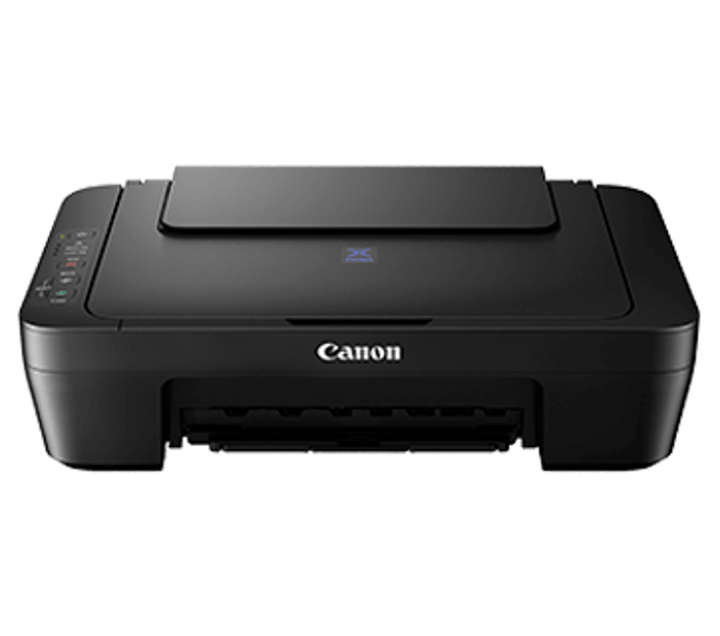


Canon PIXMA E470 Ink Efficient Wireless All-in-One Printer
Prices in SGD, excluding 9% GST.
PRODUCT DESCRIPTION
Canon PIXMA E470 Ink Efficient Wireless All-in-One Printer (1365C012AA) - 2 Years Local Warranty
The Canon PIXMA E470 is Canon's compact Wireless All-In-One for Low-Cost Printing. It has a rated print speed of 8 / 4 ipm (Mono/Colour), with Wi-Fi and USB connectivity.
Lower Cost Cartridges
Affordable ink cartridges for high quality printing.
Mobile and Cloud Printing
Experience the freedom to print from social media and scan to cloud storage services using Cloud Service accessed via Canon PRINT app.
Auto Power ON/OFF
Auto Power ON detects a print command and will automatically switch the printer on with a USB connection and automatically switches off after a specific timing.
Key Highlights
- Print, Scan, Copy
- Print Speed (A4, ISO): Up to 8 / 4 ipm (Mono/Colour)
- Wi-Fi, Wireless Direct
- Mobile Printing
- Black ink @ $16 (400 pages)
- Colour ink @ $29 (300 pages)
Ideal For
Homes, students and home offices in Singapore that want an affordable, compact printer for everyday documents, school work and photos. Supplied by SourceIT with local Singapore warranty, GST invoice and corporate or project pricing on request.
PIXMA E470 Datasheet — Technical Specifications
General
| Model | PIXMA E470 |
| Official Product Name | PIXMA E470 |
| Canon Product Code | 1365C012AA |
| Brand | Canon |
| Warranty | 2 Years Local Warranty (Singapore) - 2 years carry-in warranty by Canon Singapore |
| Print Head / Ink - Type | Fine Cartridge |
| Print Head / Ink - Number of Nozzles | Total 1,280 nozzles |
| Print Head / Ink - Ink Cartridges | PG-47, CL-57S (Optional: CL-57) |
| Maximum Printing Resolution | 4800 (Horizontal)¹ x 1200 (Vertical) dpi |
| Print Speed² (Approx.) - Document (ESAT/Simplex) | 8 / 4 ipm (Mono/Colour) |
| Printable Width | Up to 203.2 mm (8") |
| Printable Area - Bordered Printing | Top margin: 3 mm, Bottom margin: 16.7 mm, Left/Right margin: 3.4 mm (LTR: Left: 6.4 mm, Right: 6.3 mm) |
| Recommended Printing Area | Top Margin: 31.6 mm; Bottom Margin: 29.2 mm |
| Paper Size | A4, A5, B5, LTR, LGL, 4 x 6", 5 x 7", Envelopes (DL, COM10), Square (5 x 5"), Custom size (width 101.6 - 215.9 mm, length 152.4 - 676 mm) *F4 is possible via custom size settings. |
| Paper Handling Rear Tray (Maximum Number) - Plain Paper | A4, A5, B5, LTR = 60; LGL = 10 |
| Paper Handling Rear Tray (Maximum Number) - Photo Paper Plus Glossy II (PP-201) | 4 x 6" = 20, Square (5 x 5"), 5 x 7" = 10 |
| Paper Handling Rear Tray (Maximum Number) - Envelope | European DL / US Com. #10 = 5 |
| Paper Weight - Rear Tray Plain Paper | 64-105 g/m² |
| Paper Weight - Canon specialty paper | max paper weight: approx. 275 g/m² (Photo Paper Plus Glossy II, PP-201) |
| Ink End Sensor | Dot count |
| Print Head Alignment | Manual |
Scan³
| Scanner Type | Flatbed |
| Scanner Method | CIS (Contact Image Sensor) |
| Optical Resolution⁴ | Optical resolution scan is available, only when you use TWAIN Driver. 600 x 1200 dpi |
| Selectable Resolution⁵ | 25 - 19200 dpi |
| Scanning Bit Depth (Input/Output) - Grayscale | 16 bit/8 bit |
| Scanning Bit Depth (Input/Output) - Colour | 48 bit/24 bit (RGB each 16 bit / 8 bit) |
| Line Scanning Speed⁶ - Grayscale | 1.2 ms/line (300 dpi) |
| Line Scanning Speed⁶ - Colour | 3.5 ms/line (300 dpi) |
| Scanning Speed⁷ (Approx.) - Reflective (A4 Colour / 300 dpi) | 14 sec |
| Maximum Document Size - Flatbed | A4/LTR (216 x 297 mm) |
Copy
| Maximum Document Size - Flatbed | A4/LTR (216 x 297 mm) |
| Compatible Media - Size | A4, LTR |
| Compatible Media - Type | Plain Paper |
| Image Quality | Plain Paper: Draft, Standard |
| Copy Speed⁸ (Approx.) - Document (sFCOT/Simplex) | 28 sec |
| Copy Speed⁸ (Approx.) - Document (sESAT/Simplex) | 2.1 ipm |
| Multiple Copy | Mono/Colour: 1 - 21 pages |
Network
| Protocol | TCP/IP |
| Wireless LAN - Network Type | IEEE802.11b/g/n |
| Wireless LAN - Frequency Band | 2.4 GHz |
| Wireless LAN - Channel⁹ | 1 - 13 |
| Wireless LAN - Range Indoor | 50 m (depends on the transmission speed and conditions) |
| Wireless LAN - Security | WEP 64/128 bit, WPA-PSK (TKIP/AES), WPA2-PSK (TKIP/AES) |
| Direct Connection (Wireless LAN) | Available |
Printing Solutions
| Canon Print Service (for Android) | Available |
| Cloud Integration Service - From smartphone/tablet | Available |
| Canon PRINT (for iOS/Android) | Available |
System Requirements¹⁰
| Operating System | Windows 10 / 8 / 7 SP1, Windows Vista SP2, Mac OS X 10.8.5 or later |
| Interface | USB 2.0 |
| Operating Environment¹¹ - Temperature | 5 - 35°C |
| Operating Environment¹¹ - Humidity | 10 - 90% RH (no dew condensation) |
| Recommended Environment¹² - Temperature | 15 - 30°C |
| Recommended Environment¹² - Humidity | 10 - 80% RH (no dew condensation) |
| Storage Environment - Temperature | 0 - 40°C |
| Storage Environment - Humidity | 5 - 95% RH (no dew condensation) |
| Quiet Mode | Available |
| Acoustic Noise¹³ (PC Print) | 46.5 dB(A) |
| Power | AC 100-240 V, 50/60 Hz |
| Power Consumption (Approx.) - OFF | 0.2 W |
| Power Consumption (Approx.) - Standby (Scanning lamp is off) | 1.6 W |
| Power Consumption (Approx.) - Copying¹⁴ | 10 W |
| Power Consumption (Approx.) - Printing¹⁵ | 10 W |
| Dimensions (WxDxH) (Approx.) | 426 x 306 x 145 mm |
| Weight (Approx.) | 3.5 kg |
Page Yield¹⁶
| Plain Paper (A4 pages) - A4 Colour Documents¹⁷ Standard | PG-47: 400 pages; CL-57S: 180 pages |
| Plain Paper (A4 pages) - Optional | CL-57: 300 pages |
Footnotes
| 1 | Ink droplets can be placed with a pitch of 1/4800 inch at minimum |
| 2 | Document print speeds are the averages of ESAT (Word, Excel, PDF) in Office Category Test for the default simplex mode, ISO/IEC 24734. Photo print speed is based on the default setting using ISO/JIS-SCID N2 on Photo Paper Plus Glossy II and does not take into account data processing time on host computer. Print speed may vary depending on system configuration, interface, software, document complexity, print mode, page coverage, type of paper used etc. |
| 3 | TWAIN driver (ScanGear) is based on the TWAIN specification V1.9 and requires the Data Source Manager comes with the operating system. |
| 4 | Optical resolution is a measure of maximum hardware sampling resolution, based on ISO 14473 standard. |
| 5 | Increasing the scanning resolution will limit the maximum possible scanning area. |
| 6 | The fastest speed in Hi-Speed USB on Windows PC. Transfer time to computer is not included. |
| 7 | Colour document scan speed is measured with ISO / IEC 29183 Target A. Scan speed indicates the time measured between pressing the scan button of the scanner driver and the on-screen status display turns off. Scan speed may vary depending on system configuration, interface, software, scan mode settings and document size etc. |
| 8 | Copy speeds are the average of sFCOT and sESAT, ISO/IEC 29183. Copy speeds (ADF) are ESAT of copy in sequence, ISO/IEC24735. Copy speed may vary depending on document complexity, copy mode, page coverage, type of paper used etc. and does not take into account warm-up time. |
| 9 | 1-11 in US, CND, LTN, BRA, TW and HK. |
| 10 | Please visit http://asia.canon to check OS compatibility and to download the latest driver updates. |
| 11 | The performance of the printer may be reduced under certain temperature and humidity conditions |
| 12 | For the temperature and humidity conditions of papers such as photo paper, refer to the paper's packaging or the supplied instructions. |
| 13 | Acoustic Noise is measured based on ISO7779 standard with default setting. |
| 14 | Copy: When copying ISO/JIS-SCID N2 (printed by inkjet printer) on A4 size plain paper using default settings. |
| 15 | Print: When printing ISO/JIS-SCID N2 (printed by inkjet printer) on A4 size plain paper using default settings. |
| 16 | Page yields may vary depending on content coverage, print settings, temperature, humidity, and frequency of printing. |
| 17 | Declared yield value is in accordance with ISO/IEC 24711, using ISO/IEC 24712 colour chart. Values obtained by continuous printing. |
Compatibility & Software Support
Compatibility details below are taken from Canon Singapore's published specification for the PIXMA E470. Drivers, utilities and firmware are available from Canon Singapore's support site (see Datasheet & Downloads).
| Compatible Media - Size | A4, LTR |
| Compatible Media - Type | Plain Paper |
| Cloud Integration Service - From smartphone/tablet | Available |
| Operating System | Windows 10 / 8 / 7 SP1, Windows Vista SP2, Mac OS X 10.8.5 or later |
| Interface | USB 2.0 |
Package Contents & Ordering Information
Ordering Information
| Model | PIXMA E470 |
| Canon Product Code | 1365C012AA |
| Recommended Retail Price (incl. GST) | S$129.00 |
| Consumables | Standard: PG-47 PGBK (Pigment Black) 400 pages, RRP SGD 16.00; CL-57S (Colour) 180 pages, RRP SGD 21.00. Optional: CL-57 (Colour) 300 pages, RRP SGD 29.00. Yields per ISO/IEC 24711. |
Canon Singapore does not publish an itemised in-the-box list for this model. Please ask SourceIT if you need the exact package contents confirmed before ordering.
Datasheet & Downloads
Frequently Asked Questions — PIXMA E470
What warranty does the PIXMA E470 come with?
2 Years Local Warranty from Canon Singapore: 2 years carry-in warranty by Canon Singapore. Every unit sold by SourceIT is a genuine Singapore set with a GST invoice.
Which consumables does the PIXMA E470 use?
Standard: PG-47 PGBK (Pigment Black) 400 pages, RRP SGD 16.00; CL-57S (Colour) 180 pages, RRP SGD 21.00. Optional: CL-57 (Colour) 300 pages, RRP SGD 29.00. Yields per ISO/IEC 24711. Always use genuine Canon consumables to protect print quality and warranty coverage. SourceIT can supply them together with the printer.
Can I print from my phone to the PIXMA E470?
Yes. Canon lists the following mobile and cloud printing support: Cloud Integration Service - From smartphone/tablet
Is stock held locally?
SourceIT holds fast-moving Canon models in Singapore. Anything not in local stock is ordered through Canon Singapore's local distributor - ask us for the current lead time before committing to a date.
Can SourceIT quote for multiple units or a project?
Yes. Send us your quantity and delivery requirements and we will quote the printers together with consumables, with local warranty and GST invoice.
We Also Recommend


Canon MAXIFY GX7170 MegaTank Wireless Business All-in-One Printer with Fax


Canon imageCLASS MF667Cx Wireless Colour Laser All-in-One Printer with Fax


Canon imageCLASS MF662Cdw Wireless Colour Laser All-in-One Printer


Canon imageCLASS MF756Cx II Wireless Colour Laser All-in-One Printer with Fax


Canon imageCLASS MF752Cdw II Wireless Colour Laser All-in-One Printer