

BenQ InstaShow WDC15 4K Wireless Presentation System
PRODUCT DESCRIPTION
BenQ InstaShow WDC15 4K UHD Wireless Presentation System (WDC15) - Local Warranty
A Hardware Device, Not an App: Nothing Is Installed on the Laptop
InstaShow is a pure hardware solution. The Host sits behind the room display on HDMI; the presenter plugs the Button into their laptop's USB-C port and presses it. There is no software to download, no driver to install, no meeting code to type and no wireless network to join. That is the whole design brief. It means a visiting consultant, auditor or client is presenting within seconds of walking into the room, and it means the meeting room works the same way on a Windows laptop, a MacBook, a Linux machine or a Chromebook, because none of them are asked to run anything.
The IT Security Argument: No Agent on Guest Machines, No Traffic on Your LAN
App-based casting tools install an agent that captures the screen and push that content across the corporate network. The WDC15 does neither. Nothing is installed on a guest machine, so there is no software approval to chase and nothing left behind when the visitor leaves. The Button and Host form their own direct wireless link, so presentation traffic never touches the corporate LAN or the guest Wi-Fi, and video does not compete with production traffic. The link is protected with AES128 encryption and WPA3, and BenQ certifies the WDC15's connection security against CVSS 4.0.
4K UHD Output with TouchBack for Interactive Displays
The WDC15 outputs up to 4K at 30 Hz over HDMI 1.4 with HDCP, a step up from the 1080p of the earlier WDC10 and enough for detailed drawings, spreadsheets, floor plans and dense dashboards on a large room display. TouchBack is supported, so when the WDC15 is paired with an interactive flat panel or touch display the presenter can annotate, scroll and drive their laptop from the screen itself rather than walking back to the table. Up to 16 devices can be registered to one Host, with the presenter switching by pressing their own Button.
Swappable USB-C and HDMI Plugs Keep the Room Future-Proof
The WDC15 Button ships with a USB Type-C connector and a Button HDMI cable, and the plug itself is swappable with a Phillips #0 screwdriver. That solves two real problems. Mixed estates — where some laptops are USB-C only and others still expose HDMI — can be served from the same room kit. And when a plug eventually wears out from daily use, facilities replaces the plug rather than the whole transmitter. A side Mode Key switches between presentation and video playback modes at the press of a button.
BenQ WDC15 Datasheet — Technical Specifications
General
| Product | BenQ InstaShow WDC15 Wireless Presentation System |
| Part Number (SKU) | WDC15 |
| Product Type | Hardware wireless presentation system (Host + Button) |
| Software Required | None — no app, driver or network join |
| Buttons Supplied | 1 (additional Buttons available separately) |
| Local Warranty (Singapore) | Supplied by SourceIT with GST invoice |
Video & Performance
| Maximum Output Resolution (Receiver) | Up to 4K 30 Hz |
| Video Output | HDMI 1.4 (with HDCP) |
| TouchBack | Yes |
| Simultaneous Connections | 16 |
Wireless & Security
| Wi-Fi Standard | Wi-Fi 5 |
| Wireless Frequency | 5 GHz |
| Wireless Data Rate (maximum) | AC1200 (5 GHz, 867 Mbps) |
| Wi-Fi Protected Access | WPA3 |
| Advanced Encryption Standard | AES128 |
Connectivity
| Button Connector Type | USB Type-C (Button HDMI cable included; plugs are swappable) |
| Button Function Key | Mode Key |
| HDMI Out (Host) | x1 |
| LAN (RJ45) | x1 |
| Antenna | x2, 2 dBi, MIMO |
Physical & Power
| Host Dimensions (without antenna) | 110 x 110 x 29 mm |
| Host Weight | 205 g |
| Cradle Dimensions | 84.5 x 62.5 x 128 mm |
| Cradle Weight | 568 g |
| Host Power Supply | 2 A, DC 5 V ±10% |
| Host Normal Power Consumption | 10 W |
Specifications are taken from BenQ's published product data for this model. Where BenQ does not publish a figure for this exact model it has been left out rather than estimated.
Compatibility & Installation
Room installation
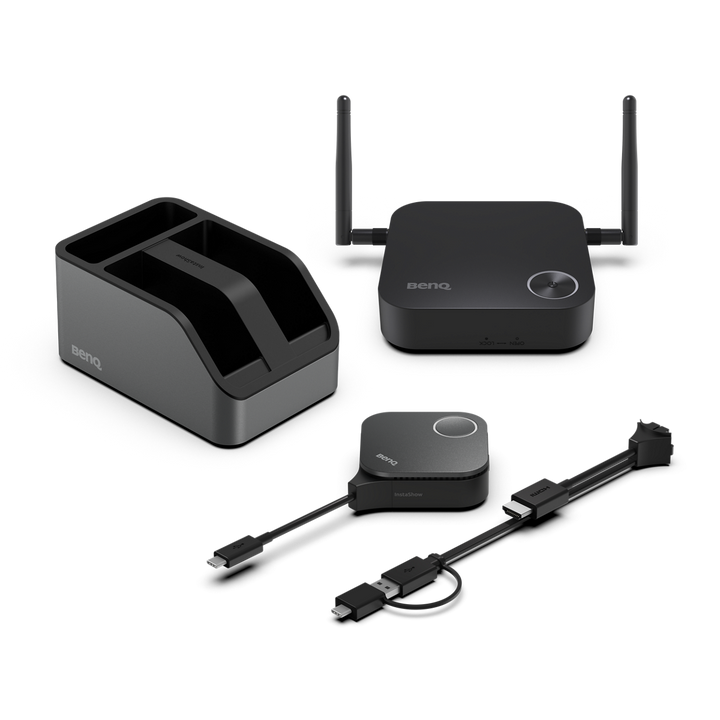
The Host connects to the room display, projector or interactive flat panel by HDMI and is powered from its own adapter. An RJ45 port is provided for wired network access to the Host's management interface. Two 2 dBi MIMO antennas are supplied. The Cradle holds the Button on the meeting table so it is visible and does not walk off.
What the presenter connects
The Button plugs into the laptop's USB Type-C port, or into HDMI using the included Button HDMI cable. No application, driver, account or network join is needed, so Windows, macOS, Linux and ChromeOS laptops all behave the same way. Press the Button to show, press again to stop.
Swappable plugs
The Button's plug can be changed between Type-C and HDMI using a Phillips #0 screwdriver, so a mixed laptop estate can be served from one room kit and a worn plug can be replaced without discarding the transmitter.
Network and security
The Button and Host communicate directly over 5 GHz Wi-Fi 5 with AES128 encryption and WPA3. Presentation traffic does not traverse the corporate LAN, and nothing is installed on the presenting device.
Adding more presenters
Extra transmitters are supplied as the InstaShow WDC15 Button Kit, which pairs to this Host. Up to 16 devices can be registered.
Package Contents & BenQ InstaShow Range
In the box
- InstaShow Host (Receiver) x 1
- InstaShow Button (Transmitter) x 1
- Antenna x 2, 2 dBi, MIMO
- Cradle x 1
- Button HDMI cable x 1
- Cable: HDMI A(M) to A(M) x 1
- Power adapter x 1
- Safety statement x 1
Package contents follow BenQ's product data for this model; items not listed by BenQ are not claimed here.
BenQ InstaShow range
| Model | Max Output | Wi-Fi | Devices |
| WDC10 | 1080p 60 Hz | Wi-Fi 5 | 16 |
| WDC15 (this listing) | 4K 30 Hz | Wi-Fi 5 | 16 |
| VS25 | 4K 60 Hz (HDMI) | Wi-Fi 6 | 64 |
Button kits
| Button Kit | Works With |
| WDC10 Button Kit | WDC10 Host |
| WDC15 Button Kit | WDC15 Host |
| VS25 / WDC25 Button Kit | VS25 Host |
Datasheet & Downloads
SourceIT can email the current data sheet revision with a quotation, including multi-room pricing and additional Button kits.
Frequently Asked Questions — BenQ InstaShow WDC15
Does anyone need to install software to present?
No. InstaShow is a hardware device. The presenter plugs the Button into USB-C or HDMI and presses it. There is no app, no driver, no account and no network to join, which is why guests can present without help from IT.
Does presentation traffic go over our corporate network?
No. The Button and Host communicate directly over their own 5 GHz Wi-Fi 5 link, protected by AES128 and WPA3. The Host's RJ45 port is for management access only — screen content does not have to traverse the corporate LAN.
How does the WDC15 differ from the WDC10 already in our rooms?
The WDC15 outputs up to 4K 30 Hz where the WDC10 tops out at 1080p 60 Hz, moves security from WPA2 to WPA3, and adds TouchBack. Its Button uses a swappable USB Type-C or HDMI plug, where the WDC10 Button uses an HDMI connector with USB Type-A for power. Both support 16 devices on Wi-Fi 5. The two are separate systems: a WDC10 Button does not pair with a WDC15 Host.
How does the WDC15 differ from the VS25?
The WDC15 is a screen-mirroring system. The VS25 is a wireless conferencing system: it outputs 4K at 60 Hz, runs Wi-Fi 6 with WPA3-Enterprise, supports 64 devices, includes a Multimedia Hub and Host Button, adds BYOM driver-free video conferencing and supports Cloud DMS management. That capability gap is what separates them on price.
What is TouchBack?
With a touch-enabled display, TouchBack sends touch input from the room screen back to the presenting laptop, so the presenter can annotate and control their own machine from the front of the room.
How many people can share one Host?
Up to 16 devices can be connected. Each presenter needs their own Button; additional Buttons are supplied as the WDC15 Button Kit.
What happens when a Button plug wears out?
The plug is swappable with a Phillips #0 screwdriver, so the Type-C or HDMI plug can be replaced rather than the whole transmitter.
What warranty and invoice do I get?
Every unit sold by SourceIT carries a local Singapore warranty and is supplied with a GST invoice.