
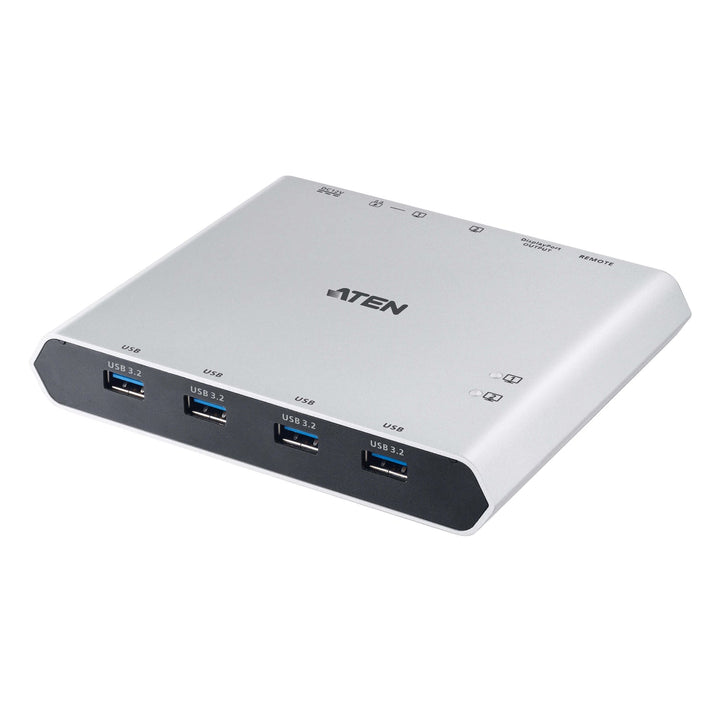


ATEN US3311 2-Port 4K DisplayPort USB-C KVM Switch with Power Pass-through
PRODUCT DESCRIPTION
ATEN US3311 2-Port 4K DisplayPort USB-C KVM Switch with Power Pass-through - 2 Years Local Warranty
KVM Switch and Dock for Two USB-C Laptops
The US3311 Duo Flex combines a KVM switch and a multiport dock for two USB-C hosts. Share one DisplayPort monitor, four USB 3.2 Gen 1 devices and a keyboard and mouse between two laptops, and switch in about three seconds.
Up to 4K at 144 Hz or 8K
Supports 3840 x 2160 at 60, 120 or 144 Hz and up to 7680 x 4320, with DP 1.4 Alt Mode and support for 21:9 and 32:9 ultrawide displays. 4K at 120/144 Hz and 8K need a Thunderbolt 4 or USB4 host with DP 1.4.
100W Charging Pass-Through
Add a USB-C power adapter and the US3311 passes up to 100W USB Power Delivery 3.0 to charge the laptop on port 1 while you work.
Mac, Windows and More
Plug-and-play with Windows 10 and later, macOS 10.12 and later (including M1/M2/M3 MacBooks), Android 8.0 and later, iPadOS 13.1 and later and iPhone 15 Pro series on iOS 17.1 and later. Switch via the port switch button or ATEN KVM Utility hotkeys.
Setting up hot desks or dual-laptop workstations? Email sales@sourceit.com.sg for volume pricing and configuration advice.
ATEN US3311 Datasheet — Technical Specifications
General
| Product Name | ATEN 2-Port 4K DisplayPort USB-C KVM Switch with Power Pass-through (Duo Flex) |
| Model | US3311 |
| Order Code | US3311-AT-E |
| Local Warranty (Singapore) | 2 years carry-in warranty |
Connectors
| Computer | 2 x USB Type-C Female (USB-C / Thunderbolt 3/4 hosts) |
| Devices | 4 x USB 3.2 Gen 1 Type-A Female |
| Video Output | 1 x DisplayPort Female |
| Power | 1 x DC jack (12 V 3.3 A); 1 x USB-C Female PD input |
Video
| Max. Resolution | 7680 x 4320 (8K); 3840 x 2160 @ 144 / 120 / 60 Hz |
| Standard | DP 1.4 Alt Mode; 2-lane / 4-lane toggle |
| Note | Thunderbolt 4 or USB4 with DP 1.4 required for 4K @ 120/144 Hz and 8K; USB may drop to USB 2.0 above 4K @ 60 Hz |
USB and Power Delivery
| USB Data Rate | Up to 5 Gbps (USB 3.2 Gen 1) |
| Power Delivery | USB PD 3.0 up to 100W pass-through (requires USB-C power adapter); port 1 PD 5/9/15/20 V; port 2 max 5 V / 3 A |
Switching
| Port Selection | Port switch button; ATEN KVM Utility hotkeys |
| Switching Time | About 3 seconds |
Environmental
| Operating Temperature | 0–40 °C |
| Storage Temperature | -20–60 °C |
| Humidity | 0–80% RH, non-condensing |
Physical
| Housing | Aluminium |
| Weight | 0.35 kg |
| Dimensions | 14.30 x 11.90 x 2.38 cm |
Compatibility
| Operating Systems | Windows 10+, macOS 10.12+, Android 8.0+, iPadOS 13.1+ (iPad Pro USB-C), iOS 17.1+ (iPhone 15 Pro series) |
| Host Requirement | USB-C with DP Alt Mode, or Thunderbolt 3/4 |
Compatibility & Applications
Typical Devices
USB-C and Thunderbolt laptops including MacBook Pro/Air with Apple silicon, Windows ultrabooks, Samsung DeX devices and iPad Pro, sharing a DisplayPort monitor and USB peripherals.
Typical Use
Hot desks and home offices where a personal and a work laptop share one monitor, keyboard and mouse, with charging from the same desk setup.
Selection Tip
The host's USB-C port must support DisplayPort Alt Mode. Full 100W charging needs a separate USB-C PD power adapter; only port 1 receives PD charging.
Package Contents & ATEN USB-C KVM Switch Ordering Information
In the Box
1 x US3311 switch, 1 x power adapter and power cord, 2 x USB-C 3.2 Gen 2 full-featured cables (1 m), 1 x port switch button, 1 x user instructions.
ATEN USB-C KVM and Sharing Models
| Model | Key feature |
| US3311 (this listing) | 2-port 4K DisplayPort USB-C KVM dock switch, 100W PD |
| US3312 | 2-port 4K USB-C DisplayPort cable KVM switch |
| CS52DP | 2-port USB-C DisplayPort hybrid cable KVM switch |
| US3342 | 2x4 USB-C Gen 2 peripheral sharing switch |
| UH3240 | 11-in-1 USB-C multiport dock, 100W pass-through |
| CS742H | 2-port 4K HDMI dual-display KVMP switch |
Datasheet & Downloads
| Datasheet | US3311 Datasheet (PDF) |
| User manual | US3311 User Manual (PDF) |
| Quick start guide | US3311 Quick Start Guide (PDF) |
| ATEN product page | US3311 on aten.com |
Need a PDF sent directly? Email sales@sourceit.com.sg quoting US3311-AT-E.
Frequently Asked Questions — ATEN US3311
Can it charge my laptop?
Yes, up to 100W USB PD 3.0 pass-through on port 1 when a USB-C power adapter is connected. Port 2 supplies up to 5 V / 3 A.
Does it work with MacBooks?
Yes. ATEN lists MacBook Pro and Air models including M1/M2/M3, on macOS 10.12 or later.
What do I need for 4K at 144 Hz or 8K?
A Thunderbolt 4 or USB4 host with DP 1.4 and a compatible monitor. USB data may drop to USB 2.0 speed above 4K at 60 Hz.
How do I switch between laptops?
Use the included port switch button or hotkeys in the ATEN KVM Utility; switching takes about three seconds.
Are cables included?
Yes, two 1 m USB-C 3.2 Gen 2 full-featured cables.
What warranty do I get?
2 years local carry-in warranty. Supplied by SourceIT with a GST invoice.


