
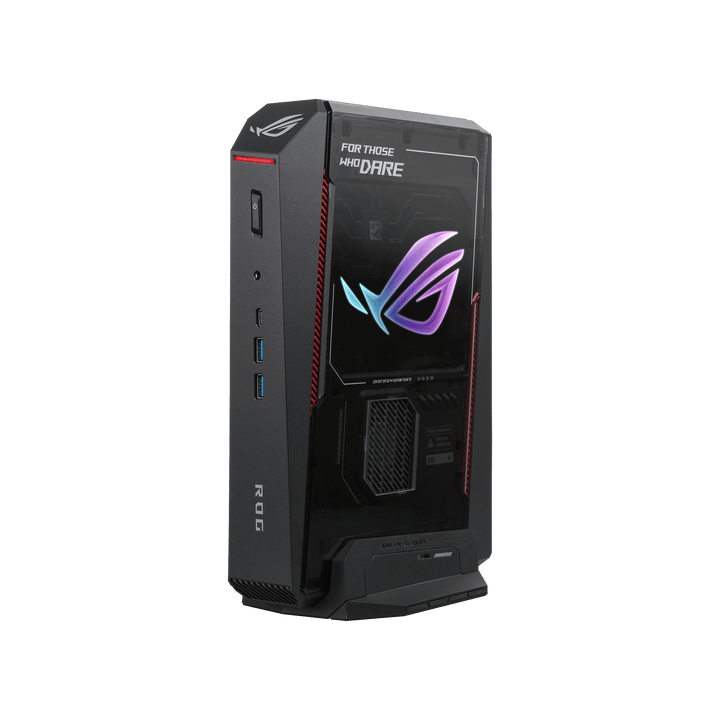


ASUS ROG NUC 16 Intel U7-270HX/ RTX5060/ DDR5 16GB/ 1TB SSD/ Win 11 Home
PRODUCT DESCRIPTION
ASUS ROG NUC 16 (RNUC16JNK7X569A3) - 3 Years Local Warranty
The Entry Point Into the ROG NUC 16 Range, Without Cutting the Chassis
The ASUS ROG NUC RNUC16JNK7X569A3 is the value configuration of the ROG NUC 16 line: the same 3-litre chassis, the same QuietFlow triple-fan and dual vapor chamber cooling, and the same five-display output as the higher-tier models, paired with an Intel Core Ultra 7 270HX Plus processor and an NVIDIA GeForce RTX 5060 Laptop GPU with 8 GB of GDDR7. If you are shopping ROG gaming mini PC Singapore options and do not need a 12 GB or 16 GB frame buffer, this is the configuration that gets you into the platform without paying for headroom you will not use.
16 GB of DDR5-5600 memory and a 1 TB NVMe SSD are fitted as standard, and Windows 11 Home is pre-installed — this is a complete, ready-to-run system, not a barebone.
NVIDIA GeForce RTX 5060 Laptop GPU — 1080p/1440p Gaming with DLSS 4
Graphics come from an NVIDIA GeForce RTX 5060 Laptop GPU with 8 GB of GDDR7 memory and 3,328 CUDA cores, built on the same Blackwell architecture as the rest of the RTX 50-series Laptop range. NVIDIA rates it at 572 AI TOPS through its fifth-generation Tensor Cores, which is what DLSS 4 frame generation and upscaling lean on. As a laptop-class GPU rather than a full desktop RTX 5060, treat it as tuned for 1080p ultra and 1440p high settings with ray tracing and DLSS enabled — not for native 4K.
Intel Core Ultra 7 270HX Plus — 20 Cores, No Hyper-Threading This Generation
The Core Ultra 7 270HX Plus is a 20-core, 20-thread hybrid processor (8 Performance + 12 Efficient cores) with 30 MB of Intel Smart Cache and a 5.3 GHz maximum turbo. Note that core count equals thread count here — the Performance cores do not run Hyper-Threading on this generation of Intel silicon, which is a change from older Core i7/i9 desktop parts some buyers may still expect. An Intel AI Boost NPU rated at 13 peak TOPS sits alongside the CPU cores; combined with the integrated graphics the platform totals 33 TOPS, below Microsoft's 40 TOPS threshold for Copilot+ PC certification, so this is not marketed as a Copilot+ PC.
16 GB DDR5-5600, Dual Channel, Room to Add an M.2 Drive Later
Memory ships as 16 GB of DDR5-5600 across two SO-DIMM modules in dual-channel configuration — both slots are occupied out of the box, so a future upgrade means replacing the modules rather than adding to them. Storage is a 1 TB M.2 2280 NVMe PCIe 4.0 SSD in the primary slot, with a second M.2 2280 slot left empty and accessible without tools for later expansion.
The 280 W Adapter — Smaller, Lighter, Easier to Deploy
This is the only configuration in the ROG NUC 16 range that ships with a 280 W external power adapter rather than the 380 W brick used on the RTX 5070 Ti and RTX 5080 models — a direct result of the lower total system power draw. For a single desk that barely matters, but if you are placing several units behind monitors, in an AV cabinet, or on a UPS-backed circuit, it is a genuinely smaller footprint to plan cabling and power budgets around.
Supplied Locally, with GST Invoice and Singapore Warranty
SourceIT supplies the ROG NUC 16 RNUC16JNK7X569A3 with a full GST invoice and local Singapore warranty support, backed by ASUS's 3-year warranty term for this range.
Need more GPU headroom for 1440p ultra or entry 4K? The RNUC16JNK9X389A3 in this same range steps up to the RTX 5070 Ti with 32 GB of memory. Email sales@sourceit.com.sg and we will help you pick the right configuration.
RNUC16JNK7X569A3 Datasheet — Technical Specifications
General
| ASUS Product Name | ASUS ROG NUC 16, Full System — RTX 5060 configuration |
| SKU | RNUC16JNK7X569A3 / 90AS00S1-M003B0 |
| ASUS Part Number | 90AS00S1-M003B0 |
| Range | ASUS ROG NUC 16, gaming mini PC with discrete GPU |
| Form Factor | Approx. 3-litre compact desktop, vertical or horizontal orientation |
| Chassis Colour | Black with illuminated ROG logo |
| Manufacturer Warranty | 3-Year Warranty (ASUS) |
| Local Warranty (Singapore) | Included with every unit supplied by SourceIT, together with a GST invoice |
Processor & Graphics
| Processor | Intel Core Ultra 7 Processor 270HX Plus |
| Cores / Threads | 20 cores (8 Performance + 12 Efficient) / 20 threads |
| Cache | 30 MB Intel Smart Cache (plus 36 MB L2) |
| Turbo & Base Frequency | 5.3 GHz max turbo; P-core base 2.4 GHz, E-core base 1.8 GHz |
| Processor Power | Base power 55 W, maximum turbo power 160 W, minimum assured power 45 W (Intel-rated figures; ASUS configures cTDP for this chassis) |
| Lithography | TSMC N3B, launched Q1'26 |
| Integrated Graphics | Intel Graphics, 4 Xe-cores, up to 1.9 GHz |
| Neural Processing Unit | Intel AI Boost NPU, 13 peak TOPS (INT8) — below the 40 TOPS Microsoft threshold for Copilot+ PC features |
| Discrete Graphics | NVIDIA GeForce RTX 5060 Laptop GPU, 8 GB GDDR7 |
| GPU Compute | 3,328 CUDA cores |
| GPU Power | 45–100 W configurable TGP (NVIDIA-published range; exact figure for this chassis not broken out by ASUS) |
| GPU AI Performance | 572 AI TOPS |
Memory & Storage
| Memory Installed | 16 GB DDR5-5600 SO-DIMM (2 x 8 GB, dual channel) |
| Memory Type | DDR5-5600 SO-DIMM |
| Storage Installed | 1 TB M.2 2280 NVMe PCIe 4.0 SSD |
| Storage Expansion | 2 x M.2 2280 slots, tool-less access. Supports 1 TB–4 TB PCIe 4.0 x4 and 1 TB–4 TB PCIe 5.0 x4 NVMe drives |
Connectivity & Display
| Front I/O | 2 x USB 3.2 Gen 2 Type-A, 1 x USB 3.2 Gen 2 Type-C, 1 x 3.5 mm combo audio jack |
| Rear I/O | 1 x Thunderbolt 4 Type-C with DisplayPort 2.1, 4 x USB 3.2 Gen 2 Type-A, 2 x HDMI 2.1 FRL, 2 x DisplayPort 2.1, 1 x RJ45 LAN, 1 x DC input (ASUS rectangular jack), 1 x Kensington lock slot |
| Display Support | Up to five displays across the two HDMI 2.1 FRL, two DisplayPort 2.1 and Thunderbolt 4 (DisplayPort 2.1) outputs; 8K@60Hz is supported on the DisplayPort 2.1 UHBR20 outputs and via HDMI 2.1 FRL |
| Wireless | Intel Killer Wi-Fi 7 BE1750x (Gig+), Bluetooth 5.4 |
| Wired LAN | Realtek RTL8125D, 2.5 Gigabit Ethernet |
Physical, Cooling & Power
| Cooling | QuietFlow Cooling: three 102 x 102 x 17 mm fans working with a dual vapor chamber, rated by ASUS as a 12% improvement in CPU thermal coverage over the prior ROG NUC generation, plus a dedicated SSD heatsink that ASUS states brings drive temperatures down from 72 °C to 59 °C under load |
| Acoustics | Approximately 38 dBA under full load (ASUS-published figure) |
| Orientation | Vertical or horizontal, patented removable stand included; the chassis is built around the same thermal solution regardless of orientation |
| Dimensions | 282.5 x 189.5 x 56.5 mm (11.12 x 7.46 x 2.22 in) |
| Weight | 3.2 kg (7.05 lb) |
| Power Adapter | 280 W external adapter, 20 VDC |
| Operating System | Windows 11 Home |
Connectivity & Setup / Thermal Design
Cooling and Thermal Design
ASUS calls the ROG NUC 16 thermal solution QuietFlow Cooling: three 102 x 102 x 17 mm fans working with a dual vapor chamber, which ASUS states improves CPU thermal coverage by 12% over the prior ROG NUC generation. A dedicated SSD heatsink is fitted, which ASUS states drops drive temperatures from 72 °C down to 59 °C under sustained load — a meaningful difference for an NVMe drive that would otherwise throttle during long game installs or asset streaming. ASUS publishes an approximate 38 dBA noise figure under full load for this range; on the RTX 5060 configuration specifically, the lower total GPU power draw against the RTX 5070 Ti and RTX 5080 models gives the cooling system more headroom, so this is a reasonable configuration to expect it to run quieter under the same workload.
Vertical or Horizontal Placement
Both orientations are supported and a patented removable stand is included in the box. Vertical placement suits a desk corner or a shelf beside a monitor; horizontal suits stacking under a monitor arm or sliding into an AV cabinet — the thermal design does not change between orientations.
Memory and Storage Upgrade Path
The 16 GB (2 x 8 GB) DDR5-5600 kit occupies both SO-DIMM slots, so a memory upgrade means swapping both modules rather than adding a third stick. If you already know a 32 GB or 64 GB workload is coming, it is worth asking SourceIT to quote fitting larger modules now rather than buying the 16 GB kit and replacing it later. Storage has a second empty M.2 2280 slot, opened without tools, so a second drive can be added at any time without touching the primary 1 TB SSD.
Networking and Display Outputs
Wired networking runs on a Realtek RTL8125D controller at 2.5 Gigabit Ethernet, with Intel Killer Wi-Fi 7 (BE1750x, Gig+) and Bluetooth 5.4 for wireless. Display output covers two HDMI 2.1 FRL, two DisplayPort 2.1 and one Thunderbolt 4 Type-C carrying DisplayPort 2.1 — up to five displays total, with 8K@60Hz available on the DisplayPort 2.1 UHBR20 outputs. That is the same display capability as the RTX 5070 Ti and RTX 5080 configurations in this range; it does not scale down with the GPU tier.
Package Contents & Ordering Information
In the Box
ASUS ROG NUC 16 system with removable stand, 280 W external AC adapter and power cord, safety information, regulatory insert and warranty card. Keyboard, mouse and monitor are not included and are ordered separately.
ASUS ROG NUC 16 Range — Ordering Information
SourceIT carries the following ASUS ROG NUC 16 configurations. These are referenced here by SKU for comparison only — email sales@sourceit.com.sg quoting the SKU to check stock and lead time.
| RNUC16JNK7X569A3 / 90AS00S1-M003B0 (this listing) | Core Ultra 7 270HX Plus, RTX 5060 8GB, 16GB DDR5-5600, Black, 280W adapter |
| RNUC16JNK9X389A3 / 90AS00S1-M00340 | Core Ultra 9 290HX Plus, RTX 5070 Ti 12GB, 32GB DDR5-6400, Black, 380W adapter |
| RNUC16JNK9X389A3-White / 90AS00S2-M00350 | Core Ultra 9 290HX Plus, RTX 5070 Ti 12GB, 32GB DDR5-6400, White, 380W adapter |
| RNUC16JNK9X289A3 / 90AS00S1-M00320 | Core Ultra 9 290HX Plus, RTX 5080 16GB, 32GB DDR5-6400, Black, 380W adapter |
| RNUC16JNK9X289A3-White / 90AS00S2-M00330 | Core Ultra 9 290HX Plus, RTX 5080 16GB, 32GB DDR5-6400, White, 380W adapter |
Related Range — ASUS ROG NUC (2025), Previous-Generation Chassis
SourceIT also carries the previous-generation ROG NUC (2025) range, built on the NUC15JNK platform with Core Ultra 255HX/275HX processors. These use a different, vertical-only chassis and are not interchangeable with the ROG NUC 16 range above. Referenced by SKU only, no ordering link:
| RNUC15JNK7X569A0 / 90AS00I1-M00330 | Core Ultra 7 255HX, RTX 5060 8GB, 16GB DDR5 |
| RNUC15JNK9X489A0 / 90AS00I1-M002T0 | Core Ultra 9 275HX, RTX 5070, 32GB DDR5 |
| RNUC15JNK9X389A0 / 90AS00I1-M001W0 | Core Ultra 9 275HX, RTX 5070 Ti 12GB, 32GB DDR5 |
Datasheet & Downloads
ASUS hosts the official product and specification pages for this range on the ROG site. The links below are the current pages for this model family.
| ROG product page | ROG NUC 16 — Overview |
| ROG specifications page | ROG NUC 16 — Full Specifications |
| ROG press release | ASUS Republic of Gamers Announces ROG NUC 16 |
For the PDF datasheet, user manual or driver downloads, email sales@sourceit.com.sg quoting RNUC16JNK7X569A3 and we will send you the current files directly.
Frequently Asked Questions — ASUS ROG NUC 16 RNUC16JNK7X569A3
Is the RTX 5060 in this the same as a desktop RTX 5060?
No — it is the RTX 5060 Laptop GPU, an 8 GB GDDR7 mobile-class part built on NVIDIA's Blackwell architecture with 3,328 CUDA cores. It performs closer to a gaming laptop than a full desktop RTX 5060 card, which is the trade-off for fitting a discrete GPU into a 3-litre chassis with quiet cooling.
Is this a complete system or a barebone unit?
Complete system. It ships with the Core Ultra 7 270HX Plus processor, RTX 5060 Laptop GPU, 16 GB DDR5-5600 memory and a 1 TB NVMe SSD already fitted, with Windows 11 Home pre-installed.
Can I add more memory or storage later?
Storage, yes easily — a second M.2 2280 slot is empty and opens without tools. Memory is possible but both SO-DIMM slots are already occupied by the 16 GB kit, so an upgrade means replacing both modules rather than adding a third. Ask SourceIT to quote fitting a larger kit.
Is 8 GB of graphics memory a limitation?
For 1080p and 1440p gaming with DLSS enabled, no. For native 4K gaming with high texture settings, or local AI/LLM workloads that need more than roughly 8 GB of VRAM, yes — and graphics memory cannot be upgraded on a laptop-class GPU. If that is your use case, the RTX 5070 Ti or RTX 5080 configurations in this range are the better fit.
Is this a Copilot+ PC?
No. The Core Ultra 7 270HX Plus NPU delivers 13 peak TOPS, and the platform total including integrated graphics is 33 TOPS, below Microsoft's 40 TOPS requirement for Copilot+ PC certification.
Why does this configuration get a smaller power adapter than the RTX 5070 Ti and RTX 5080 models?
Lower total system power draw. ASUS pairs this RTX 5060 configuration with a 280 W adapter against the 380 W adapter used on the higher-tier models — a real advantage if you are deploying several units and need to plan cabling or UPS capacity.
How does this compare with the RTX 5070 Ti and RTX 5080 configurations in the same chassis?
Chassis, cooling, display outputs, wireless, wired networking and warranty are all identical across the range. This configuration steps down the CPU to the Core Ultra 7 270HX Plus (20 cores vs 24), the GPU to the RTX 5060 (8 GB vs 12–16 GB) and memory to 16 GB DDR5-5600 (vs 32 GB DDR5-6400). Everything else about the platform carries over unchanged.
Does it come with a Singapore warranty and a GST invoice?
Yes. Every ASUS ROG NUC 16 RNUC16JNK7X569A3 sold by SourceIT comes with local Singapore warranty support and a GST invoice; ASUS backs this system with a 3-year warranty.


