
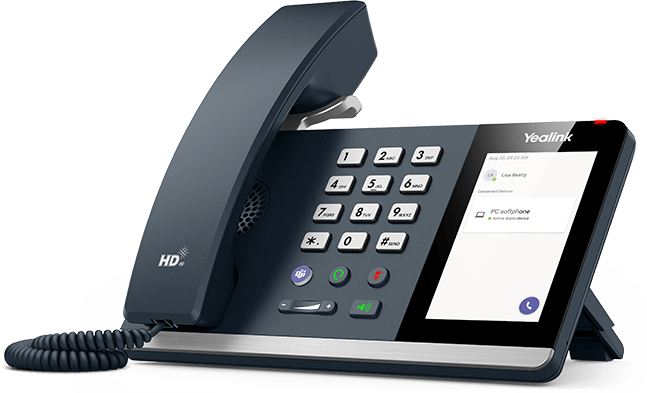


Yealink MP45 Teams IP Desktop Phone
PRODUCT DESCRIPTION
Yealink MP45 Teams USB Desktop Phone (1301118) - 2 Years Local Warranty
Yealink MP45 — Affordable USB Phone for Microsoft Teams
The Yealink MP45 Teams Edition is a brand-new, affordable USB phone for Microsoft Teams and UC platforms, designed for daily desktop work and hot-desking. It connects to your PC over USB as a plug-and-play peripheral — no network port or SIP account needed — and puts a familiar handset, keypad and 4-inch touch screen alongside your Teams client.
4-Inch Touch Screen with Teams-Tailored Interface
A 4.0-inch 480 x 800 capacitive touch screen presents a Teams-tailored user interface, and the dedicated Teams button gives one-touch access to calls and meetings. Four feature keys (Teams, headset, mute, speakerphone) plus volume controls keep everything within reach.
HD Audio with Yealink Noise Proof Technology
An HD handset and HD speaker, full-duplex speakerphone with acoustic echo cancellation, noise suppression and Yealink Noise Proof Technology keep your voice clear in busy Singapore offices. The handset is hearing aid compatible (HAC).
Plug and Play for Hot-Desking
Connect and power the MP45 through a single USB cable with USB-A/C adapter — it is recognised automatically by any PC, making it perfect for shared desks. IT teams can manage it via Yealink USB Connect, with an RJ9 headset port and a 2.5mm busylight jack for optional accessories.
Yealink MP45 Datasheet — Technical Specifications
General
| Model | Yealink MP45 Teams Edition — USB phone compatible with Microsoft Teams |
| Part Number | 1301118 |
| Device Type | USB desktop phone (works as a peripheral of your computer) |
| Platform | Microsoft Teams and Skype for Business compatible |
| Warranty | 2 Years Local Warranty (Singapore) |
Display & Controls
| Screen | 4.0 inch (480 x 800) capacitive touch screen with backlight |
| Keys | Telephone keypad; 4 feature keys (Teams, headset, mute, speakerphone); volume keys |
Audio
| Audio Quality | HD voice — HD handset, HD speaker (Yealink Optima HD) |
| Speakerphone | Full-duplex hands-free speakerphone with AEC |
| Noise Control | Yealink Noise Proof Technology, Noise Suppression (NS) |
| DSP Features | NS, AJB (Adaptive Jitter Buffer), AGC (Automatic Gain Control) |
| Handset | Wired handset, hearing aid compatible (HAC) |
Connectivity
| PC Connection | USB cable with plug-and-play USB-A/C adapter (powers the phone) |
| Headset | 1 x RJ9 headset port (RJ wired headsets) |
| Busylight | 1 x 2.5mm jack for optional busylight |
| Network | No Ethernet/RJ45 port — the MP45 operates through your PC's connection |
Power & Physical
| Power | Powered via USB; optional PSU AC 100-240V, DC 5V/1.2A |
| Power Consumption (PSU) | 1.5W - 6W |
| Dimensions (W x D x H x T) | 223 x 159 x 127 x 36 mm |
| Mounting | Desk stand, wall mountable |
| Operating Conditions | -10 to 50°C, 10-95% humidity |
Compatibility & Software Support
The MP45 works as a USB peripheral of your computer and is compatible with Microsoft Teams and Skype for Business, presenting a Teams-tailored touch interface. It is automatically recognised when connected to a PC — no drivers or SIP configuration required. Device deployment and firmware are handled through Yealink USB Connect, with management support via the Yealink Management Cloud Service. Because it uses your PC's connection, there is no Ethernet port, PoE or standalone SIP operation.
Package Contents & MP Series Ordering Information
In the box: Yealink MP45 USB phone, handset with handset cord, stand, quick start guide. Optional: power adapter, busylight.
Yealink Teams Desk Phones at SourceIT
| Yealink MP45 — USB phone for Teams (this model) | 1301118 |
| Yealink MP50 — USB phone with Bluetooth mobile pairing | MP50 |
| Yealink MP52 E2 — standalone IP Teams phone, 2.4" screen | 1301016 |
| Yealink MP54 E2 — standalone IP Teams phone, 4" touch | 1301215 |
Datasheet & Downloads
Frequently Asked Questions — Yealink MP45
Q: Is the Yealink MP45 a standalone IP phone?
No — the MP45 is a USB phone that works as a peripheral of your computer. It has no Ethernet port or SIP account; your PC's Teams client handles the calling. If you need a standalone Teams IP phone, see the MP52 E2 or MP54 E2.
Q: How does the MP45 differ from the MP50?
Both are 4-inch-touch USB phones for Teams. The MP50 adds built-in Bluetooth for mobile phone calling and three USB-A ports; the MP45 is the newer, more affordable model (Yealink recommends it as the MP50's successor) focused on simple plug-and-play Teams calling.
Q: Does the MP45 need its own power supply?
Usually not — it is powered over the USB connection to your PC. An optional 5V/1.2A power adapter is available if required.
Q: Can I use a headset and busylight with the MP45?
Yes. It has an RJ9 port for wired headsets and a 2.5mm jack for an optional busylight so colleagues can see when you are on a call.
Q: Is the MP45 good for hot-desking?
Yes — plug the USB cable into any PC and the MP45 is recognised automatically, making it ideal for shared desks and flexible work arrangements in Singapore offices.
Q: Does the Yealink MP45 come with warranty in Singapore?
Yes. Every MP45 sold by SourceIT comes with 2 years local Singapore warranty and a GST invoice.


