
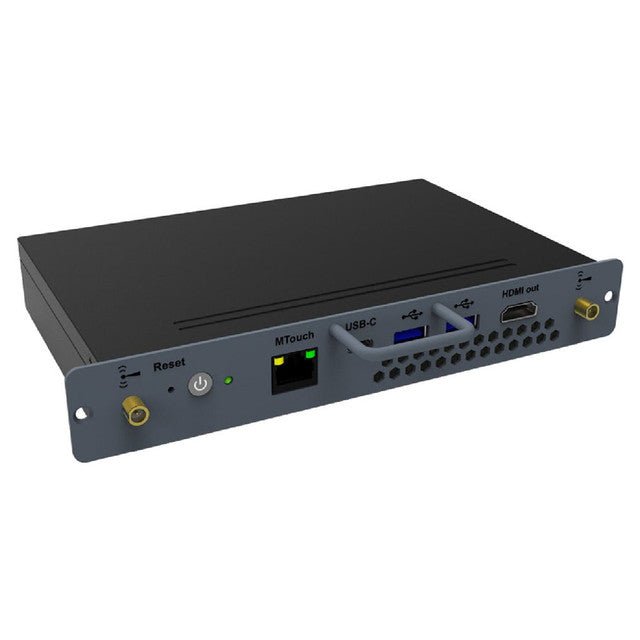

Yealink MCore-OPS Windows OPS for MeetingBoard
PRODUCT DESCRIPTION
Yealink MCore-OPS Windows OPS for MeetingBoard (1303085) - 2 Years Local Warranty
Yealink MCore-OPS-T: Windows Compute Module for MeetingBoard
The Yealink MCore-OPS (part 1303085, MCore-OPS-T Teams Edition) is a Windows OPS (Open Pluggable Specification) compute module that slots directly into the dedicated bay of a Yealink MeetingBoard interactive display — adding full Windows capability to the board with no external PC, no cable clutter and no equipment shelf.
11th Gen Intel Core i5 Performance
Inside is an Intel Core i5-1135G7 processor with 8 GB DDR4 memory, a 128 GB SSD and Intel Iris Xe graphics — smooth performance for Microsoft Teams Rooms on Windows, Office documents, browsers and line-of-business apps running natively on the MeetingBoard's 4K touch surface.
Teams Edition for Microsoft Teams Rooms on Windows
This Teams Edition ships with Windows 11 IoT Enterprise x64, purpose-built to run Microsoft Teams Rooms on Windows on the MeetingBoard 65 and MeetingBoard 86 — upgrading the board from its native Android experience to a full MTR-on-Windows deployment favoured by many Singapore enterprises.
Clean, Integrated, Secure Installation
The OPS module slides into the MeetingBoard's side slot for a completely integrated deployment: one display, zero visible cabling. Wi-Fi 6 and Bluetooth 5.2 come built in, while TPM 2.0 and UEFI Secure Boot meet corporate security baselines.
Yealink MCore-OPS Datasheet — Technical Specifications
| Model | Yealink MCore-OPS-T (Teams Edition) |
| Part Number | 1303085 |
| Product Type | OPS (Open Pluggable Specification) Windows compute module |
| Warranty | 2 Years Local Warranty (Singapore) |
| Processor | Intel Core i5-1135G7 (11th Gen) |
| Memory | 8 GB DDR4 (2 × 4 GB) |
| Storage | 128 GB SSD |
| Graphics | Intel Iris Xe Graphics |
| Operating System | Windows 11 IoT Enterprise x64 (licence included) |
| Wi-Fi | Wi-Fi 6 (802.11ax) |
| Bluetooth | Bluetooth 5.2 |
| Ethernet | 1 × RJ45 |
| Video Output | 1 × HDMI out |
| USB | 2 × USB-A 3.0, 1 × USB-C 3.0 |
| Security | TPM 2.0, UEFI Secure Boot, Kernel DMA protection |
| Compatible Displays | Yealink MeetingBoard 65 / MeetingBoard 86 |
Compatibility & Software Support
Displays: Installs in the dedicated OPS slot of the Yealink MeetingBoard 65 and MeetingBoard 86.
Platforms: Teams Edition (MCore-OPS-T) runs Windows 11 IoT Enterprise for Microsoft Teams Rooms on Windows deployments; as a full Windows PC it also runs Office, browsers and Windows line-of-business applications on the board's touch display.
Management: Manageable alongside the MeetingBoard through the Yealink Device Management Platform / Yealink Management Cloud Service, plus standard Windows enterprise tooling (Intune/AD) used by your IT team.
Package Contents & MeetingBoard Ordering Information
Yealink MCore-OPS module, 2 × antenna, 2 × screws, screwdriver, Quick Start Guide.
| MCore-OPS-T Windows OPS (Teams Edition) | 1303085 (this product) |
| MeetingBoard 65" for Microsoft Teams Rooms | MeetingBoard 65-Teams |
| MeetingBoard 86" for Microsoft Teams Rooms | MeetingBoard 86-Teams |
| MB Camera 6X PTZ Module | MB-Camera-6X |
| CTP25 10.1" Touch Console | 1303132 |
Datasheet & Downloads
Frequently Asked Questions — Yealink MCore-OPS
What does the "-T" in MCore-OPS-T mean?
Part 1303085 is the Teams Edition of the MCore-OPS: it ships with Windows 11 IoT Enterprise configured for Microsoft Teams Rooms on Windows on the MeetingBoard.
Which MeetingBoard models does it fit?
The module slots into the dedicated OPS bay of the MeetingBoard 65 and MeetingBoard 86.
Why add the MCore-OPS when the MeetingBoard already runs Teams on Android?
The board's native mode is Teams Rooms on Android. Adding the MCore-OPS-T turns it into a Teams Rooms on Windows system — the choice for organisations that standardise on MTR-Windows features, peripherals and management tooling.
What performance does it have?
An 11th Gen Intel Core i5-1135G7, 8 GB DDR4 RAM, 128 GB SSD and Intel Iris Xe graphics, with Wi-Fi 6 and Bluetooth 5.2 built in.
Is installation complicated?
No — the OPS module slides into the MeetingBoard's side slot and is secured with the included screws and antennas. No external PC, cabling or shelf is needed.
Does the MCore-OPS come with local warranty?
Yes. Every MCore-OPS sold by SourceIT comes with 2 years local Singapore warranty and a GST invoice.


