
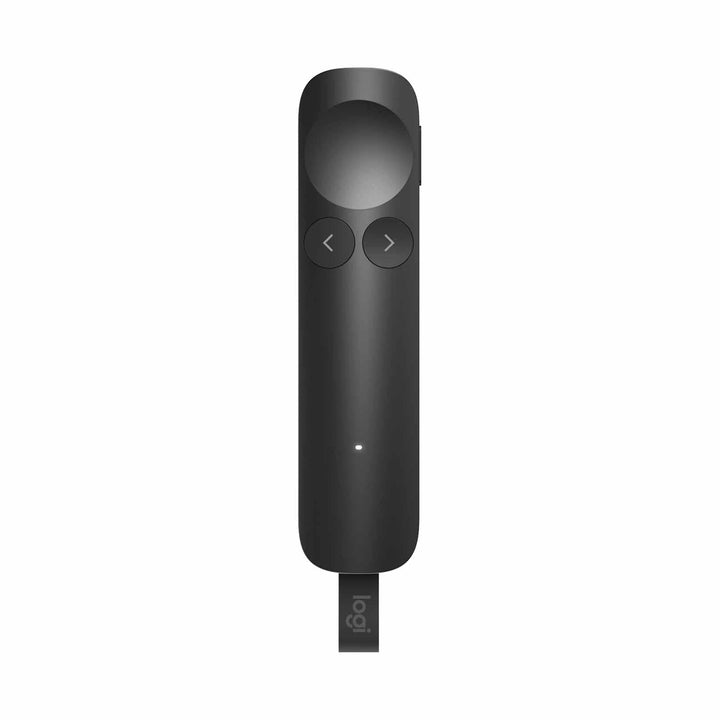


Logitech Spotlight 2 Wireless Presenter Graphite
PRODUCT DESCRIPTION
Logitech Spotlight 2 Wireless Presenter Graphite (910-007675) - 2 Years Local Warranty
Advanced Wireless Presentation Remote with Class 1 Laser and Digital Highlighting
The Logitech Spotlight 2 Wireless Presenter Graphite (910-007675) is Logitech's flagship presenter for boardrooms, lecture theatres and hybrid meeting rooms. It pairs a Class 1 laser for classic pointing at a projection screen with four digital highlighting modes — Spotlight, Squarelight, Magnify and Annotation — plus a digital pointer that draws directly on your slides. One remote covers the in-room audience and the people joining from home.
Digital Highlighting That Remote Attendees Can Actually See
A laser dot disappears the moment a presentation is shared over video. Spotlight 2's highlighting effects are rendered on the presentation itself, so they are captured by screen sharing and every remote participant sees exactly what you are emphasising. Annotation lets you mark up a slide live, and Magnify zooms into fine detail such as a chart axis or a contract clause without leaving the deck.
Haptic Feedback and Four-Button Control
Four buttons (next, back, highlight and action) sit under the thumb, and pressure and gyro sensors translate your hand movement into on-screen motion. Haptic feedback confirms highlighting and mode changes in your hand, so you never look down at the remote. Logitech also builds in a haptic guided-breathing exercise through Logi Options+ to help steady your pacing before a keynote.
Logi Bolt USB-C Receiver, Bluetooth and 30-Metre Range in Singapore Meeting Rooms
Connect over Bluetooth Low Energy or the included Logi Bolt USB-C receiver — useful for locked-down corporate laptops and for room PCs where Bluetooth pairing is restricted. Logitech rates the range at up to 30 m (100 ft) with an open line of sight, which covers a full-floor town hall as comfortably as a 10-seat boardroom. At 125 x 30 x 13.5 mm and 52.5 g it disappears into a jacket pocket between engagements, and Logitech builds it with 43% post-consumer recycled plastic in FSC-certified paper packaging.
Logitech Spotlight 2 Datasheet — Technical Specifications
General
| Model | Logitech Spotlight 2 Advanced Wireless Presentation Remote |
| Part Number | 910-007675 |
| Colour | Graphite |
| Product Type | Wireless presentation remote / presenter |
| Recycled Plastic | 43% post-consumer recycled plastic (Graphite, Sand, Light Lilac and Black) |
| Packaging | FSC-certified paper packaging |
| Warranty | 2 Years Local Warranty (Singapore) |
Pointing & Controls
| Digital Highlighting Modes | Spotlight, Squarelight, Magnify, Annotation |
| Digital Pointer | Yes |
| Laser | Class 1 laser |
| Haptic Feedback | Tactile feedback when highlighting slide details and when following the guided breathing exercise |
| Buttons | 4 (next, back, highlight, action) |
| Sensor Technology | Pressure, gyro |
Connectivity
| Wireless Technology | Logi Bolt USB-C receiver (included), Bluetooth Low Energy |
| Wireless Range | Up to 30 m (100 ft) with an open line of sight |
Battery
| Battery Life | Up to 90 days on a full charge |
| Quick Charge | 1-minute charge gives up to 3 hours of use |
| Low Battery Indication | Red LED blinking at 10% or below |
| Charging Port | USB-C |
Design & Power
| Presenter Dimensions (H x W x D) | 125 mm x 30 mm x 13.5 mm (4.92 in x 1.18 in x 0.53 in) |
| Presenter Weight | 52.5 g (1.85 oz) |
| Logi Bolt USB-C Receiver Dimensions (H x W x D) | 40.3 mm x 13.6 mm x 7 mm (1.59 in x 0.54 in x 0.28 in) |
| Logi Bolt USB-C Receiver Weight | 1.5 g |
Compatibility & Software Support
Logitech publishes the following operating system support for Spotlight 2:
| Logi Bolt USB-C Receiver | Windows 10, 11 or later; macOS 14 or later; ChromeOS; Linux |
| Bluetooth Low Energy | Windows 10, 11 or later; macOS 14 or later; ChromeOS; Linux; Android 14 or later; iPadOS 17 or later |
| Software | Logi Options+ (customisable shortcuts, digital highlighting effects, haptic guided breathing) |
Spotlight 2 renders its highlighting effects digitally on the presentation itself, so anything you emphasise is captured in a shared screen and is visible to remote participants. Slide navigation works as a standard keyboard-class device, so it operates with PowerPoint, Keynote, Google Slides, PDF and other presentation applications without additional drivers. Logitech does not publish a Microsoft Teams, Zoom or Google Meet device certification for presenters, so none is claimed here.
Package Contents & Spotlight Series Ordering Information
In the box
- Spotlight 2 Presenter
- Logi Bolt USB-C receiver
- User documentation
Logitech Presenter Ordering Information (SourceIT Singapore)
| Logitech Spotlight 2 Wireless Presenter Graphite (this listing) | 910-007675 |
| Logitech Spotlight 2 Wireless Presenter Sands | 910-007677 |
| Logitech Spotlight 2 Wireless Presenter Light Lilac | 910-007676 |
| Logitech Spotlight Wireless Presenter Slate | 910-004863 |
| Logitech Spotlight Wireless Presenter Gold | 910-004864 |
Datasheet & Downloads
Frequently Asked Questions — Logitech Spotlight 2
What is the difference between the Graphite, Sands and Light Lilac versions?
Nothing except the finish. All three are the same Spotlight 2 hardware with the same laser, digital highlighting, haptics, battery and Logi Bolt USB-C receiver — only the colour and part number differ. This listing is the Graphite version (910-007675).
Does Spotlight 2 have a real laser pointer, or only on-screen effects?
Both. Logitech specifies a Class 1 laser for pointing at a physical projection screen, plus digital highlighting modes — Spotlight, Squarelight, Magnify, Annotation and a digital pointer — that render on the presentation itself.
How is Spotlight 2 different from the original Logitech Spotlight?
The original Logitech Spotlight uses three digital pointing modes (Highlight, Magnify and a digital laser effect) with no physical laser beam. Spotlight 2 adds a Class 1 laser, haptic feedback, four highlighting modes with annotation, a Logi Bolt USB-C receiver and Logi Options+ customisation.
Do I need to install software to use it?
Slide navigation works out of the box over the Logi Bolt USB-C receiver or Bluetooth Low Energy. The digital highlighting modes, button customisation and the haptic guided-breathing pacing feature are configured in the free Logi Options+ app for Windows and macOS.
Will remote attendees on a video call see the highlighting?
Yes. Because the effects are drawn on the presentation rather than projected as a light dot, they are captured by screen sharing and appear for everyone viewing the shared screen.
How far can I stand from the laptop, and how do I charge it?
Logitech rates the wireless range at up to 30 m (100 ft) with an open line of sight. Charging is over USB-C: a full charge lasts up to 90 days, and a one-minute top-up gives up to three hours of presenting.
Is the part number on this listing the same as the one on Logitech's global datasheet?
Not always. Logitech's worldwide documents often quote Americas part numbers, while the Singapore channel SKU differs. The part number supplied by SourceIT for this listing is 910-007675. Logitech also markets the mid-tone finish as “Sand” in global material, which is listed here as “Sands”.
Does it come with a Singapore warranty?
Yes. Every Spotlight 2 sold by SourceIT comes with 2 years local Singapore warranty and a GST invoice.


