
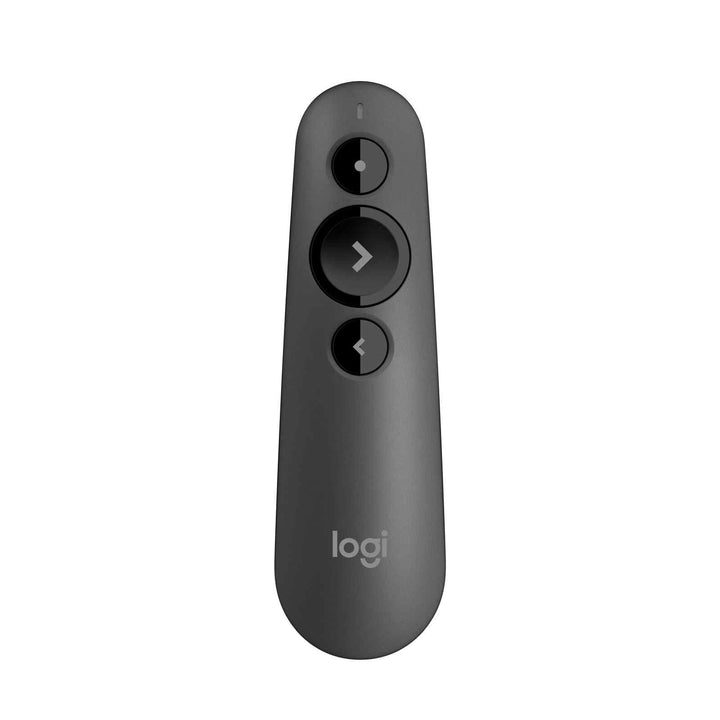


Logitech R500s Red Laser Wireless Presenter- Graphite
PRODUCT DESCRIPTION
Logitech R500s Red Laser Wireless Presenter - Graphite (910-006521) - 2 Years Local Warranty
Dual-Connectivity Presentation Remote with Bluetooth Low Energy and USB
The Logitech R500s (910-006521) in Graphite connects two ways: over Logitech's 2.4 GHz USB receiver, or directly over Bluetooth Low Energy for the USB-C-only laptops now standard in most Singapore offices. That makes it the safe corporate choice when you cannot predict which machine will be plugged into the room — and the only presenter in this range with Bluetooth.
Cross-Platform Support Across Windows, macOS, ChromeOS, Linux, iOS and Android
Logitech publishes support for Windows 7/8/10 or later, macOS X 10.12 or later, ChromeOS, Linux 2.6 or later, iOS 8 or later and Android 5.0 or later. In mixed-fleet environments — agencies, campuses, consultancies where Macs and Windows laptops share the same meeting room — that breadth is the reason to specify the R500s over the R400.
Three-Button Design with Logi Options+ Customisation
The R500s keeps three buttons so you can drive it without looking: forward, back and laser. Long presses add start-presentation and blank-screen actions, and Logi Options+ lets you remap the buttons, monitor battery status and keep the computer awake mid-presentation. Holding the laser button also reports the battery state before you walk on stage.
20 m Range and 12-Month Battery Life on a Single AAA
The R500s operates up to 20 m (65 ft) from the host, and runs about 12 months on one AAA cell. When the battery finally falls low, Logitech's power-saving mode disables the laser but keeps slide control alive for roughly another week — a fading battery does not end your presentation. The remote is 123.6 x 36.6 x 24.7 mm and 53.5 g, and the USB receiver stores in a compartment inside it.
Logitech R500s Datasheet — Technical Specifications
General
| Model | Logitech R500s Laser Presentation Remote |
| Part Number | 910-006521 |
| Colour | Graphite |
| Product Type | Wireless presentation remote |
| Remote model number | R-R0013 |
| Carbon footprint | 2.91 kg CO2e (as published by Logitech) |
| Warranty | 2 Years Local Warranty (Singapore) |
Laser
| Laser type | Red laser pointer |
| Laser class | Logitech's product pages state Class 1; Logitech's R500s support specification article states Class 2 – see FAQ |
| Wavelength | 640–660 nm (per Logitech support specification) |
| Output | Less than 1 mW |
| Screen note | Logitech describes it as a low-power beam, less noticeable when reflected on LCD and plasma screens |
Controls
| Buttons | Three-button design: laser, next, back |
| Long-press actions | Next (hold) starts the presentation; Back (hold) blanks the screen – requires the app |
| Battery check | Press and hold the laser button to check battery status |
| Customisation | Button functions customisable in Logi Options+ |
| Timer / LCD | Not fitted – see the R800 |
Connectivity
| Wireless technology | Logitech proprietary 2.4 GHz wireless and Bluetooth Low Energy |
| Operating range | 20 m (65 ft); may vary with environment and computing conditions |
| Receiver | USB-A receiver, model C-U0016, stored in a compartment in the remote |
| Receiver dimensions | 25.0 x 17.5 x 6.6 mm; 2.00 g |
Battery & Power
| Battery | 1 x AAA, replaceable (not rechargeable) |
| Battery life | Up to 12 months |
| Low battery mode | Disables the laser to extend slide control by roughly one further week |
| Battery monitoring | Via Logi Options+ and via the laser-button battery check |
Design
| Dimensions | 123.6 x 36.6 x 24.7 mm |
| Weight | 53.5 g |
Compatibility & Software Support
Operating system support as published by Logitech for the R500s:
| Windows | Windows 7, Windows 8, Windows 10 or later |
| macOS | macOS X 10.12 or later |
| ChromeOS | Supported |
| Linux | Linux 2.6 or later |
| iOS | iOS 8 or later |
| Android | Android 5.0 or later |
| Connection options | 2.4 GHz USB-A receiver or Bluetooth Low Energy |
Software
Logi Options+ is the current Logitech app for the R500s. It customises button functions, monitors battery status and keeps the computer awake during a presentation. Logi Options+ runs on recent versions of Windows and macOS (Windows 10 or later, macOS 14 or later). The advanced long-press actions — start presentation and blank screen — require the app to be installed on the presenting machine.
Logitech's older Presentation software is no longer supported or maintained; Logitech has moved presentation devices to Logi Options+.
Package Contents & Presenter Range Ordering Information
In the Box
- Logitech R500s Laser Presentation Remote (Graphite)
- USB-A receiver (stored inside the remote)
- AAA battery
- User documentation
Logitech Presenter Range — Ordering Information
| Model / Colour | Part Number |
| R400 Wireless Presenter – Black, red laser | 910-001361 |
| R500s Laser Presentation Remote – Graphite (this listing) | 910-006521 |
| R500s Laser Presentation Remote – Mid Grey | 910-006522 |
| R800 Professional Presenter – Black, green laser | 910-001358 |
At a Glance
| Specification | R400 / R500s / R800 |
| Laser colour | Red / Red / Green |
| Wireless range | 15 m / 20 m / 30 m |
| Connection | 2.4 GHz USB / 2.4 GHz USB + Bluetooth LE / 2.4 GHz USB |
| LCD, timer and vibration alerts | No / No / Yes |
| Battery | 2 x AAA / 1 x AAA / 2 x AAA |
| Software customisation | None required / Logi Options+ / None required |
Datasheet & Downloads
Frequently Asked Questions — Logitech R500s
What is the difference between the Graphite and Mid Grey R500s?
Only the finish. Graphite (910-006521) is this listing; the other Singapore colourway is Mid Grey (910-006522). Specifications, range, battery and software support are identical.
Is the laser Class 1 or Class 2?
Logitech's own sources disagree, and we would rather show you that than pick one. Logitech's R500s product pages describe a red Class 1 laser, while Logitech's R500s support specification article states Class 2, less than 1 mW, 640–660 nm. Either way it is a low-power red pointer intended for presentation use. If your organisation has a specific laser-class requirement for safety compliance, contact SourceIT and we will confirm with Logitech before you order.
Does it work without the USB receiver?
Yes. The R500s is the only presenter in this range with Bluetooth Low Energy, so it pairs directly with a laptop that has no USB-A port. You can also use the supplied USB-A receiver where a plug-and-play connection is preferred, for example on shared room PCs.
Will it work with a Mac, an iPad or a Chromebook?
Yes. Logitech publishes macOS X 10.12 or later, iOS 8 or later, ChromeOS, Linux 2.6 or later and Android 5.0 or later alongside Windows. This is the broadest platform support of the three R-series presenters — the R400 and R800 are published for Windows only.
Do I need a countdown timer?
If you present to a schedule — conference slots, training modules, pitch sessions — the R800 is the model to buy: it has an LCD, a settable timer and silent vibration alerts at 5, 2 and 0 minutes. The R500s has no timer or display.
How long does the battery last, and what happens when it runs low?
About 12 months on one AAA. Logitech then switches the remote into a low-battery mode that disables the laser but keeps slide navigation working for roughly another week, so you are not stranded mid-session. Battery status is visible in Logi Options+ and by holding the laser button.
Is the R500s covered by warranty in Singapore?
Yes. Every R500s sold by SourceIT comes with 2 years local Singapore warranty and a GST invoice.


