
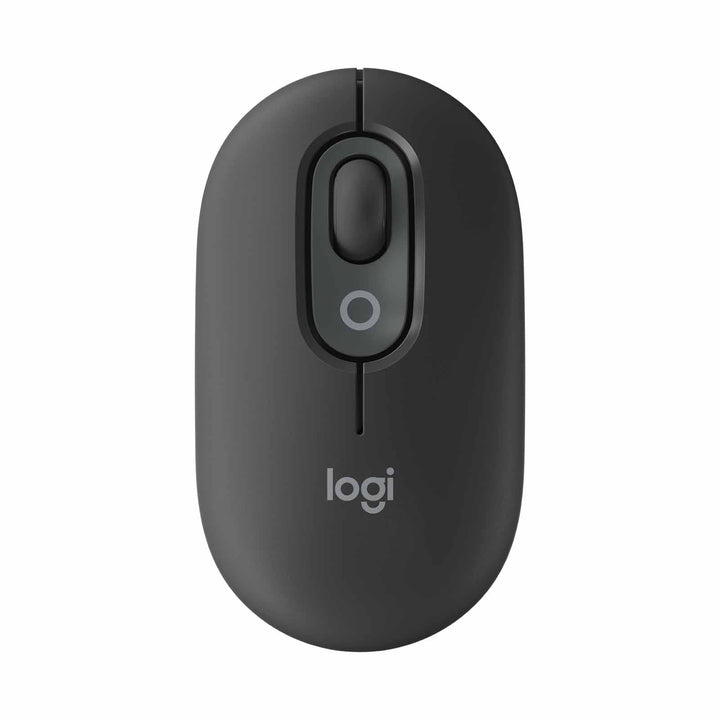

Logitech Pop Mouse With Emoji Graphite
PRODUCT DESCRIPTION
Logitech Pop Mouse With Emoji Graphite (910-007401) - 2 Years Local Warranty
Logitech POP Mouse with Emoji Button — Compact Wireless Mouse
The Logitech Pop Mouse With Emoji Graphite (910-007401) is Logitech's compact wireless mouse for desks that want a bit of character without giving up everyday precision. It uses high-precision tracking, connects over Bluetooth to as many as three devices, and coordinates with the POP Icon Keys keyboard colourways. SourceIT stocks it in Singapore with a GST invoice and local warranty support.
SmartWheel Scrolling and SilentTouch Quiet Clicks
The SmartWheel gives you controlled, precise navigation whether you are nudging a spreadsheet row or racing down a long document. Logitech's SilentTouch Technology cuts click noise by 90%, which matters more than people expect in open-plan offices, shared meeting rooms and any desk within earshot of a colleague on a call.
Two Customisable Action Buttons and the Emoji Button via Logi Options+
POP Mouse carries two customisable Action Buttons, including its signature one-tap emoji button. The free Logi Options+ app on Windows and macOS lets you reassign them to whatever actually speeds up your day — an app, a browser tab, a Smart Action, a screenshot, or an emoji you use constantly. Options+ also enables Logitech Flow for moving the cursor between two computers.
Bluetooth Multi-Device, Up to 24 Months Battery, Low Carbon Footprint
Connect POP Mouse to three devices and switch between laptop, tablet and phone without re-pairing. Battery life runs up to 24 months, so it stays out of the support queue, and Logitech publishes a product carbon footprint of 1.85 kg CO2e with recycled plastic in the build — useful evidence when a procurement checklist asks for it.
Logitech POP Mouse Datasheet — Technical Specifications
General
| Product Name | Logitech Pop Mouse With Emoji Graphite |
| Model | Logitech POP Mouse |
| Part Number | 910-007401 |
| UPC | 097855198778 |
| Manufacturer | Logitech |
| Product Type | Compact wireless Bluetooth mouse with emoji button |
| Colour (SourceIT listing) | Graphite |
| Warranty | 2 Years Local Warranty (Singapore) |
Tracking & Controls
| Tracking | High-precision optical tracking |
| Buttons | 2 customisable Action Buttons, including the one-tap emoji button |
| Scroll Wheel | SmartWheel — precise, controlled navigation |
| Click Noise | SilentTouch Technology — 90% less click noise |
| Multi-Device Switching | Connect and switch between up to 3 devices |
Connectivity
| Wireless Technology | Bluetooth Low Energy |
| Logi Bolt | Supported — Logi Bolt receiver is not included and is ordered separately |
| Paired Devices | Up to 3 |
Battery
| Battery Life | Up to 24 months |
| Battery | Supplied pre-installed — no recharging cable required |
Design, Power & Sustainability
| Materials | Made with recycled plastic |
| Product Carbon Footprint | 1.85 kg CO2e (Logitech-stated) |
| Packaging | Paper from FSC-certified forests |
| Colour Coordination | Matches the Logitech POP Icon Keys colourways |
Specifications above are taken from Logitech's official product page and Logitech's product announcement. Figures Logitech does not publish for this model — including physical dimensions, weight, DPI range and Bluetooth version — are deliberately omitted rather than estimated.
Compatibility & Software Support
Operating system support (as listed by Logitech for POP Mouse):
- Windows
- macOS
- ChromeOS
- Android
- iPadOS
Software: Logi Options+ (Windows and macOS) is the free app used to reassign the two Action Buttons and the emoji button, build Smart Actions, and turn on Logitech Flow so one mouse can move a cursor between two computers. The mouse works as a standard Bluetooth mouse on ChromeOS, Android and iPadOS without the app.
Receiver: Bluetooth is the primary connection. Logi Bolt is supported where a managed environment prefers a secured USB receiver; the receiver is sold separately.
Package Contents & POP Series Ordering Information
In the box:
- Logitech POP Mouse
- Battery (pre-installed)
- User documentation
A Logi Bolt receiver is not included and can be ordered separately.
Logitech POP Mouse ordering information
| Variant | SG Part Number |
| POP Mouse with emoji button Graphite (this listing) | 910-007401 |
| POP Mouse with emoji button Off White | 910-007400 |
| POP Mouse with emoji button Rose | 910-007402 |
| POP Mouse with emoji button Lilac | 910-007403 |
Other Logitech POP products at SourceIT
| Related Logitech POP product | SG Part Numbers |
| Logitech POP Icon Keys wireless keyboard (keyboard only) | 920-013083, 920-013084, 920-013085, 920-013086 |
| Logitech POP Icon Combo keyboard + mouse bundle | 920-013121, 920-013122, 920-013123, 920-013124 |
Datasheet & Downloads
Logitech does not publish a standalone PDF datasheet for the consumer POP Icon range; the official Logitech product and support pages below are the authoritative specification sources and are what the table above is built from.
- Logitech POP Mouse official product page
- Logitech Support — Getting Started with POP Mouse
- Logitech POP Icon Combo official product page (keyboard + POP Mouse bundle)
- Logitech press release — POP Icon Keys, POP Icon Combo and POP Mouse specifications and sustainability data
- Logi Options+ download (Windows and macOS)
Frequently Asked Questions — Logitech POP Mouse
What is the difference between the Graphite, Off White, Rose and Lilac POP Mouse?
Colour only. All four share the same SmartWheel, the same SilentTouch clicking, the same two customisable Action Buttons and the same up-to-24-month battery life. The colours are designed to coordinate with the matching POP Icon Keys keyboard. Order against the Singapore part number on this page (910-007401).
The Logitech global site shows a different part number. Is this the same mouse?
Yes. Logitech uses region-specific part numbers for the POP range, so overseas listings quote different codes for the mouse sold here as 910-007400 to 910-007403. The hardware and specification are identical; the Singapore part number on this listing is the one to order against.
What does the emoji button actually do?
It is one of two customisable Action Buttons. Out of the box it opens an emoji picker for one-tap emoji insertion; through Logi Options+ on Windows or macOS you can reassign it to anything more useful to you — a screenshot, mute, a Smart Action, or launching an app.
Should I buy the POP Mouse alone or the POP Icon Combo?
The POP Icon Combo bundles this mouse with the matching POP Icon Keys keyboard in one box and is the better buy for a fresh desk set-up. Buy the mouse standalone when you are replacing a mouse only, or adding one to a keyboard the user already has.
Does it need a USB receiver or a dongle?
No. POP Mouse pairs directly over Bluetooth with up to three devices. Logi Bolt is supported for managed fleets that require a secured USB receiver, but the receiver is not included and would be quoted separately.
Is it quiet enough for an open-plan office or a meeting room?
Yes — that is the point of SilentTouch Technology, which Logitech rates at 90% less click noise. It is a sensible default for shared floors, call-heavy teams, libraries and classrooms.
What warranty do I get?
Yes. Every POP Mouse sold by SourceIT comes with 2 years local Singapore warranty and a GST invoice.


