
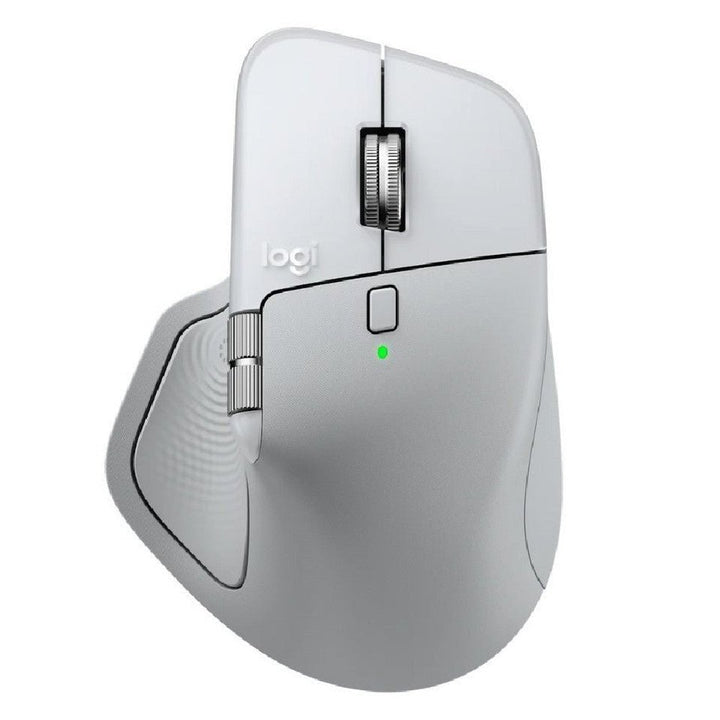


Logitech MX Master 4 Wireless Mouse Pale Grey
PRODUCT DESCRIPTION
Logitech MX Master 4 Wireless Mouse Pale Grey (910-007566) - 2 Years Local Warranty
Logitech MX Master 4 — Flagship Wireless Productivity Mouse in Pale Grey
The Logitech MX Master 4 Wireless Mouse in Pale Grey (910-007566) is Logitech's flagship right-handed productivity mouse, built for designers, engineers, analysts and hybrid-office professionals in Singapore who live in demanding applications all day. It pairs an 8,000 DPI Darkfield sensor, MagSpeed electromagnetic scrolling and a new haptic Actions Ring for precise, low-fatigue control across Windows, macOS, ChromeOS, Linux and iPadOS.
Haptic Actions Ring and MagSpeed Scrolling for Faster Workflows
A dedicated button summons the on-screen Actions Ring — a customisable wheel of app-specific tools and shortcuts at your cursor — while a haptic panel in the thumb rest confirms each action with subtle tactile feedback. The MagSpeed wheel scrolls up to 1,000 lines per second and shifts automatically between precise ratchet and hyper-fast free-spin, with a separate thumbwheel for horizontal scrolling.
8,000 DPI Darkfield Tracking — Even on Glass
The Darkfield high-precision sensor tracks from 200 to 8,000 DPI on virtually any surface, including glass 4 mm or thicker, so it works confidently on any desk. Eight buttons (six programmable) give power users deep per-application customisation through Logi Options+.
Up to 70 Days on a Charge and Multi-Device Easy-Switch
The 650 mAh battery delivers up to 70 days of use per USB-C charge, and a one-minute quick charge provides about three hours. Easy-Switch pairs the mouse with up to three computers over Bluetooth Low Energy, and Logitech Flow moves your cursor and copies files across them. Every unit sold by SourceIT is backed by 2 years local Singapore warranty with a GST invoice.
Logitech MX Master 4 Datasheet — Technical Specifications
General
| Product Name | Logitech MX Master 4 (Pale Grey) |
| Brand / Vendor | Logitech |
| Form Factor | Full-size right-handed ergonomic wireless mouse |
| Warranty | 2 Years Local Warranty (Singapore) |
Sensor & Tracking
| Sensor | Darkfield high-precision sensor |
| DPI Range | 200–8,000 DPI (adjustable in 50 DPI increments) |
| Tracking on Glass | Yes, on glass 4 mm or thicker |
| Report Rate | 125 Hz (8 ms) |
Buttons & Controls
| Buttons | 8 buttons (6 programmable) — left/right, back/forward, gesture, wheel mode-shift, middle click, Actions Ring |
| Scroll Wheel | MagSpeed electromagnetic scrolling — up to 1,000 lines/second, free-spin and precision modes |
| Thumbwheel | Yes — dedicated thumbwheel for horizontal scrolling |
| Actions Ring | Yes — customisable on-screen Actions Ring via Logi Options+ |
| Haptic Feedback | Yes — customisable haptic feedback in the thumb rest |
Connectivity
| Wireless | Bluetooth Low Energy (no USB receiver in the consumer box — the For Business SKU ships with an encrypted Logi Bolt USB-C receiver) |
| Multi-Device (Easy-Switch) | Up to 3 devices |
| Wireless Range | Up to 10 m |
| Charging Port | USB-C rechargeable |
Battery & Charging
| Battery Type | Rechargeable Li-Po, 650 mAh (100% recycled cobalt) |
| Battery Life | Up to 70 days on a full charge |
| Quick Charge | 1 minute of charging = up to 3 hours of use |
| Charging Port | USB-C |
Design & Physical
| Dimensions | Height 50.8 mm × Width 88.4 mm × Depth 128.2 mm |
| Weight | 150 g |
| Handedness | Right-handed only |
| Part Number | 910-007566 |
Compatibility & Software Support
| Operating Systems | Windows 10/11 or later; macOS 12 or later; ChromeOS; Linux; iPadOS 15 or later; Android 12 or later |
| Software | Logi Options+ (Actions Ring editor, haptic intensity, app-specific profiles, Logitech Flow) |
| Certifications | Works With Chromebook; Certified for Zoom; Engineered for Intel Evo (MX Master 4 hardware). Microsoft Teams certification is not claimed by Logitech for this device. |
| Flow | Logitech Flow — control up to 3 computers and copy/paste across them |
Package Contents & MX Master Series Ordering Information
- Logitech MX Master 4 mouse (Pale Grey)
- USB-C charging cable
- User documentation
Logitech MX Master Series Ordering Information
| Logitech MX Master 4 — Graphite (Consumer) | 910-007565 — View at SourceIT |
| Logitech MX Master 4 — Pale Grey (Consumer) | 910-007566 (this listing) |
| Logitech MX Master 4 for Business — Graphite | 910-007619 — View at SourceIT |
| Logitech MX Master 4 for Mac — White Silver | 910-007578 — View at SourceIT |
The consumer MX Master 4 pairs over Bluetooth Low Energy and does not include a wireless receiver. For a secure USB receiver and enterprise deployment, see the MX Master 4 for Business, or purchase a Logi Bolt receiver separately. Regional SKU note: Logitech publishes region-specific part numbers for the same product. The number on this listing is the SG/APAC reference stocked by SourceIT; Americas/EMEA part numbers on some global Logitech datasheets differ.
Datasheet & Downloads
Frequently Asked Questions — Logitech MX Master 4
What colours does the MX Master 4 come in?
SourceIT stocks the consumer MX Master 4 in Graphite (910-007565) and Pale Grey (910-007566, this listing), plus the MX Master 4 for Business in Graphite and the MX Master 4 for Mac in White Silver.
Does the Pale Grey MX Master 4 include a USB receiver?
No. The consumer editions connect over Bluetooth Low Energy only. If you need the encrypted Logi Bolt USB-C receiver in the box, choose the MX Master 4 for Business.
What is the Actions Ring?
A customisable on-screen ring, opened with a dedicated button, that puts app-specific shortcuts at your cursor. The MX Master 4 also adds haptic feedback in the thumb rest — a new feature over the MX Master 3S.
Does it track on glass?
Yes. The Darkfield sensor works at 200–8,000 DPI on virtually any surface, including glass 4 mm or thicker.
How does it compare to the MX Master 3S?
The MX Master 4 adds the haptic Actions Ring and refined ergonomics with a larger 650 mAh battery. The MX Master 3S remains excellent if you don't need haptics — it shares the 8K Darkfield sensor, Quiet Clicks and MagSpeed wheel.
Is it certified for Microsoft Teams?
Logitech lists Zoom certification and Works With Chromebook for the MX Master 4; Teams certification is not currently claimed for this device.
Does it come with 2 years local Singapore warranty?
Yes. Every MX Master 4 sold by SourceIT comes with 2 years local Singapore warranty and a GST invoice.


