
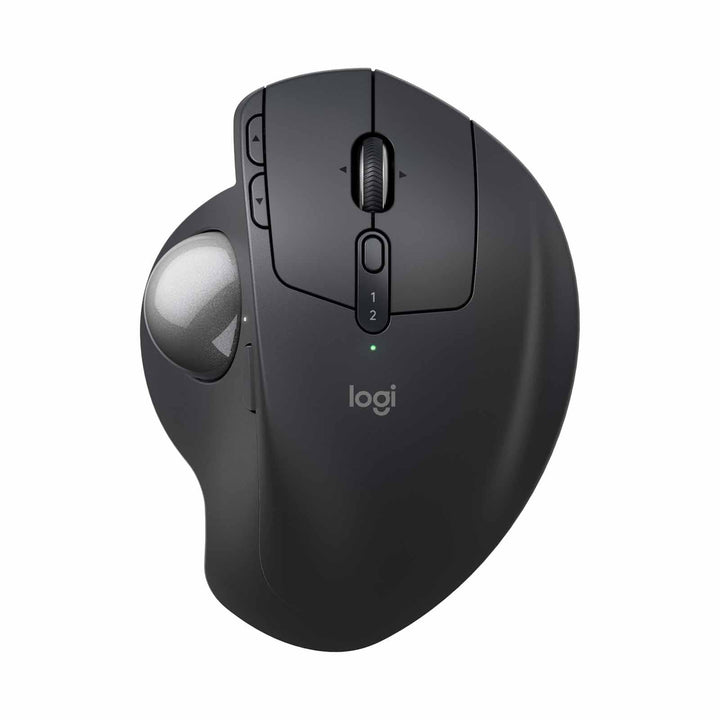

Logitech MX Ergo S Advanced Trackball Wireless Mouse
PRODUCT DESCRIPTION
Logitech MX Ergo S Advanced Trackball Wireless Mouse (910-007261) - 2 Years Local Warranty
Trackball Comfort That Keeps Your Arm Still
The MX Ergo S keeps your hand in one place while the ball does the moving, reducing the reaching and gliding that a regular mouse demands. An adjustable hinge lets you tilt the base up to 20 degrees to find the most natural wrist angle for all-day work.
Precise Tracking, Quieter Clicks
Logitech Advanced Optical Tracking gives you accuracy from 512 to 2048 DPI, and a precision-mode button instantly slows the cursor for detailed work. The updated MX Ergo S adds quieter clicks on the main buttons — up to 90% less click noise — so it suits shared and open-plan offices.
Work Across Two Computers
Connect over Bluetooth or the included Logi Bolt receiver and switch between two computers with Easy-Switch. With Logitech Flow you can move the cursor, copy and paste across machines as if they were one.
Long Battery, USB-C Charging
A single full charge lasts up to 120 days, and a one-minute top-up gives you a full day of use. It recharges over USB-C and is built partly from recycled plastic.
Logitech MX Ergo S Datasheet — Technical Specifications
General
| Product | Logitech MX Ergo S Advanced Trackball Wireless Mouse |
| Part Number | 910-007261 |
| Model | M-R0009 |
| Type | Wireless ergonomic trackball mouse |
| Tilt | Adjustable base, 0 to 20 degrees |
| Buttons | 8 buttons, 6 customisable |
| Warranty | 2 Years Local Warranty (Singapore) |
Tracking & Controls
| Sensor | Logitech Advanced Optical Tracking |
| DPI Range | 512 to 2048 DPI (nominal); 100–4000 DPI adjustable in software |
| Scroll Wheel | Tilt scroll wheel with precision-mode button |
| Click Noise | Quiet clicks on main buttons |
| Durability | Left/right buttons rated to 3 million clicks; middle wheel to 1 million |
Connectivity
| Connectivity | Bluetooth 5.2 Low Energy or Logi Bolt USB receiver (included) |
| Easy-Switch | Pair and switch between 2 computers |
| Wireless Range | Up to 10 m |
Battery & Power
| Battery | Rechargeable Lithium-ion, 500 mAh |
| Battery Life | Up to 120 days per full charge; 1-minute charge for a full day of use |
| Charge Time / Port | Approx. 2 hours full charge, USB-C |
Design & Materials
| Dimensions (H x W x D) | 132.5 mm x 99.8 mm x 51.4 mm |
| Weight | 164 g without metal plate; 259 g with metal plate |
| Materials | Includes post-consumer recycled plastic (PCR ABS / PC) |
Compatibility & Software Support
Operating systems: Windows 10/11 or later, macOS 12 or later, Linux, ChromeOS, iPadOS 15+ (Bluetooth), Android 12+ (Bluetooth).
Connection: Bluetooth 5.2 Low Energy or the included Logi Bolt USB-A receiver. Easy-Switch moves between 2 paired computers.
Software: Logi Options+ for button customisation and settings; Logitech Flow for cross-computer control, copy and paste.
Package Contents & MX Ergo Ordering Information
In the box: MX Ergo S trackball, Logi Bolt USB receiver, user documentation. Note: a USB-C charging cable is not included in this configuration.
Related trackballs at SourceIT:
| MX Ergo S Advanced Trackball (this listing) | 910-007261 |
| Ergo M575 for Business — Graphite | 910-006222 |
| M575S Ergo Trackball | 910-007031 |
Datasheet & Downloads
Official Logitech resources:
Frequently Asked Questions — Logitech MX Ergo S
Is a trackball hard to get used to?
Most people adapt within a few days. Because your hand and arm stay still and only your thumb moves the ball, many users find it more comfortable than a regular mouse for long sessions.
What is new versus the original MX Ergo?
The MX Ergo S adds quieter clicks on the main buttons and USB-C charging, while keeping the same adjustable tilt hinge and precision tracking.
How does it compare with the Ergo M575?
The MX Ergo S is the premium option: adjustable tilt, rechargeable battery, more customisable buttons and a precision-mode button. The Ergo M575 is a simpler AA-powered trackball at a lower price.
Does it come with a charging cable?
This configuration ships with the trackball and Logi Bolt receiver but not a USB-C cable. Any standard USB-C cable will charge it.
Can I use it with two computers at once?
Yes. Easy-Switch pairs it with two computers, and Logitech Flow lets you move the cursor and copy content between them.
Does the MX Ergo S come with a warranty?
Yes. Every MX Ergo S sold by SourceIT comes with 2 years local Singapore warranty and a GST invoice.


