
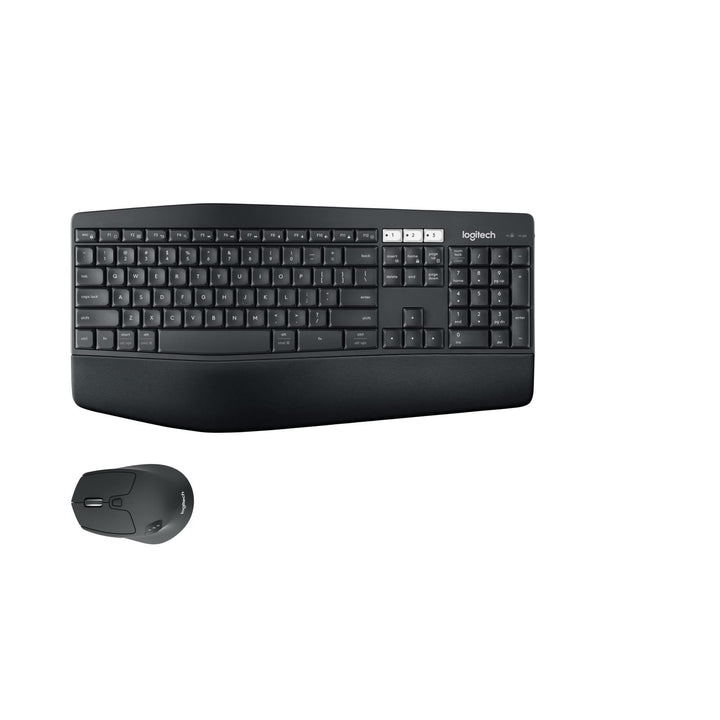

Logitech MK850 Wireless Combo
PRODUCT DESCRIPTION
Logitech MK850 Performance Wireless Keyboard and Mouse Combo (920-008233) - 2 Years Local Warranty
Flagship Multi-Device Combo: K850 Keyboard and M720 Triathlon Mouse
The Logitech MK850 Performance Combo (920-008233) is the top of this range and the only set here that pairs two genuinely premium components: the K850 curved keyboard and the M720 Triathlon mouse. Both connect over Bluetooth Low Energy or a Logitech Unifying receiver, and both carry Easy-Switch across three devices — so a Singapore professional running a work laptop, a desktop and a tablet can move between all three at the press of a button.
Curved Keyframe, Concave Keys and a Cushioned Palm Rest
The K850 uses a curved keyframe with concave keys at standard 19 mm key spacing and an integrated cushioned palm rest, so hands stay supported and fingers land naturally through a long session. Three tilt positions — flat, 4° and 8° — let each user dial in their angle, and three Bluetooth channel LEDs make it obvious which host is currently connected.
Eight-Button M720 Triathlon Mouse with Hyper-Fast Scrolling
The M720 Triathlon is a serious productivity mouse: eight buttons, 1000 DPI high-precision optical tracking, a Hyper-Fast Scrolling 3G Core wheel and a tilt wheel with middle click, in a 115 x 74 x 45 mm contoured body weighing 135 g with its battery. Hyper-fast scrolling spins freely through long documents and spreadsheets, then ratchets back for line-by-line precision.
Three Years of Keyboard Battery and Logitech Flow Support
The K850 runs up to 36 months on two AAA cells and the M720 up to 24 months on a single AA, with a battery status LED on the mouse. Through Logi Options+ the combo supports Logitech Flow, letting one mouse and keyboard control two computers and copy content between them. Logitech publishes a carbon footprint of 12.25 kg CO2e for the combo.
Logitech MK850 Performance Datasheet — Technical Specifications
General
| Model | Logitech MK850 Performance Wireless Combo |
| Part Number (Asia Pacific / Singapore) | 920-008233 |
| Component Models | K850 keyboard and M720 Triathlon mouse |
| Regulatory Models | Combo Y-R0061; keyboard Y-R0063; mouse M-R0062 |
| Manufacturer | Logitech |
| Product Type | Bluetooth and Unifying wireless keyboard and mouse combo |
| Colour | Black |
| Carbon Footprint | 12.25 kg CO2e |
| Warranty | 2 Years Local Warranty (Singapore) |
Keyboard (K850)
| Layout | Full-size with number pad |
| Keyframe | Curved keyframe with concave keys |
| Key Spacing | Standard 19 mm |
| Palm Rest | Integrated cushioned palm rest |
| Tilt Positions | 3 — flat, 4° and 8° |
| Easy-Switch | 3 devices, with 3 Bluetooth channel LEDs |
| Dimensions | 430 x 210 x 25 mm |
| Weight | 733 g |
Mouse (M720 Triathlon)
| Design | Contoured, with soft rubber surface |
| Sensor | High-precision optical tracking |
| Resolution | 1000 DPI |
| Buttons | 8 |
| Scrolling | Hyper-Fast Scrolling Wheel 3G Core; tilt wheel with middle click |
| Easy-Switch | 3 channels |
| Indicators | Battery status LED |
| Dimensions | 115 x 74 x 45 mm |
| Weight | 135 g (with AA battery) |
Connectivity
| Wireless Technology | Bluetooth Low Energy or Logitech Unifying (2.4 GHz) — both supported |
| Receiver | Logitech Unifying USB receiver included |
| Range | 10 m (33 ft) |
| Multi-Device Switching | Easy-Switch across 3 devices on both keyboard and mouse |
| Logi Bolt | Not supported |
Battery
| Keyboard Battery | 2 x AAA, user-replaceable |
| Keyboard Battery Life | Up to 36 months |
| Mouse Battery | 1 x AA, user-replaceable |
| Mouse Battery Life | Up to 24 months |
Design & Power
| Form Factor | Curved full-size keyboard with cushioned palm rest, plus contoured 8-button mouse |
| Colour | Black |
| Power | Alkaline batteries only — no charging cable or dock |
Compatibility & Software Support
Operating system support — combo and K850 keyboard
- Windows 8 or higher
- macOS X 10.10 or higher
- ChromeOS
- Android 5.0
M720 Triathlon mouse — wider support when used on its own
- Via Bluetooth: Windows 10 and 11 or later, macOS 10.5 or later, ChromeOS, Linux 2.6 or later, Android 5.0 or later, iPadOS 13.4 or later
- Via Unifying: Windows 7, 8, RT, 10 and 11 or later, macOS 10.5 or later, ChromeOS, Linux 2.6 or later
Software
Logitech states that the Logi Options+ app is required for setup of the MK850, and Logi Options+ replaces the older Logitech Options that shipped with the product at launch. Options+ is where you customise the eight M720 buttons, configure Easy-Switch and enable Logitech Flow, which lets a single keyboard and mouse control two computers and copy files and text between them. Logi Options+ runs on Windows and macOS.
SourceIT supplies this product with 2 years local Singapore warranty and a GST invoice. Logitech’s own published manufacturer warranty period may differ by region — contact SourceIT if you need the manufacturer terms in writing.
Package Contents & MK Combo Ordering Information
In the box
- 1 x K850 wireless keyboard (2 x AAA batteries pre-installed)
- 1 x M720 Triathlon wireless mouse (1 x AA battery pre-installed)
- 1 x Logitech Unifying receiver
- 1 x USB extender cable
- User documentation
In-the-box list taken from Logitech’s datasheet for the equivalent MK850 SKU 920-008659; Logitech does not publish a business datasheet for the Asia Pacific SKU.
Logitech MK combo range at SourceIT
| MK120 Corded Combo | 920-002586 |
| MK200 Media Combo (corded) | 920-002693 |
| MK220 Compact Wireless Combo | 920-003235 |
| MK250 Compact Wireless Combo — Graphite | 920-013559 |
| MK250 Compact Wireless Combo — Off White | 920-013560 |
| MK250 Compact Wireless Combo — Rose | 920-013561 |
| MK270R Wireless Combo | 920-006314 |
| MK295 Silent Wireless Combo | 920-009814 |
| MK345 Wireless Combo (palm rest) | 920-012926 |
| MK470 Slim Combo — Graphite | 920-009182 |
| MK470 Slim Combo — Off White | 920-009183 |
| MK470 Slim Combo — Rose | 920-011326 |
| MK540 Advanced Wireless Combo | 920-008682 |
| MK850 Performance Wireless Combo (this listing) | 920-008233 |
Regional part number note: 920-008233 is the Asia Pacific SKU stocked in Singapore. Logitech’s Latin American datasheet covers the same product as 920-008659 (UPC 097855134936), so an overseas datasheet will quote a different number for equivalent hardware. Logitech does not publish an official barcode table for the MK850, so we do not state a UPC for this listing.
Component availability: the K850 keyboard and M720 Triathlon mouse are also sold separately by Logitech. Contact SourceIT if you need to add spare M720 mice to an existing MK850 deployment.
Datasheet & Downloads
- Logitech MK850 Performance — Technical Specifications (Logitech Support)
- Logitech K850 Keyboard — Technical Specifications (Logitech Support)
- Logitech M720 Triathlon Mouse — Technical Specifications (Logitech Support)
- Logitech MK850 Performance — Product Page (Singapore)
Logitech does not publish a business datasheet PDF for the MK850; the support specification pages linked above are the authoritative technical source.
Frequently Asked Questions — Logitech MK850 Performance
Can the MK850 connect to more than one computer?
Yes — that is its defining feature. Both the K850 keyboard and the M720 Triathlon mouse support Easy-Switch across three devices, with three channel LEDs on the keyboard showing which host is active. You can mix connection types too: one machine over the Unifying receiver and another over Bluetooth. No other combo in this range offers multi-device switching.
Does it use Bluetooth or a Unifying receiver?
Both. The MK850 supports Bluetooth Low Energy and Logitech Unifying 2.4 GHz, with a Unifying receiver included in the box. Use Bluetooth on machines where USB ports are scarce, and the receiver where you want the most robust link or where the host has no Bluetooth radio. Range is 10 m either way. It is not a Logi Bolt device.
What is Logitech Flow and do I need it?
Flow lets one MK850 keyboard and mouse control two computers on the same network, moving the cursor between screens and copying text and files across. It is configured in Logi Options+ and is entirely optional — but if you run a laptop next to a desktop, it removes the need for a KVM switch. Note that Logitech states Logi Options+ is required for initial setup of the MK850.
How does the MK850 compare with the MK540 and MK345?
All three have an integrated palm rest. The MK345 is the value option on a plain 2.4 GHz receiver. The MK540 Advanced adds Unifying, a 107-key layout and a 10 million keystroke rating, but its mouse is a basic 3-button single-channel design. The MK850 is the flagship: curved concave keyframe, cushioned rest, dual connectivity, Easy-Switch on both devices and the 8-button hyper-fast-scrolling M720 Triathlon mouse.
Is the M720 Triathlon suitable for left-handed users?
Logitech describes the M720 as a contoured mouse with a soft rubber surface but does not formally label its handedness, so we do not claim it is ambidextrous. In practice its sculpted shape with thumb buttons suits right-handed use. For a documented ambidextrous mouse, the MK540 Advanced and MK270R are the alternatives here.
Do I need a licence, subscription or room PC?
No. The MK850 is a desktop peripheral set — there is no licence, subscription or compute appliance. The only software involved is Logi Options+, which Logitech states is required for setup and is a free download for Windows and macOS. Batteries are pre-installed, so the combo works from the moment it is unboxed and paired.
Can I buy the keyboard or mouse separately, or add more?
Yes. Logitech sells the K850 keyboard and the M720 Triathlon mouse as standalone products, so an existing MK850 deployment can be extended or a single failed component replaced without buying a whole new combo. Because both are Unifying devices, additional units can also be adopted onto an existing Unifying receiver. Contact SourceIT for a quote on individual components.
Does the MK850 Performance come with warranty in Singapore?
Yes. Every MK850 Performance sold by SourceIT comes with 2 years local Singapore warranty and a GST invoice.


