
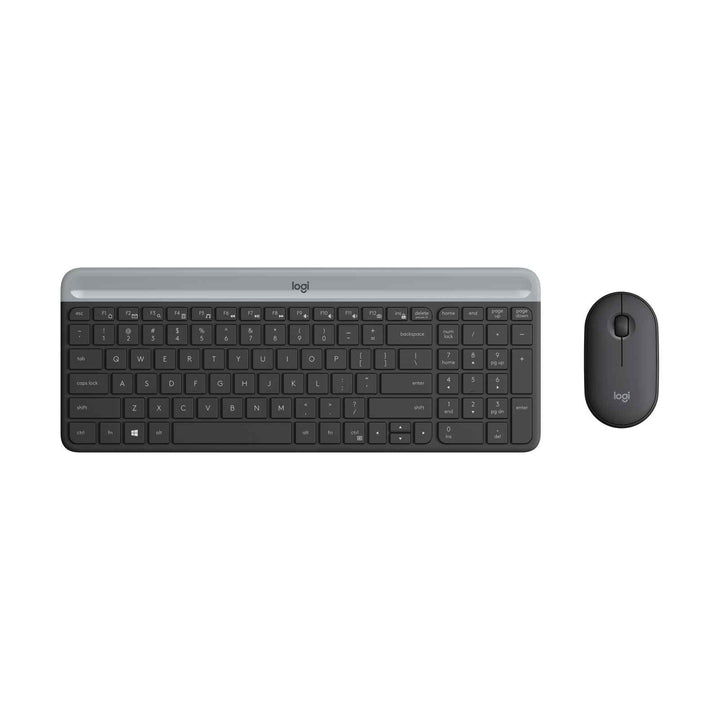

Logitech MK470 Wireless Slim Combo Graphite
PRODUCT DESCRIPTION
Logitech MK470 Wireless Slim Combo Graphite (920-009182) - 2 Years Local Warranty
Slim Wireless Keyboard and Mouse Combo for Singapore Offices, Classrooms and Home Desks
The Logitech MK470 Slim Combo (920-009182) pairs an ultra-thin 21.3 mm keyboard with a low-profile ambidextrous mouse in a matching graphite finish. Both devices share one plug-and-play 2.4 GHz Logitech Nano receiver, so a single USB-A port drives the whole desk setup. It is a practical standard-issue combo for Singapore offices refreshing open-plan workstations, for school and campus labs, and for home-office desks where cable clutter is the enemy.
Low-Profile Scissor Keys with 1.8 mm Travel and Quiet Clicking
The keyboard uses low-profile scissor keys with 1.8 mm of key travel for a stable, laptop-like typing feel, and Logitech rates the mouse click as 90% noise-reduced against its M170 in lab testing. In shared meeting rooms, hot-desking zones and quiet study areas, that difference is the point: you can type through a call without broadcasting every keystroke.
Compact Full Layout with Number Pad and 12 FN Shortcut Keys
Despite measuring only 373.5 x 143.9 x 21.3 mm, the MK470 keeps a number pad for finance, admin and data-entry work, plus 12 FN shortcut keys for media and system controls. The mouse is a 107 x 59 x 26.5 mm ambidextrous shape weighing 100 g with its battery, tracking at up to 1,000 DPI with a 20-million-click button rating.
36-Month Keyboard Battery Life on 2.4 GHz Wireless
Logitech rates the keyboard at 36 months on two AAA cells and the mouse at 18 months on a single AA, with batteries pre-installed and an automatic sleep mode when the devices are idle. The Nano receiver delivers a 10 m operating range. For IT teams, that means far fewer battery call-outs across a floor of desks — and no charging cables to manage.
Logitech MK470 Datasheet — Technical Specifications
General
| Model | Logitech MK470 Slim Combo |
| Part Number | 920-009182 |
| Colour | Graphite |
| Product Type | Wireless keyboard and mouse combo |
| Keyboard model number | Y-R0075 |
| Mouse model number | M-R0075 |
| Receiver model number | C-U0010 |
| Carbon footprint | 8.71 kg CO2e (ISO 14067, 2-year use period; third-party reviewed by DEKRA) |
| Warranty | 2 Years Local Warranty (Singapore) |
Keyboard
| Key type | Low-profile scissor keys |
| Key travel | 1.8 mm |
| Layout | Compact layout with number pad |
| Shortcut keys | 12 FN shortcuts |
| Battery | 2 x AAA, user replaceable (pre-installed) |
| Battery life | Up to 36 months (varies with use and computing conditions) |
| Power saving | Automatic sleep mode when inactive |
| Report rate | 50 Hz (20 ms) |
| Dimensions | 373.5 x 143.9 x 21.3 mm |
| Weight | 558 g with batteries |
| Materials | ABS / Mylar |
Mouse
| Sensor | High-precision optical tracking |
| Resolution | 1,000 DPI maximum |
| Buttons | 3 buttons, rated to 20 million clicks |
| Scroll wheel | Mechanical scroll wheel, rubber wheel surface |
| Shape | Low-profile ambidextrous |
| Click acoustics | 90% noise reduction (Logitech lab test vs Logitech M170) |
| Battery | 1 x AA, user replaceable (pre-installed) |
| Battery life | Up to 18 months |
| Report rate | 125 Hz (8 ms) |
| Maximum speed | Greater than 160 IPS |
| Dimensions | 107 x 59 x 26.5 mm |
| Weight | 100 g with battery |
Connectivity
| Wireless technology | 2.4 GHz wireless |
| Receiver | Logitech Nano receiver, USB Type-A, plug and play |
| Receiver pairing | Dedicated pre-paired receiver – not Logitech Unifying and not Logi Bolt |
| Operating range | 10 m (33 ft) |
| Receiver dimensions | 18.7 x 14.4 x 6.1 mm, 2 g |
| USB protocol | HID 1.1, Full Speed |
Design & Power
| Power source | Alkaline batteries (included), no charging required |
| Retail package | 455 x 150 x 35 mm, 861 g |
| Handedness | Ambidextrous mouse |
Compatibility & Software Support
Operating system support as published by Logitech for the MK470:
| Windows | Windows 7, Windows 8, Windows 10 or later |
| ChromeOS | Supported |
| Microsoft Surface | Listed as "Works with Surface" on the Logitech datasheet |
| macOS / Linux | Not listed by Logitech for this product – see FAQ |
| Port required | One free USB-A port for the Nano receiver |
Software
The MK470 keyboard is listed on Logitech's official Logi Options+ supported-devices page, on Windows only, with support for key customisation, Smart Actions, status and notifications, and the Logi AI Prompt Builder. The bundled mouse does not appear in the Logi Options+ mice table, so treat the mouse as plug-and-play with no software customisation. Logi Options+ itself requires Windows 10 or later (or macOS 14 or later). Logitech Options, SetPoint and Unifying Software are legacy applications that Logitech no longer maintains.
No driver installation is required for basic keyboard and mouse operation — plug in the Nano receiver and both devices connect.
Package Contents & MK470 Series Ordering Information
In the Box
- Logitech MK470 slim wireless keyboard with 2 x AAA batteries pre-installed
- Logitech wireless mouse with 1 x AA battery pre-installed
- Logitech USB Nano receiver
- User documentation
MK470 Series Ordering Information
| Model / Colour | Part Number |
| MK470 Slim Combo – Graphite (this listing) | 920-009182 |
| MK470 Slim Combo – Off-White | 920-009183 |
| MK470 Slim Combo – Rose | 920-011326 |
All three colourways are the same hardware; only the finish differs. Logitech's EMEA datasheet lists further regional part numbers in Graphite and Off-White — the SKUs above are the Singapore catalogue numbers stocked by SourceIT.
Datasheet & Downloads
Official Logitech documentation for the MK470 Slim Combo:
Frequently Asked Questions — Logitech MK470
Is there any difference between the Graphite, Off-White and Rose MK470?
No. All three share identical hardware, specifications and part-number family — only the finish changes. This listing is the Graphite version (920-009182); we also stock Off-White and Rose.
Does the MK470 use a Logi Bolt or Unifying receiver?
Neither. Logitech's technical specification lists the MK470 as 2.4 GHz wireless with a dedicated non-Unifying Nano receiver. The receiver is pre-paired to this keyboard and mouse and cannot be used to add other Logitech Unifying or Logi Bolt devices. If you need Logi Bolt for a managed corporate fleet, look at Logitech's business-class input devices instead.
Does it work with a Mac?
Logitech publishes Windows 7/8/10 or later and ChromeOS support for the MK470 and does not list macOS or Linux. The receiver is a standard USB HID device, but because Logitech does not certify macOS for this model we do not claim it. For a Mac-certified combo, ask us about the Logitech MX or Signature business ranges.
Can I customise the keys or check the battery level in software?
Partly. The MK470 keyboard is supported in Logi Options+ on Windows only, where you can customise keys, use Smart Actions and see status notifications. The mouse is not listed as a Logi Options+ device, so it works plug-and-play without customisation.
How long do the batteries actually last, and are they included?
Logitech rates the keyboard at up to 36 months on two AAA cells and the mouse at up to 18 months on a single AA. Both sets are pre-installed in the box, so the combo works out of the carton. Real life varies with usage, but this is one of the longest-running combos we stock — useful when you are deploying dozens of desks and do not want a battery-swap schedule.
Does it have a number pad, and how much desk space does it need?
Yes, the number pad is included and the keyboard still measures only 373.5 x 143.9 mm and 21.3 mm thin, so it suits shallow desks and hot-desk benches where a full-size board will not fit comfortably.
Is the MK470 covered by warranty in Singapore?
Yes. Every MK470 Slim Combo sold by SourceIT comes with 2 years local Singapore warranty and a GST invoice.


