
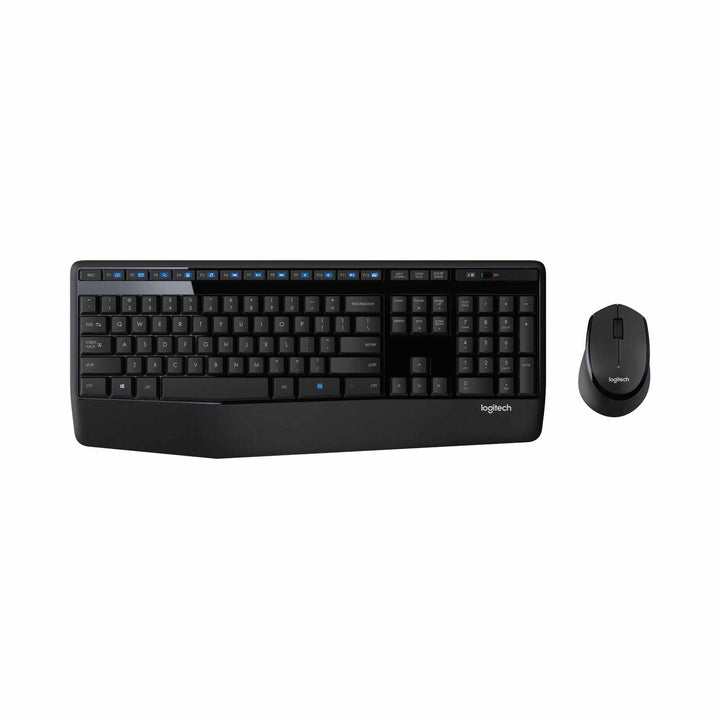

Logitech MK345 Wireless Combo
PRODUCT DESCRIPTION
Logitech MK345 Wireless Keyboard and Mouse Combo with Palm Rest (920-012926) - 2 Years Local Warranty
Full-Size Wireless Combo with an Integrated Palm Rest
The Logitech MK345 Wireless Combo (920-012926) is built around comfort for people who are at the keyboard all day. A textured, integrated palm rest runs the full width of the board and the mouse is a sculpted right-handed shape that fills the palm rather than being gripped. For Singapore finance, admin and data-entry desks where the same person types for eight hours, that combination matters more than any single specification.
Full Layout with Number Pad and 12 Function Keys
The keyboard is a full-size design at 447.2 x 186.7 x 21.4 mm with a complete number pad, arrow keys and 12 FN keys carrying media controls for mute, volume and playback. Adjustable tilt legs set the typing angle, a Caps Lock indicator shows state at a glance, and the board is spill-resistant to a maximum of 60 ml of liquid.
Sculpted Right-Handed Mouse for Long Sessions
The included mouse is a contoured right-hand design at 105.4 x 67.9 x 38.4 mm with three buttons and a 2D mechanical scroll wheel for vertical scrolling. Smooth optical tracking with no visible light handles documents, spreadsheets and browsing without fuss. The shape encourages a relaxed, supported grip that reduces fatigue across a long working day.
Three Years of Keyboard Battery and Certified Carbon Neutral
The keyboard runs up to 36 months on two AAA cells and the mouse up to 18 months on a single AA, all through one 2.4 GHz USB nano receiver with a 10 m range. Logitech certifies the MK345 as carbon neutral and publishes a footprint of 8.72 kg CO2e over a two-year use period, calculated to ISO 14067:2018 with critical review by DEKRA.
Logitech MK345 Datasheet — Technical Specifications
General
| Model | Logitech Wireless Combo MK345 |
| Part Number (Singapore / Asia Pacific) | 920-012926 |
| UPC | 097855196613 |
| Keyboard Regulatory Model | Y-R0042 |
| Mouse Regulatory Model | M-R0051 or M-R0111 depending on production revision |
| Manufacturer | Logitech |
| Product Type | 2.4 GHz wireless keyboard and mouse combo |
| Colour | Black |
| Sustainability | Certified carbon neutral; 8.72 kg CO2e over a 2-year use period (ISO 14067:2018, DEKRA critical review) |
| Warranty | 2 Years Local Warranty (Singapore) |
Keyboard
| Layout | Full-size with number pad and arrow keys |
| Function Keys | 12 FN keys |
| Media Controls | Mute, volume and play |
| Palm Rest | Integrated, textured, full width |
| Tilt Legs | Adjustable height |
| Spill Resistance | Tested under limited conditions to a maximum of 60 ml liquid spillage |
| Indicators | Caps Lock indicator |
| Dimensions | 447.2 x 186.7 x 21.4 mm |
| Weight | 603 g (with batteries) |
Mouse
| Design | Contoured right-hand mouse — right-handed design |
| Sensor | Smooth optical tracking (tracking light not visible) |
| Buttons | 3 |
| Scrolling | 2D mechanical scroll wheel — vertical scrolling only, no left/right tilt |
| Dimensions | 105.4 x 67.9 x 38.4 mm |
| Weight | Logitech quotes 78 g with batteries on the 920-012926 specification sheet and 86.4 g on its support specification page |
| Resolution | Logitech does not publish a DPI figure for the MK345 mouse, so we do not state one |
Connectivity
| Wireless Technology | 2.4 GHz wireless via USB nano receiver |
| Receiver | Single nano receiver serving both devices — 14.4 x 18.7 x 6.1 mm, 1.8 g |
| Range | 10 m (33 ft) |
| USB Standard | USB 2.0 |
| Bluetooth | Not supported |
| Unifying / Logi Bolt | Not a Unifying or Logi Bolt device |
Battery
| Keyboard Battery | 2 x AAA alkaline, user-replaceable |
| Keyboard Battery Life | Up to 36 months |
| Mouse Battery | 1 x AA alkaline, user-replaceable |
| Mouse Battery Life | Up to 18 months |
Design & Power
| Form Factor | Full-size keyboard with integrated palm rest, plus sculpted right-handed mouse |
| Materials | Made with recycled plastic (Logitech does not publish a percentage for this model) |
| Colour | Black |
| Power | Alkaline batteries only — no charging cable or dock |
Compatibility & Software Support
Operating system support
- Windows 10, Windows 11 or later
- ChromeOS
An available USB port is required for the receiver. This is the list on Logitech’s current specification sheet for 920-012926. Logitech’s older support page for the same keyboard still shows a legacy list of Windows XP, Vista, 7 and 8 — that entry has not been refreshed and the newer figure above is the one we publish. Logitech does not claim macOS support for the MK345.
Software
Depends on the mouse revision. Logitech documents two mouse variants for the MK345: the M-R0111 requires no software at all, while the older M-R0051 carries a battery LED indicator and is associated with Logitech SetPoint. Neither is needed for normal typing and pointing — the combo is plug-and-play. The MK345 is not a Unifying or Logi Bolt device and is not managed through Logi Options+ or Logitech Sync.
SourceIT supplies this product with 2 years local Singapore warranty and a GST invoice. Logitech’s own published manufacturer warranty period may differ by region — contact SourceIT if you need the manufacturer terms in writing.
Package Contents & MK Combo Ordering Information
In the box
- 1 x MK345 full-size wireless keyboard with integrated palm rest
- 1 x MK345 contoured right-handed wireless mouse
- 1 x USB nano receiver
- Batteries (2 x AAA keyboard, 1 x AA mouse)
- User documentation
Logitech MK combo range at SourceIT
| MK120 Corded Combo | 920-002586 |
| MK200 Media Combo (corded) | 920-002693 |
| MK220 Compact Wireless Combo | 920-003235 |
| MK250 Compact Wireless Combo — Graphite | 920-013559 |
| MK250 Compact Wireless Combo — Off White | 920-013560 |
| MK250 Compact Wireless Combo — Rose | 920-013561 |
| MK270R Wireless Combo | 920-006314 |
| MK295 Silent Wireless Combo | 920-009814 |
| MK345 Wireless Combo (palm rest) (this listing) | 920-012926 |
| MK470 Slim Combo — Graphite | 920-009182 |
| MK470 Slim Combo — Off White | 920-009183 |
| MK470 Slim Combo — Rose | 920-011326 |
| MK540 Advanced Wireless Combo | 920-008682 |
| MK850 Performance Wireless Combo | 920-008233 |
Regional part number note: 920-012926 is the Singapore SKU on this listing and carries UPC 097855196613, taken from Logitech’s own specification sheet for that part. Logitech sells the same MK345 under several other regional SKUs including 920-006491, 920-006481 (US) and 920-012936 (Graphite, US), so an overseas datasheet or quote may show a different number for equivalent hardware.
Datasheet & Downloads
Frequently Asked Questions — Logitech MK345
Is the MK345 mouse suitable for left-handed users?
No. Logitech describes it explicitly as a “contoured right-hand mouse” with a right-handed design, so it is shaped for the right hand only. If you need an ambidextrous mouse, the MK270R and MK250 combos both use mice that Logitech documents as ambidextrous.
Which combo should I choose for all-day typing comfort?
The MK345 and the MK850 Performance are the two combos in this range with an integrated palm rest. The MK345 is the value option with a textured rest and a 2.4 GHz receiver. The MK850 adds a cushioned rest, dual Bluetooth and Unifying connectivity, Easy-Switch across three devices and an 8-button M720 Triathlon mouse. The MK540 Advanced also has an integrated palm rest and sits between them on price.
How long do the batteries last?
Up to 36 months for the keyboard on two AAA cells and up to 18 months for the mouse on a single AA. Batteries are included in the box and all cells are standard user-replaceable alkalines — there is no charging dock or cable to manage.
Do I need a licence, software or a room PC?
No. The MK345 is a standard desktop peripheral set with no licence, subscription or compute appliance involved. Plug the nano receiver into any available USB port and both devices work. One older mouse revision (M-R0051) is associated with Logitech SetPoint for its battery LED, but no software is required for normal use.
What is the DPI of the MK345 mouse?
Logitech does not publish a DPI figure for the MK345 mouse anywhere in its official documentation, so we deliberately do not state one. Logitech describes it as smooth optical tracking with a non-visible tracking light. If a specified DPI matters for your use case, the Signature Wired M520 for Business is documented at 400–4000 DPI adjustable.
Is the receiver a Unifying receiver, and can I use one dongle for several devices?
No. The MK345 uses a plain 2.4 GHz nano receiver and Logitech never labels it as Unifying or Logi Bolt, so it will not adopt additional Logitech devices onto one dongle. For a genuine Unifying deployment where one receiver serves multiple peripherals, choose the MK540 Advanced or MK850 Performance combo.
Is the keyboard protected against spills?
It is spill-resistant, tested under limited conditions to a maximum of 60 ml of liquid spillage. Logitech is explicit that the keyboard must not be immersed in liquid. Treat it as protection against a knocked-over cup rather than a waterproof rating, and unplug and dry it thoroughly after any spill.
Does the MK345 come with warranty in Singapore?
Yes. Every MK345 sold by SourceIT comes with 2 years local Singapore warranty and a GST invoice.


