
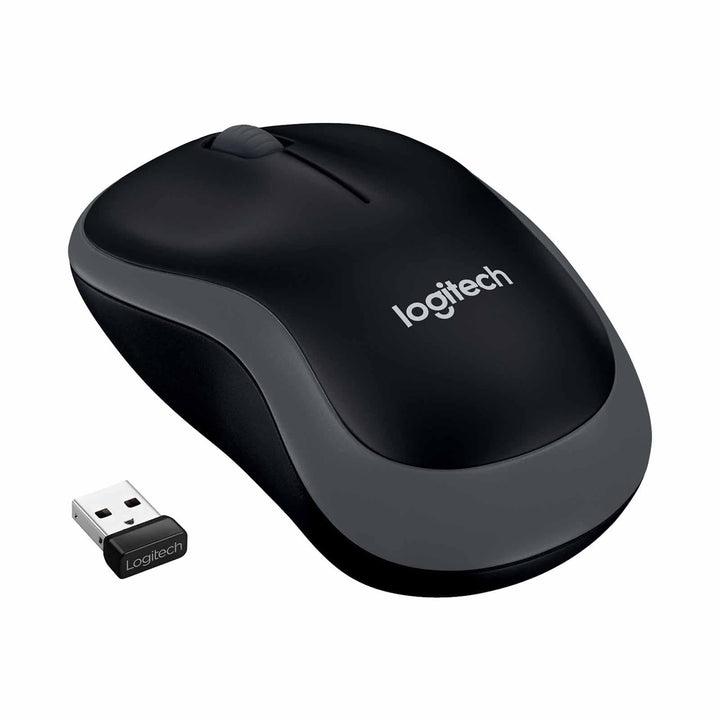


Logitech M185 Basic Wireless Mouse Black
Prices in SGD, excluding 9% GST.
PRODUCT DESCRIPTION
Logitech M185 Basic Wireless Mouse Black (910-002255) - 2 Years Local Warranty
Logitech M185 Wireless Mouse — The Compact Business Standard
The Logitech M185 Basic Wireless Mouse Black (910-002255) is one of the most widely deployed wireless mice in corporate IT, and the reason is consistency: a 2.4 GHz nano receiver, a fixed 1000 dpi optical sensor, a 12-month AA battery and nothing to configure. For Singapore offices, campuses and shared-desk floors, it is a device you can standardise on and then stop thinking about.
1000 DPI Logitech Advanced Optical Tracking
Logitech specifies Advanced Optical Tracking at 1000 dpi with controlled line-by-line scrolling — the combination that suits spreadsheets, ERP screens, long PDFs and browser work. Tracking is stable on ordinary desk surfaces, and because the resolution is fixed there is no DPI button for a user to knock out of position on a hot desk.
Contoured Shell That Suits Left- and Right-Handed Users
Logitech describes the M185 as a compact contoured design that is equally comfortable for both left- and right-handed users. At 99 × 60 × 39 mm and roughly 72–75 g depending on hardware revision, it has more height under the palm than Logitech's flattest travel mice while still fitting a laptop bag. One SKU covers your whole floor.
12-Month Battery, Recycled Plastic and a Three-Year Logitech Warranty
A single AA battery runs the M185 for up to 12 months, with an on/off switch and auto-sleep mode conserving power between sessions. Logitech states the M185 is made with recycled plastic, publishes a 3.97 kg CO2e carbon footprint, and backs the product with a three-year limited hardware warranty — a strong combination for procurement teams evaluating total cost and sustainability criteria together.
Logitech M185 Datasheet — Technical Specifications
General
| Product name | Logitech M185 Basic Wireless Mouse Black |
| Part number | 910-002255 |
| Logitech hardware variants | M-R0038 / M-R0061 / M-R0078 / M-R0084 / M-R0085 / MR0102 |
| Product type | Wireless optical mouse |
| Shape | Compact contoured design, suitable for left- and right-handed users |
| Sustainability | Made with recycled plastic; 3.97 kg CO2e carbon footprint (Logitech published) |
| Warranty | 2 Years Local Warranty (Singapore) |
Tracking & Controls
| Sensor | Logitech Advanced Optical Tracking |
| Resolution | 1000 dpi (±) |
| Scroll wheel | Yes — 2D (optical or mechanical depending on hardware revision); controlled line-by-line scrolling |
| Special buttons | Middle-click |
Connectivity
| Wireless | 2.4 GHz via USB nano receiver |
| Wireless range | Up to 10 m |
| Receiver models | C-U0007 / C-U0010 / C-U0019 (nano), USB 2.0 |
| Unifying | The M185 mouse is Unifying-pairable; the bundled receiver may be a Unifying or non-Unifying nano receiver depending on hardware revision |
| Connect button | No |
Battery
| Battery | 1 × AA, user-replaceable |
| Battery life | Up to 12 months |
| Power switch | Yes — on/off switch |
| Power saving | Auto-sleep power-saving mode |
Design & Power
| Dimensions (H × W × D) | 39.0 × 60.0 × 99.0 mm (M-R0038 / M-R0061 / M-R0078) |
| Dimensions — later revisions | 38.6 × 60.0 × 99.5 mm (M-R0084 / M-R0085 / MR0102) |
| Weight | 75.2 g (M-R0038 / M-R0061 / M-R0078); 71.8 g (M-R0084 / M-R0085 / MR0102) |
| Receiver storage | Compartment inside the mouse |
| Power source | AA battery (no mains power or charging required) |
Compatibility & Software Support
Operating systems officially listed by Logitech: Windows, macOS, ChromeOS and Linux. The per-revision specification detail Logitech publishes is:
- M-R0061: Windows 7 / 8 / 10 or later; Mac OS X 10.8.x or later; ChromeOS; Linux kernel 2.6.x or later
- MR0102: Windows 7 / 8 / 10 / 11 or later; macOS 10.15 or later; ChromeOS; Linux kernel 2.6
The M185 is plug-and-play — connect the nano receiver to a USB-A port and the mouse is available immediately, with no drivers and no pairing step. No Logitech software or licence is required for normal use.
On Unifying: Logitech states that the M185 mouse is a “Unifying ready” device that can be used with any Unifying USB receiver, while also noting that the receiver supplied in some revisions is not itself a Unifying receiver. If you are consolidating multiple peripherals onto one Unifying dongle, please confirm the revision with SourceIT before ordering in volume.
Package Contents & Logitech M185 Ordering Information
In the box
- Logitech M185 Wireless Mouse
- USB nano receiver
- AA battery
- User documentation
Logitech M185 ordering information
| Logitech M185 Basic Wireless Mouse Black — 910-002255 (this listing) | 2.4 GHz nano receiver, 99 mm contoured shell, 1000 dpi |
| Logitech M221 Silent Wireless Mouse Charcoal — 910-004882 | Same 99 × 60 × 39 mm shell with SilentTouch clicking |
| Logitech M170 Wireless Mouse — 910-004658 | Flatter, lighter 97.3 mm compact alternative |
| Logitech B175 Wireless Mouse — 910-002635 | Business-channel mouse in the same 99 mm form factor |
Logitech sells the M185 under several regional SKUs and does not publish a public colour-to-part-number mapping. The Singapore-channel part number for this listing is 910-002255 — please quote it when ordering.
Datasheet & Downloads
- Logitech M185 product page (official)
- Logitech M185 technical specifications (official)
- Logitech M185 product support page (official)
- Logitech M185 quick start guide (official PDF)
Logitech does not publish a standalone datasheet PDF for the M185; the technical-specification article above is the authoritative published source.
Frequently Asked Questions — Logitech M185
Which hardware revision will I receive?
Logitech ships the M185 in several hardware revisions with very slightly different dimensions (39.0 × 60.0 × 99.0 mm at 75.2 g, or 38.6 × 60.0 × 99.5 mm at 71.8 g) and different scroll-wheel construction. All share the same 1000 dpi sensor, 2.4 GHz nano receiver and 12-month battery rating. If a specific revision matters for a standardisation project, ask SourceIT before ordering.
Is the M185 comfortable for both hands?
Yes. Logitech describes it as equally comfortable for left- and right-handed users, which makes it a practical single-SKU standard for hot-desking and training rooms. Right-hand-specific alternatives such as the M331 SILENT offer more palm support but only suit right-handed users.
How does the M185 compare with the M221 Silent?
Same 99 × 60 × 39 mm body and same 1000 dpi sensor. The M221 Silent adds Logitech SilentTouch clicking and is rated for up to 18 months of battery life rather than 12. If your users share an open-plan floor or join calls from their desks, the M221 is the better specification.
Can I pair it with a Logitech Unifying receiver?
Logitech states the M185 mouse can be used with any Unifying USB receiver, though the receiver supplied in the box is not always a Unifying one. For a consolidation project, confirm the revision first.
Does it need software, a licence or a room PC?
No. It is a standalone USB peripheral — plug in the receiver and it works. Nothing to install, license or manage.
Is there sustainability data for green procurement?
Yes. Logitech states the M185 is made with recycled plastic and publishes a 3.97 kg CO2e product carbon footprint. Logitech does not publish a model-specific recycled-content percentage.
Does this mouse come with a Singapore warranty?
Yes. Every M185 sold by SourceIT comes with 2 years local Singapore warranty and a GST invoice.


