
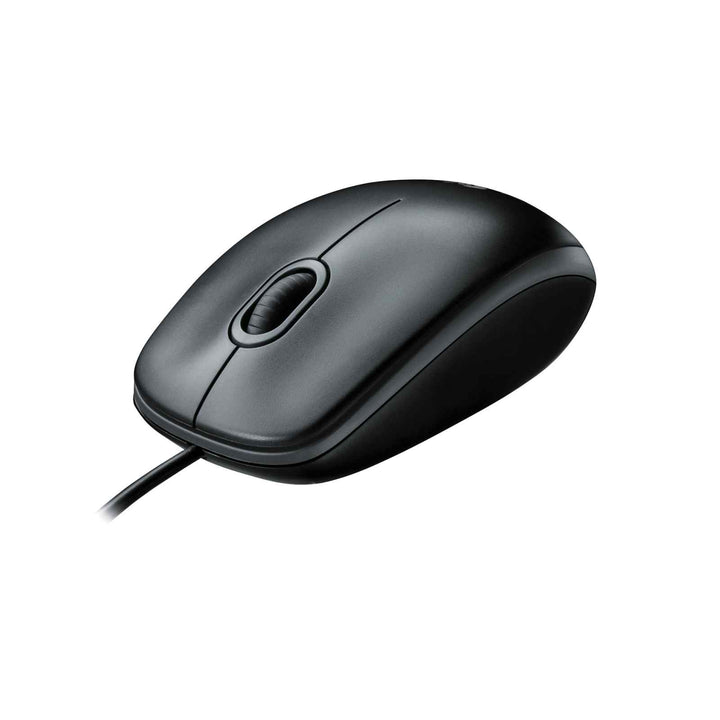


Logitech M100r Basic Wired USB Mouse
PRODUCT DESCRIPTION
Logitech M100r Basic Wired USB Mouse (910-006765) - 2 Years Local Warranty
Logitech M100r Wired USB Mouse — Zero-Maintenance Desk Standard
The Logitech M100r Basic Wired USB Mouse (910-006765) is the mouse you specify when the requirement is simply that it always works. There is no battery to change, no receiver to lose and no pairing sequence — USB bus power and plug-and-play detection mean it is live the second it is connected. For Singapore offices, computer labs, reception counters and public-access terminals, that removes an entire category of support ticket.
Red LED Optical Tracking at 1000 DPI
Logitech specifies the M100r with a visible-red LED optical sensor at a typical 1000 dpi (rated range 893–1208 dpi), which is the standard resolution band for document, spreadsheet and browser work. A rubber scroll wheel gives controlled line-by-line movement through long pages. Three buttons — left, right and middle-click — cover everything a business user needs without a configuration step.
Full-Size Ambidextrous Shell with a 180 cm Cable
At 113 × 62 × 38 mm and 90 g, the M100r is a full-size, fully symmetrical mouse, so a single SKU serves left- and right-handed staff on shared desks. The 180 cm USB-A cable comfortably reaches a tower PC on the floor or a monitor-mounted dock, which is where most cable-length complaints come from in practice.
Backed by a Three-Year Logitech Limited Hardware Warranty
Logitech publishes a three-year limited hardware warranty for the M100r and states a product carbon footprint of 1.73 kg CO2e — the lowest in this class of Logitech mouse, largely because there is no radio and no battery. SourceIT supplies every unit with two years local Singapore warranty and a GST invoice, and can quote volume pricing for fleet rollouts.
Logitech M100r Datasheet — Technical Specifications
General
| Product name | Logitech M100r Basic Wired USB Mouse |
| Part number | 910-006765 |
| Logitech model numbers | M-U0026 / M-U0003 / M-U0004 |
| Product type | Wired optical mouse |
| Shape | Full size, ambidextrous, plug and play |
| Materials | ABS body with rubber scroll wheel |
| Carbon footprint (Logitech published) | 1.73 kg CO2e |
| Warranty | 2 Years Local Warranty (Singapore) |
Tracking & Controls
| Sensor | Optical, visible red LED |
| Resolution | 1000 dpi typical (893–1208 dpi rated range) |
| Buttons | 3 — left-click, right-click, middle-click |
| Scroll wheel | Rubber scroll wheel |
Connectivity
| Connection | USB corded, plug and play |
| Cable length | 180 cm (70.87 in) |
| Requirement | One available USB port |
Design & Power
| Dimensions (H × W × D, Logitech labelling) | 113 × 62 × 38 mm |
| Weight | 90 g |
| Power | USB bus powered — 5 VDC typical (4.25–5.25 VDC), 100 mA |
| Batteries | None required |
| Operating temperature | 0 °C to 40 °C |
| Storage temperature | −20 °C to 60 °C |
| Operating humidity | 10–90% |
Compatibility & Software Support
Operating systems officially listed by Logitech:
- Windows 10, Windows 11 or later
- macOS 10.5 or later
- ChromeOS
- Linux kernel 2.6 or later
Logitech's product page summarises this as “works with Windows, macOS and Linux”. The M100r is a standard USB HID device, so it is also recognised by thin clients, KVM switches and most embedded or kiosk platforms that accept a USB-A mouse.
No software is required and no Logitech software is offered for this model — button behaviour is fixed. That is deliberate: for shared workstations and public terminals, a device with no configurable state is a feature, not a limitation.
Package Contents & Logitech M-Series Wired Ordering Information
In the box
- Logitech M100r Basic Wired USB Mouse
- User documentation
Logitech M-Series Wired ordering information
| Logitech M100r Basic Wired USB Mouse — 910-006765 (this listing) | USB-A wired, 1000 dpi, full-size ambidextrous |
| Logitech M520 for Business Wired Mouse USB-C — 910-007512 | USB-C wired alternative for modern laptops and docks |
| Logitech MK200 Wired Combo — 920-002693 | Wired keyboard and mouse supplied together |
Datasheet & Downloads
- Logitech M100r product page — Singapore (official)
- Logitech M100 / M100r technical specifications (official)
- Logitech M100r product support page (official)
- Logitech M100r quick start guide (official PDF)
Logitech publishes the M100r specification under its M100 technical-specification article, which covers the same internal model numbers (M-U0026 / M-U0003 / M-U0004). No separate datasheet PDF is published.
Frequently Asked Questions — Logitech M100r
Is the M100r the same as the Logitech M100?
They share a platform. Logitech's M100r support page lists the same internal model numbers (M-U0026 / M-U0003 / M-U0004) covered by the M100 technical-specification article, so the published dimensions, cable length, sensor and button count apply to both. M100r is the current naming for this SKU.
Why choose a wired mouse over wireless for an office fleet?
Three reasons come up repeatedly with SourceIT's corporate customers: no batteries to replace across hundreds of desks, no receivers to be lost or swapped between machines, and no radio to manage in dense open-plan floors. For fixed desktops, labs and public terminals, wired is usually the lower total-cost option.
Is the 180 cm cable long enough for a tower PC under the desk?
Yes. Logitech specifies 180 cm (70.87 in), which reaches from a floor-standing tower to a normal desktop working position without an extension. For monitor-mounted or dock-mounted USB ports the slack is generous.
Does it work on both left and right hands?
Yes — Logitech describes the M100r as a full-size ambidextrous design, so one SKU covers your whole floor. That is a meaningful simplification when procuring for hot desks and training rooms.
What is the difference between the M100r and the M520 for Business?
Connector and channel. The M100r is USB-A and sits in Logitech's entry line; the M520 for Business is a USB-C wired mouse aimed at modern laptops and USB-C docks where a USB-A port may not be available.
Do I need any software, licence or compute appliance?
No. It is a standard USB HID mouse. Nothing to install, nothing to license, nothing to manage.
Does this mouse come with a Singapore warranty?
Yes. Every M100r sold by SourceIT comes with 2 years local Singapore warranty and a GST invoice.


