
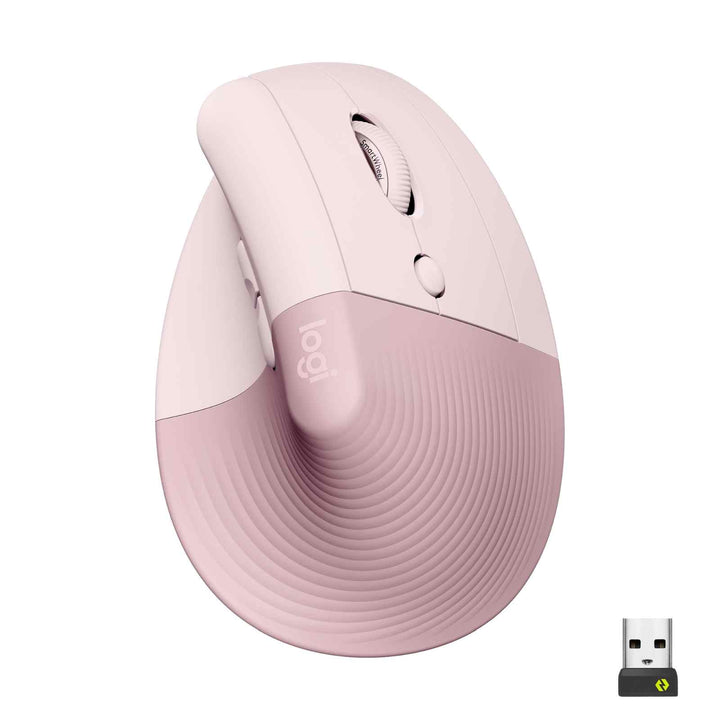


Logitech Lift Vertical Ergonomic Mouse Rose
PRODUCT DESCRIPTION
Logitech Lift Vertical Ergonomic Mouse Rose (910-006481) - 2 Years Local Warranty
Logitech Lift Vertical Ergonomic Mouse Rose — 57° Angle for Small to Medium Hands
The Logitech Lift Vertical Ergonomic Mouse in Rose (910-006481) uses a 57° vertical angle to place the hand in a natural handshake position, reducing wrist pressure and forearm strain during long Singapore workdays. It's designed specifically for small to medium hands — the segment Logitech's larger MX Vertical does not target.
Whisper-Quiet Clicks and Silent Magnetic SmartWheel
The Lift uses near-silent left/right switches (rated 5 million clicks) and a silent magnetic SmartWheel — a genuine improvement in shared offices and quiet meeting rooms. The soft rubber grip and cozy thumb rest keep the hand relaxed even in extended sessions.
Dual Wireless with Logi Bolt Receiver and Bluetooth
The Lift pairs to up to 3 devices via Bluetooth Low Energy or the included Logi Bolt USB receiver, and Easy-Switch hops between them with a single button. Logitech Flow lets you move cursor and copy/paste files across up to 3 multi-OS devices. Wireless range is up to 10 m.
24 Months on One AA Battery and 2 Years Local Warranty
A single AA battery (included) powers the Lift for up to 24 months of typical use — no charging cable to carry on business trips. Every Lift sold by SourceIT ships with 2 years local Singapore warranty and a GST invoice.
Logitech Lift Datasheet — Technical Specifications
General
| Product Name | Logitech Lift Vertical Ergonomic Mouse (Rose) |
| Brand / Vendor | Logitech |
| Part Number | 910-006481 |
| Colour | Rose |
| Form Factor | Vertical ergonomic right-handed wireless mouse |
| Warranty | 2 Years Local Warranty (Singapore) |
Ergonomic Design
| Vertical Angle | 57° vertical angle (natural handshake position) |
| Hand Size Guidance | Designed for small to medium hands |
| Grip | Soft rubber grip with cozy thumb rest |
| Handedness | Right-handed (the Lift left-handed variant uses different SKUs) |
Sensor & Tracking
| Sensor | Logitech optical sensor (Pluto One) |
| DPI Range | 400–4,000 DPI (software-adjustable) |
| Microprocessor | 32-bit ARM |
Buttons & Controls
| Buttons | 4 buttons + connectivity/Easy-Switch button (per Logitech official specifications) |
| Quiet Clicks | Yes — whisper-quiet clicks (5 million-click life on left/right) |
| Scroll Wheel | Silent magnetic SmartWheel |
Connectivity
| Wireless | Logi Bolt USB receiver (included) + Bluetooth Low Energy |
| Multi-Device (Easy-Switch) | Up to 3 devices |
| Wireless Range | Up to 10 m |
| Wireless Security | Logi Bolt secure encrypted wireless (Security Mode 1, Level 4) |
Battery
| Battery Type | 1 × AA battery (included, user-replaceable) |
| Battery Life | Up to 24 months |
Design & Physical
| Dimensions | Height 108 mm × Width 70 mm × Depth 71 mm |
| Weight | 125 g (with battery) |
| Sustainability | Post-consumer recycled plastic in mouse (approximately 70% for Graphite, 54% for Off-White/Pale Grey and Rose); certified carbon neutral |
Compatibility & Software Support
| Operating Systems | Windows 10/11 or later; macOS 10.15 or later; Linux; ChromeOS; iPadOS 14 or later; Android 8 or later |
| Software | Logi Options+ (button customisation, DPI adjustment, multi-device Flow) |
| Enterprise Management | Not applicable to the consumer SKU |
| Flow | Logitech Flow supported — control up to 3 multi-OS devices with one mouse |
Package Contents & Logitech Lift Ordering Information
- Logitech Lift Vertical Ergonomic Mouse
- Logi Bolt USB receiver
- 1 × AA battery (pre-installed)
- User documentation
Logitech Lift Ordering Information
| Logitech Lift — Graphite Black (Consumer) | 910-006479 — In stock at SourceIT |
| Logitech Lift — Pale Grey / Off-White (Consumer) | 910-006480 — In stock at SourceIT |
| Logitech Lift — Rose (Consumer) (this listing) | 910-006481 |
| Logitech Lift for Business — Graphite | 910-006497 — In stock at SourceIT |
Regional SKU note: 910-006479/-6480/-6481/-6497 are the SG/APAC/EMEA references. Americas ships different part numbers (for example 910-006466 Graphite, 910-006473 Rose) for the same product.
Datasheet & Downloads
Frequently Asked Questions — Logitech Lift
Who is the Lift designed for — how is it different from the MX Vertical?
The Lift is Logitech's vertical mouse for small to medium hands. The MX Vertical (910-005449) is larger, uses a rechargeable USB-C battery and the older Unifying receiver — better suited to medium and larger hands. Both use the 57° angle to reduce wrist strain.
What does the "for Business" version add?
The Lift for Business ships with the encrypted Logi Bolt USB receiver and adds Logi Options+ deployment/management for IT teams. The hardware — 57° angle, SmartWheel, 4 buttons, AA battery, 24-month life — is the same as the consumer Lift.
What colours does the Lift come in and are they in stock at SourceIT?
SourceIT stocks Graphite Black (910-006479), Pale Grey / Off-White (910-006480) and Rose (910-006481), plus the Lift for Business Graphite (910-006497).
How does the Lift power itself and how long does the battery last?
A single AA battery (included) powers the Lift for up to 24 months of typical use — no charging cable to remember on business trips.
Does it work with iPad, Android and ChromeOS?
Yes. Officially supported OSs include Windows 10/11 or later, macOS 10.15 or later, ChromeOS, Linux, iPadOS 14 or later and Android 8 or later.
Is there a left-handed Lift?
Yes — Logitech makes a left-handed Lift under different SKUs (not this listing). Please check with SourceIT if you need the left-handed variant.
Does it come with 2 years local Singapore warranty?
Yes. Every Logitech Lift sold by SourceIT comes with 2 years local Singapore warranty and a GST invoice.


