
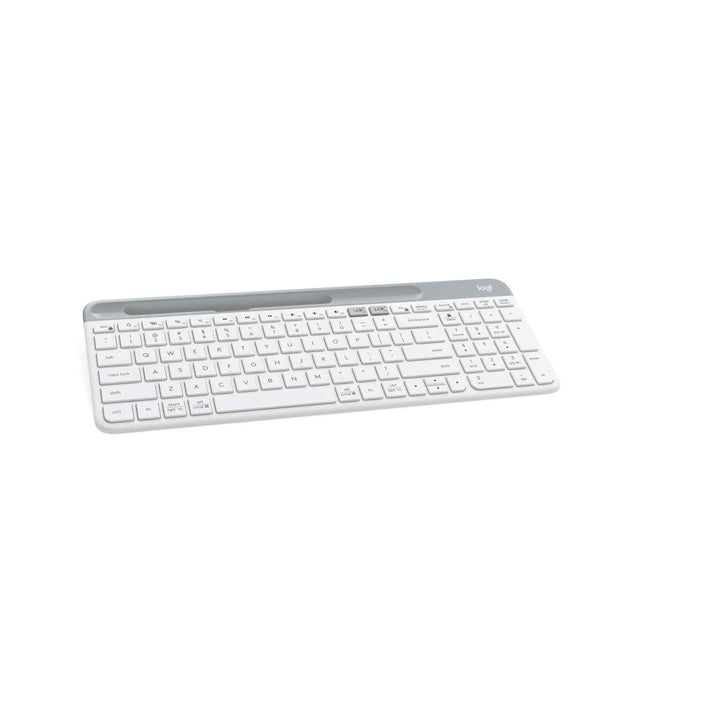


Logitech K580 Multi-Device Wireless Keyboard White
PRODUCT DESCRIPTION
Logitech K580 Multi-Device Wireless Keyboard White (920-009211) - 2 Years Local Warranty
Logitech K580 Slim Multi-Device Wireless Keyboard with Built-In Phone Cradle
The Logitech K580 (920-009211) is a slim, quiet wireless keyboard built for people who work across a computer and a phone at the same time. The integrated cradle holds a smartphone or small tablet upright above the number pad, turning it into a second screen for chat, reference material or a Teams call while you keep typing on the main machine. The White finish suits light desks, reception counters and home offices where a black keyboard would look heavy.
Full Number Pad in a Space-Saving 21.3 mm Profile
At 373.5 mm x 143.9 mm x 21.3 mm, the K580 keeps a complete 10-key number pad without the sprawl of a traditional full-size board — which matters on the compact desks and hot-desk benches common in Singapore offices. Low-profile key switches give a fluid, laptop-style keystroke that stays quiet in open-plan spaces, and 12 FN keys put media and shortcut controls one press away.
Easy-Switch Between Two Devices, Bluetooth or Unifying Receiver
Connect over Bluetooth Low Energy or the bundled Logitech Unifying USB receiver, with a 10 m wireless operating range. Easy-Switch keys pair the keyboard to two devices and move between them instantly — laptop to phone and back without touching a setting. Because the receiver is Unifying-ready, it can share a single USB port with a compatible Logitech Unifying mouse.
Two Years of Battery Life on Two AAA Cells
Two pre-installed AAA batteries run the K580 for up to 24 months of typical use — no charging cable, no dock, no downtime. Logi Options+ handles key customisation on Windows and macOS. Logitech publishes a 6.43 kg CO₂e carbon footprint for this model, which is useful supporting evidence if your procurement process asks for product-level environmental data.
Logitech K580 Datasheet — Technical Specifications
General
| Model | Logitech K580 Slim Multi-Device Wireless Keyboard |
| Part Number | 920-009211 |
| Product Type | Slim Multi-Device Wireless Keyboard |
| Colour | White / Off-White |
| Manufacturer | Logitech |
| Carbon Footprint | 6.43 kg CO₂e (published by Logitech) |
| Warranty | 2 Years Local Warranty (Singapore) |
Keyboard
| Layout | Slim compact layout retaining a full 10-key number pad |
| Key Switches | Low-profile key switches for quiet, laptop-style typing |
| Function Keys | 12 customisable FN keys with media shortcuts |
| Device Cradle | Integrated cradle for a smartphone or small tablet |
| Multi-Device Pairing | Easy-Switch across 2 devices |
Connectivity
| Wireless Technology | Logitech Unifying receiver (2.4 GHz) or Bluetooth Low Energy |
| Receiver | Unifying USB receiver included (Unifying-ready) |
| Wireless Operating Range | 10 m |
Battery
| Battery Type | 2 x AAA (pre-installed) |
| Battery Life | Up to 24 months |
Design & Physical
| Dimensions (W x D x H) | 373.5 mm x 143.9 mm x 21.3 mm |
| Weight | 558 g (including batteries) |
| Profile | 21.3 mm thin |
Compatibility & Software Support
Operating system support (per Logitech's published K580 specification): Windows 7, 8, 10 or later; macOS 10.10 or later; iOS 5 or later; iPadOS 13.4 or later; Android 5.0 or later.
Connection methods: the bundled Logitech Unifying USB receiver, or Bluetooth Low Energy. Easy-Switch holds two paired devices — typically a computer on one channel and a phone or tablet on the other.
Software: Logi Options+ for key customisation and FN key assignment on Windows and macOS.
ChromeOS note: Logitech sells a separate K580 Chrome OS Edition with a Chromebook-specific key layout. The standard K580 part numbers listed here are documented against Windows, macOS, iOS, iPadOS and Android — if you specifically need the Chromebook-layout version, contact us before ordering.
Receiver note: the K580 ships with a Logitech Unifying receiver, not a Logi Bolt receiver. If your organisation has standardised on Logi Bolt for security reasons, consider Signature MK650 for Business or Wave Keys for Business instead.
Package Contents & K580 Series Ordering Information
In the box:
Logitech K580 Slim Multi-Device Wireless Keyboard
Logitech Unifying USB receiver
2 x AAA batteries (pre-installed)
User documentation
K580 series — ordering information (SourceIT Singapore):
| K580 Multi-Device — Black / Graphite | 920-009210 |
| K580 Multi-Device — White / Off-White (this listing) | 920-009211 |
| K580 Multi-Device — Rose | 920-011329 |
Need a matching mouse or a bulk order for a whole floor? Email sales@sourceit.com.sg.
Datasheet & Downloads
Frequently Asked Questions — Logitech K580
Is there any functional difference between the Black, White and Rose K580?
None. All three are the same keyboard — same slim profile, same phone cradle, same Unifying and Bluetooth connectivity, same 24-month battery life. Only the finish and part number differ.
What actually fits in the phone cradle?
It is designed to hold a smartphone or a small tablet upright at a readable angle. Most phones sit in it comfortably with a slim case on; a large tablet in a heavy protective case is asking too much of it. If a propped-up iPad is the requirement, a dedicated stand or a Logitech Combo Touch folio is the better answer.
How many devices can it switch between?
Two, via the Easy-Switch keys. If you need three channels, look at Pebble Keys 2 (K380s) or MX Keys Mini for Business, both of which hold three.
Bluetooth or the USB receiver — which should we use?
Bluetooth is simplest for laptops, tablets and phones. Use the bundled Unifying receiver on desktops without Bluetooth, where corporate policy blocks Bluetooth peripherals, or where you want the keyboard active at the login screen. The receiver is Unifying-ready, so a compatible Logitech Unifying mouse can share the same dongle and free up a USB port.
How does the K580 compare with Pebble Keys 2 or MX Keys?
The K580 is the only one of the three with a built-in phone cradle and a full number pad, which makes it the pick for finance, admin and data-entry desks. Pebble Keys 2 is smaller and more portable with no number pad. MX Keys for Business is the premium option with backlighting, rechargeable battery and Logi Bolt security.
Does it need charging?
No. It runs on two AAA batteries that ship pre-installed and last up to 24 months of typical use, so there is no charging cable to issue with the keyboard and nothing for users to forget.
Does the warranty cover me in Singapore?
Yes. Every K580 sold by SourceIT comes with 2 years local Singapore warranty and a GST invoice.


