
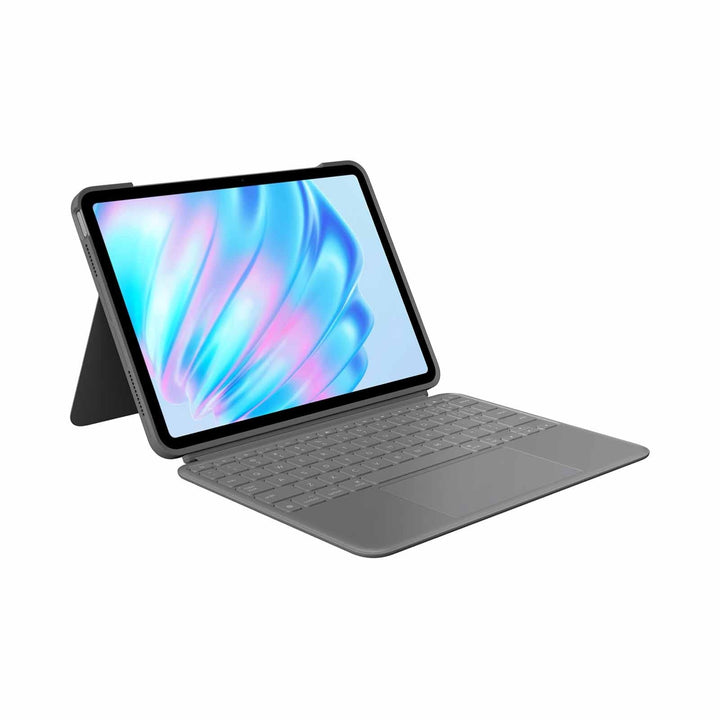


Logitech Combo Touch iPad Air for 11-inch M2 Oxford Grey
PRODUCT DESCRIPTION
Logitech Combo Touch for iPad Air 11-inch Oxford Grey (920-012627) - 1 Year Local Warranty
Logitech Combo Touch for iPad Air 11-inch — Turn Your iPad Into a Laptop
The Logitech Combo Touch for iPad Air 11-inch (920-012627) is a detachable keyboard case that gives an iPad a full-size backlit keyboard, a large Multi-Touch trackpad and all-round protection in one accessory. It is built for 11-inch iPad Air fleets in schools and hybrid offices. Because the keyboard lifts away in a second, the same case covers typing at a desk, sketching with a Pencil, presenting from a meeting-room table and reading on the commute.
Backlit Keyboard and Multi-Touch Trackpad
The detachable keyboard uses full-size scissor keys in a familiar layout with a dedicated row of iPadOS shortcut keys for volume, media playback, Do Not Disturb and screenshots. The backlighting is adjustable across 16 brightness levels, so late finishes and dim meeting rooms are not a problem. The largest Multi-Touch trackpad yet on a Combo Touch supports the full set of iPadOS Multi-Touch gestures, so switching apps, selecting text and working in Split View feel much closer to a laptop than to a tablet.
Four Use Modes and a Smart Connector That Never Needs Charging
Type, view, sketch and read modes are handled by the adjustable kickstand and the detachable keyboard — 10°–60° adjustable viewing angles. The keyboard connects through the Apple Smart Connector, which means no Bluetooth pairing, no drivers and no battery to charge or replace. For IT teams in Singapore running managed iPad fleets, that removes an entire category of support ticket: there is nothing to re-pair after a device is wiped and re-enrolled.
Protection, Materials and Apple Pencil Storage
The case adds front and back protection while keeping the ports and cameras accessible, and it is built from soft-touch textiles and recycled plastic. There is also dedicated storage space for an Apple Pencil, so annotation and sketching stay part of the daily workflow. Supplied by SourceIT Pte Ltd with local Singapore warranty support and a GST invoice for your procurement records.
Logitech Combo Touch for iPad Air 11-inch Datasheet — Technical Specifications
General
| Model | Logitech Combo Touch for iPad Air 11-inch |
| Part Number | 920-012627 |
| Colour | Oxford Grey |
| Product Type | Detachable backlit keyboard case with trackpad for iPad |
| Compatible iPad Models | iPad Air 11-inch (M2) iPad Air 11-inch (M3) iPad Air 11-inch (M4) iPad Air (5th generation, 10.9-inch) |
| Use Modes | Type, View, Sketch and Read |
| Warranty | 1 Year Local Warranty (Singapore) |
Keyboard
| Keyboard Type | Detachable, full-size keyboard with scissor keys |
| Backlighting | Auto-backlit, 16 brightness levels |
| Key Pitch & Travel | 19 mm key pitch, 1 mm key travel |
| Shortcut Keys | Full row of iPadOS shortcut keys including volume, media playback, Do Not Disturb and screenshot |
Trackpad
| Trackpad | Largest Multi-Touch trackpad yet on a Combo Touch |
| Gestures | Multi-Touch gestures — swipe, pinch, double tap and scroll |
Connectivity & Power
| Connection | Apple Smart Connector |
| Bluetooth Pairing | Not required |
| Charging | Not required — powered by the iPad through the Smart Connector |
Design & Physical
| Dimensions | 252 x 189 x 15.1 mm (L x W x D) |
| Weight | 495 g (keyboard case, complete) |
| Kickstand | 10°–60° adjustable viewing angles |
| Protection | Front and back protection |
| Materials | Soft-touch textile, made with recycled plastic |
| Apple Pencil | Dedicated storage space for Apple Pencil |
Specifications above are taken from Logitech published sources. Where a figure is not published by Logitech for this specific part number, it is omitted rather than estimated.
Compatibility & Software Support
Supported iPad Models
| Compatible with | iPad Air 11-inch (M2) iPad Air 11-inch (M3) iPad Air 11-inch (M4) iPad Air (5th generation, 10.9-inch) |
| Operating System | iPadOS |
Logitech and Apple currently list iPad Air 5th generation as the oldest supported model. Earlier SourceIT copy and some retail packaging also cite iPad Air 4th generation (10.9-inch) — please confirm with us before ordering for a 4th-generation fleet.
Software & Setup
The Logitech Combo Touch for iPad Air 11-inch connects through the Apple Smart Connector, so there is no Bluetooth pairing, no driver installation and no separate charging. Attach the iPad and the keyboard and trackpad are ready to use, which makes it straightforward to deploy across a fleet of managed iPads without adding anything to your MDM workload.
Keyboard backlighting, trackpad tracking speed and gesture behaviour are handled by iPadOS in Settings. Logi Options+ is not required for this product and Logitech does not publish an Options+ profile for Combo Touch.
Package Contents & Combo Touch Ordering Information
Package Contents
- Logitech Combo Touch for iPad Air 11-inch keyboard case (920-012627)
- Detachable backlit keyboard with trackpad
- User documentation
Combo Touch Ordering Information
SourceIT carries the full Logitech Combo Touch range in Singapore. Match the case to the exact iPad generation you are deploying:
| Model | Part Number & Colour |
| Combo Touch for iPad Pro 13-inch (M4 & M5) | 920-012662 — Graphite |
| Combo Touch for iPad Pro 11-inch (M4 & M5) | 920-012767 — Graphite |
| Combo Touch for iPad Pro 11-inch (M4 & M5) | 920-013297 — Sand |
| Combo Touch for iPad Pro 12.9-inch (5th & 6th gen) | 920-010215 — Oxford Grey (please enquire) |
| Combo Touch for iPad Pro 11-inch (1st–4th gen) | 920-010150 — Oxford Grey |
| Combo Touch for iPad Air 13-inch (M2, M3 & M4) | 920-012609 — Oxford Grey |
| Combo Touch for iPad Air 11-inch (M2, M3 & M4) / Air 5th gen (this listing) | 920-012627 — Oxford Grey |
| Combo Touch for iPad Air 11-inch / Air 4th & 5th gen | 920-013295 — Sand |
| Combo Touch for iPad (10th gen & A16) | 920-011434 — Oxford Grey |
| Combo Touch for iPad 10.2-inch (7th, 8th & 9th gen) | 920-009726 — Graphite |
Not sure which generation you have? Send us the iPad model number (the A-number printed on the back of the device) and we will confirm the correct Combo Touch part number before you raise the PO.
Datasheet & Downloads
Logitech Combo Touch for iPad Air 11-inch Datasheet & Documentation
- Logitech Combo Touch for iPad Air 11-inch — official product page
- Combo Touch for iPad Air 11-inch — Apple Singapore listing (dimensions & weight)
- Logitech press release — Combo Touch for the new iPad Air and iPad Pro (2024)
- Logitech Support — downloads, manuals and warranty claims
Logitech does not publish a standalone PDF datasheet for the Combo Touch range; the official product and support pages linked above are the authoritative specification sources. If your procurement process requires a signed specification sheet, contact SourceIT and we will request the current distributor SKU sheet from Logitech Singapore.
Frequently Asked Questions — Logitech Combo Touch for iPad Air 11-inch
Is there a difference between the Oxford Grey and the Sand colourway?
No functional difference. Oxford Grey (920-012627) and Sand (920-013295) are the same case, keyboard and trackpad — only the exterior finish changes. Choose on appearance and on how visible everyday marks will be: the darker finish hides scuffs better in a shared classroom or hot-desk environment, while the lighter finish looks smarter on a client-facing desk. You can view the alternative at Combo Touch for iPad Air 11-inch / Air 4th & 5th gen — 920-013295.
Who is the Logitech Combo Touch for iPad Air 11-inch best suited to?
It suits 11-inch iPad Air fleets in schools and hybrid offices. The detachable design means one accessory covers typing, sketching with Apple Pencil, watching and reading, so staff and students do not need a separate stand or sleeve. It is a common choice for Singapore schools running managed iPad programmes and for hybrid teams who want an iPad to double as a travel laptop.
How does it compare with the other Combo Touch models SourceIT carries?
Every Combo Touch shares the same idea — a detachable backlit keyboard, a Multi-Touch trackpad and a Smart Connector link — but each part number is cut for one specific iPad chassis and will not fit another. The practical difference is size, weight and which Apple Pencil the case is designed to stow. Adjacent models in our catalogue include Combo Touch for iPad Pro 13-inch (M4 & M5) (920-012662), Combo Touch for iPad Pro 11-inch (M4 & M5) (920-012767), Combo Touch for iPad Pro 11-inch (M4 & M5) (920-013297), Combo Touch for iPad Pro 11-inch (1st–4th gen) (920-010150).
Does the keyboard need charging, pairing or a separate licence?
No. The Combo Touch for iPad Air 11-inch draws power from the iPad through the Apple Smart Connector, so there is no battery to charge, no Bluetooth pairing step and no software licence or subscription to buy. That also means there is nothing to re-pair when an iPad is wiped and re-enrolled in your MDM.
Can I still use an Apple Pencil with the case fitted?
Yes — the case has dedicated storage space for an Apple Pencil. You do not need to remove the case to sketch or annotate: detach the keyboard, fold the case into sketch mode and write directly on the screen.
Why do some Logitech datasheets show a different part number?
Logitech assigns different part numbers to the same product by region. The Singapore and wider APAC part number for this model is 920-012627, which is the SKU you will receive from SourceIT and the SKU that appears on your invoice. Logitech's Americas material for the same product is published under 920-012626. The hardware is the same; only the regional packaging and part number differ, so do not be concerned if a global datasheet quotes the other number.
Is the keyboard backlit and how does it type?
Yes — auto-backlit, 16 brightness levels. The keys are full-size scissor keys in a standard layout with a full row of iPadOS shortcut keys, so the typing action is close to a laptop rather than a flat cover keyboard. The trackpad supports the same Multi-Touch gestures as iPadOS, which means text selection, app switching and Split View all work without lifting your hand to the screen.
What warranty do I get when I buy from SourceIT?
Every Combo Touch for iPad Air 11-inch sold by SourceIT comes with 1 year local Singapore warranty and a GST invoice. Logitech supplies the Combo Touch range with a one-year limited hardware warranty, and we handle the claim locally for you rather than sending you offshore.


