
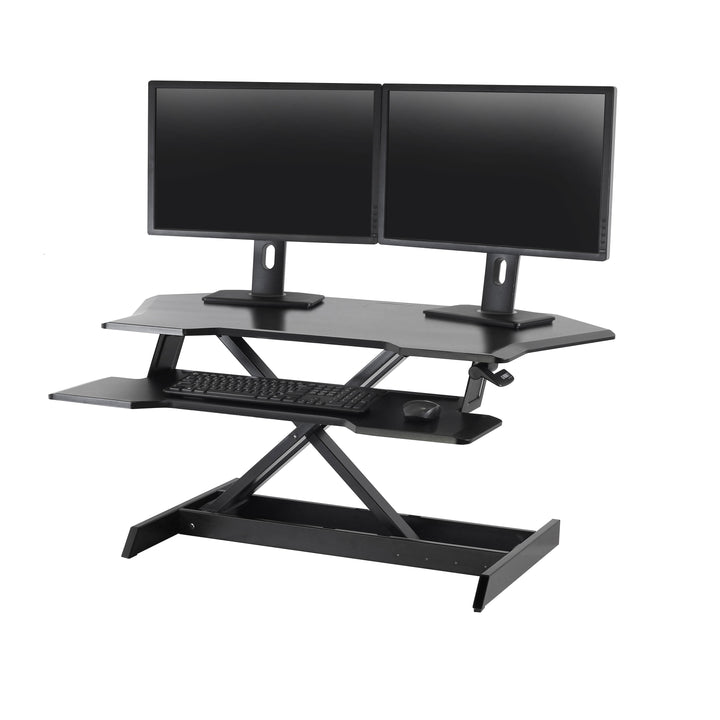


Ergotron WorkFit® Corner Standing Desk Converter
PRODUCT DESCRIPTION
Ergotron WorkFit® Corner Standing Desk Converter (33-468-921) - 5 Years Local Warranty
A Standing Desk Converter Built for the Corner You Already Have
Most sit-stand converters assume a straight desk edge. The Ergotron WorkFit Corner is shaped for the L-shaped and corner desks that fill Singapore offices and home studies, turning the one part of the workstation that usually goes to waste into the most usable surface in the room. It sits on top of the desk you already own, so there is nothing to drill, nothing to clamp and no need to replace the furniture.
15 in of Straight-Up Lift That Keeps Its Footprint
Ergotron specifies 15 in (38 cm) of vertical adjustment, taking the worksurface to a maximum height of 20 in (50.8 cm) above the desk. Critically, the WorkFit Corner lifts straight up and down rather than arcing forward, so the worksurface stays over its original footprint when you stand. In a corner that matters more than anywhere else on the desk, because there is no room for the surface to travel into.
A 36 in Worksurface and a Full-Width Keyboard Tray
The worksurface measures 36 in x 23.6 in (91.4 x 60 cm) and opens to a maximum width of 44 in (110 cm), with a separate keyboard tray of 36 in x 14.5 in (91 x 37 cm) tapering to 7.8 in (19.8 cm) deep at the ends. That is enough surface for a monitor, a laptop and paperwork at the same time, with the keyboard and mouse dropped to a proper typing height below the screen.
35 lbs of Capacity, Single or Dual Monitors
Ergotron rates the WorkFit Corner at 35 lbs (15.9 kg) and confirms it fits single and dual monitor setups. Ergotron also states the unit is load tested to four times its weight capacity to avoid tipping, and cycled through 10,000 up and down tests for years of trouble-free height adjustment — useful reassurance for a converter that spends its life in a corner where a tipping failure would take two monitors with it.
Ships Fully Assembled — Working in Minutes
The WorkFit Corner ships fully assembled with out-of-the-box installation, so there is no build time and no tools to find. For an office rollout that is the difference between a desk being productive the same morning and losing an afternoon to flat-pack assembly. Ergotron backs it with a full five-year warranty, and SourceIT supplies it with local Singapore warranty support and a GST invoice.
Ergotron WorkFit Corner Datasheet — Technical Specifications
General
| Product | Ergotron WorkFit Corner Standing Desk Converter |
| Part Number | 33-468-921 |
| Finish | Black — the only finish Ergotron lists for this model |
| Product Type | Desktop sit-stand converter for corner and L-shaped desks |
| Installation | Ships fully assembled with out-of-the-box installation; sits on the existing desktop |
| 5-Year Manufacturer Warranty (Ergotron) | 5 years — Ergotron states the WorkFit Corner is “tested and guaranteed with a full five-year warranty” |
| Local Warranty (Singapore) | Included with every unit sold by SourceIT |
Capacity & Worksurface
| Weight Capacity | 35 lbs (15.9 kg) |
| Worksurface Dimensions | 36 in x 23.6 in (91.4 x 60 cm) |
| Maximum Worksurface Width | 44 in (110 cm) |
| Keyboard Tray Dimensions | 36 in x 14.5 in (91 x 37 cm), tapering to 7.8 in (19.8 cm) deep at the ends |
| Number of Monitors | Fits single and dual monitor setups |
| Load Testing | Load tested to four times its weight capacity to avoid tipping; tested to 140 lbs (63.6 kg) |
Adjustment & Motion
| Lift / Height Adjustment | 15 in (38 cm) of vertical adjustment |
| Maximum Worksurface Height | 20 in (50.8 cm) above the desktop |
| Motion Path | Lifts straight up and down — the worksurface remains over its original footprint when standing |
| Cycle Testing | 10,000 up and down tests |
| Monitor Mount Options | Accepts two kinds of optional Ergotron monitor mounts, including a Dual Monitor Riser Kit (ordered separately) |
Design & Durability
| Product Weight | 57.5 lbs (26.1 kg) |
| Shipping Weight | 76 lbs (34.5 kg) |
| Shipping Dimensions | 47.7 x 36 x 9.5 in (121.3 x 91.4 x 24.1 cm) |
| Reference Document | Ergotron WorkFit Corner product sheet, literature date 10.01.2020 |
Every figure above is taken from Ergotron’s official WorkFit Corner product sheet. Supported monitor screen size, construction materials and a named lift technology are not published by Ergotron for this model and have been omitted rather than estimated — note in particular that the 140 lbs tipping-test figure is a safety test result and is not a usable load rating. The capacity to work to is 35 lbs (15.9 kg).
Compatibility & Fit
The WorkFit Corner is a desktop converter, not a mount. It sits on top of an existing corner or L-shaped desk, so there is no desk clamp, no grommet hole to drill and no wall fixing — and therefore no desk-thickness limit to check. What you do need is enough clear corner surface: the unit needs 36 in x 23.6 in (91.4 x 60 cm) of desktop, opening to a maximum width of 44 in (110 cm). Measure the corner before ordering, particularly in compact home offices and hot-desking layouts.
On monitors. Ergotron confirms the WorkFit Corner fits single and dual monitor setups and rates the unit at 35 lbs (15.9 kg) total. Ergotron does not publish a maximum supported screen diagonal for this model, so we do not quote one — any figure you see elsewhere is a reseller estimate. Work to the weight instead: add up your monitors, laptop and anything else that will ride on the surface, and keep the total under 35 lbs. Two typical 24 in office monitors sit comfortably inside that budget; two heavy 32 in panels very likely do not.
Ultrawide and curved panels. The same rule applies and the same caution is warranted: these panels are usually heavy, and on a corner unit the load also sits further from the desk edge. Send SourceIT your exact monitor model and we will check the weight against the 35 lb rating before you order.
Monitors can be raised further. Ergotron confirms the WorkFit Corner accepts two kinds of optional monitor mount, including a Dual Monitor Riser Kit. These lift the screens above the worksurface so the display sits at eye level while the keyboard stays at elbow height — the correct ergonomic relationship, and the reason a converter with a monitor mount outperforms one without. The mounts are ordered separately.
| Mounting | Sits on the existing desktop — no clamp, grommet or wall fixing |
| Desk Thickness | Not applicable — nothing clamps to the desk |
| Desk Space Required | 36 in x 23.6 in (91.4 x 60 cm), opening to a maximum 44 in (110 cm) wide |
| Desk Shape | Designed specifically for corner and L-shaped desks |
| Screens | Single and dual monitor setups |
| Total Capacity | 35 lbs (15.9 kg) — monitors, laptop and desk items combined |
| Maximum Screen Size | Not published by Ergotron for this model — specify by weight |
| VESA Pattern | Not applicable to the converter itself; determined by the optional monitor mount |
Package Contents & WorkFit Ordering Information
In the box: Ergotron does not publish an itemised carton list for the WorkFit Corner. What Ergotron does state plainly is that the unit ships fully assembled with out-of-the-box installation — the worksurface, keyboard tray and lift mechanism arrive as one working assembly. Monitor mounts, including the Dual Monitor Riser Kit, are ordered separately and are not included.
WorkFit Corner — Ordering
| 33-468-921 — WorkFit Corner Standing Desk Converter, Black (this listing) | 15 in (38 cm) lift · 35 lbs (15.9 kg) · 36 x 23.6 in worksurface · ships fully assembled · 5-year warranty |
Ergotron lists no alternative finish or second part number for the WorkFit Corner — 33-468-921 in black is the only variant.
Other Ergotron Sit-Stand Workstations at SourceIT
| 24-547-003 — LearnFit Sit-Stand Desk, Short | Mobile sit-stand desk, 29 to 45 in (73.7 to 114.3 cm) · 15 lbs (7 kg) · 10-year warranty |
| 24-206-214 — Neo-Flex LCD Cart | Mobile sit-stand monitor cart · 27 in (68.6 cm) total adjustment · 26 lbs (11.8 kg) |
| 24-205-214 — Neo-Flex Laptop Cart | Mobile sit-stand laptop cart · 20 in (50.8 cm) adjustment · 3 to 15 lbs (1.36 to 6.8 kg) |
Related Ergotron Accessories at SourceIT
| 50-193-200 — Ergotron Notebook Tray | Adds a laptop platform to an Ergotron LX arm · 2.5 to 12 lbs (1.1 to 5.4 kg) |
Datasheet & Downloads
- Ergotron WorkFit Corner — Official Datasheet / Product Sheet (PDF)
- Ergotron WorkFit Corner (33-468) — Official Product Page
- Ergotron Limited Warranty Terms and Conditions (PDF)
SourceIT supplies Ergotron across Singapore with local warranty support and a GST invoice. Contact us for volume pricing, site survey and delivery scheduling.
Frequently Asked Questions — Ergotron WorkFit Corner
Will it fit my corner desk?
It needs 36 in x 23.6 in (91.4 x 60 cm) of clear desktop and opens to a maximum width of 44 in (110 cm). The WorkFit Corner is purpose-shaped for corner and L-shaped desks — measure the corner itself rather than the overall desk, because the depth of the return is usually the constraint.
How high does it lift?
15 in (38 cm) of vertical adjustment, reaching a maximum worksurface height of 20 in (50.8 cm) above the desktop. It lifts straight up and down, so the worksurface stays over its original footprint when you stand — important in a corner, where a converter that arcs forward has nowhere to go.
What size monitor does it take?
Ergotron does not publish a maximum screen diagonal for the WorkFit Corner, so we will not quote one. Specify by weight instead: the unit is rated at 35 lbs (15.9 kg) for everything on the surface combined. Send SourceIT your monitor model and we will check it against the rating.
Can I use two monitors?
Yes. Ergotron confirms the WorkFit Corner fits single and dual monitor setups, and accepts two kinds of optional monitor mount including a Dual Monitor Riser Kit. Keep the combined weight of both screens plus anything else on the surface inside the 35 lb (15.9 kg) rating.
Does it clamp to the desk or need drilling?
Neither. It sits on top of the desk you already have, so there is no desk-thickness limit, no grommet hole and nothing to fix to a wall. That makes it straightforward in leased Singapore office space where drilling furniture or walls is not permitted.
How much assembly is involved?
None. Ergotron ships the WorkFit Corner fully assembled with out-of-the-box installation. Note the shipping carton is substantial at 47.7 x 36 x 9.5 in (121.3 x 91.4 x 24.1 cm) and 76 lbs (34.5 kg), so plan lift access for upper floors.
How does it compare with a mobile sit-stand desk?
The WorkFit Corner upgrades a desk you already own and stays put. If you need the workstation itself to move — between classrooms, wards or meeting spaces — look at the LearnFit Sit-Stand Desk (24-547-003) or the Neo-Flex LCD Cart (24-206-214) instead, both of which roll on their own base.
Is there a local warranty in Singapore?
Yes. Every Ergotron WorkFit Corner sold by SourceIT comes with local Singapore warranty and a GST invoice; Ergotron backs the WorkFit Corner with a 5-year manufacturer warranty.
Product Videos
Ergotron WorkFit Corner Standing Desk Converter


