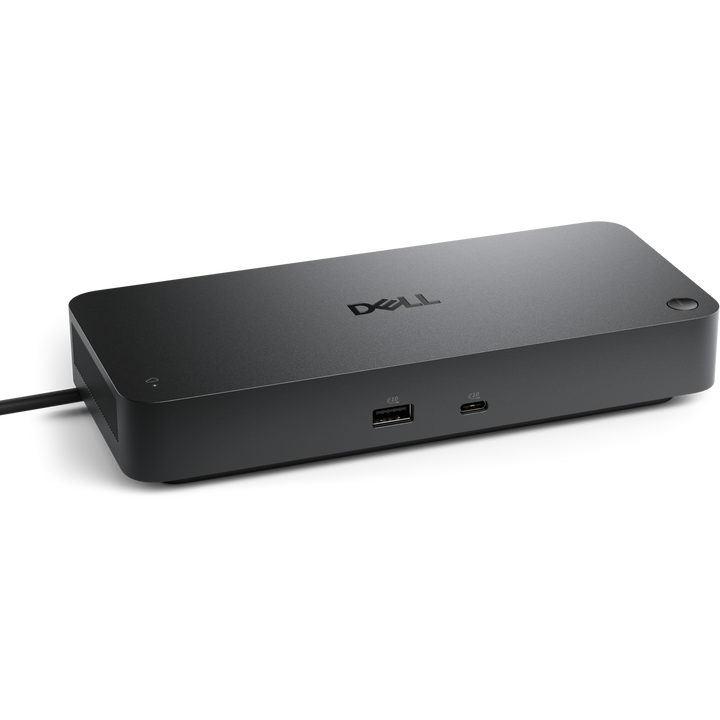


Dell Pro Smart Dock SD25 USB-C Docking Station
PRODUCT DESCRIPTION
Dell Pro Smart Dock - SD25 (210-BRJY) - 3 Years Local Warranty
A USB-C Dock IT Can Manage from the Cloud
The Dell Pro Smart Dock SD25 brings Dell Device Management Console to a USB-C dock: automatic or scheduled firmware updates, version pinning or downgrade, peripheral inventory and status — with no PC attached — plus zero-touch enrolment with DHCP auto discovery or DNS SRV.
Up to Four Displays
HDMI 2.1, two DisplayPort 1.4 ports and a USB-C Multi-function DisplayPort connect up to four screens — up to 1 x 4K at 60 Hz without compression, or up to 2 x 5K or 1 x 6K at 60 Hz with Display Stream Compression.
Power and Ports for the Whole Desk
The 180 W adapter delivers 130 W to Dell laptops (96 W to non-Dell), and the dock adds 2.5GbE Ethernet, four 10 Gbps USB-A ports and a 10 Gbps USB-C port that charge devices with or without a PC.
Buying for an office roll-out? Email sales@sourceit.com.sg for volume pricing and delivery lead time.
Dell SD25 Datasheet — Technical Specifications
General
| Product Name | Dell Pro Smart Dock - SD25 |
| Model | SD25 |
| Dell SKU (Singapore) | 210-BRJY |
| Product Line | Dell Pro Smart Docks |
| Local Warranty (Singapore) | 3-Year Limited Hardware Warranty with Advanced Exchange (Dell Singapore), supplied by SourceIT with a GST invoice |
Host Connection
| Host Interface | USB Type-C with DisplayPort Alt Mode |
| Host Cable Length | 0.9 m |
| Power to Host | 130 W (Dell systems); 96 W (non-Dell systems) |
| Power Adapter | 180 W |
Ports
| Video Outputs | 2 x DisplayPort 1.4; 1 x HDMI 2.1; 1 x USB-C 3.2 Gen 2 Multi-function DisplayPort 1.4 |
| USB-A | 4 x USB-A 3.2 Gen 2 (10 Gbps) |
| USB-C | 1 x USB-C 3.2 Gen 2 (10 Gbps) |
| Ethernet | 1 x RJ45, 2.5GbE |
| Thunderbolt | No |
| Power to Connected Devices | 4 x USB-A 3.2 Gen 2 (4.5 W each), 1 x USB-C 3.2 Gen 2 (15 W), 1 x USB-C Multi-function DisplayPort (7.5 W); all deliver power with or without a PC |
Video Support
| Maximum Displays | 4 |
| Without Display Stream Compression | Up to 4 x SXGA (1280 x 1024) @ 60 Hz, 3 x FHD @ 60 Hz, 2 x QHD @ 60 Hz, or 1 x 4K @ 60 Hz |
| With Display Stream Compression | Up to 4 x WQHD (3440 x 1440) @ 60 Hz, 2 x 5K (5120 x 2160) @ 60 Hz, or 1 x 6K (6144 x 3456) @ 60 Hz |
Management & Security
| Cloud Management | Dell Device Management Console (no PC required): automatic or scheduled firmware updates, maintain a specific firmware version or downgrade, peripheral inventory and status |
| Enrolment | Zero-touch provisioning with DHCP auto discovery or DNS SRV, Dell Display and Peripheral Manager, Dell Management Agent |
| IT Features | Dell Command Update, Dock Power Button Sync, Kernel DMA protection, MAC address pass-through, port disablement, PXE boot, Wake-on-LAN, WLAN to LAN switch |
| Indicators | Remote management LED |
| Lock Slots | Kensington lock slot and Noble Wedge lock slot |
Physical
| Dimensions | 205 x 90 x 35.25 mm |
| Weight | 562 g |
Compatibility & Software Support
Supported Operating Systems
Windows 10, Windows 11, Ubuntu 24.04, Red Hat Enterprise Linux 9.6+ and ChromeOS 137, per the Dell datasheet.
Host Laptops
Any laptop with USB-C and DisplayPort Alt Mode; 130 W charging applies to Dell systems, 96 W to non-Dell. Display modes depend on the host graphics and DSC support.
Host Software
Dell Firmware Utility and Dell Display and Peripheral Manager.
Package Contents & Dell Pro Docks Ordering Information
In the Box
Docking station, power adapter and power cord, documentation (Quick Start Guide; Safety, Environmental and Regulatory Information).
Dell Pro Docks
| Model | Key feature |
| WD25 | USB-C, 100 W to Dell PCs, 130 W adapter |
| SD25 (this listing) | USB-C smart dock, 130 W to Dell PCs, cloud management |
| SD25TB4 | Thunderbolt 4 smart dock, 130 W to Dell PCs |
| SD25TB5 | Thunderbolt 5 smart dock, up to 300 W to Dell PCs |
Datasheet & Downloads
| Dell datasheet | Dell Pro Smart Dock SD25 Datasheet (PDF) |
| Manuals & drivers | Documents and drivers on Dell Support |
| Dell product page | Product page on dell.com Singapore |
Need a PDF sent directly? Email sales@sourceit.com.sg quoting SD25.
Frequently Asked Questions — Dell SD25
What makes the SD25 a "Smart Dock"?
It can be managed from the cloud with Dell Device Management Console — firmware updates, version control and inventory — without a PC attached. The WD25 lacks this.
Is it Thunderbolt?
No. The SD25 connects over USB-C with DisplayPort Alt Mode. For Thunderbolt see the SD25TB4 or SD25TB5.
How much power does it give my laptop?
130 W to Dell systems and 96 W to non-Dell systems, from the 180 W adapter.
How many monitors?
Up to four; resolutions depend on the host and on Display Stream Compression support (see the video table).
What warranty do I get?
3-year Dell Limited Hardware Warranty with Advanced Exchange, supplied locally by SourceIT with a GST invoice.