
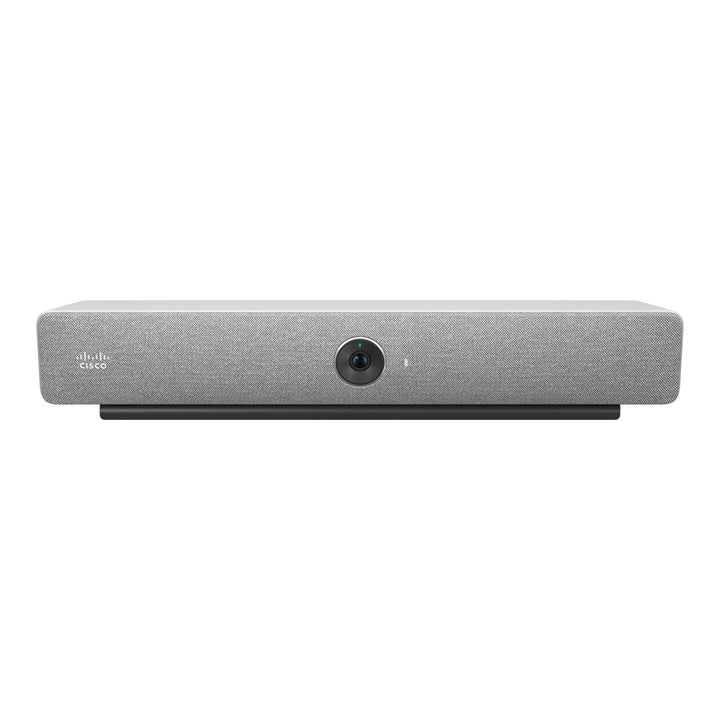


Cisco Webex Room Bar First Light with Table Room Navigator
Email sales@sourceit.com.sg or use Request for Quotation below and our team will confirm the latest price, availability and lead time.
PRODUCT DESCRIPTION
Cisco Room Bar First Light with Table-Stand Room Navigator (CS-BAR-T-K9) — 1 Year Local Warranty
All-in-one video bar for huddle spaces and small rooms
The Cisco Room Bar (CS-BAR-T-K9) combines a 12 MP camera, a beamforming microphone array, stereo speakers and the compute engine in a single 53.4 cm bar that mounts above or below the display. Cisco optimises its microphones for up to five people seated within 3 metres, which makes it a fit for huddle rooms, focus rooms and small meeting rooms. This part number is the First Light (white) finish bundled with a table-stand Cisco Room Navigator.
12 MP camera with a 120° field of view
The camera uses a 1/2.3-inch CMOS sensor behind a fixed-focus f/2.5 lens with a 120° horizontal and 95° vertical field of view, so people sitting close to the screen stay in frame. Auto framing, speaker tracking and Frames mode (which gives each participant their own tile) are built in, with 5x digital zoom. A camera privacy cover is included in the box.
Audio tuned for small rooms
A 4-element beamforming microphone array, supported by additional front-facing microphones for speaker tracking, picks up speech while AI-powered noise removal, de-reverberation and acoustic echo cancellation suppress background noise and room echo. Two full-range drivers provide stereo, directional audio from 100 Hz to 20 kHz at up to 93 dB SPL.
Room Navigator for Table included
The bundle ships with a Cisco Room Navigator on a table stand: a 10.1-inch, 1920 × 1200 capacitive touch controller that sits on the meeting table and is powered over the supplied 8 m flat Ethernet cable from the Room Bar's dedicated PoE port. Participants use it to join scheduled meetings, share content and control the room, and its built-in sensors report temperature, humidity and air quality (TVOC) to Control Hub.
Webex, Microsoft Teams Rooms and BYOD
Running Cisco RoomOS, the Room Bar joins Webex meetings natively and can join Microsoft Teams, Zoom and Google Meet meetings through RoomOS video interoperability. It can alternatively run Microsoft Teams Rooms on Android. A single USB-C cable from a laptop carries content and lets the laptop use the bar's camera, microphones and speakers for any soft client (USB passthrough).
Two screens, wireless sharing and cloud management
Two HDMI outputs support single- or dual-screen layouts at up to 3840 × 2160 at 60 fps. Content can be shared over HDMI, USB-C, the Webex app, Miracast or Apple AirPlay. Devices are provisioned and monitored in Webex Control Hub, or registered on-premises to Cisco Unified CM or Expressway.
Cisco Room Bar Datasheet — Technical Specifications
Camera
| Resolution | 12 MP, 30 frames per second |
| Sensor / lens | 1/2.3-inch CMOS, f/2.5 aperture, fixed focus |
| Field of view | 120° horizontal, 95° vertical |
| Zoom | 5x digital |
| Intelligent framing | Auto framing (face detection), speaker tracking, Frames camera mode; auto brightness and white balance |
| Mounting orientation | Above or below the screen; image rotates automatically when mounted upside down |
Audio
| Microphones | 4-element beamforming array plus front-facing microphones for speaker tracking |
| Pickup guidance | Optimised for up to 5 people seated within 3 m |
| Speakers | Stereo, 2 full-range drivers, directional audio; 100 Hz – 20 kHz (±3 dB); max 93 dB SPL |
| Audio processing | AI-powered noise removal, acoustic echo cancellation, automatic gain control, de-reverberation, full duplex, full-band audio, spatial audio, active lip sync, ultrasound |
| Audio inputs | 1x HDMI, 1x analog microphone input, 1x USB-C, 1x USB-A, Bluetooth, 1x PoE for one Cisco IP microphone (audio over IP) |
Video & Content
| Video standards | H.263, H.264, AV1 |
| Main video encode/decode | 1920 × 1080 at 30 fps |
| Content stream | Up to 3840 × 2160 at 15 fps (H.239 / BFCP dual stream) |
| Video inputs | 1x HDMI (up to 3840 × 2160 at 30 fps, including 1920 × 1080 at 60 fps); 1x USB-C (up to 3840 × 2160 at 30 fps) |
| Video outputs | 2x HDMI, up to 3840 × 2160 at 60 fps, CEC 2.0, touchscreen compatible |
| Wireless sharing | Webex app (up to 3840 × 2160 at 7.5 fps), Miracast (1920 × 1080 at 60 fps), Apple AirPlay, Microsoft Teams Cast (up to 1920 × 1080 at 15 fps) |
| USB passthrough | Camera, microphones and speakers to a connected computer over one USB-C cable |
| Bandwidth | Up to 20 Mbps; 1080p30 from 1472 kbps, 1080p60 from 2560 kbps |
| Multipoint | 4-way embedded SIP/H.323 conferencing with the optional MultiSite licence |
Network & Connectivity
| Ethernet | 1x RJ-45 100/1000 Mbps LAN; 1x RJ-45 100/1000 Mbps PoE port for the Room Navigator |
| Wi-Fi | 802.11a/b/g/n/ac, 2.4 / 5 GHz, 2x2 MIMO; WPA3 and WPA3-Enterprise |
| Bluetooth | Bluetooth and Bluetooth Low Energy |
| Other ports | 1x USB 2.0 Type-A (USB microphone or peripherals), 1x micro-USB service port, factory reset pinhole |
| Protocols | H.323, SIP, Webex, WebRTC |
| Firewall traversal | Cisco Expressway, H.460.18 / H.460.19 |
| IP features | IPv4 DHCP, IPv6, 802.1X, 802.1Q VLAN, 802.1p, DiffServ QoS, HTTP(S) proxy |
| Security | HTTPS / SSH management, SRTP media encryption (AES-128-GCM / AES-256-GCM), end-to-end encryption in Webex meetings |
Room Navigator for Table
| Display | 10.1-inch capacitive touch LCD, 1920 × 1200 |
| Power | PoE 802.3af Class 0 (powered from the Room Bar) |
| Sensors | Temperature, humidity, air quality (TVOC) |
| Mounting | Table stand |
Power & Physical
| Power supply | External PSU, 100–240 VAC 50/60 Hz, 12 V DC, peak 86 W |
| Power consumption | Active meeting 14.3 W; idle 8.2 W; networked standby 7 W |
| Room Bar dimensions (W × H × D) | 53.4 × 8.2 × 6.4 cm (21 × 3.2 × 2.5 in) |
| Room Bar weight | 1.5 kg (3.3 lb) |
| Shipping weight with table-stand Navigator | 5.2 kg (11.5 lb) |
| Colour | First Light |
| Operating environment | 0 °C to 35 °C, 10% to 90% relative humidity |
Compatibility & Software Support
Meeting platforms
In RoomOS mode the Room Bar joins Webex meetings natively and joins Microsoft Teams, Zoom and Google Meet meetings through RoomOS video interoperability. It can instead be deployed as a Microsoft Teams Rooms on Android device. Through USB-C passthrough, a connected laptop can use the bar's camera, microphones and speakers with any soft client.
Software
RoomOS 11 or later is required for native Webex meetings and video interoperability; on-premises deployments are supported from RoomOS 10.19.3.0.
Management & registration
Cloud: Webex Control Hub for provisioning, monitoring, troubleshooting, analytics and workspace insights. On-premises: native registration to Cisco Unified Communications Manager 12.5(1) or later, Cisco Expressway, TelePresence Management Suite 15.13.4 or later, and third-party standards-based SIP proxies and H.323 gatekeepers. Webex Edge for Devices links on-premises registered devices to the Webex cloud.
Optional licences and accessories
Remote Monitoring (L-KIT-RM) and the MultiSite embedded multipoint option (L-KITMINI-MS) are ordered separately. Cisco lists the Table Microphone Pro, Ceiling Microphone Pro and Table Microphone with jack plug (CS-MIC-TABLE-J=) as optional microphones, plus HDMI, multi-head and USB-C cables.
Warranty
Sold by SourceIT as a Singapore unit with a 1-year local warranty. Cisco states a 1-year limited liability warranty for this product family in its data sheet. Keep your SourceIT invoice as proof of purchase for warranty claims.
Package Contents & Cisco Room Bar Family Ordering Information
In the Box
Cisco lists the following default contents for the Room Bar bundle:
- Cisco Room Bar (First Light)
- Cisco Room Navigator, table-stand version
- HDMI 2.0 cable, grey, 1.5 m
- Power supply, AC/DC 12 V, 7.0 A, 86.1 W
- Camera privacy cover
- Flat Ethernet cable for the Room Navigator, 8 m
- Mounting kit for wall or screen
Cisco Room Bar Family
| Model | Key difference |
| Cisco Room Bar (CS-BAR-T-K9) (this listing) | First Light, with table-stand Room Navigator |
| Cisco Room Bar (CS-BAR-W-K9) | First Light, with wall-mount Room Navigator |
| Cisco Room Bar (CS-BAR-T-C-K9) | Carbon Black, with table-stand Room Navigator |
| Cisco Room Bar (CS-BAR-W-C-K9) | Carbon Black, with wall-mount Room Navigator |
| Cisco Room Bar No Radio (CS-BAR-NR-K9) | First Light, no Wi-Fi or Bluetooth radio, table-stand Navigator |
| Cisco Room Bar BYOD (CS-BAR-L-UK9 / CS-BAR-C-UK9) | USB-only BYOD model; Room Navigator not included |
| Cisco Room Bar Pro (CS-BARPRO-K9) | Larger bar for small and medium rooms: 96 MP dual-lens camera, 16-element microphone array, three HDMI outputs |
Datasheet & Downloads
Frequently Asked Questions — Cisco Room Bar
What is the difference between CS-BAR-T-K9 and CS-BAR-W-K9?
Both include a Room Bar and a Room Navigator. The "T" bundle includes the table-stand Room Navigator; the "W" bundle (CS-BAR-W-K9) includes the wall-mount Room Navigator. The Room Bar itself is the same.
How many people is the Room Bar designed for?
Cisco optimises the Room Bar microphones for up to five people seated within 3 metres, and positions it for huddle, focus and small meeting rooms. For medium rooms, Cisco offers the Room Bar Pro.
Does the Room Bar work with Microsoft Teams and Zoom?
Yes. In RoomOS mode it joins Microsoft Teams, Zoom and Google Meet meetings through video interoperability, alongside native Webex. It can also be deployed as a native Microsoft Teams Rooms on Android device, and any laptop client can use it over USB-C passthrough.
Does it support two displays?
Yes. The Room Bar has two HDMI outputs supporting up to 3840 × 2160 at 60 fps, with dual-screen layouts for video and content.
Is the Room Bar powered over Ethernet?
No. The Room Bar uses the included external 12 V power supply (86 W peak). Its PoE port powers the Room Navigator, not the bar itself.


