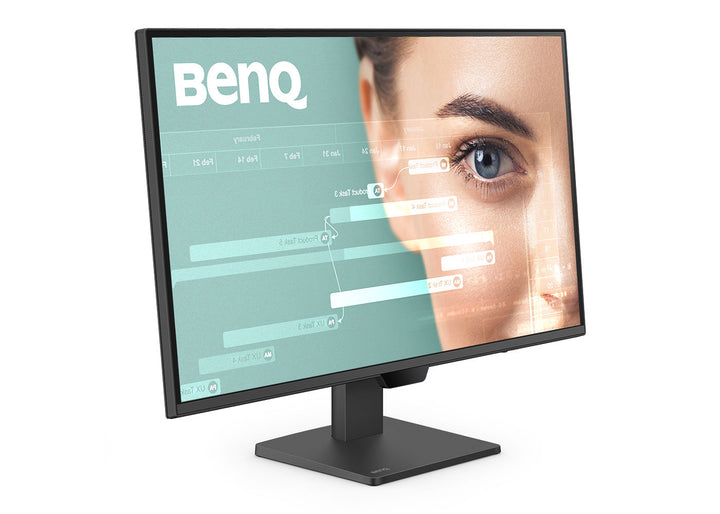


BenQ GW2790Q 27" 2K QHD 100Hz Home Office Monitor
PRODUCT DESCRIPTION
BenQ GW2790Q 27" 2K QHD Home Office Monitor (GW2790Q) - 3 Year Local Warranty
2560 x 1440 on 27 Inches — Two Full Documents Side by Side
The GW2790Q runs a 27-inch IPS panel at 2560 x 1440, which works out to 109 pixels per inch. That is the step up that matters for office work: at Full HD a 27-inch screen looks coarse, while QHD gives roughly 1.8 times the working area of 1080p without shrinking text to the point where you reach for scaling. Two A4 documents, or a spreadsheet beside a browser, sit side by side at readable size. For a Singapore office standardising on a single productivity panel across finance, admin and design-adjacent roles, this is the practical sweet spot.
100Hz Refresh and 1500:1 Native Contrast
Refresh runs at 100Hz rather than the usual 60Hz, so scrolling through long documents, code and web pages is visibly smoother — a small comfort gain that adds up across an eight-hour day. Response time is 5 ms grey-to-grey, with a 1 ms MPRT figure, and VESA MediaSync keeps video playback free of tearing. Native contrast is 1500:1, higher than the 1000:1 to 1300:1 typical of office IPS panels, so blacks in dark-theme editors and charts hold more depth. Brightness is 350 nits typical, with 99% sRGB coverage and 16.7 million colours.
Eye-Care Engineering Built for Full Working Days
BenQ's eye-care stack is the reason these panels end up in call centres and back offices. The GW2790Q is flicker-free, carries hardware Low Blue Light, and uses Brightness Intelligence Gen2 — an ambient light sensor that trims panel brightness as the office lighting changes through the day rather than leaving a 350-nit screen blazing at 6pm. An ePaper mode renders documents in a high-contrast monochrome for long reading sessions, Colour Weakness mode assists staff with colour vision deficiency, and Eye Reminder prompts breaks. TÜV Rheinland certifies the panel for Eye Comfort, EyeSafe, Flicker-free and Low Blue Light.
Light Enough for Any Arm, Matte Enough for Any Window
At 4.7 kg with the stand and 4.3 kg without it, the GW2790Q is easy to wall-mount or put on a monitor arm using the standard 100 x 100 mm VESA pattern — worth planning for, because the supplied stand tilts from -5° to 20° but does not adjust for height. The screen coating is matte, which is what you want facing the glass-heavy offices common in Singapore's CBD. Inputs are two HDMI 2.0 and one DisplayPort 1.2, with 2 W stereo speakers and a headphone jack for calls.
BenQ GW2790Q Datasheet — Technical Specifications
General
| Product | BenQ GW2790Q 27" 2K QHD 100Hz Home Office Monitor |
| Part Number (SKU) | GW2790Q |
| Screen Size | 27 inch |
| Panel Type | IPS, LED backlight |
| Aspect Ratio | 16:9 |
| Manufacturer Warranty | 3 Year Local Warranty (BenQ Singapore) |
| Local Warranty (Singapore) | Supplied by SourceIT with GST invoice |
Display
| Resolution (max.) | 2560 x 1440 (QHD) |
| Pixel Density | 109 PPI |
| Brightness (typ.) | 350 nits |
| Native Contrast | 1500:1 |
| Colour Gamut | 99% sRGB |
| Display Colours | 16.7 million |
| Viewing Angle (L/R) | 178° / 178° |
| Response Time | 5 ms GtG, 1 ms MPRT |
| Refresh Rate | 100 Hz |
| Panel Coating | Matte |
| Gamma | 1.8 - 2.6 |
| HDCP | 1.4 |
| Colour Modes | M-book, Standard, User, Game, ePaper, Care mode, Coding, Cinema |
| Colour Temperature | Bluish, Normal, Reddish, User Define |
| AMA (overdrive) | Yes |
Audio
| Built-in Speakers | 2 W x 2 |
| Headphone Jack | Yes |
Connectivity
| HDMI (v2.0) | 2 |
| DisplayPort (v1.2) | 1 |
| Supplied Signal Cable | HDMI (may vary by region) |
Eye Care & Certification
| Flicker-free Technology | Yes |
| Low Blue Light | Yes |
| Brightness Intelligence Gen2 | Yes |
| Colour Weakness Mode | Yes |
| ePaper Mode | Yes |
| Eye Reminder | Yes |
| TÜV Certificate | Eye Comfort, EyeSafe, Flicker-free, Low Blue Light (Hardware Solution) |
| VESA MediaSync | Yes |
| Eye-CareU Software | Yes |
Physical & Environmental
| Tilt (down/up) | -5° to 20° |
| Height Adjustment | Not supported on this model |
| VESA Wall Mount | 100 x 100 mm |
| Dimensions with Stand (HxWxD) | 448.5 x 614.0 x 181.9 mm |
| Dimensions without Stand (HxWxD) | 371.9 x 614.0 x 61.6 mm |
| Net Weight | 4.7 kg |
| Net Weight (without stand) | 4.3 kg |
| Energy Star | 8.0 |
| TCO Certified | 9.0 |
| EPEAT | Bronze |
Power
| Voltage Rating | 100 - 240 V |
| Power Supply | Built-in |
| Power Consumption (normal) | 20 W |
| Power Consumption (max) | 42 W |
| Power Consumption (sleep mode) | < 0.5 W |
Specifications are taken from BenQ's published product data for this model. Where BenQ does not publish a figure for this exact model it has been left out rather than estimated.
Compatibility & Installation
Mounting
The GW2790Q uses the standard 100 x 100 mm VESA pattern, so it fits almost any desk clamp, wall bracket or dual-monitor arm. The included stand offers tilt only, from -5° to 20°; it does not adjust for height, swivel or rotate to portrait. If your staff need height adjustment or portrait mounting, budget for a monitor arm at the same time — at 4.3 kg without the base the panel is well within the range of even light gas-spring arms.
What it connects to
Two HDMI 2.0 ports and one DisplayPort 1.2 give you three sources without a switch — a docked laptop on DisplayPort and two desktops or a meeting-room input on HDMI, for example. All three carry the full 2560 x 1440 at 100Hz. HDCP 1.4 is supported for protected content. There is no USB-C on this model, so a single-cable laptop setup needs a separate dock; if one-cable USB-C docking is the requirement, look at the GW2786TC or GW2790QT instead.
Audio and calls
Built-in 2 W stereo speakers and a headphone jack handle Teams and Zoom audio at desk volume. There is no built-in microphone on this model, so staff on heavy call duty should pair it with a headset or a USB-C model that carries a noise-cancelling mic.
Software and eye-care management
BenQ's Eye-CareU utility is supported, letting you configure Brightness Intelligence, break reminders and low blue light behaviour from the desktop instead of the on-screen menu — useful when rolling out a consistent configuration across a floor of identical units.
Package Contents & BenQ GW Series Range
In the box
- BenQ GW2790Q monitor with stand
- HDMI signal cable (may vary by region)
- Quick Start Guide
- Warranty card
- Safety instruction sheet
Package contents follow BenQ's product data for this model; items not listed by BenQ are not claimed here.
BenQ GW range
| Model | Size & Resolution |
| GW2490 | 23.8" Full HD |
| GW2490T | 23.8" Full HD, height adjustable |
| GW2485TC | 23.8" Full HD, USB-C |
| GW2486TC | 23.8" Full HD, USB-C 65 W |
| GW2780 | 27" Full HD |
| GW2780T | 27" Full HD, height adjustable |
| GW2790 | 27" Full HD |
| GW2790T | 27" Full HD, height adjustable |
| GW2785TC | 27" Full HD, USB-C |
| GW2786TC | 27" Full HD, USB-C 65 W |
| GW2790Q (this listing) | 27" QHD 2560 x 1440 |
| GW2790QT | 27" QHD, USB-C |
| GW3290QT | 31.5" QHD, USB-C |
Datasheet & Downloads
SourceIT can email the current BenQ data sheet revision for the GW2790Q on request with a quotation.
Frequently Asked Questions — BenQ GW2790Q
What does the "Q" in GW2790Q mean?
In BenQ's GW naming, the Q denotes QHD resolution — 2560 x 1440. The plain GW2790 is the same 27-inch size at Full HD 1920 x 1080. A T suffix indicates a height-adjustable stand and TC indicates USB-C connectivity, so a GW2790QT is the QHD panel with both.
Does the stand adjust for height?
No. BenQ specifies tilt only on the GW2790Q, from -5° to 20°. There is no height adjustment, swivel or pivot. If height adjustment is a requirement, the GW2790QT has an ergonomic stand, or you can mount the GW2790Q on any 100 x 100 mm VESA arm.
Is QHD worth it over Full HD at 27 inches?
For desk work, generally yes. A 27-inch Full HD panel works out to 82 PPI; the GW2790Q is 109 PPI at the same size. Text edges are noticeably cleaner and you get about 1.8 times the usable desktop area, which is what lets two documents sit side by side legibly rather than overlapping.
Does it have USB-C for single-cable laptop docking?
No. The GW2790Q's inputs are two HDMI 2.0 and one DisplayPort 1.2. For USB-C power delivery and data over one cable, the GW2786TC (Full HD, 65 W) or GW2790QT (QHD) are the models to look at.
What does the 100Hz refresh rate actually do for office work?
It makes scrolling and window dragging visibly smoother than a 60Hz panel. It is not a gaming specification at this level, but over a long day of reading documents and code the reduction in motion blur is a genuine comfort difference. VESA MediaSync is also supported, which keeps video playback free of tearing.
What eye-care features does it have, and are they certified?
The panel is flicker-free with hardware Low Blue Light, Brightness Intelligence Gen2 ambient light adaptation, an ePaper reading mode, Colour Weakness assistance and Eye Reminder break prompts. TÜV Rheinland certifies it for Eye Comfort, EyeSafe, Flicker-free and Low Blue Light (Hardware Solution).
Can I mount it on a monitor arm?
Yes. It uses the standard 100 x 100 mm VESA pattern and weighs 4.3 kg without the base, which is within the working range of essentially every desk-clamp gas-spring arm sold in Singapore.
Does it come with a Singapore warranty and a GST invoice?
Yes. Every BenQ GW2790Q sold by SourceIT comes with the BenQ Singapore 3 Year Local Warranty and a GST invoice.