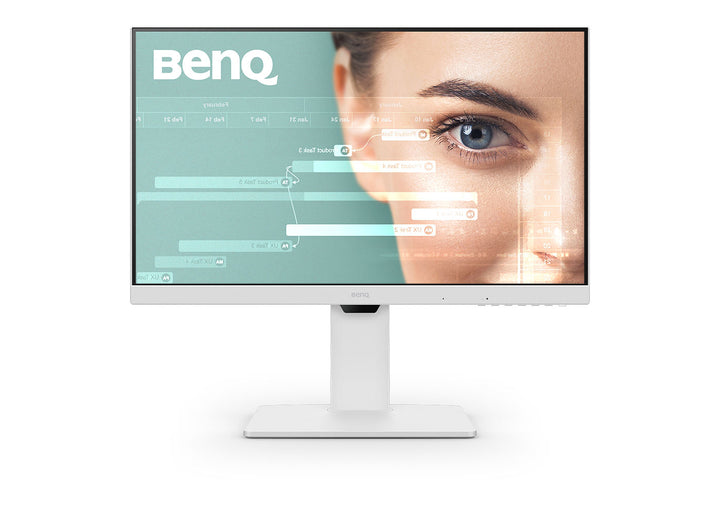


BenQ GW2786TC 27" Full HD USB-C 100Hz Home Office Monitor
PRODUCT DESCRIPTION
BenQ GW2786TC 27" Full HD USB-C Home Office Monitor (GW2786TC) - 3 Year Local Warranty
One USB-C Cable Carries Video, Data and 65 W of Charge
The GW2786TC's USB-C port handles DisplayPort Alt Mode video, USB data and 65 W of Power Delivery over a single cable, which is enough to keep most 13 to 14-inch business ultrabooks charged while they drive the screen. Two downstream USB Type-A ports at USB 3.2 Gen 1 speeds turn the monitor into the desk's hub for a keyboard, mouse or external drive. For a hot-desking floor or a hybrid team that docks and undocks daily, that reduces the desk to one cable and removes a separate dock from the bill of materials.
Daisy Chain a Second Screen from DisplayPort Out
DisplayPort out with MST lets you run a second display from the first monitor rather than back to the laptop, which matters when a thin notebook has only one spare port. Connect the laptop over USB-C, then a short DisplayPort cable from the GW2786TC to the second panel, and both screens extend the desktop. Alongside that, there is one HDMI 1.4 input and one DisplayPort 1.2 input for desktops or meeting-room sources. The panel runs 1920 x 1080 at 100Hz with 99% sRGB coverage and a 1300:1 native contrast ratio.
Noise-Cancelling Microphone for Teams and Zoom
Unlike most office monitors at this price, the GW2786TC carries a built-in microphone with noise cancellation, plus 2 W stereo speakers and a headphone jack. For a back-office or reception desk that takes occasional calls rather than living on a headset, that is a complete conferencing endpoint with no accessories to issue or lose. The eye-care stack behind it is BenQ's full set: flicker-free operation, Low Blue Light Plus, Brightness Intelligence Gen2 ambient adaptation, an ePaper reading mode and Colour Weakness assistance, certified by TÜV Rheinland.
Full Ergonomic Stand with 130 mm of Height Travel
The TC stand is the proper ergonomic one: 130 mm of height adjustment, tilt from -5° to 20°, 45° swivel each way and a full 90° pivot into portrait. Portrait matters for code review, long document proofing and anyone reading legal or financial filings end to end. The screen coating is matte, which suits the glass-walled offices common in Singapore. It mounts on the standard 100 x 100 mm VESA pattern at 4.9 kg without the base if you would rather use an arm.
BenQ GW2786TC Datasheet — Technical Specifications
General
| Product | BenQ GW2786TC 27" Full HD USB-C 100Hz Home Office Monitor |
| Part Number (SKU) | GW2786TC |
| Screen Size | 27 inch |
| Panel Type | IPS, LED backlight |
| Aspect Ratio | 16:9 |
| Manufacturer Warranty | 3 Year Local Warranty (BenQ Singapore) |
| Local Warranty (Singapore) | Supplied by SourceIT with GST invoice |
Display
| Resolution (max.) | 1920 x 1080 (Full HD) |
| Pixel Density | 82 PPI |
| Brightness (typ.) | 250 nits |
| Native Contrast | 1300:1 |
| Colour Gamut | 99% sRGB |
| Display Colours | 16.7 million |
| Viewing Angle (L/R) | 178° / 178° |
| Response Time (GtG) | 5 ms |
| Refresh Rate | 100 Hz |
| Panel Coating | Matte |
| Gamma | 1.8 - 2.6 |
| HDCP | 1.4 |
| Picture Modes | Care mode, Coding, Colour Weakness, ECO, ePaper, Game, Low Blue Light Plus, M-book, Movie, sRGB, Standard, User |
| Colour Temperature | Bluish, Normal, Reddish, User Define |
| AMA (overdrive) | Yes |
Audio
| Built-in Speakers | 2 W x 2 |
| Microphone | Built-in, with noise cancellation |
| Headphone Jack | Yes |
Connectivity
| USB-C | 1 (Power Delivery 65 W, DisplayPort Alt Mode, Data) |
| HDMI (v1.4) | 1 |
| DisplayPort (v1.2) | 1 |
| DisplayPort Out (MST) | Yes |
| Daisy Chain | DisplayPort out (MST) |
| USB Type-A Downstream | 2 (USB 3.2 Gen 1, 5 Gbps, 4.5 W charging) |
| Supplied Signal Cables | HDMI (v1.4), USB-C (may vary by region) |
Eye Care & Certification
| Flicker-free Technology | Yes |
| Low Blue Light Plus | Yes |
| Brightness Intelligence Gen2 | Yes |
| Colour Weakness Mode | Yes |
| ePaper Mode | Yes |
| TÜV Certificate | Eye Comfort, EyeSafe 2.0, Flicker-free, Low Blue Light |
| Eye-CareU Software | Yes |
| Display QuicKit | Yes |
| Firmware Update by USB | Yes |
Physical & Environmental
| Height Adjustment | 130 mm |
| Tilt (down/up) | -5° to 20° |
| Swivel (left/right) | 45° / 45° |
| Pivot | 90° |
| VESA Wall Mount | 100 x 100 mm |
| Dimensions with Stand (HxWxD) | 407.0 - 535.4 x 612.3 x 234.9 mm |
| Dimensions in Portrait (HxWxD) | 666.2 x 371.8 x 234.9 mm |
| Dimensions without Stand (HxWxD) | 371.8 x 612.3 x 56.1 mm |
| Net Weight | 7.9 kg |
| Net Weight (without stand) | 4.9 kg |
| Energy Star | 8.0 |
| TCO Certified | 9.0 |
| EPEAT | Bronze |
Power
| Voltage Rating | 100 - 240 V |
| Power Supply | Built-in |
| USB-C Power Delivery | 65 W |
| Power Consumption (normal) | 17.3 W |
| Power Consumption (max) | 120 W |
| Power Consumption (sleep mode) | < 0.5 W |
Specifications are taken from BenQ's published product data for this model. Where BenQ does not publish a figure for this exact model it has been left out rather than estimated.
Compatibility & Installation
Mounting and orientation
The supplied stand covers the full range of ergonomic adjustment: 130 mm of height travel, -5° to 20° tilt, 45° swivel each way and a 90° pivot into portrait. Portrait mode is genuinely useful for document review and code. If you prefer an arm, the panel uses the standard 100 x 100 mm VESA pattern and weighs 4.9 kg without the base. In portrait the unit stands 666.2 mm tall, so check overhead clearance under low shelving.
USB-C laptop docking
The USB-C port carries DisplayPort Alt Mode video, USB data and 65 W of Power Delivery simultaneously. Any laptop whose USB-C port supports DisplayPort Alt Mode — which covers most current business notebooks and MacBooks — will drive the screen, charge and reach the monitor's USB hub over one cable. Machines that draw more than 65 W under sustained load, such as mobile workstations with discrete graphics, will charge more slowly and should keep their own power supply for heavy work.
Daisy chaining a second monitor
DisplayPort out with Multi-Stream Transport lets you run a second display from the GW2786TC rather than from the laptop. Connect the notebook to the monitor over USB-C, then a DisplayPort cable from the monitor's DP out to the second screen. MST behaviour depends on the host graphics driver, so confirm support on your laptop fleet before standardising on a two-screen daisy chain.
What else it connects to
One HDMI 1.4 input and one DisplayPort 1.2 input handle desktops, thin clients or a meeting-room source alongside the USB-C laptop. Two downstream USB Type-A ports at USB 3.2 Gen 1 (5 Gbps) serve a keyboard, mouse or external drive, with 4.5 W available for charging a phone. Firmware can be updated over USB, and BenQ's Display QuicKit and Eye-CareU utilities configure the monitor from the desktop.
Package Contents & BenQ GW Series Range
In the box
- BenQ GW2786TC monitor with ergonomic stand
- HDMI (v1.4) signal cable (may vary by region)
- USB-C cable (may vary by region)
- Quick Start Guide
- Warranty card
- Safety instruction sheet
Package contents follow BenQ's product data for this model; items not listed by BenQ are not claimed here.
BenQ GW range
| Model | Size & Resolution |
| GW2490 | 23.8" Full HD |
| GW2490T | 23.8" Full HD, height adjustable |
| GW2485TC | 23.8" Full HD, USB-C |
| GW2486TC | 23.8" Full HD, USB-C 65 W |
| GW2780 | 27" Full HD |
| GW2780T | 27" Full HD, height adjustable |
| GW2790 | 27" Full HD |
| GW2790T | 27" Full HD, height adjustable |
| GW2785TC | 27" Full HD, USB-C |
| GW2786TC (this listing) | 27" Full HD, USB-C 65 W |
| GW2790Q | 27" QHD 2560 x 1440 |
| GW2790QT | 27" QHD, USB-C |
| GW3290QT | 31.5" QHD, USB-C |
Datasheet & Downloads
SourceIT can email the current BenQ data sheet revision for the GW2786TC on request with a quotation.
Frequently Asked Questions — BenQ GW2786TC
What do the letters "TC" mean in GW2786TC?
In BenQ's GW naming, T indicates the ergonomic height-adjustable stand and C indicates USB-C connectivity. So a TC model has both: the full-motion stand and a USB-C port carrying video, data and power over one cable.
Will 65 W charge my laptop?
It is enough for most 13 to 14-inch business ultrabooks and MacBook Air class machines under normal office load. A mobile workstation or a 16-inch laptop with discrete graphics draws more than 65 W when working hard, so it will charge slowly or hold steady rather than gain charge — keep its own adapter for heavy tasks.
How does the daisy chain work, and what do I need?
The GW2786TC has DisplayPort out with MST. Connect your laptop to the monitor by USB-C, then run a DisplayPort cable from the monitor's DP out to a second screen, and the desktop extends across both. MST support depends on your laptop's graphics driver, so verify it on one machine before rolling it out across a fleet.
Does it have a microphone for video calls?
Yes. BenQ specifies a built-in microphone with noise cancellation on this model, along with 2 W stereo speakers and a headphone jack. That makes it a self-contained endpoint for Teams or Zoom without issuing a separate headset.
Can I rotate it into portrait?
Yes, the stand pivots a full 90°, along with 130 mm of height travel, 45° swivel each way and -5° to 20° tilt. In portrait the unit measures 666.2 mm tall, so check the clearance under any overhead shelving first.
How does it differ from the 23.8-inch GW2486TC?
They are the same monitor in two sizes with the same 1920 x 1080 resolution, 100Hz refresh, 65 W USB-C and ergonomic stand. The GW2486TC is 23.8 inches at 93 PPI, so text is slightly denser; the GW2786TC is 27 inches at 82 PPI, giving physically larger text at the same desktop area. The 27-inch model also adds a second HDMI-era difference in stand travel and carries the same noise-cancelling microphone.
Is Full HD enough at 27 inches?
At 82 PPI, text is larger but less crisp than on a QHD panel of the same size. For data entry, browser work and line-of-business applications it is perfectly comfortable and often preferred because nothing needs scaling. If you want more desktop area and sharper text at 27 inches, the GW2790Q is the QHD alternative.
Does it come with a Singapore warranty and a GST invoice?
Yes. Every BenQ GW2786TC sold by SourceIT comes with the BenQ Singapore 3 Year Local Warranty and a GST invoice.