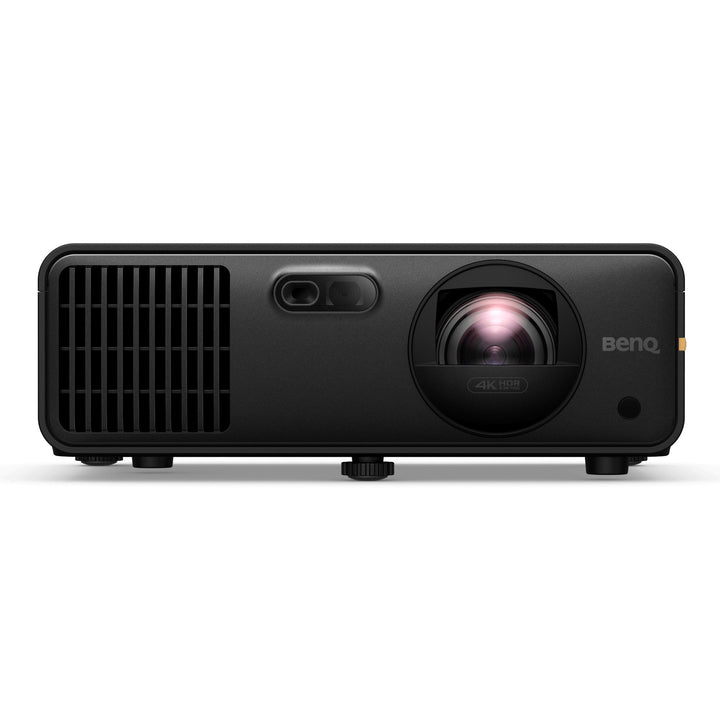


BenQ AK700ST 4K 4000lm Laser Short Throw Golf Simulator Projector
PRODUCT DESCRIPTION
BenQ AK700ST 4K 4000lm Laser Short Throw Golf Simulator Projector (AK700ST) - Local Warranty Support
Built for the Golf Simulator Bay, Not Adapted to It
The AK700ST is sold by BenQ as a golf simulation projector, and every design choice points at an enclosed hitting bay: a 0.69 to 0.83 short throw so the unit clears the swing plane, 4,000 ANSI lumens to hold a bright image on an impact screen, a 102.5% offset that lets it sit high and fire down onto a full-height screen, and 3D keystone with rotation correction for the awkward mounting angles a bay forces on you. Commercial simulator rooms, golf clubs, clubhouse lounges and residential bays in Singapore all face the same constraint - the projector cannot be where the ball goes - and short throw is the answer.
Laser Light Source: 20,000 Hours, No Lamp to Change
A laser light source rated at 20,000 hours removes the biggest recurring cost in a commercial simulator: lamp modules. A bay that runs ten hours a day, seven days a week, is still inside that rating after five years, so there is no lamp budget line, no stock of spares and no session cancelled because a lamp failed mid-round. Laser also reaches full brightness instantly, which matters when a bay is switched on and off between bookings, and it holds colour far more consistently over its life than a lamp does - useful when ball flight and terrain are being read off the image.
Auto Focus, Auto Screen Fit and 1.2x Zoom for Fast Commissioning
Getting a projector square to an impact screen from a high, angled mount is the slow part of building a bay. The AK700ST has auto focus and auto screen fit, plus 3D keystone correction of +/-30 degrees vertically, horizontally and in rotation, and a 1.2x zoom lens. That combination means the bracket does not have to be positioned to the millimetre: mount it roughly, let the projector find the screen edges, and fine-tune. For an installer commissioning several bays it is the difference between a morning and a day.
4K Detail With 95% Rec.709 and 3,000,000:1 Contrast
Native 4K UHD (3840x2160) at 4,000 ANSI lumens with a published 3,000,000:1 FOFO contrast ratio and 95% Rec.709 coverage gives simulator software the resolution to render fairway texture, grain direction and distance markers legibly at close viewing range - a player stands two or three metres from the screen, so pixel structure and colour accuracy show far more than they would in a cinema. Two HDMI 2.0b inputs with HDCP 2.2 take the simulator PC and a second source, USB Type-C carries DisplayPort video, and RS-232 supports room control.
BenQ AK700ST Datasheet — Technical Specifications
General
| Product | BenQ AK700ST 4K Short Throw Laser Golf Simulation Projector |
| Part Number (SKU) | AK700ST |
| Projection System | DLP |
| Light Source | Laser |
| Platform | None - fed from a simulator PC or media source over HDMI |
| Local Warranty (Singapore) | Supplied by SourceIT with GST invoice and local warranty support |
Optics & Light Source
| Light Source Life | 20,000 hrs |
| Throw Ratio | 0.69 ~ 0.83 |
| Zoom Ratio | 1.2x |
| Projection Offset | 102.5% (full height) |
| Keystone Adjustment | 3D, vertical +/-30 degrees; horizontal +/-30 degrees; rotation +/-30 degrees |
Picture
| Native Resolution | 4K UHD (3840 x 2160) |
| Brightness | 4,000 ANSI lumens |
| Contrast Ratio | 3,000,000:1 (FOFO) |
| Display Colour | 30-bit (1.07 billion colours) |
| Colour Gamut | 95% Rec.709 coverage |
Connectivity
| HDMI | x2 - HDMI-1 (2.0b / HDCP2.2), HDMI-2 (2.0b / HDCP2.2) |
| USB Type-A | x2 - USB Type A-1 (2.0 / power supply 1.5A / service) |
| USB Type-C | x1 - DisplayPort with PD out 5V/1A |
| RS-232 | x1 |
Audio
| Speaker | 10W |
| Noise Level | 32 dB (typical) / 29 dB (Eco) |
Physical & Environmental
| Dimensions (W x H x D) | 303.5 x 112.4 x 234.5 mm |
| Net Weight | 3.4 kg +/- 100g |
Power
| Power Consumption | 212W (Normal, 110V) |
| Standby Power | <0.5W |
Specifications are taken from BenQ's published product data for this model. Where BenQ does not publish a figure for this exact model it has been left out rather than estimated.
Compatibility & Installation
Throw distance and screen size in a golf bay
Throw ratio is 0.69 to 0.83 with 1.2x zoom, so throw distance equals image width multiplied by that ratio. Working from BenQ's published figures: a 100-inch 16:9 image is 2.21 metres wide and needs roughly 1.5 to 1.8 metres of throw distance; a 120-inch image is 2.66 metres wide and needs roughly 1.8 to 2.2 metres; a 150-inch image is 3.32 metres wide and needs roughly 2.3 to 2.8 metres. Put the other way round, a projector mounted 2.5 metres back from the impact screen produces an image between roughly 3.0 and 3.6 metres wide, which is about 136 to 164 inches on the 16:9 diagonal. Most simulator screens are wider than 16:9, so confirm the software's output aspect ratio before fixing the mount.
Mounting in an enclosure
Projection offset is 102.5% full height, so the projector can be ceiling-mounted above and slightly ahead of the hitting position and still fill a full-height screen without extreme tilt. 3D keystone gives +/-30 degrees vertical, +/-30 degrees horizontal and +/-30 degrees rotation, which covers an off-centre or rotated bracket in a tight enclosure. Auto focus and auto screen fit handle the final alignment. Allow clearance for the intake and exhaust so the unit is not enclosed in netting or acoustic wadding.
What it connects to
Two HDMI 2.0b inputs with HDCP 2.2 take the simulator PC and a second source such as a media player or a laptop for coaching video. USB Type-C carries DisplayPort video with 5V/1A power out. Two USB Type-A ports cover media, service and a 1.5A power supply for a small dongle. RS-232 allows the projector to be driven from a room controller so the bay powers up and down with the booking system.
Network and content
There is no built-in smart platform on this model; the image comes from the simulator PC over HDMI. Control is over RS-232.
Related models
For an even shorter throw in a very tight bay, see the BenQ LK830ST at a fixed 0.496 throw ratio. For a brighter, higher-specified installation projector see the BenQ LK936ST, and for a 1080p simulator option the BenQ AH500ST.
Package Contents & BenQ Golf Simulation Range
In the box
- BenQ AK700ST projector
- Remote control
- Power cord
- Quick start guide
Package contents follow BenQ's product data for this model; items not listed by BenQ are not claimed here.
BenQ golf simulation range
| Model | Key specification |
| AK700ST (this listing) | 4K UHD, 4,000 lm, laser, 0.69-0.83 throw, 1.2x zoom |
| LK830ST | 4K UHD, 4,000 lm, laser, fixed 0.496 throw |
| LK936ST | 4K UHD, laser, short throw installation |
| AH500ST | 4,000 lm, short throw golf simulator |
Datasheet & Downloads
SourceIT can email the current data sheet revision together with a quotation, including throw distance tables worked to your bay dimensions and impact screen size, plus mounting accessory options.
Frequently Asked Questions — BenQ AK700ST
What light source does it use and what does that mean for a commercial bay?
Laser, rated by BenQ at 20,000 hours. There is no lamp module, so there is no consumable to stock, no replacement cost per bay and no session lost to a lamp failure. A bay open ten hours a day, seven days a week, uses about 3,650 hours a year, so the rating covers roughly five years of that duty before any decline is expected.
How does laser compare with lamp and LED on this range?
Lamp models such as the MW560C are rated at 6,000 hours in Normal mode and use a replaceable module. LED models such as the TK705i are rated at 20,000 hours Normal and 30,000 hours ECO but top out at 3,000 lumens. Laser, as here, combines the 20,000 hour solid-state rating with the 4,000 lumen output a lit simulator bay needs - which is why it is the light source used across BenQ's simulation projectors.
How far back from the impact screen does it mount?
Throw ratio is 0.69 to 0.83 with 1.2x zoom. A 120-inch 16:9 image is 2.66 metres wide, so it needs roughly 1.8 to 2.2 metres of throw distance. At a fixed 2.5 metre mount the image is roughly 3.0 to 3.6 metres wide. Confirm your simulator software's output aspect ratio before finalising the bracket position.
Will it clear the swing?
That depends on your bay, but the short throw ratio and the 102.5% full-height offset are what let the unit be mounted high and well forward of the hitting position rather than behind the player where a standard-throw projector would have to sit. Measure your ceiling height and swing arc before committing to a mounting point.
Is 4,000 lumens enough for a room with lights on?
4,000 ANSI lumens is the output BenQ specifies for this simulation model and is intended for a bay with normal room lighting rather than a blacked-out theatre. Impact screen material and gain will affect the result, so tell us your screen and we will sense-check it.
How do I connect the simulator PC?
Over either of the two HDMI 2.0b inputs, which are HDCP 2.2. A second source can stay connected on the other HDMI port, and USB Type-C will take DisplayPort video from a laptop. RS-232 is available for control integration.
How is it different from the LK830ST?
Both are 4K, 4,000 lumen laser models. The AK700ST has a 0.69 to 0.83 throw ratio with 1.2x zoom and 3D keystone including rotation; the LK830ST has a fixed 0.496 throw ratio for even tighter bays, 2D keystone, and adds a LAN port and a 15W speaker.
Does it come with a Singapore warranty and a GST invoice?
Yes. Every unit sold by SourceIT is supplied with local Singapore warranty support and a GST invoice. BenQ's projector warranty terms vary by model and by light source, and the laser light engine is normally covered on its own separate terms, so please ask us to confirm both in writing with your quotation.