
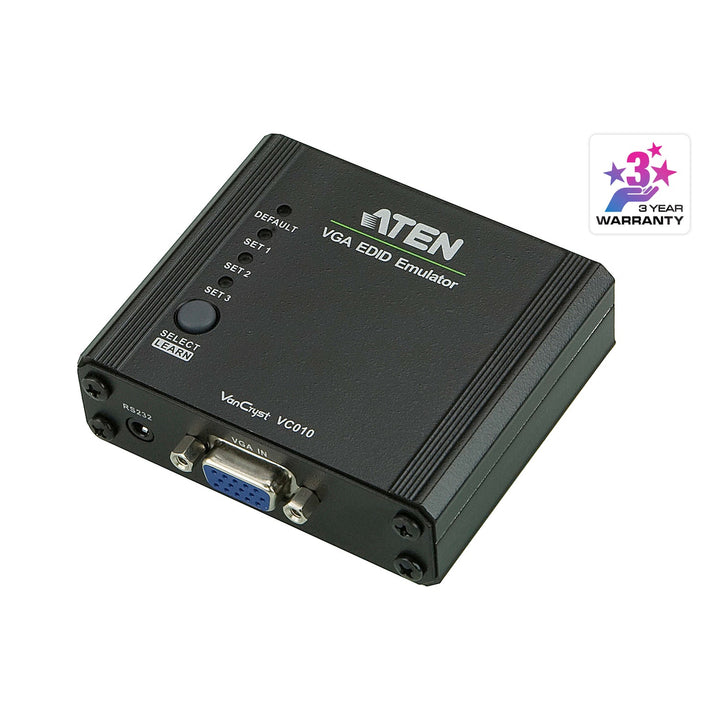


ATEN VC010 VGA EDID Emulator with Programmer
PRODUCT DESCRIPTION
ATEN VC010 VGA EDID Emulator with Programmer - 2 Years Local Warranty
Keep Sources at the Right Resolution
The VC010 sits between a VGA source and the downstream switch, extender or display and presents a stable EDID to the source. PCs and media players keep their resolution and window layout even when displays are switched, turned off or disconnected.
VGA up to 1920 x 1200
Handles VGA video up to WUXGA 1920 x 1200 with hot-plugging and wide screen support, and an LED shows video source status.
Three EDID Modes, Including Full Programming
Choose Default mode, Learning mode to copy the EDID of a connected display, or Programming mode, where ATEN's EDID Wizard software on a PC writes a custom EDID via the supplied RS-232 configuration cable.
Flexible Power
A DC jack and supplied USB-to-DC power cord power the unit (0.11 W), and ATEN also supports non-powered operation. The compact metal housing measures 7.90 x 7.76 x 2.45 cm.
Specifying EDID management for a control room or signage project? Email sales@sourceit.com.sg for configuration advice and a project quote.
ATEN VC010 Datasheet — Technical Specifications
General
| Product Name | ATEN VGA EDID Emulator with Programmer |
| Model | VC010 |
| Order Code | VC010-AT |
| Local Warranty (Singapore) | 2 years carry-in warranty |
Connectors
| Input | 1 x HDB-15 Female (blue) |
| Output | 1 x HDB-15 Female (blue) |
| Impedance | 75 ohm |
Video
| Max. Resolution | WUXGA 1920 x 1200 |
| Signaling Rate | 2.25 Gbits (1080p) |
| Features | Hot-plugging, wide screen support |
EDID
| EDID Modes | Default / Learning / Programming (EDID Wizard via RS-232) |
| LED | Video source indication |
Power
| Power | DC jack (USB-to-DC power cord supplied); non-powered operation supported |
| Power Consumption | 0.11 W |
Physical
| Housing | Metal |
| Weight | 0.15 kg |
| Dimensions | 7.90 x 7.76 x 2.45 cm |
Compatibility & Applications
Typical Devices
PCs, servers, media players and signage players with VGA outputs, feeding VGA switches, KVM switches, extenders, splitters and displays.
Typical Use
Control rooms, digital signage, KVM and AV switching systems and test benches where the source must hold a fixed resolution.
Selection Tip
Use Learning mode for a quick copy of your display's EDID, or Programming mode when you need a custom resolution that no attached display reports.
Package Contents & ATEN EDID Emulator Ordering Information
In the Box
1 x VC010 VGA EDID Emulator with Programmer, 1 x RS-232 Configuration Cable (1.8 m), 1 x USB to DC Power Cord, 1 x User Instructions.
ATEN EDID Emulator Models
| Model | Key feature |
| VC010 (this listing) | VGA EDID emulator with programmer |
| VC060 | DVI EDID emulator with programmer |
| VC080 | 4K HDMI EDID emulator with programmer |
| VC081A | True 4K HDMI EDID emulator adapter, bus-powered |
Datasheet & Downloads
| Datasheet | VC010 / VC060 / VC080 Datasheet (PDF) |
| User manual | VC010 / VC060 / VC080 User Manual (PDF) |
| Quick start guide | VC010 / VC060 / VC080 Quick Start Guide (PDF) |
| ATEN product page | VC010 on aten.com |
Need a PDF sent directly? Email sales@sourceit.com.sg quoting VC010-AT.
Frequently Asked Questions — ATEN VC010
What does an EDID emulator do?
It presents a fixed display identity (EDID) to the source, so the source does not change resolution or rearrange windows when the display is switched, powered off or unplugged.
How do I program a custom EDID?
Connect the supplied RS-232 configuration cable to a PC and use ATEN's EDID Wizard software in Programming mode.
Does it need power?
A USB-to-DC power cord is supplied for the DC jack; ATEN also supports non-powered operation.
What is the maximum resolution?
WUXGA 1920 x 1200
What warranty do I get?
2 years local carry-in warranty. Supplied by SourceIT with a GST invoice.


