
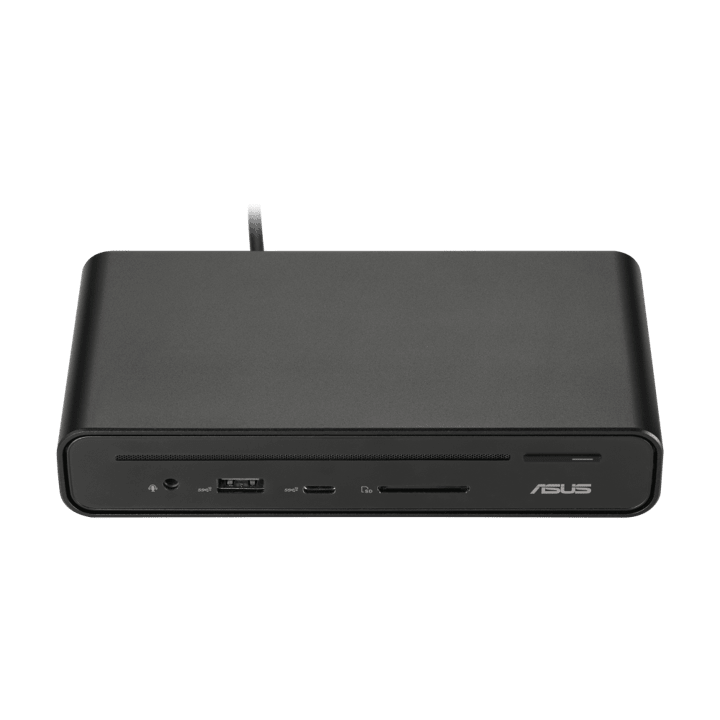


ASUS Triple Display USB-C Dock DC300
PRODUCT DESCRIPTION
ASUS Triple Display USB-C Dock DC300 (90XB08CN-BDS020) - 1 Year Local Warranty
A USB-C Dock That Turns One Cable into a Three-Monitor Desk
The ASUS Triple Display USB-C Dock DC300 connects to a laptop through a single USB-C cable and fans out to up to three external monitors, Gigabit Ethernet, USB peripherals and an SD card reader — a desktop docking accessory rather than a laptop, so this listing focuses on ports, power delivery and display support rather than a CPU-and-memory specification table. It is built for general-purpose USB-C laptops running Windows or macOS, not restricted to a specific ASUS laptop family.
Up to Three External 4K Displays
Video output is provided through a dedicated DisplayPort 1.4 port, an HDMI 2.0 port and a USB-C port that also carries DisplayPort Alt Mode — three independent video outputs in total. ASUS documents each output individually at up to 3840 x 2160 (4K UHD) at 60Hz. Actual triple-display behaviour at full 4K on every screen simultaneously depends on the host laptop's own USB-C/Thunderbolt controller and its GPU's total display bandwidth, so if you are planning a genuine three-monitor 4K setup, check your laptop's own documented maximum display output before ordering, or email us your laptop model and we will confirm.
150W Power Delivery for Laptop Charging
The DC300 ships with a 150W (20V/7.5A) power adapter, supplying the dock's own ports and charging a connected laptop through the same USB-C cable used for video and data — removing the need for a separate laptop charger at the desk for most USB-C laptops within that power budget.
USB Ports, Gigabit Ethernet and an SD Card Reader
Connectivity covers one USB-C 3.2 Gen 2 port (10Gbps), one USB-A 3.2 Gen 2 port (10Gbps) and two USB-A 3.2 Gen 1 ports (5Gbps) for keyboards, mice, external drives and other desk peripherals, plus a Gigabit Ethernet port for a wired network connection independent of office Wi-Fi, and an SD card reader for photographers, videographers or anyone regularly pulling files off a camera card. A 3.5mm audio combo jack and a Kensington lock slot round out the port selection.
Compact Desk Footprint with an Included Stand
The dock itself measures 160 x 80 x 32 mm and weighs 514g, small enough to sit unobtrusively on a desk beside a laptop, and ships with a small stand (95g) for positioning the dock at an angle. Its plastic-and-metal construction and black finish are styled for a corporate office desk or a home workstation rather than a specialist studio rig.
Supplied Locally, with GST Invoice and Singapore Warranty
SourceIT supplies the ASUS Triple Display USB-C Dock DC300 (90XB08CN-BDS020) with a full GST invoice and local Singapore warranty support.
Not sure whether your laptop's USB-C port supports the DC300's full three-display, 150W charging feature set? Email sales@sourceit.com.sg with your laptop model and we will confirm compatibility before you order.
ASUS DC300 Datasheet — Technical Specifications
General
| ASUS Product Name | ASUS Triple Display USB-C Dock DC300 |
| Part Number (PN) | 90XB08CN-BDS020 |
| Product Type | USB-C docking station (not a laptop) |
| Host Compatibility | USB-C laptops running Windows 10 or later, or macOS 13 or later |
| Local Warranty (Singapore) | 1 Year, included with every unit supplied by SourceIT, together with a GST invoice |
Ports
| Upstream (to Laptop) | 1 x USB-C 3.2 Gen 2, DisplayPort 1.4 Alt Mode, Power Delivery |
| USB-C (Downstream) | 1 x USB-C 3.2 Gen 2, 10Gbps, 5V/3.0A |
| USB-A | 1 x USB-A 3.2 Gen 2 (10Gbps, 5V/2.4A), 2 x USB-A 3.2 Gen 1 (5Gbps) |
| Video Output | 1 x DisplayPort 1.4, 1 x HDMI 2.0 |
| Wired LAN | 1 x RJ-45 Gigabit Ethernet |
| Card Reader | 1 x SD card reader |
| Audio | 1 x 3.5 mm combo audio jack |
| Security | 1 x Kensington lock slot |
| Power Input | 1 x DC jack (4.5mm) |
Power
| Power Adapter Supplied | 150W, 20V DC / 7.5A |
| Laptop Charging | Yes, via Power Delivery through the upstream USB-C connection, using the supplied 150W adapter |
Display Support
| Maximum External Displays | Up to 3 (DisplayPort, HDMI and USB-C outputs combined) |
| Per-Output Maximum Resolution | 3840 x 2160 (4K UHD) at 60Hz, each output individually |
| Simultaneous Triple-4K Output | Dependent on host laptop's USB-C/Thunderbolt controller and GPU display bandwidth — check your laptop's own specifications or ask us to confirm |
Physical
| Dimensions (Dock) | 160 x 80 x 32 mm |
| Weight (Dock) | 514 g ± 5 g |
| Weight (Stand) | 95 g ± 5 g |
| Cable Length | 65 cm |
| Material | Plastic, metal |
| Colour | Black |
| Package Contents | DC300 dock, stand, 150W power adapter and power cord, user documentation |
Connectivity & Setup
Confirming Triple-Display Support Before You Buy
Getting three independent 4K displays working at once through a single USB-C connection depends on the laptop's own video output capability, not on the dock alone — most integrated laptop GPUs can drive two or three external 4K displays at reduced refresh rate or via DisplayPort's Multi-Stream Transport (MST) feature, but not every laptop and not every combination of resolutions. If a genuine three-screen 4K@60Hz setup is the goal, check your laptop's documented maximum external display output first, or email us your laptop model and we will confirm what the DC300 will actually deliver on it.
Setting Up the Three Video Outputs
The DisplayPort 1.4 and HDMI 2.0 ports are each a direct, independent display connection, while the USB-C downstream port carries DisplayPort Alt Mode for a third monitor with a USB-C or USB-C-to-DisplayPort cable. Mixing display types — for example, two monitors on DisplayPort and HDMI plus a third laptop-style USB-C monitor — is the most straightforward way to reach three displays without depending on MST daisy-chaining.
Wired Network and Storage
The built-in Gigabit Ethernet port gives a faster, more stable connection than most office Wi-Fi for video calls or large file transfers, and the SD card reader is a genuine convenience for anyone regularly offloading photos or video from a camera without carrying a separate card reader.
Charging Through the Dock
The supplied 150W adapter both powers the dock's own ports and charges a connected laptop through the upstream USB-C cable via Power Delivery. Most USB-C laptops charge normally within this power budget; a small number of high-draw gaming or workstation laptops may require more power than the dock delivers for full-speed charging under heavy load — check your laptop's own charger wattage if that is a concern.
Package Contents & Ordering Information
In the Box
ASUS Triple Display USB-C Dock DC300, stand, 150W power adapter and power cord, user documentation.
Related Docking Accessories in Our Catalogue
SourceIT also carries the ASUS SimPro Dock 2, a Thunderbolt 3 dock built specifically for ASUS's own ExpertBook, Pro and BR-series laptops with a smart card reader for corporate login. Email sales@sourceit.com.sg with your laptop model and how many monitors you need to run and we will recommend the right dock.
| Triple Display USB-C Dock DC300 (this listing) | USB-C — up to triple 4K@60Hz display output — 150W adapter, Power Delivery — Gigabit Ethernet, SD card reader |
| SimPro Dock 2 | Thunderbolt 3 — dual 4K digital display output — 180W adapter, laptop charging — Gigabit Ethernet, smart card reader |
Choosing Between the DC300 and the SimPro Dock 2
The DC300 is the more broadly compatible choice, supporting any USB-C laptop on Windows 10+ or macOS 13+, with up to three external displays and an SD card reader. The SimPro Dock 2 is purpose-built for ASUS ExpertBook, Pro and BR-series laptops over Thunderbolt 3, with a smart card reader for corporate smart-card login but display support capped at two external monitors. Choose the DC300 if you need three screens or are not on an ASUS ExpertBook; choose the SimPro Dock 2 if smart card login is a requirement and your laptop is an ASUS ExpertBook with Thunderbolt 3.
Datasheet & Downloads
ASUS hosts a current specifications page for the DC300 on its Singapore site, which is live and describes this exact model.
| ASUS Singapore specifications page | ASUS Triple Display USB-C Dock DC300 — Full Specifications |
For the PDF datasheet or user manual for the DC300 (90XB08CN-BDS020), email sales@sourceit.com.sg quoting 90XB08CN-BDS020 and we will send you the current files directly.
Frequently Asked Questions — ASUS Triple Display USB-C Dock DC300
Will this work with any USB-C laptop?
It is built as a general-purpose dock for USB-C laptops running Windows 10 or later or macOS 13 or later — broader compatibility than ASUS's own ExpertBook-focused SimPro Dock 2. Full triple-display and full-power charging still depend on your laptop's own USB-C controller and charger wattage, so email us your model if you want that confirmed first.
Can I really run three 4K monitors at once?
Each of the three video outputs is individually rated up to 4K@60Hz by ASUS, but whether your laptop can drive all three simultaneously at full 4K depends on its own GPU and USB-C/Thunderbolt controller, not on the dock alone. Check your laptop's documented maximum external display output, or ask us before ordering if a genuine three-screen 4K setup is the goal.
Does it charge my laptop through the dock?
Yes — the supplied 150W adapter charges a connected laptop via Power Delivery through the same USB-C cable used for video and data, removing the need for a separate laptop charger at the desk for most USB-C laptops.
Does it have an SD card reader?
Yes, a built-in SD card reader is fitted, useful for offloading photos or video from a camera directly.
What is the difference between this and your SimPro Dock 2?
The DC300 works with any compatible USB-C laptop and supports up to three external displays. The SimPro Dock 2 is built specifically for ASUS ExpertBook, Pro and BR-series laptops over Thunderbolt 3, adds a smart card reader for corporate login, but is limited to two external displays.
Is Ethernet built in?
Yes, a Gigabit RJ-45 Ethernet port is built into the dock.
Does it come with a Singapore warranty and a GST invoice?
Yes. Every ASUS Triple Display USB-C Dock DC300 sold by SourceIT comes with local Singapore warranty support and a GST invoice.
We Also Recommend


