
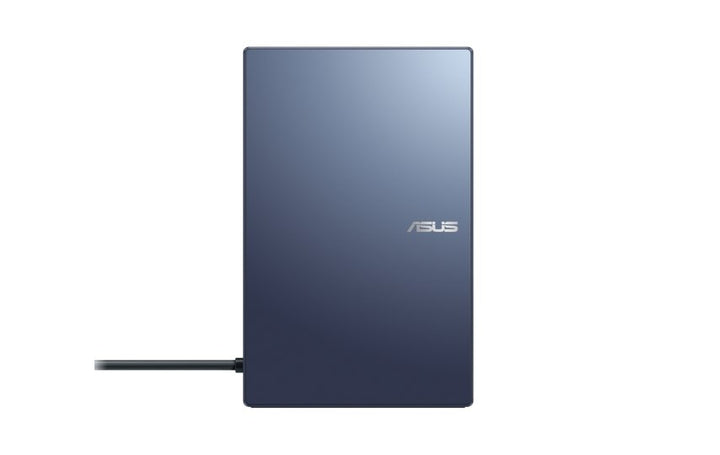


ASUS SimPro Dock 2
PRODUCT DESCRIPTION
ASUS SimPro Dock 2 (90NX0460-P00070) - 1 Year Local Warranty
A Thunderbolt Docking Station Built for the ASUS ExpertBook and Pro Lines
The ASUS SimPro Dock 2 is a single-cable docking station designed primarily around ASUS's own ExpertBook (B1–B9 series), Pro and BR-series business laptops, connecting to the host laptop over a Thunderbolt 3 upstream port and fanning out to a full desk setup — dual external displays, wired Ethernet, USB peripherals and a smart card reader — through one cable. It is a desktop docking solution rather than a laptop, so this listing focuses on ports, power delivery and display support rather than a CPU-and-memory specification table.
Single-Cable Connection Over Thunderbolt 3
The dock connects to the host laptop through a single Thunderbolt 3 Type-C cable, carrying video, data and charging power together. That single connection is what removes the daily plug-in-plug-out routine of a docked desk setup — arrive, connect one cable, and monitors, Ethernet, keyboard, mouse and any other desk peripherals are all live without touching them individually.
Dual 4K Display Support
Display output covers a Thunderbolt 3 port, two DisplayPort 1.4 outputs, a standard HDMI 2.0 port and a VGA port for older projectors or monitors. ASUS documents dual external 4K (3840 x 2160) output over the digital outputs, or a single external 4K output over HDMI alone; the VGA port is limited to Full HD (1920 x 1080), as is normal for the analogue VGA standard. This gives a genuinely flexible mix — two current 4K monitors on the digital ports, or one modern display plus a legacy VGA projector for a meeting room.
180W Power Adapter for Laptop Charging Through the Dock
The SimPro Dock 2 is supplied with an ASUS 180W power adapter, which both powers the dock's own ports and charges the connected laptop through the single Thunderbolt cable — so a compatible ASUS laptop does not need its own separate charger at the desk. ASUS does not publish a specific USB-C Power Delivery wattage figure to the host laptop separately from the adapter's total 180W rating on the SimPro Dock 2's own documentation, so we state the adapter rating here rather than an unconfirmed per-port charging figure.
USB Ports and Fast Data Transfer
Three USB 3.0 Type-A downstream ports and one USB Type-C downstream port cover keyboards, mice, external drives and other desk peripherals, with the USB 3.0 ports rated for data transfer up to 10Gbps. A Gigabit Ethernet (10/100/1000M) port gives a fast, stable wired network connection independent of office Wi-Fi, and a built-in smart card reader supports corporate smart-card login where that is part of your organisation's security policy.
Supplied Locally, with GST Invoice and Singapore Warranty
SourceIT supplies the ASUS SimPro Dock 2 (90NX0460-P00070) with a full GST invoice and local Singapore warranty support.
Not sure whether your laptop's Thunderbolt or USB-C port supports the SimPro Dock 2's full charging and display feature set? Email sales@sourceit.com.sg with your laptop model and we will confirm compatibility before you order.
ASUS SimPro Dock 2 Datasheet — Technical Specifications
General
| ASUS Product Name | ASUS SimPro Dock 2 |
| Part Number (PN) | 90NX0460-P00070 |
| Product Type | Thunderbolt 3 docking station (not a laptop) |
| Host Compatibility | ASUS ExpertBook B1–B9 series, ASUS Pro series, ASUS BR series laptops with a Thunderbolt 3-capable USB-C port |
| Local Warranty (Singapore) | 1 Year, included with every unit supplied by SourceIT, together with a GST invoice |
Ports
| Upstream (to Laptop) | 1 x Thunderbolt 3, USB Type-C |
| USB Type-A | 3 x USB 3.0 Type-A, downstream, up to 10Gbps |
| USB Type-C (Downstream) | 1 x USB Type-C, downstream |
| Video Output | 1 x Thunderbolt 3, 2 x DisplayPort 1.4, 1 x HDMI 2.0, 1 x VGA |
| Wired LAN | 1 x Gigabit Ethernet (10/100/1000M) |
| Audio | 1 x microphone-in, 1 x audio-out |
| Card Reader | 1 x smart card reader |
Power
| Power Adapter Supplied | ASUS 180W AC adapter |
| Laptop Charging | Yes, through the Thunderbolt 3 upstream connection using the supplied 180W adapter; a specific per-port Power Delivery wattage is not published by ASUS separately from the adapter rating |
Display Support
| Dual External Output (digital) | 3840 x 2160 (4K UHD, 16:9) on each of two displays |
| HDMI Single External Output | 3840 x 2160 (4K UHD, 16:9) |
| VGA Single External Output | 1920 x 1080 (Full HD, 16:9) |
Physical
| Dimensions (W x D x L) | 99 x 161.5 x 40.6 mm |
| Weight | 650 g |
| Package Contents | SimPro Dock 2, ASUS 180W power adapter and power cord, Thunderbolt 3 cable, user documentation |
Connectivity & Setup
Confirming Thunderbolt 3 Compatibility Before You Buy
The SimPro Dock 2 is built around a Thunderbolt 3 upstream connection, and ASUS documents it as compatible with its own ExpertBook B1–B9, Pro and BR-series laptops. Not every USB-C port is a Thunderbolt port — some USB-C ports carry data and charging only, without the display and full-bandwidth data features Thunderbolt adds — so before ordering, confirm your laptop's specific port supports Thunderbolt 3 or Thunderbolt 4 (Thunderbolt 4 ports accept a Thunderbolt 3 dock). Email us your laptop model and we will check compatibility against ASUS's documentation.
Setting Up Dual 4K Monitors
Two external 4K displays are supported through the dock's Thunderbolt 3, DisplayPort and HDMI outputs in combination — ASUS documents dual-display 4K output through the digital ports as a set, so the exact pairing of ports used depends on how many of the digital outputs your monitors accept. For a legacy VGA-only projector or monitor, the VGA port is available as a third option, capped at Full HD.
Wired Network and Smart Card Login
The built-in Gigabit Ethernet port gives a faster and more stable connection than most office Wi-Fi, useful for video calls, large file transfers or any network-dependent business application. The smart card reader is there specifically for organisations using smart-card-based login as part of a corporate security policy — for most home or small-office users this port will simply go unused, and that is expected.
One-Cable Docking in Daily Use
Once set up, daily use is a single Thunderbolt 3 cable connect and disconnect at the laptop end — monitors, Ethernet, USB peripherals and charging all come up together, and unplugging that one cable disconnects everything cleanly when it is time to pack up and leave the desk.
Package Contents & Ordering Information
In the Box
ASUS SimPro Dock 2, ASUS 180W power adapter and power cord, Thunderbolt 3 cable, user documentation.
Related Docking Accessories in Our Catalogue
SourceIT also carries the ASUS Triple Display USB-C Dock DC300, a USB-C (not Thunderbolt-specific) dock aimed at a broader range of USB-C laptops with triple-display support. Email sales@sourceit.com.sg with your laptop model and how many monitors you need to run and we will recommend the right dock.
| SimPro Dock 2 (this listing) | Thunderbolt 3 — dual 4K digital display output — 180W adapter, laptop charging — Gigabit Ethernet, smart card reader |
| Triple Display USB-C Dock DC300 | USB-C — up to triple 4K@60Hz display output — 150W adapter, Power Delivery — Gigabit Ethernet, SD card reader |
Choosing Between the SimPro Dock 2 and the DC300
The SimPro Dock 2 is built specifically around ASUS's own ExpertBook, Pro and BR-series laptops over Thunderbolt 3, with a smart card reader for corporate login and dual 4K display support. The DC300 is a more general-purpose USB-C dock supporting up to three external displays and a broader range of Windows and macOS laptops, without the Thunderbolt-specific or smart-card requirements. If your laptop is an ASUS ExpertBook and two displays is enough, the SimPro Dock 2 is the closer-matched accessory; if you need three displays or are not on an ASUS ExpertBook, the DC300 is the more flexible choice.
Datasheet & Downloads
ASUS's current Singapore accessories pages do not carry a dedicated product or specification page for the SimPro Dock 2 under the docks and dongles category at present. The specifications in this listing are drawn from ASUS's own published SimPro Dock 2 technical documentation.
For the PDF datasheet, user manual or driver downloads for the SimPro Dock 2 (90NX0460-P00070), email sales@sourceit.com.sg quoting 90NX0460-P00070 and we will send you the current files directly.
Frequently Asked Questions — ASUS SimPro Dock 2
Will this work with any USB-C laptop?
Not with full functionality. The SimPro Dock 2 is built around a Thunderbolt 3 upstream connection and is documented by ASUS specifically against its own ExpertBook B1–B9, Pro and BR-series laptops. A laptop with a data-and-charging-only USB-C port, without Thunderbolt, will not get the full display and data bandwidth this dock is designed for. Email us your laptop model before ordering to confirm compatibility.
How many monitors can I connect, and at what resolution?
ASUS documents dual external 4K (3840 x 2160) output through the digital video ports, a single external 4K output if using HDMI alone, or Full HD through the VGA port for older equipment.
Does it charge my laptop through the dock?
Yes — the supplied 180W ASUS adapter powers both the dock and charges a connected laptop through the single Thunderbolt 3 cable, so a separate laptop charger is not needed at the docked desk. ASUS does not publish a specific per-port charging wattage figure separate from the adapter's overall rating.
Does it include a smart card reader?
Yes, a built-in smart card reader is fitted, intended for organisations using smart-card-based corporate login.
What data transfer speed do the USB ports support?
The USB 3.0 Type-A ports are rated for data transfer up to 10Gbps.
What is the difference between this and your Triple Display USB-C Dock DC300?
The SimPro Dock 2 is built specifically for ASUS ExpertBook, Pro and BR-series laptops over Thunderbolt 3, with dual 4K display support and a smart card reader. The DC300 is a more general-purpose USB-C dock for a broader range of Windows and macOS laptops, supporting up to three external displays but without the smart-card or Thunderbolt-specific design.
Is Ethernet built in?
Yes, a Gigabit (10/100/1000M) Ethernet port is built into the dock.
Does it come with a Singapore warranty and a GST invoice?
Yes. Every ASUS SimPro Dock 2 sold by SourceIT comes with local Singapore warranty support and a GST invoice.


