
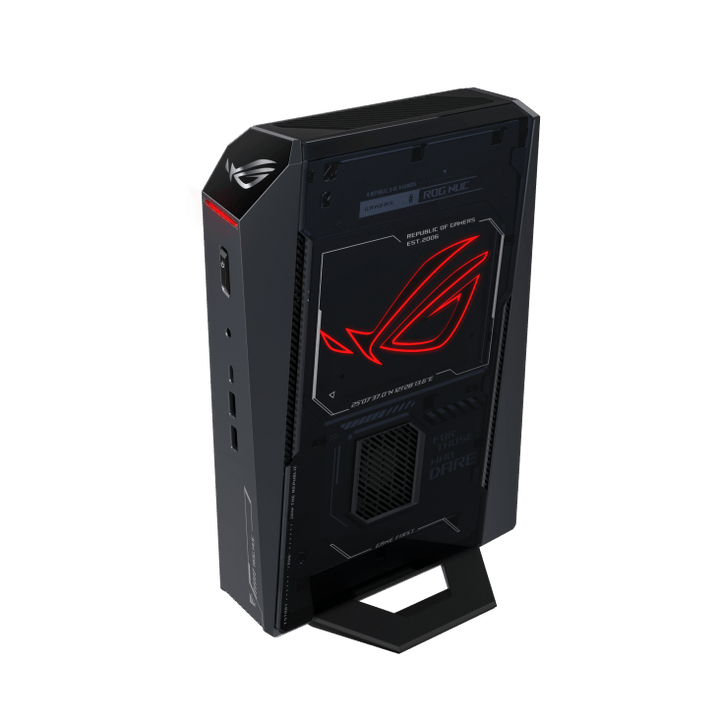


ASUS ROG NUC U9/512GB/32GB/RTX 5080 RNUC15JNK9X289A0
PRODUCT DESCRIPTION
ASUS ROG NUC U9 / RTX 5080 (RNUC15JNK9X289A0) - 3 Years Local Warranty
Who the ROG NUC U9 / RTX 5080 Configuration Is For
This is the top-specification ASUS ROG NUC (2025), sold under the part number RNUC15JNK9X289A0. It pairs an Intel Core Ultra 9 275HX with an NVIDIA GeForce RTX 5080 Laptop GPU (16 GB GDDR7) and 32 GB of DDR5-6400 memory in a roughly 3-litre chassis. It suits three kinds of Singapore buyer: a gamer who wants the fastest GPU available in this chassis without moving to a full tower; a streamer or hybrid creator who needs enough CPU cores and GPU headroom to encode and game at the same time; and anyone deploying compact high-performance PCs into a space-constrained office or studio where a tower simply will not fit under the desk.
The unit is a complete, pre-built system — Windows 11 Home, 32 GB DDR5-6400 memory and a 1 TB NVMe SSD are all fitted and configured before it ships, so there is no assembly step between unboxing and first login.
CPU: Intel Core Ultra 9 275HX in Detail
The Core Ultra 9 275HX runs 24 cores — 8 Performance and 16 Efficient — as 24 threads, with 36 MB of Intel Smart Cache and a maximum turbo of 5.4 GHz. Intel's hybrid design on this generation does not run Hyper-Threading on the Performance cores, so thread count tracks core count exactly. A built-in Intel AI Boost NPU contributes up to 13 TOPS of additional AI compute, which is below Microsoft's 40 TOPS bar for Copilot+ PC certification but still useful for background AI tasks that offload from the GPU.
GPU: NVIDIA GeForce RTX 5080 Laptop GPU in Detail
The discrete GPU is the RTX 5080 Laptop GPU, NVIDIA's flagship mobile-class Blackwell part: 16 GB of GDDR7 memory, 7,680 CUDA cores and 1,334 AI TOPS. NVIDIA publishes a configurable TGP of up to 175 W for this GPU tier; ASUS has not broken out the specific wattage configured inside this chassis. That is enough compute for native 4K gaming with ray tracing and DLSS 4 frame generation running, and for GPU-accelerated creative work such as video encoding, 3D rendering previews and local AI model inference at a scale a laptop-class GPU can realistically handle.
Memory, Storage and the Expansion Slot Left Unused
32 GB of DDR5-6400 across two CSO-DIMM modules runs dual channel from the factory. A 1 TB M.2 2280 NVMe PCIe 4.0 SSD holds the operating system and initial application install, and a second M.2 2280 slot sits empty, rated for a further 1 TB to 4 TB PCIe 4.0 or PCIe 5.0 drive — worth knowing about before you assume 1 TB is a hard ceiling.
Built to MIL-STD 810H, Cooled by Three Fans and a Dual Vapor Chamber
Inside the compact chassis, three fans work against a dual vapor chamber to manage heat from the CPU and GPU together. ASUS has put the ROG NUC (2025) range through MIL-STD 810H durability testing — a military-derived standard for shock, vibration and environmental stress, useful shorthand for build quality rather than a noise or thermal-performance claim. The unit stands vertically on its included removable stand; ASUS documents that it can be laid on its side with the stand off, provided the exhaust vents stay clear.
Locally Supplied by SourceIT
SourceIT supplies the RNUC15JNK9X289A0 with a full GST invoice and local Singapore warranty support, backed by ASUS's 3-year manufacturer warranty for this range. Email sales@sourceit.com.sg with your intended use case — gaming, streaming, or a compact deployment — and we will confirm this is the right configuration before you order.
RNUC15JNK9X289A0 Datasheet — Technical Specifications
General
| ASUS Product Name | ASUS ROG NUC (2025), Full System — RTX 5080 configuration, 1TB SSD |
| SKU | RNUC15JNK9X289A0 / 90AS00I1-M001X0 |
| ASUS Part Number | 90AS00I1-M001X0 |
| Range | ASUS ROG NUC (2025), gaming mini PC with discrete GPU (NUC15JNK platform) |
| Form Factor | Approx. 3-litre compact desktop, vertical-standing chassis with removable stand |
| Chassis Colour | Black with illuminated ROG logo |
| Manufacturer Warranty | 3-Year Warranty (ASUS) |
| Local Warranty (Singapore) | Included with every unit supplied by SourceIT, together with a GST invoice |
Processor & Graphics
| Processor | Intel Core Ultra 9 Processor 275HX |
| Cores / Threads | 24 cores (8 Performance + 16 Efficient) / 24 threads |
| Cache | 36 MB Intel Smart Cache |
| Turbo Frequency | Up to 5.4 GHz max turbo |
| Neural Processing Unit | Intel AI Boost NPU, up to 13 TOPS (INT8) — below the 40 TOPS Microsoft threshold for Copilot+ PC features |
| Integrated Graphics | Intel Graphics (integrated, alongside the discrete GPU below) |
| Discrete Graphics | NVIDIA GeForce RTX 5080 Laptop GPU, 16 GB GDDR7 |
| GPU Compute | 7,680 CUDA cores |
| GPU Power | Up to 175 W configurable TGP (NVIDIA-published maximum for this GPU tier; exact figure for this chassis not broken out by ASUS) |
| GPU AI Performance | 1,334 AI TOPS |
Memory & Storage
| Memory Installed | 32 GB DDR5-6400 CSO-DIMM (2 x 16 GB, dual channel) |
| Maximum Memory (ASUS-published) | Up to 96 GB (48 GB DDR5-5600 SO-DIMM x 2) per ASUS's specification page — this figure is quoted at a different memory speed to the 32 GB DDR5-6400 kit fitted as standard, so confirm compatibility with SourceIT before planning an upgrade |
| Storage Installed | 1 TB M.2 2280 NVMe PCIe 4.0 SSD |
| Storage Expansion | Second M.2 2280 slot, supports a further 1 TB–4 TB PCIe 4.0 x4 or 1 TB–4 TB PCIe 5.0 x4 NVMe drive |
Connectivity & Display
| Front I/O | 2 x USB 3.2 Gen 2 Type-A, 1 x USB 3.2 Gen 2 Type-C, 1 x 3.5 mm combo audio jack |
| Rear I/O | 1 x Thunderbolt 4 Type-C with DisplayPort 2.1, 4 x USB 3.2 Gen 2 Type-A, 2 x HDMI 2.1 FRL, 2 x DisplayPort 2.1, 1 x RJ45 LAN, 1 x DC input, 1 x Kensington lock slot |
| Display Support | Up to four displays across the two HDMI 2.1, two DisplayPort 2.1 and Thunderbolt 4 (DisplayPort 2.1) outputs |
| Wireless | Intel Wi-Fi 7 (BE200), Bluetooth 5.4 |
| Wired LAN | 2.5 Gigabit Ethernet (RJ45) |
Physical, Cooling & Power
| Cooling | Three fans working with a dual vapor chamber |
| Durability | MIL-STD 810H durability testing passed (shock, vibration and environmental stress — not an acoustic claim) |
| Orientation | Vertical, with removable stand included; ASUS notes the chassis can be laid on its side with the stand removed, provided the exhaust vents have clear airflow |
| Dimensions | 282.4 x 187.7 x 56.5 mm (11.12 x 7.39 x 2.22 in) |
| Weight | 3.12 kg (6.88 lb) |
| Power Adapter | 330 W external adapter, 19.5 VDC, 16.9 A |
| Operating System | Windows 11 Home |
Connectivity & Setup / Thermal Design
Setting Expectations on Noise Under Load
Three fans and a dual vapor chamber cool the CPU and GPU together in a 3-litre chassis. MIL-STD 810H testing speaks to durability under shock, vibration and environmental stress — it says nothing about how loud the unit gets, and ASUS does not publish a dBA figure for this range that we can independently verify. Plan on the fans being clearly audible during a sustained gaming or rendering session; most owners of this class of mini PC use a headset rather than open speakers when the load is heavy.
Where and How to Place It
The included stand sets the chassis up to run vertically, which is the placement ASUS designs and tests around. Laying it flat is technically possible once the stand is removed, but ASUS's own guidance is to keep the exhaust vents clear if you do — so vertical, on a shelf or under a monitor arm, is the safer default in a Singapore office or gaming room where airflow around the desk can already be tight.
Planning a Later Upgrade
The single empty M.2 2280 slot is the easy win — tool-less, and rated for a further PCIe 4.0 or PCIe 5.0 drive up to 4 TB. Memory is a bigger commitment: both CSO-DIMM slots already carry the 32 GB DDR5-6400 kit, so any increase means swapping both modules, and ASUS's quoted 96 GB maximum is stated at DDR5-5600 rather than the 6400 speed fitted here. Ask SourceIT to confirm the real path before ordering replacement memory.
Networking for a Desk or a Rack Shelf
2.5 Gigabit Ethernet over RJ45 covers wired networking, with Intel Wi-Fi 7 (BE200) and Bluetooth 5.4 for everything wireless. On the display side, two HDMI 2.1 FRL outputs, two DisplayPort 2.1 outputs and a Thunderbolt 4 Type-C port carrying DisplayPort 2.1 combine to support up to four simultaneous displays.
Package Contents & Ordering Information
In the Box
ASUS ROG NUC (2025) system with removable vertical stand, 330 W external AC adapter and power cord, safety information, regulatory insert and warranty card. Keyboard, mouse and monitor are not included and are ordered separately.
ASUS ROG NUC (2025) Range — Ordering Information
SourceIT carries the following ASUS ROG NUC (2025) configurations on this NUC15JNK platform. These are referenced here by SKU for comparison only — email sales@sourceit.com.sg quoting the SKU to check stock and lead time.
| RNUC15JNK7X569A0 / 90AS00I1-M00330 | Core Ultra 7 255HX, RTX 5060 8GB, 16GB DDR5 |
| RNUC15JNK9X489A0 / 90AS00I1-M002T0 | Core Ultra 9 275HX, RTX 5070, 32GB DDR5 |
| RNUC15JNK9X389A0 / 90AS00I1-M001W0 | Core Ultra 9 275HX, RTX 5070 Ti 12GB, 32GB DDR5 |
| RNUC15JNK9X289A0 (this specification) / 90AS00I1-M001X0 | Core Ultra 9 275HX, RTX 5080 16GB, 32GB DDR5, 1TB SSD |
| RNUC15JNK9X28AA0 / 90AS00I1-M00100 | Core Ultra 9 275HX, RTX 5080 16GB, 32GB DDR5, 2TB SSD |
Note: this specification (RNUC15JNK9X289A0) is also carried as a separate listing in our catalogue. Both listings describe the identical configuration and part number — use whichever page you found first, or email us and we will point you to current stock.
Related Range — ASUS ROG NUC 16, Newer Chassis
SourceIT also carries the newer ROG NUC 16 range, on the NUC16JNK platform with Core Ultra 7/9 HX Plus processors, larger 380 W adapters on the higher GPU tiers, and a chassis that supports both vertical and horizontal placement without the caveats of this generation. These are a different chassis and not interchangeable with the ROG NUC (2025) range above. Referenced by SKU only, no ordering link:
| RNUC16JNK7X569A3 / 90AS00S1-M003B0 | Core Ultra 7 270HX Plus, RTX 5060 8GB, 16GB DDR5-5600 |
| RNUC16JNK9X389A3 / 90AS00S1-M00340 | Core Ultra 9 290HX Plus, RTX 5070 Ti 12GB, 32GB DDR5-6400 |
| RNUC16JNK9X289A3 / 90AS00S1-M00320 | Core Ultra 9 290HX Plus, RTX 5080 16GB, 32GB DDR5-6400 |
Datasheet & Downloads
ASUS hosts the official product and specification pages for this range on the ROG site. The links below are the current pages for this model family.
| ROG product page | ROG NUC (2025) — Overview |
| ROG specifications page | ROG NUC (2025) — Full Specifications |
For the PDF datasheet, user manual or driver downloads, email sales@sourceit.com.sg quoting RNUC15JNK9X289A0 and we will send you the current files directly.
Frequently Asked Questions — ASUS ROG NUC U9 / RTX 5080 RNUC15JNK9X289A0
How does the RTX 5080 Laptop GPU compare with a desktop RTX 5080?
It is a different, mobile-class part — 16 GB GDDR7, 7,680 CUDA cores, up to 175 W configurable TGP against NVIDIA's own published range. It is the strongest GPU available in this compact chassis, but a desktop RTX 5080 card in a full tower will still out-perform it given the much larger power and cooling budget a tower allows.
Is Windows 11 Home already installed, or do I need to set it up myself?
It ships pre-installed and activated, along with the 32 GB DDR5-6400 memory and 1 TB NVMe SSD already fitted. There is no build or OS installation step required.
Is this good for streaming as well as gaming?
Yes — the combination of 24 CPU threads and a GPU with dedicated encoding hardware handles simultaneous gaming and encoding well, which is the workload that matters most for streaming. Heavier concurrent workloads (gaming plus encoding plus a demanding OBS scene) will draw more on the CPU than lighter setups.
Can I upgrade the storage or memory later?
Storage yes, easily — a second, empty M.2 2280 slot takes a further drive up to 4 TB. Memory is more involved, since both CSO-DIMM slots are already filled with the 32 GB DDR5-6400 kit and ASUS's quoted 96 GB maximum is stated at a different memory speed (DDR5-5600). Confirm the real ceiling with SourceIT before buying modules.
Does the chassis need to stand upright?
It is designed to, on the included removable stand. ASUS states it can technically lie flat with the stand off, provided the exhaust vents are not blocked — vertical is the tested and recommended orientation.
What warranty and invoicing do I get buying through SourceIT?
A full GST invoice and local Singapore warranty support on every unit, backed by ASUS's 3-year manufacturer warranty for the ROG NUC (2025) range.
I found this exact configuration listed twice on your site — is that a mistake?
No. Both listings describe the identical RNUC15JNK9X289A0 configuration and part number. Either page can be used to order; email sales@sourceit.com.sg if you would like current stock and lead time confirmed before you commit.


