
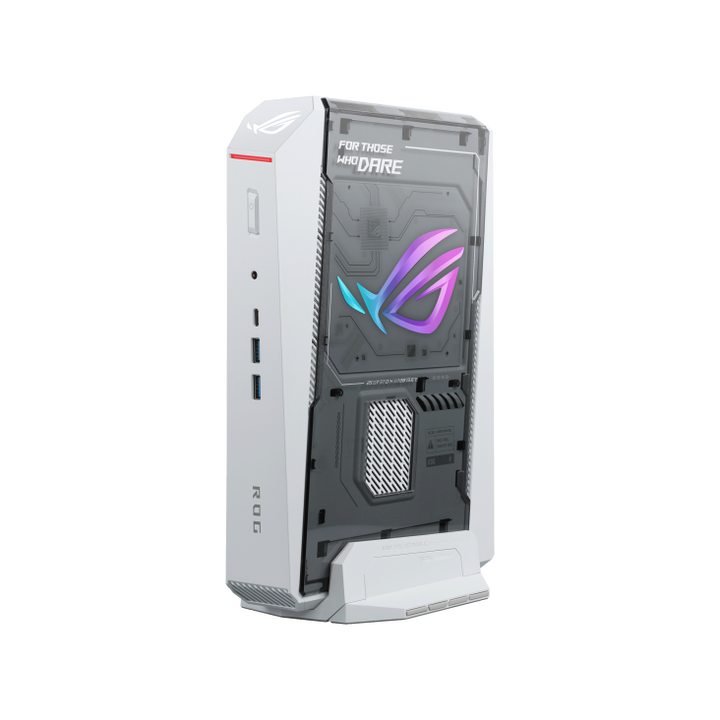


ASUS ROG NUC 16 Intel U9-290HX/ RTX5080/ DDR5 32GB/ 1TB SSD/ Win 11 Home - White
PRODUCT DESCRIPTION
ASUS ROG NUC 16 Intel Core Ultra 9 Processor 290HX Plus / RTX 5080 / 32GB DDR5-6400 / 1TB / Windows 11 Home (RNUC16JNK9X289A3 - White) - 3 Years Onsite Local Warranty
The RTX 5080 ROG NUC 16 in Moonlight White
The ASUS ROG NUC 16 RNUC16JNK9X289A3 - White pairs the Intel Core Ultra 9 Processor 290HX Plus with an NVIDIA GeForce RTX 5080 Laptop GPU and 16 GB of GDDR7 video memory, finished in Moonlight White. It suits a bright desk or living-room setup where a black chassis would stand out, without giving up anything in specification against the black version.
NVIDIA GeForce RTX 5080 Laptop GPU — 16 GB GDDR7
ASUS rates the RTX 5080 Laptop GPU in this system at 1,334 AI TOPS. Fifth-generation Tensor Cores with FP4 support drive DLSS 4.5 with Dynamic Multi Frame Generation in supported games, and accelerate local inference and generative tools. The 16 GB frame buffer gives more headroom for 4K textures and larger AI models than the 12 GB RTX 5070 Ti configuration.
Intel Core Ultra 9 290HX Plus with 32 GB DDR5-6400
The Core Ultra 9 290HX Plus is a 24-thread processor with a 55 W base TDP, configurable from 45 W to 160 W in this chassis. It is paired with 32 GB of DDR5-6400 memory across two CSO-DIMM modules in dual channel and a 1 TB M.2 NVMe PCIe 4.0 SSD, with Windows 11 Home pre-installed.
Built Around a 3-Litre Gaming Chassis
Every configuration in the ROG NUC 16 family shares the same compact chassis footprint — 282.5 x 189.5 x 56.5 mm and 3.2 kg — with a patented removable stand so the system can stand upright beside a monitor or lie flat under one. A built-in G-sensor detects the orientation and adjusts the thermal settings to suit. Lighting is controlled through Armoury Crate with Aura Sync, and ASUS states the design has passed MIL-STD-810H testing along with additional bump and drop tests.
Cooling Designed for Desktop-Class Graphics
QuietFlow Cooling uses three 102 x 102 x 17 mm fans and a vapor chamber with 72% thermal coverage, including full contact over the CPU and the laptop GPU. ASUS rates the design at a 12% increase in CPU thermal capacity and below 38 dB(A) under sustained high load. A dedicated SSD heatsink brings SSD operating temperature down to 59°C, an 18.5% reduction in thermal output compared with running without it. This RTX 5080 configuration is paired with the 380 W adapter, the larger of the two adapters in the range.
Up to Five 4K Displays
Rear outputs comprise two HDMI 2.1 FRL ports, two DisplayPort 2.1 ports and a Thunderbolt 4 Type-C port with DisplayPort 2.1, so the system can drive up to five 4K displays. HDMI 2.1 supports 4K at 120 Hz or 8K at 60 Hz with HDR10+ and eARC, and ASUS lists 8K at 60 Hz over DisplayPort 2.1 (UHBR20) across two monitors. Six 10 Gbps USB Type-A ports, a 20 Gbps USB Type-C port, Intel Killer Wi-Fi 7, Bluetooth 5.4 and 2.5 Gigabit Ethernet cover everything else.
Supplied Locally, with GST Invoice and Singapore Onsite Warranty
SourceIT supplies the ASUS ROG NUC 16 RNUC16JNK9X289A3 - White with a full GST invoice and local Singapore support. ASUS backs this system with a 3-year onsite warranty, so a qualifying hardware fault is attended to at your premises.
Prefer black? The RNUC16JNK9X289A3 (90AS00S1-M00320) carries the same specification in Obsidian Black. Email sales@sourceit.com.sg and we will confirm stock for either colour.
ASUS RNUC16JNK9X289A3 - White Datasheet — Technical Specifications
General
| ASUS Product Name | ASUS ROG NUC 16, Full System |
| SKU | RNUC16JNK9X289A3 - White |
| ASUS Part Number | 90AS00S2-M00330 |
| Range | ASUS ROG NUC 16 gaming mini PC (NUC16JNK platform) |
| Chipset | Intel HM870 |
| Chassis Colour | Moonlight White |
| Manufacturer Warranty | 3-Year Onsite Warranty (ASUS) |
| Local Warranty (Singapore) | Included with every unit supplied by SourceIT, together with a GST invoice |
Processor & Graphics
| Processor | Intel Core Ultra 9 Processor 290HX Plus (cTDP 45–160 W) |
| Discrete Graphics | NVIDIA GeForce RTX 5080 Laptop GPU, 16 GB GDDR7 |
| Integrated Graphics | Intel Graphics |
| GPU AI Performance | 1,334 AI TOPS (ASUS) |
Memory & Storage
| Memory Installed | 32 GB DDR5-6400 CSO-DIMM (2 x 16 GB, dual channel) |
| Memory Slots | 2 x DDR5 SO-DIMM / CSO-DIMM, dual channel; ASUS lists a maximum of 64 GB as DDR5-5600 SO-DIMM x2 or DDR5-6400 CSO-DIMM x2 |
| Storage Installed | 1 TB M.2 2280 NVMe PCIe 4.0 SSD |
| M.2 Slots | 2 x M.2 2280 NVMe: 1 x PCIe Gen4 x4 and 1 x PCIe Gen5 x4, each supporting 1 TB–2 TB SSDs |
| Access | Tool-less upgrade of memory and SSD |
Connectivity & Display
| Front I/O | 2 x USB 3.2 Gen 2 Type-A, 1 x USB 3.2 Gen 2 Type-C, 1 x 3.5 mm combo audio jack |
| Rear I/O | 1 x Thunderbolt 4 Type-C with DisplayPort 2.1, 4 x USB 3.2 Gen 2 Type-A, 2 x HDMI 2.1 FRL, 2 x DisplayPort 2.1, 1 x RJ45 LAN, 1 x DC input (ASUS rectangle jack), 1 x Kensington lock |
| Display Support | Up to five 4K displays; HDMI 2.1 up to 4K@120Hz or 8K@60Hz; 8K@60Hz via DisplayPort 2.1 UHBR20 on two monitors |
| Wireless | Intel Killer Wi-Fi 7 BE1750x (Gig+), Bluetooth 5.4 |
| Wired LAN | Realtek RTL8125D, 2.5 Gigabit Ethernet |
| Audio | Realtek ALC3342-CG |
Physical & Security
| Cooling | QuietFlow Cooling: 3 x 102 x 102 x 17 mm fans, vapor chamber with 72% thermal coverage over CPU and GPU, dedicated SSD heatsink; below 38 dB(A) under sustained high load (ASUS) |
| Orientation | Vertical or horizontal on the patented removable stand; G-sensor adjusts thermal settings to orientation |
| Dimensions | 282.5 x 189.5 x 56.5 mm (11.12 x 7.46 x 2.22 in) |
| Weight | 3.2 kg (7.05 lb) |
| Power Adapter | 380 W external adapter (20 VDC, 19 A) |
| Security | Kensington lock slot |
| Durability | MIL-STD-810H tested (ASUS) |
| Operating System | Windows 11 Home, pre-installed |
Connectivity & Setup / Expansion
Setting Up
Connect a monitor to any of the HDMI 2.1, DisplayPort 2.1 or Thunderbolt 4 outputs, plug in a keyboard and mouse, and connect the 380 W external adapter to the rear DC input. Windows 11 Home is pre-installed, so the system is ready for first sign-in. Armoury Crate handles hardware monitoring, cooling profiles, lighting and driver updates, and the NVIDIA App keeps Game Ready and Studio drivers current.
Vertical or Horizontal Placement
The removable stand supports upright placement beside a display or flat placement under a monitor or in an AV cabinet. The G-sensor detects which way the system is sitting and adjusts thermal behaviour accordingly, so either orientation is a supported configuration.
Memory and Storage Upgrades
Memory and the SSD are reached without tools. Both memory slots are populated with 2 x 16 GB DDR5-6400 CSO-DIMM as shipped; ASUS lists a maximum of 64 GB (DDR5-6400 CSO-DIMM x2 or DDR5-5600 SO-DIMM x2), so moving to 64 GB means replacing both modules. The board has two M.2 2280 NVMe slots — one PCIe Gen4 x4 and one PCIe Gen5 x4 — each supporting 1 TB to 2 TB drives, so there is room to add a second SSD as a game or project library grows.
Networking
Wired networking is 2.5 Gigabit Ethernet on a Realtek RTL8125D controller. Wireless is Intel Killer Wi-Fi 7 BE1750x with support for 320 MHz channels, plus Bluetooth 5.4 for controllers, headsets and peripherals.
ASUS Ecosystem Features
ASUS Power Sync powers the NUC and a compatible monitor on and off together over HDMI CEC, and GlideX lets you share and control screens across devices. Aura Sync links the system lighting with other compatible ASUS and ROG gear.
Package Contents & Ordering Information
In the Box
ASUS ROG NUC 16 system with removable stand, 380 W AC adapter and power cord, safety information, regulatory insert and warranty card. Keyboard, mouse and monitor are not included and are ordered separately.
ASUS ROG NUC 16 Range — Ordering Information
SourceIT carries the following ASUS ROG NUC 16 configurations. They are referenced here by SKU for comparison — email sales@sourceit.com.sg quoting the SKU to check stock and lead time.
| RNUC16JNK7X569A3 / 90AS00S1-M003B0 | Core Ultra 7 270HX Plus, RTX 5060 Laptop GPU 8GB GDDR7, 16GB DDR5-5600 (2 x 8GB), 1TB PCIe 4.0 SSD, Obsidian Black, 280W adapter |
| RNUC16JNK9X389A3 / 90AS00S1-M00340 | Core Ultra 9 290HX Plus, RTX 5070 Ti Laptop GPU 12GB GDDR7, 32GB DDR5-6400 (2 x 16GB), 1TB PCIe 4.0 SSD, Obsidian Black, 380W adapter |
| RNUC16JNK9X389A3 - White / 90AS00S2-M00350 | Core Ultra 9 290HX Plus, RTX 5070 Ti Laptop GPU 12GB GDDR7, 32GB DDR5-6400 (2 x 16GB), 1TB PCIe 4.0 SSD, Moonlight White, 380W adapter |
| RNUC16JNK9X289A3 / 90AS00S1-M00320 | Core Ultra 9 290HX Plus, RTX 5080 Laptop GPU 16GB GDDR7, 32GB DDR5-6400 (2 x 16GB), 1TB PCIe 4.0 SSD, Obsidian Black, 380W adapter |
| RNUC16JNK9X289A3 - White / 90AS00S2-M00330 (this listing) | Core Ultra 9 290HX Plus, RTX 5080 Laptop GPU 16GB GDDR7, 32GB DDR5-6400 (2 x 16GB), 1TB PCIe 4.0 SSD, Moonlight White, 380W adapter |
| RNUC16JNK9X8ADA3 / 90AS00S3-M001T0 | ROG NUC 16 Edition 20: Core Ultra 9 290HX Plus, RTX 5090 Laptop GPU 24GB GDDR7, 64GB DDR5-6400 (2 x 32GB), 2TB PCIe 5.0 SSD, 380W adapter |
All configurations share the same chassis, I/O, wireless and cooling layout; they differ in processor, graphics, memory, storage, power adapter and chassis colour.
Datasheet & Downloads
ASUS hosts the official product, specification and support pages for the ROG NUC 16. The links below go directly to them.
| ROG NUC 16 product page | ROG NUC 16 — Overview |
| ROG NUC 16 specifications page | ROG NUC 16 — Full Specifications |
| ROG NUC 16 gallery | ROG NUC 16 — Gallery |
| ASUS support | ROG NUC 16 — Drivers, Manuals & Support |
For the user manual, drivers or BIOS updates, use the ASUS support pages above, or email sales@sourceit.com.sg quoting RNUC16JNK9X289A3 and we will help.
Frequently Asked Questions — ASUS ROG NUC 16 RNUC16JNK9X289A3 - White
Is this a complete system?
Yes. It ships with the Intel Core Ultra 9 Processor 290HX Plus, NVIDIA GeForce RTX 5080 Laptop GPU, 32GB DDR5-6400 memory and a 1TB NVMe SSD fitted, with Windows 11 Home pre-installed.
Is the white version specified any differently from the black one?
No. Processor, graphics, memory, storage, I/O, cooling and warranty are identical; only the chassis colour differs.
How does the RTX 5080 compare with the RTX 5070 Ti configuration?
Both use the Core Ultra 9 290HX Plus, 32 GB DDR5-6400 and a 1 TB SSD. The RTX 5080 Laptop GPU has 16 GB of GDDR7 against 12 GB on the RTX 5070 Ti.
Can I upgrade memory and storage later?
Yes, without tools. Memory is fitted as 2 x 16 GB, so a move to the 64 GB maximum means replacing both modules. A second M.2 2280 slot is available for an additional 1 TB–2 TB NVMe SSD.
Can it lie flat as well as stand upright?
Yes. The patented removable stand supports both vertical and horizontal placement, and the built-in G-sensor adjusts thermal settings to the orientation.
How many monitors can it drive?
Up to five 4K displays across the two HDMI 2.1 FRL, two DisplayPort 2.1 and one Thunderbolt 4 (DisplayPort 2.1) outputs. HDMI 2.1 also supports 8K at 60 Hz.
Does it have Wi-Fi 7?
Yes — Intel Killer Wi-Fi 7 BE1750x with Bluetooth 5.4, alongside 2.5 Gigabit Ethernet.
Does it come with a Singapore warranty and a GST invoice?
Yes. Every ASUS ROG NUC 16 RNUC16JNK9X289A3 - White sold by SourceIT comes with local Singapore support and a GST invoice; ASUS backs this system with a 3-year onsite warranty.


