
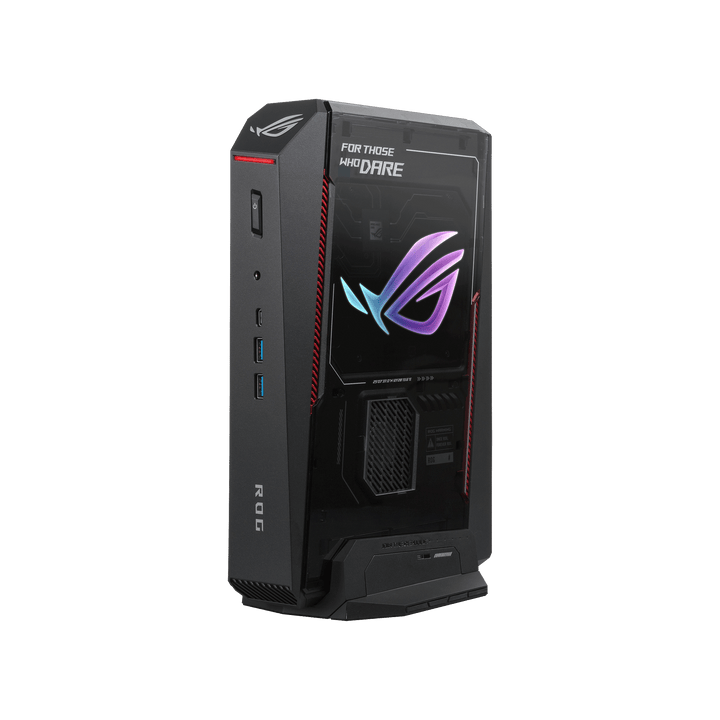


ASUS ROG NUC 16 Intel U9-290HX/ RTX5080/ DDR5 32GB/ 1TB SSD/ Win 11 Home
PRODUCT DESCRIPTION
ASUS ROG NUC 16 (RNUC16JNK9X289A3) - 3 Years Local Warranty
The Flagship of the Range — RTX 5080 Laptop GPU, 16 GB GDDR7
The ASUS ROG NUC 16 RNUC16JNK9X289A3 is the top configuration in the ROG NUC 16 line: an Intel Core Ultra 9 290HX Plus processor paired with an NVIDIA GeForce RTX 5080 Laptop GPU carrying a full 16 GB of GDDR7, in the same 3-litre chassis as the rest of the range. For a Singapore desk or AV cabinet that needs the most capable ROG gaming mini PC ASUS currently makes — without the volume of a full tower — this is the configuration to specify.
32 GB of DDR5-6400 memory and a 1 TB NVMe SSD are fitted as standard, Windows 11 Home is pre-installed, and the system ships complete and ready to run.
NVIDIA GeForce RTX 5080 Laptop GPU — 7,680 CUDA Cores, 1,334 AI TOPS
The RTX 5080 Laptop GPU is the top of NVIDIA's current Laptop GPU stack: 16 GB of GDDR7 memory, 7,680 CUDA cores and fifth-generation Tensor Cores rated at 1,334 AI TOPS. The 16 GB frame buffer is the meaningful number here — it is what separates this configuration from the RTX 5070 Ti below it for native 4K gaming with high-resolution texture packs, and for local AI or LLM workloads that need more headroom than a 12 GB card can comfortably hold.
Intel Core Ultra 9 290HX Plus — 24 Cores, 5.5 GHz Turbo
24 cores (8 Performance + 16 Efficient), 24 threads, 36 MB of Intel Smart Cache and a 5.5 GHz maximum turbo — the same processor fitted to the RTX 5070 Ti configuration in this range, here paired with the higher-tier GPU. The Performance cores do not run Hyper-Threading on this generation, so core count and thread count are equal. An integrated Intel AI Boost NPU adds 13 peak TOPS alongside the GPU's compute.
32 GB DDR5-6400, with Room for More
Memory ships as 32 GB across two DDR5-6400 CSO-DIMM modules in dual channel — the same memory configuration as the RTX 5070 Ti build, appropriate given this is a CPU-and-memory pairing shared across the two higher tiers in the range. Storage is a 1 TB M.2 2280 NVMe PCIe 4.0 SSD, with a second empty M.2 2280 slot for expansion as a game library grows.
Same QuietFlow Cooling, Now Working Hardest
This is the configuration that puts the most demand on the ROG NUC 16's QuietFlow Cooling — three fans and a dual vapor chamber, unchanged across the range but here cooling the highest combined CPU/GPU power draw. It ships with the 380 W external adapter, the largest unit ASUS pairs with this chassis, reflecting the RTX 5080's higher configurable TGP.
Supplied Locally, with GST Invoice and Singapore Warranty
SourceIT supplies the ROG NUC 16 RNUC16JNK9X289A3 with a full GST invoice and local Singapore warranty support, backed by ASUS's 3-year warranty term for this range.
Want the same build in white? The RNUC16JNK9X289A3-White carries the identical specification in a white chassis. Email sales@sourceit.com.sg and we will help you confirm stock.
RNUC16JNK9X289A3 Datasheet — Technical Specifications
General
| ASUS Product Name | ASUS ROG NUC 16, Full System — RTX 5080 configuration |
| SKU | RNUC16JNK9X289A3 / 90AS00S1-M00320 |
| ASUS Part Number | 90AS00S1-M00320 |
| Range | ASUS ROG NUC 16, gaming mini PC with discrete GPU |
| Form Factor | Approx. 3-litre compact desktop, vertical or horizontal orientation |
| Chassis Colour | Black with illuminated ROG logo |
| Manufacturer Warranty | 3-Year Warranty (ASUS) |
| Local Warranty (Singapore) | Included with every unit supplied by SourceIT, together with a GST invoice |
Processor & Graphics
| Processor | Intel Core Ultra 9 Processor 290HX Plus |
| Cores / Threads | 24 cores (8 Performance + 16 Efficient) / 24 threads |
| Cache | 36 MB Intel Smart Cache |
| Turbo & Base Frequency | 5.5 GHz max turbo; P-core base 2.7 GHz, E-core base 1.8 GHz |
| Processor Power | Base power 55 W, maximum turbo power 160 W, minimum assured power 45 W (Intel-rated figures; ASUS configures cTDP for this chassis) |
| Lithography | TSMC N3B, launched Q1'26 |
| Integrated Graphics | Intel Graphics, 4 Xe-cores, up to 2.0 GHz |
| Neural Processing Unit | Intel AI Boost NPU, 13 peak TOPS (INT8) — below the 40 TOPS Microsoft threshold for Copilot+ PC features |
| Discrete Graphics | NVIDIA GeForce RTX 5080 Laptop GPU, 16 GB GDDR7 |
| GPU Compute | 7,680 CUDA cores |
| GPU Power | 80–150 W configurable TGP (NVIDIA-published range; exact figure for this chassis not broken out by ASUS) |
| GPU AI Performance | 1,334 AI TOPS |
Memory & Storage
| Memory Installed | 32 GB DDR5-6400 CSO-DIMM (2 x 16 GB, dual channel) |
| Memory Type | DDR5-6400 CSO-DIMM |
| Storage Installed | 1 TB M.2 2280 NVMe PCIe 4.0 SSD |
| Storage Expansion | 2 x M.2 2280 slots, tool-less access. Supports 1 TB–4 TB PCIe 4.0 x4 and 1 TB–4 TB PCIe 5.0 x4 NVMe drives |
Connectivity & Display
| Front I/O | 2 x USB 3.2 Gen 2 Type-A, 1 x USB 3.2 Gen 2 Type-C, 1 x 3.5 mm combo audio jack |
| Rear I/O | 1 x Thunderbolt 4 Type-C with DisplayPort 2.1, 4 x USB 3.2 Gen 2 Type-A, 2 x HDMI 2.1 FRL, 2 x DisplayPort 2.1, 1 x RJ45 LAN, 1 x DC input (ASUS rectangular jack), 1 x Kensington lock slot |
| Display Support | Up to five displays across the two HDMI 2.1 FRL, two DisplayPort 2.1 and Thunderbolt 4 (DisplayPort 2.1) outputs; 8K@60Hz is supported on the DisplayPort 2.1 UHBR20 outputs and via HDMI 2.1 FRL |
| Wireless | Intel Killer Wi-Fi 7 BE1750x (Gig+), Bluetooth 5.4 |
| Wired LAN | Realtek RTL8125D, 2.5 Gigabit Ethernet |
Physical, Cooling & Power
| Cooling | QuietFlow Cooling: three 102 x 102 x 17 mm fans working with a dual vapor chamber, rated by ASUS as a 12% improvement in CPU thermal coverage over the prior ROG NUC generation, plus a dedicated SSD heatsink that ASUS states brings drive temperatures down from 72 °C to 59 °C under load |
| Acoustics | Approximately 38 dBA under full load (ASUS-published figure) |
| Orientation | Vertical or horizontal, patented removable stand included; the chassis is built around the same thermal solution regardless of orientation |
| Dimensions | 282.5 x 189.5 x 56.5 mm (11.12 x 7.46 x 2.22 in) |
| Weight | 3.2 kg (7.05 lb) |
| Power Adapter | 380 W external adapter, 20 VDC, 19 A |
| Operating System | Windows 11 Home |
Connectivity & Setup / Thermal Design
Cooling and Thermal Design Under the Heaviest Load in the Range
The RTX 5080 configuration uses the same QuietFlow Cooling as every ROG NUC 16 build — three 102 x 102 x 17 mm fans against a dual vapor chamber, with a dedicated SSD heatsink ASUS states holds drive temperatures around 59 °C against 72 °C without it — but here it is working against the highest combined CPU/GPU power draw in the range. ASUS's published full-load acoustic figure for the range is around 38 dBA; expect fan noise on this configuration to sit at or above that figure under a sustained gaming or rendering session, since this build carries the heaviest thermal load the chassis is designed for.
Vertical or Horizontal Placement
A patented removable stand is included and both orientations are supported. There is no published thermal penalty for either orientation on this chassis.
Memory and Storage Upgrade Path
32 GB of DDR5-6400 occupies both CSO-DIMM slots as shipped. ASUS's specification table for the range states a maximum of 64 GB DDR5-5600 SO-DIMM x2 or 64 GB DDR5-6400 CSO-DIMM x2 — which could mean 64 GB total or 64 GB per module, and ASUS's public pages do not disambiguate, so confirm the real ceiling with SourceIT before planning around a specific number. A second, empty M.2 2280 slot is available for extra storage.
Networking and Display Outputs
Wired networking is 2.5 Gigabit Ethernet via a Realtek RTL8125D controller, with Intel Killer Wi-Fi 7 (BE1750x, Gig+) and Bluetooth 5.4 wireless. Display output — two HDMI 2.1 FRL, two DisplayPort 2.1 and one Thunderbolt 4 Type-C with DisplayPort 2.1, up to five displays with 8K@60Hz on the DisplayPort 2.1 UHBR20 outputs — is identical across the entire ROG NUC 16 range.
Package Contents & Ordering Information
In the Box
ASUS ROG NUC 16 system with removable stand, 380 W external AC adapter and power cord, safety information, regulatory insert and warranty card. Keyboard, mouse and monitor are not included and are ordered separately.
ASUS ROG NUC 16 Range — Ordering Information
SourceIT carries the following ASUS ROG NUC 16 configurations. Referenced here by SKU for comparison only — email sales@sourceit.com.sg quoting the SKU to check stock and lead time.
| RNUC16JNK7X569A3 / 90AS00S1-M003B0 | Core Ultra 7 270HX Plus, RTX 5060 8GB, 16GB DDR5-5600, Black, 280W adapter |
| RNUC16JNK9X389A3 / 90AS00S1-M00340 | Core Ultra 9 290HX Plus, RTX 5070 Ti 12GB, 32GB DDR5-6400, Black, 380W adapter |
| RNUC16JNK9X389A3-White / 90AS00S2-M00350 | Core Ultra 9 290HX Plus, RTX 5070 Ti 12GB, 32GB DDR5-6400, White, 380W adapter |
| RNUC16JNK9X289A3 / 90AS00S1-M00320 | Core Ultra 9 290HX Plus, RTX 5080 16GB, 32GB DDR5-6400, Black, 380W adapter |
| RNUC16JNK9X289A3-White / 90AS00S2-M00330 | Core Ultra 9 290HX Plus, RTX 5080 16GB, 32GB DDR5-6400, White, 380W adapter |
Related Range — ASUS ROG NUC (2025), Previous-Generation Chassis
SourceIT also carries the previous-generation ROG NUC (2025) range on the NUC15JNK platform, including its own RTX 5080 configuration on the older, vertical-only chassis. Referenced by SKU only, no ordering link:
| RNUC15JNK7X569A0 / 90AS00I1-M00330 | Core Ultra 7 255HX, RTX 5060 8GB, 16GB DDR5 |
| RNUC15JNK9X489A0 / 90AS00I1-M002T0 | Core Ultra 9 275HX, RTX 5070, 32GB DDR5 |
| RNUC15JNK9X389A0 / 90AS00I1-M001W0 | Core Ultra 9 275HX, RTX 5070 Ti 12GB, 32GB DDR5 |
Datasheet & Downloads
ASUS hosts the official product and specification pages for this range on the ROG site. The links below are the current pages for this model family.
| ROG product page | ROG NUC 16 — Overview |
| ROG specifications page | ROG NUC 16 — Full Specifications |
| ROG press release | ASUS Republic of Gamers Announces ROG NUC 16 |
For the PDF datasheet, user manual or driver downloads, email sales@sourceit.com.sg quoting RNUC16JNK9X289A3 and we will send you the current files directly.
Frequently Asked Questions — ASUS ROG NUC 16 RNUC16JNK9X289A3
Is the RTX 5080 in this the same as a desktop RTX 5080?
No — it is the RTX 5080 Laptop GPU, a 16 GB GDDR7 mobile-class part with 7,680 CUDA cores on NVIDIA's Blackwell architecture. It is the most capable Laptop GPU NVIDIA currently offers, but it is still a mobile-class part, and expect performance closer to a high-end gaming laptop than a full desktop RTX 5080 card.
Is this a complete system?
Yes. It ships with the Core Ultra 9 290HX Plus, RTX 5080 Laptop GPU, 32 GB DDR5-6400 memory and a 1 TB NVMe SSD fitted, with Windows 11 Home pre-installed.
Is the 16 GB frame buffer actually needed over the RTX 5070 Ti's 12 GB?
For 1080p/1440p gaming, not really — both handle that comfortably. It matters for native 4K gaming with high-resolution texture packs, and for local AI/LLM workloads where model size can outgrow 12 GB quickly. If neither applies to you, the RTX 5070 Ti configuration is a lower-cost way into the same chassis and CPU.
Can I add more memory or storage later?
Storage yes, via the second empty M.2 2280 slot. Memory means replacing both DDR5-6400 CSO-DIMM modules since both slots are occupied by the 32 GB kit. ASUS's own specification page leaves the true maximum ambiguous — ask SourceIT to confirm before planning an upgrade.
Is this a Copilot+ PC?
No. The Core Ultra 9 290HX Plus NPU delivers 13 peak TOPS and the platform total including integrated graphics is 33 TOPS, below Microsoft's 40 TOPS requirement. The RTX 5080's own AI TOPS figure is high, but Copilot+ PC certification is specifically an NPU requirement.
How loud is it under a sustained gaming load?
ASUS's published full-load figure for the ROG NUC 16 range is around 38 dBA; this configuration carries the heaviest combined CPU/GPU load in the range, so treat that as the lower bound rather than a guaranteed ceiling for this specific build.
Is a white version of this configuration available?
Yes — the RNUC16JNK9X289A3-White carries the identical Core Ultra 9 290HX Plus, RTX 5080, 32 GB DDR5-6400 specification in a white chassis.
Does it come with a Singapore warranty and a GST invoice?
Yes. Every ASUS ROG NUC 16 RNUC16JNK9X289A3 sold by SourceIT comes with local Singapore warranty support and a GST invoice; ASUS backs this system with a 3-year warranty.


