
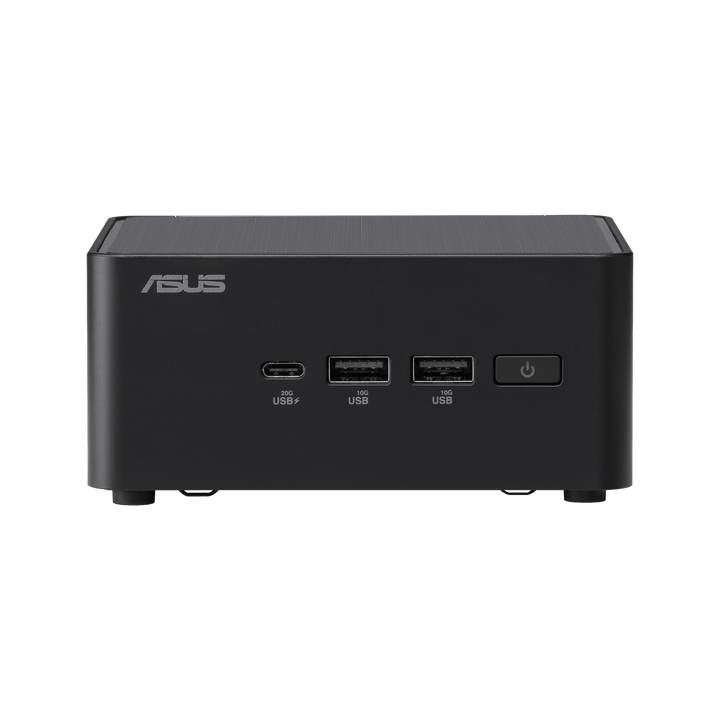


ASUS NUC 14 PRO U5 Barebone RNUC14RVHU500000I
PRODUCT DESCRIPTION
ASUS NUC 14 Pro U5 Barebone (RNUC14RVHU500000I) - 3 Years Onsite Warranty
A Barebone Platform — No Memory, No Storage, No OS Included
The ASUS NUC 14 Pro U5 Barebone (RNUC14RVHU500000I) is exactly what "barebone" means: the chassis, motherboard, Intel Core Ultra 5 125H processor and I/O are ASUS-built and ready, but memory, storage and an operating system are not included and must be fitted separately before the unit can boot into anything. This is a system-builder platform for resellers, IT integrators and technical buyers who want to specify their own RAM capacity, drive configuration and OS — kiosk builders, digital signage integrators and businesses standardising on a specific Linux distribution are the typical buyers, not someone looking for a plug-in-and-go desktop.
If you want a complete, ready-to-use mini PC with memory, storage and Windows 11 Pro already fitted, our ASUS NUC 14 Pro AI range (Core Ultra 5/7/9, Lunar Lake platform) is the right listing instead — this barebone unit is a different, earlier platform generation aimed at builders, not end users wanting a turnkey machine.
Intel Core Ultra 5 125H — Meteor Lake Platform
The fitted processor is the Intel Core Ultra 5 125H, configured at 40 W cTDP, on Intel's Meteor Lake platform with an on-chip Intel AI Boost NPU for supported AI workloads at low power. It is a genuinely capable business-class chip for the workloads this barebone is aimed at — kiosk and signage software, light virtualisation, general commercial computing — once memory, storage and an OS are fitted by the integrator.
Memory: You Choose — Up to 96 GB Across Two SO-DIMM Slots
Two SO-DIMM slots support dual-channel DDR5-5600, up to 96 GB total (2 x 48 GB) — genuine desktop-class memory headroom, and entirely your choice of capacity, speed within spec and brand, since nothing ships fitted. Match the memory to the workload the finished build is destined for; we can also supply compatible DDR5 SO-DIMM modules alongside the barebone if you would rather order both together.
Storage: Two M.2 Slots Plus an Optional 2.5-Inch SATA Bay
Storage is equally open: one M.2 2280 PCIe Gen4 x4 slot supports NVMe SSDs from 128 GB up to 4 TB, and a second M.2 2242 PCIe Gen4 x4 slot supports drives from 128 GB up to 2 TB. On the Tall chassis SKU, an additional 2.5-inch SATA bay accepts a SATA SSD or HDD from 128 GB up to 4 TB. None of these drives ship fitted — this barebone gives you the slots and the flexibility, not the parts.
No Operating System Fitted — Windows, Ubuntu or RHEL, Your Choice
ASUS documents this platform as supporting Windows 11 64-bit, Ubuntu 24.04 LTS 64-bit and Red Hat Enterprise Linux 64-bit, but none of these are preinstalled — you fit and licence the OS of your choice after adding memory and storage. For a kiosk, signage or embedded Linux deployment where Windows licensing would be unnecessary overhead, that is precisely the point of buying a barebone rather than a fully loaded system.
Connectivity: Thunderbolt 4, Wi-Fi 6E, 2.5G Ethernet
Networking is Intel Wi-Fi 6E (AX211) with Bluetooth 5.3 over internal antennas, plus a wired Intel i226 2.5 Gb Ethernet port. I/O includes Thunderbolt 4, HDMI 2.1, USB 3.2 Gen 2 and internal USB 2.0 headers for integrators who need to wire in additional front-panel or internal peripherals as part of a custom build.
Supplied Locally, with GST Invoice and Singapore Onsite Warranty
SourceIT supplies the ASUS NUC 14 Pro U5 Barebone with a full GST invoice and local Singapore support. ASUS backs this barebone platform with a 3-year onsite warranty covering the supplied hardware — memory, storage and any OS you fit yourself are outside that manufacturer warranty and are your own component choices to manage.
Not sure whether the barebone or a fully-configured NUC 14 Pro AI system fits your project better? Email sales@sourceit.com.sg with what you are building and we will help you decide, and quote compatible memory and storage alongside the barebone if that is the route you take.
ASUS RNUC14RVHU500000I Datasheet — Technical Specifications
General
| ASUS Product Name | ASUS NUC 14 Pro U5 Barebone — AI-Enabled Mini PC for Commercial Use |
| SKU | RNUC14RVHU500000I |
| Internal Item Code | 90AR0072-M000L0 |
| Range | ASUS NUC 14 Pro (Meteor Lake platform), Barebone |
| Form Factor | Mini PC, Barebone (Tall chassis) |
| What Is NOT Included | Memory, storage (M.2 / SATA drives) and operating system are not fitted or included — supplied separately by the integrator |
| Manufacturer Warranty | 3-Year Onsite Warranty (ASUS), covering the barebone hardware as supplied |
| Local Warranty (Singapore) | Included with every unit supplied by SourceIT, together with a GST invoice |
Processor & Graphics
| Processor | Intel Core Ultra 5 Processor 125H (Meteor Lake, cTDP 40W) |
| Graphics | Intel integrated graphics (Arc-class on specified SKUs) |
| Neural Processing Unit | Intel AI Boost NPU (on-chip) |
Memory Support (Not Included)
| Memory Type | DDR5-5600 SO-DIMM, dual-channel |
| Slots / Maximum | 2 x SO-DIMM slots, up to 96 GB total (2 x 48 GB), per ASUS |
| Included With Barebone | No memory fitted — specify and order separately |
Storage Support (Not Included)
| Primary M.2 Slot | 1 x M.2 2280, PCIe Gen4 x4, supports 128 GB to 4 TB NVMe SSD |
| Secondary M.2 Slot | 1 x M.2 2242, PCIe Gen4 x4, supports 128 GB to 2 TB NVMe SSD |
| 2.5-inch SATA Bay | 1 x SATA port for 2.5-inch SSD/HDD (Tall chassis SKU only), supports 128 GB to 4 TB SATA drive |
| Included With Barebone | No drives fitted — specify and order separately; refer to the latest ASUS QVL list for qualified drives |
Connectivity
| Wireless LAN | Intel Wi-Fi 6E (AX211), Bluetooth 5.3, internal antennas |
| Wired LAN | 1 x Intel i226 2.5 Gb Ethernet |
| Video / Data I/O | Thunderbolt 4, HDMI 2.1, USB 3.2 Gen 2, internal USB 2.0 headers |
Operating System (Not Included)
| OS Included | None — operating system is not fitted at the factory |
| Documented OS Support | Windows 11 64-bit, Ubuntu 24.04 LTS 64-bit, Red Hat Enterprise Linux 64-bit, per ASUS |
Warranty Term (As Supplied)
| Barebone Hardware | 3 Years Onsite (ASUS) |
| Memory, Storage, OS Fitted by Integrator | Covered by the component supplier's own warranty, not by ASUS's barebone warranty |
Connectivity & Setup / Expansion
Fitting Memory Before First Boot
Both SO-DIMM slots need DDR5-5600 memory fitted before the system will boot into an OS at all — this is not optional expansion, it is a required step to bring the barebone to life. Dual-channel operation (both slots populated with matching modules) gets the best performance from the platform; a single stick will boot but leaves bandwidth on the table. Up to 96 GB total is supported across the two slots.
Choosing and Fitting Storage
The primary M.2 2280 PCIe Gen4 slot is the natural home for your main OS drive, supporting up to 4 TB. The secondary M.2 2242 slot (up to 2 TB) suits a second smaller drive or a cache/scratch disk depending on your build. On the Tall chassis SKU, the 2.5-inch SATA bay adds a third option for bulk storage or a lower-cost spinning or SATA SSD drive. Check ASUS's current QVL (qualified vendor list) before committing to a specific drive model, particularly for the M.2 2242 slot where physical size compatibility matters.
Installing an Operating System
With memory and storage fitted, you install the operating system of your choice from a USB installer in the usual way — Windows 11 64-bit, Ubuntu 24.04 LTS 64-bit and Red Hat Enterprise Linux 64-bit are the platforms ASUS documents as supported. Windows licensing is not included with this barebone and needs to be purchased and applied separately if that is your chosen OS.
Networking and Video Out
Intel Wi-Fi 6E with Bluetooth 5.3 and a wired 2.5G Ethernet port cover networking. Thunderbolt 4 and HDMI 2.1 handle video output and high-bandwidth peripherals, with USB 3.2 Gen 2 external ports and internal USB 2.0 headers available for integrators wiring in additional front-panel connectivity as part of a custom enclosure or kiosk build.
Typical Integration Scenarios
Kiosk and digital signage builds typically pair this barebone with a modest memory configuration and a single M.2 SSD running a locked-down Windows or Linux image. Commercial desktop resellers building to a specific customer spec often max out memory and add both M.2 drives plus the SATA bay for bulk storage. Either way, SourceIT can source and pre-fit the memory and storage alongside the barebone if you would rather receive a build that only needs an OS image applied.
Package Contents & Ordering Information
What Ships in the Box
The barebone chassis with motherboard, Intel Core Ultra 5 125H processor, wireless module and I/O already fitted, plus the external power adapter, power cord and ASUS user documentation. Memory, storage (M.2 and SATA drives) and an operating system are not included and are not fitted — these are specified and ordered separately based on your intended build.
Components You Will Need to Order Alongside This Barebone
| DDR5-5600 SO-DIMM memory | Up to two modules, matched pair recommended for dual-channel, up to 96 GB total |
| M.2 2280 NVMe SSD (primary) | 128 GB to 4 TB, PCIe Gen4 x4 |
| M.2 2242 NVMe SSD (secondary, optional) | 128 GB to 2 TB, PCIe Gen4 x4 |
| 2.5-inch SATA SSD/HDD (optional, Tall SKU) | 128 GB to 4 TB |
| Operating system licence (if Windows) | Windows 11 64-bit — not included; Ubuntu 24.04 LTS and RHEL are free/subscription Linux alternatives ASUS also documents as supported |
Email sales@sourceit.com.sg with your intended memory, storage and OS configuration and we will quote the full build, or supply the barebone alone if you are sourcing components elsewhere.
Related ASUS NUC Systems in Our Catalogue
If a fully-configured system is a better fit than a barebone build, our ASUS NUC 14 Pro AI range (RNUC14LNKU5074N3, RNUC14LNKU7094N3, RNUC14LNKU9094N3) ships with memory, storage and Windows 11 Pro already fitted on the newer Lunar Lake platform, ready to use out of the box — a genuinely different platform generation and product proposition from this barebone.
Datasheet & Downloads
ASUS hosts the official product and specification pages for this model. The links below are ASUS's current product and specification pages for this model family.
| ASUS Global product page | ASUS NUC 14 Pro — Overview |
For the PDF datasheet, user manual, the current ASUS QVL for compatible memory and storage, or driver downloads, email sales@sourceit.com.sg quoting RNUC14RVHU500000I and we will send you the current files directly.
Frequently Asked Questions — ASUS NUC 14 Pro U5 Barebone RNUC14RVHU500000I
What exactly does "barebone" mean here — what am I actually getting?
You get the chassis, motherboard, Intel Core Ultra 5 125H processor, wireless module and I/O ports, all fitted by ASUS. You do not get memory, storage or an operating system — none of those are included, and the unit cannot boot into anything usable until you or your integrator fits them.
Will this power on and show anything out of the box?
It will power on, but without memory fitted it cannot POST into an operating system. You need at least one DDR5 SO-DIMM module and a storage drive with an OS installed before it functions as a usable computer.
How much memory can it actually take?
Up to 96 GB total across two SO-DIMM slots, running dual-channel DDR5-5600 when both slots are populated with matching modules. None of that memory is fitted or included — you choose the capacity and we can supply it alongside the barebone if you want it delivered as one build.
What storage options does it support?
Two M.2 slots — a 2280 slot for drives up to 4 TB and a 2242 slot for drives up to 2 TB, both PCIe Gen4 — plus a 2.5-inch SATA bay for a drive up to 4 TB on the Tall chassis SKU. All three are empty as supplied.
Does it come with Windows?
No. ASUS documents this platform as supporting Windows 11 64-bit, Ubuntu 24.04 LTS 64-bit and Red Hat Enterprise Linux 64-bit, but none are preinstalled or licensed with the barebone — you install and licence the OS of your choice after fitting memory and storage.
Why would I buy a barebone instead of a fully-configured NUC?
Control over the exact memory capacity, storage configuration and operating system for the finished build — genuinely useful for kiosk, signage and system-integration projects with a specific spec, or where a non-Windows OS makes a preinstalled Windows licence unnecessary overhead. If you just want a ready-to-use desktop, our ASUS NUC 14 Pro AI systems ship complete instead.
Does the warranty cover the memory and storage I fit myself?
No. ASUS's 3-year onsite warranty on this barebone covers the hardware ASUS actually supplies — the chassis, motherboard, CPU and fitted I/O. Memory and storage you or your integrator fit afterward are covered by whatever warranty came with those specific components, not by ASUS's barebone warranty.
Does it come with a Singapore warranty and a GST invoice regardless?
Yes. Every ASUS NUC 14 Pro U5 Barebone sold by SourceIT comes with local Singapore support and a GST invoice on the barebone hardware, backed by ASUS's 3-year onsite warranty on that hardware as supplied.


