
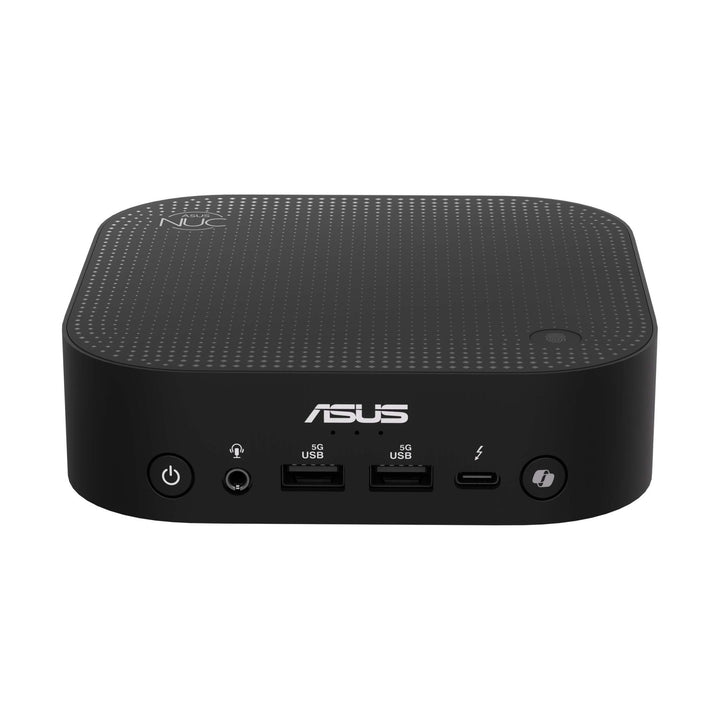


ASUS NUC 14 PRO AI U5/16GB/1TB SSD RNUC14LNKU5074N3
PRODUCT DESCRIPTION
ASUS NUC 14 Pro AI U5 (RNUC14LNKU5074N3) - 3 Years Onsite Warranty
A Full-Height NUC That Disappears Behind a Monitor
Strip away the branding and the ASUS NUC 14 Pro AI RNUC14LNKU5074N3 is 130 x 130 x 34 mm of aluminium and plastic weighing under 600 grams — small enough to sit behind a display on the included VESA bracket and be forgotten about, yet a fully-specced Windows 11 Pro desktop underneath. Inside is an Intel Core Ultra 5 226V processor on Intel's Lunar Lake platform, 16 GB of LPDDR5x memory and a 1 TB NVMe SSD, all fitted and ready to switch on. Reception desks, meeting-room compute, branch-office workstations and anywhere a tower PC would simply be in the way are the natural home for this configuration.
What's Under the Hood: Lunar Lake and a Genuine On-Device NPU
The Core Ultra 5 226V is not a repackaged older chip — it is built on Intel's current Lunar Lake architecture, running at up to 30 W cTDP with Intel Arc 130V graphics handling display and light GPU work. The part of the spec sheet that actually changes how the machine behaves day to day is the onboard NPU 4, independently rated at 48 TOPS. That single figure is what pushes this configuration past Microsoft's 40 TOPS bar for Copilot+ PC status, and it is why Windows features like Live Captions translation, background blur in video calls, and Recall run as local computation on this chip rather than a network call to a cloud model.
16 GB Is Fixed — Plan for It, Not Around It
One thing to know before ordering: the LPDDR5x memory in this NUC is soldered directly to the board, a choice Intel's Lunar Lake platform makes across the board for efficiency, not something ASUS does selectively. There is no SO-DIMM slot and nothing to add later. 16 GB is what this SKU ships with and what it will always have — if that is a marginal call for your intended use, order the 32 GB RNUC14LNKU7094N3 or RNUC14LNKU9094N3 instead of hoping to upgrade afterward. Storage takes the opposite approach: a single M.2 2280 PCIe Gen4 slot holds the 1 TB SSD fitted at the factory, and it is a straightforward user swap for a larger drive whenever the need arises.
Cabling: Thunderbolt-First, One Wired LAN Port
Two Thunderbolt 4 Type-C ports, each carrying DisplayPort 2.1, plus a rear HDMI 2.1 output cover the display side of things — three monitors, in practice, from a chassis you can palm. Wireless networking is Intel Wi-Fi 7 (BE201) with Bluetooth 5.4; wired is a single 2.5G Intel I226-V port. Note that single-port detail if you were expecting dual LAN — ASUS's own PN-series Mini-PCs carry two wired ports where this NUC carries one, and we can point you to that range instead if network redundancy at the endpoint matters for your deployment.
Backed With a Singapore Onsite Warranty and GST Invoice
SourceIT ships the RNUC14LNKU5074N3 with a full GST invoice and coordinates ASUS's 3-year onsite warranty locally, so a genuine hardware fault gets an engineer to your address rather than a courier label and a wait. If 16 GB turns out to be too tight after all, email sales@sourceit.com.sg — we carry the 32 GB Core Ultra 7 and Core Ultra 9 configurations of this same NUC family and can talk through which one actually fits the job.
ASUS RNUC14LNKU5074N3 Datasheet — Technical Specifications
General
| ASUS Product Name | ASUS NUC 14 Pro AI, Full System |
| SKU | RNUC14LNKU5074N3 |
| Internal Item Code | 90AS00N1-M000W0 |
| Range | ASUS NUC 14 Pro AI |
| Form Factor | Ultra-compact desktop, 34 mm-thin chassis |
| Manufacturer Warranty | 3-Year Onsite Warranty (ASUS) |
| Local Warranty (Singapore) | Included with every unit supplied by SourceIT, together with a GST invoice |
Processor & Graphics
| Processor | Intel Core Ultra 5 Processor 226V (Lunar Lake, cTDP 30W) |
| Graphics | Intel Arc Graphics 130V (integrated) |
| Neural Processing Unit | Intel NPU 4, up to 48 TOPS — Copilot+ PC certified |
| Chipset | Integrated (SoC platform) |
Memory & Storage
| Memory Installed | 16 GB LPDDR5x-8533, soldered, 2-channel |
| Memory Upgradability | Not user-upgradable — soldered to the board. Order the 32 GB configuration if more memory is needed |
| Primary Storage | 1 TB M.2 2280 NVMe PCIe 4.0 SSD |
| Storage Expansion | Single M.2 2280 slot, user-replaceable, supports larger PCIe Gen4 NVMe drives |
Connectivity
| Wireless LAN | Intel Wi-Fi 7 (BE201), Bluetooth 5.4 |
| Wired LAN | 1 x Intel I226-V 2.5G RJ45 |
| Display Outputs | 2 x Thunderbolt 4 Type-C (DisplayPort 2.1 capable), 1 x HDMI 2.1 |
| Maximum Displays Supported | Up to 3 displays across Thunderbolt 4 and HDMI outputs |
Ports & I/O
| Front USB | 2 x USB 3.2 Gen 1 Type-A, 1 x Thunderbolt 4 Type-C |
| Rear USB | 1 x Thunderbolt 4 Type-C, 2 x USB 3.2 Gen 2 Type-A |
| Audio | 1 x 3.5 mm combo audio jack (front) |
| Power Input | DC-in (rear) |
Physical & Environmental
| Dimensions (W x D x H) | 130 x 130 x 34 mm |
| Net Weight | 0.58 kg, per ASUS |
| Mounting | VESA mounting bracket included |
| Operating System | Windows 11 Pro, Copilot+ PC certified |
Power
| Power Adapter | External AC adapter, exact rating printed on the unit and adapter label |
| Package Contents | AC adapter, power cord, VESA mounting bracket, user documentation. Keyboard, mouse and monitor are not included |
Connectivity & Setup / Expansion
Getting Three Monitors Out of One Small Box
Both Thunderbolt 4 Type-C ports carry DisplayPort 2.1, so a USB-C monitor connects with a single cable, while a DisplayPort- or HDMI-only monitor needs a Thunderbolt/USB-C adapter cable or a dock. The rear HDMI 2.1 output handles a third screen directly. That is a genuine triple-display desk setup from a chassis that fits in one hand.
One Wired Port, Fast Wireless
Wired networking is a single 2.5G Intel I226-V port; wireless is Intel Wi-Fi 7 with Bluetooth 5.4. If your site needs a second wired NIC for failover or segment bridging, this specific NUC configuration does not offer it — the PN-series Mini-PCs in our catalogue carry dual 2.5G LAN as standard and are worth a look instead.
Memory Is Fixed, Storage Is Not
Soldered LPDDR5x means the 16 GB fitted here is permanent — there is no upgrade path after the sale. The M.2 2280 slot holding the 1 TB SSD is the opposite case: a standard user-accessible NVMe slot that accepts a larger PCIe Gen4 drive whenever you want to swap it in.
Mounting Behind a Monitor
A VESA bracket ships in the box, so the whole unit can be screwed to the back of a compatible display and vanish from the desk entirely — genuinely useful in a reception or meeting-room setting where cable clutter and desk space both matter. Left unmounted, the 34 mm-thin chassis also sits flat without fuss.
Day-to-Day Peripheral Use
Front-facing USB 3.2 Type-A and Thunderbolt 4 ports take a keyboard, mouse, webcam or external drive without reaching around the back of the unit. The rear Thunderbolt 4 port doubles as a high-bandwidth connection for an external SSD or a single-cable dock setup when you want one cable to carry power, data and a display.
Package Contents & Ordering Information
What's in the Carton
AC power adapter, power cord, VESA mounting bracket and user documentation ship with every unit. There is no keyboard, mouse or monitor in the box — those are ordered separately if you need them.
The Rest of the NUC 14 Pro AI Line-Up
SourceIT carries three configurations of this NUC generation, referenced here by SKU for comparison — email sales@sourceit.com.sg quoting the SKU for current stock and lead time.
| RNUC14LNKU5074N3 (this listing) | Core Ultra 5 226V | 16GB LPDDR5x / 1TB SSD |
| RNUC14LNKU7094N3 | Core Ultra 7 258V | 32GB LPDDR5x / 1TB SSD |
| RNUC14LNKU9094N3 | Core Ultra 9 288V | 32GB LPDDR5x / 1TB SSD |
We also stock the ASUS NUC 14 Pro U5 Barebone (RNUC14RVHU500000I) for buyers who would rather fit their own memory, storage and OS on an earlier Meteor Lake NUC platform — a genuinely different product from the fully-loaded, non-upgradable-memory NUC 14 Pro AI line described here.
Datasheet & Downloads
ASUS's own product and specification pages for this NUC generation are the pages we point you to for the manufacturer's own detail.
| ASUS Singapore product page | ASUS NUC 14 Pro AI — Overview |
| ASUS Singapore specifications page | ASUS NUC 14 Pro AI — Full Specifications |
Want the PDF datasheet or driver package? Email sales@sourceit.com.sg quoting RNUC14LNKU5074N3 and we will send the current files across directly.
Frequently Asked Questions — ASUS NUC 14 Pro AI RNUC14LNKU5074N3
Does 16 GB come installed, or do I need to add it myself?
It comes installed and soldered — there is nothing to fit and, more importantly, nothing you can add afterward. This is a complete, ready-to-sign-in system: Core Ultra 5 226V, 16 GB LPDDR5x, 1 TB NVMe SSD and Windows 11 Pro, all set up at the factory.
What actually happens if I run out of memory down the line?
Nothing good — there is no slot to add a stick to, because the memory is soldered to the board on this whole Lunar Lake generation of NUC. The only fix is buying the 32 GB configuration in the first place, so if there is real doubt about whether 16 GB will hold up, order RNUC14LNKU7094N3 or RNUC14LNKU9094N3 instead.
Is the "AI" in the name marketing, or does it change anything real?
It is a real, measurable NPU — 48 TOPS, independently rated, sitting well clear of the 40 TOPS bar Microsoft set for Copilot+ PC status. That number is what lets Windows run on-device AI features (Live Captions, Studio Effects, Recall and similar) as local computation rather than a cloud call.
Only one Ethernet port — is that a problem?
Depends on the deployment. For a single desk or a reception point, one 2.5G port is plenty. If you specifically need dual wired LAN for redundancy or bridging, this NUC generation does not offer it on any configuration — our ASUS PN-series Mini-PCs do, and we would steer you there instead.
Can I run a second graphics card or expand the GPU?
No — the Arc 130V graphics is soldered into the platform along with the CPU, and there is no expansion slot of any kind in this chassis. If discrete graphics is a requirement, this NUC family is the wrong shape of machine for the job.
How is this different from the older ASUS NUC 14 Pro U5 Barebone you also sell?
Different generation, different proposition entirely. This is a sealed, fully-configured Lunar Lake system with 48 TOPS of NPU and fixed memory. The barebone is an earlier Meteor Lake platform sold empty — no RAM, no drive, no OS — for someone who wants to build the configuration themselves.
What does the onsite warranty actually cover in Singapore?
A genuine hardware failure within the warranty period gets diagnosed and fixed at your premises by an authorised technician — you are not shipping the unit anywhere and waiting on a return. SourceIT handles arranging that onsite visit as part of what we include with every unit sold.
Does the price include GST invoicing and local support?
Yes — every RNUC14LNKU5074N3 we sell comes with a proper GST invoice and SourceIT's own local support layered on top of ASUS's 3-year onsite manufacturer warranty.


