
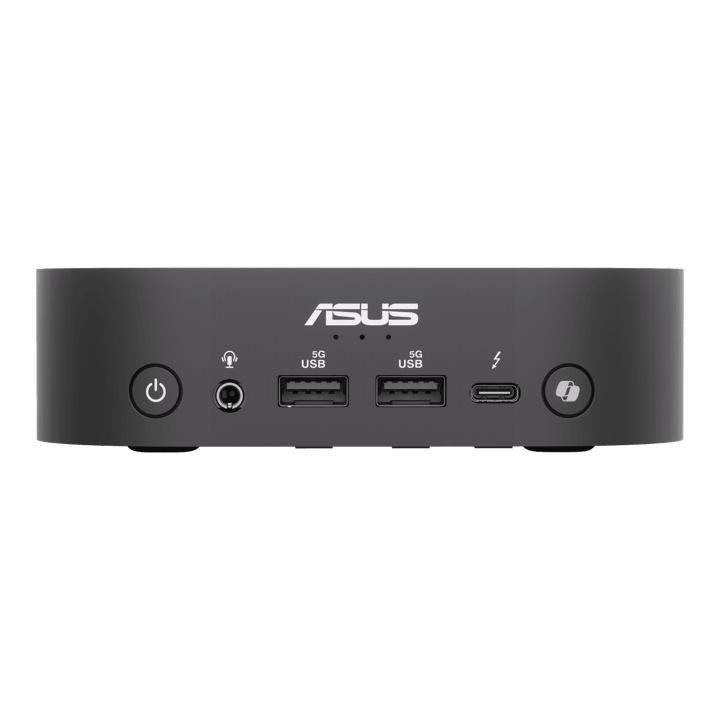


ASUS NUC 14 PRO AI Intel U9-288V/ 32GB/ 1TB SSD/ Win 11 Pro
Currently out of stock. Request a quote and
our team will confirm the latest price, availability and lead time.
PRODUCT DESCRIPTION
ASUS NUC 14 Pro AI Core Ultra 9 288V (RNUC14LNKU9094N3) - 3 Years Onsite Warranty
The Flagship Configuration of ASUS's Copilot+ Certified NUC
The ASUS NUC 14 Pro AI RNUC14LNKU9094N3 is the top-specified Intel Core Ultra 9 288V configuration of ASUS's NUC 14 Pro AI Mini PC, built on Intel's Lunar Lake platform in a 130 x 130 x 34 mm chassis. It ships as a complete system with 32 GB of soldered LPDDR5x memory and a 1 TB PCIe 4.0 NVMe SSD already fitted, running Windows 11 Pro out of the box. For a Singapore desktop where the workload is genuinely CPU-bound — heavier multitasking, demanding office and analysis software, or frequent on-device AI feature use — this is the highest-performing configuration in the family, still in a footprint smaller than a paperback book.
Intel Core Ultra 9 288V — The Fastest Chip in the Lunar Lake Line-Up
The Core Ultra 9 288V is Intel's top-tier Lunar Lake chip: 8 cores (4 performance, 4 efficient) clocked up to 5.1 GHz, running at up to 30 W cTDP, paired with Intel Arc 140V integrated graphics — the same GPU tier as the Core Ultra 7 configuration in this family, with the CPU itself as the differentiator at the top of the range. Like the rest of the Core Ultra 200V series, it carries Intel's NPU 4 rated at 48 TOPS on its own, well above the 40 TOPS Microsoft requires for Copilot+ PC certification, so on-device AI features in Windows 11 run locally. Independent reporting on the Core Ultra 9 288V configuration of this NUC has put ASUS's combined "platform TOPS" figure — CPU, GPU and NPU AI throughput added together — at up to 120 TOPS; the 48 TOPS NPU figure remains the one to rely on for dedicated AI acceleration specifically.
32 GB LPDDR5x and a 1 TB PCIe 4.0 NVMe SSD, Non-Upgradable Memory
Memory on the NUC 14 Pro AI is soldered LPDDR5x rather than SO-DIMM, a deliberate trade-off of Intel's Lunar Lake platform for power efficiency and board space — and unlike ASUS's PN-series Mini-PCs, it cannot be added to after purchase. This configuration ships with 32 GB fitted as standard. Storage is a single M.2 2280 PCIe Gen4 NVMe SSD slot, 1 TB fitted and user-replaceable with a larger PCIe Gen4 drive later if needed.
Thunderbolt 4, Wi-Fi 7 and Triple-Display Support
Video and high-speed data run through two Thunderbolt 4 Type-C ports, each DisplayPort 2.1 capable, plus a rear HDMI 2.1 port, giving a comfortable three-display setup from a single unit. Wireless is Intel Wi-Fi 7 (BE201) with Bluetooth 5.4, and wired networking is a single Intel I226-V 2.5G Ethernet port. Front-panel USB 3.2 Gen 1 Type-A ports and a 3.5 mm audio jack cover everyday peripherals without reaching behind the unit.
Supplied Locally, with GST Invoice and Singapore Onsite Warranty
SourceIT supplies the ASUS NUC 14 Pro AI RNUC14LNKU9094N3 with a full GST invoice and local Singapore support. ASUS backs this model with a 3-year onsite warranty, so a qualifying hardware fault is resolved at your premises.
If the Core Ultra 9 is more than your workload needs, the same family is also available as RNUC14LNKU7094N3 (Core Ultra 7 258V, 32 GB) and RNUC14LNKU5074N3 (Core Ultra 5 226V, 16 GB). Email sales@sourceit.com.sg and we will help you size the right configuration.
ASUS RNUC14LNKU9094N3 Datasheet — Technical Specifications
General
| ASUS Product Name | ASUS NUC 14 Pro AI, Full System |
| SKU | RNUC14LNKU9094N3 |
| Internal Item Code | 90AS00N1-M001Z0 |
| Range | ASUS NUC 14 Pro AI |
| Form Factor | Ultra-compact desktop, 34 mm-thin chassis |
| Manufacturer Warranty | 3-Year Onsite Warranty (ASUS) |
| Local Warranty (Singapore) | Included with every unit supplied by SourceIT, together with a GST invoice |
Processor & Graphics
| Processor | Intel Core Ultra 9 Processor 288V (8C/8T, 4P+4E, up to 5.1 GHz, Lunar Lake, cTDP 30W) |
| Graphics | Intel Arc Graphics 140V (integrated, 8 Xe-cores) |
| Neural Processing Unit | Intel NPU 4, up to 48 TOPS — Copilot+ PC certified |
| Combined Platform AI Throughput | Up to 120 TOPS across CPU, GPU and NPU, per ASUS / independent testing of this configuration |
| Chipset | Integrated (SoC platform) |
Memory & Storage
| Memory Installed | 32 GB LPDDR5x-8533, soldered, 2-channel |
| Memory Upgradability | Not user-upgradable — soldered to the board |
| Primary Storage | 1 TB M.2 2280 NVMe PCIe 4.0 SSD |
| Storage Expansion | Single M.2 2280 slot, user-replaceable, supports larger PCIe Gen4 NVMe drives |
Connectivity
| Wireless LAN | Intel Wi-Fi 7 (BE201), Bluetooth 5.4 |
| Wired LAN | 1 x Intel I226-V 2.5G RJ45 |
| Display Outputs | 2 x Thunderbolt 4 Type-C (DisplayPort 2.1 capable), 1 x HDMI 2.1 |
| Maximum Displays Supported | Up to 3 displays across Thunderbolt 4 and HDMI outputs |
Ports & I/O
| Front USB | 2 x USB 3.2 Gen 1 Type-A, 1 x Thunderbolt 4 Type-C |
| Rear USB | 1 x Thunderbolt 4 Type-C, 2 x USB 3.2 Gen 2 Type-A |
| Audio | 1 x 3.5 mm combo audio jack (front) |
| Power Input | DC-in (rear) |
Physical & Environmental
| Dimensions (W x D x H) | 130 x 130 x 34 mm |
| Net Weight | 0.58 kg, per ASUS |
| Mounting | VESA mounting bracket included |
| Operating System | Windows 11 Pro, Copilot+ PC certified |
Power
| Power Adapter | External AC adapter, exact rating printed on the unit and adapter label |
| Package Contents | AC adapter, power cord, VESA mounting bracket, user documentation. Keyboard, mouse and monitor are not included |
Connectivity & Setup / Expansion
Display Setup
The two Thunderbolt 4 Type-C ports each support DisplayPort 2.1, so a Thunderbolt- or USB-C-capable monitor plugs straight in, while a DisplayPort or HDMI monitor needs a Thunderbolt/USB-C to DisplayPort or HDMI cable or dock. The rear HDMI 2.1 port covers a third display without an adapter, giving a comfortable triple-monitor desk setup from one unit.
Networking
A single Intel I226-V 2.5G Ethernet port covers wired networking, backed by Intel Wi-Fi 7 with Bluetooth 5.4 for wireless. Unlike ASUS's PN-series Mini-PCs, this NUC has one wired LAN port rather than dual LAN — if your deployment needs a resilient second wired connection, the PN-series is the better fit and we can advise on the right model.
Memory and Storage — What Can and Cannot Be Changed
Memory is soldered LPDDR5x and is fixed at 32 GB on this configuration — it cannot be upgraded after purchase. Storage is different: the single M.2 2280 PCIe Gen4 NVMe slot is user-accessible and the 1 TB drive fitted as standard can be replaced with a larger PCIe Gen4 drive later if needed.
Mounting and Placement
A VESA mounting bracket is included in the box, so the unit can be fixed to the back of a compatible monitor to clear the desk entirely. At 130 x 130 x 34 mm it also sits flat and unobtrusively on a desk or shelf where VESA mounting is not required.
Peripheral Compatibility
The front USB 3.2 Type-A ports and Thunderbolt 4 Type-C port handle everyday peripherals — keyboard, mouse, webcam or an external drive — without reaching behind the unit. The rear Thunderbolt 4 port additionally supports high-bandwidth accessories such as an external SSD enclosure or a Thunderbolt dock for a single-cable desk setup.
Package Contents & Ordering Information
In the Box
AC power adapter, power cord, VESA mounting bracket and user documentation. Keyboard, mouse and monitor are not included and are ordered separately.
ASUS NUC 14 Pro AI Family — Ordering Information
SourceIT carries the following ASUS NUC 14 Pro AI configurations. These are referenced here by SKU for comparison only — email sales@sourceit.com.sg quoting the SKU to check stock and lead time.
| RNUC14LNKU5074N3 | Core Ultra 5 226V | 16GB LPDDR5x / 1TB SSD |
| RNUC14LNKU7094N3 | Core Ultra 7 258V | 32GB LPDDR5x / 1TB SSD |
| RNUC14LNKU9094N3 (this listing) | Core Ultra 9 288V | 32GB LPDDR5x / 1TB SSD |
For a barebone NUC 14 Pro build with no memory, storage or OS fitted, see the ASUS NUC 14 Pro U5 Barebone (RNUC14RVHU500000I) also in our catalogue — a different platform generation and chassis, built for system integrators who fit their own components.
Datasheet & Downloads
ASUS hosts the official product and specification pages for this model. The links below are ASUS's current product and specification pages for this model family.
| ASUS Singapore product page | ASUS NUC 14 Pro AI — Overview |
| ASUS Singapore specifications page | ASUS NUC 14 Pro AI — Full Specifications |
For the PDF datasheet, user manual or driver downloads, email sales@sourceit.com.sg quoting RNUC14LNKU9094N3 and we will send you the current files directly.
Frequently Asked Questions — ASUS NUC 14 Pro AI RNUC14LNKU9094N3
Is this a complete system or a barebone unit?
Complete system. The RNUC14LNKU9094N3 ships with the Intel Core Ultra 9 288V processor, 32 GB LPDDR5x memory and a 1 TB PCIe 4.0 NVMe SSD already fitted, with Windows 11 Pro preinstalled and ready for first sign-in.
Can I add more memory later if I need it?
No. Memory on the NUC 14 Pro AI is soldered LPDDR5x and is fixed at 32 GB on this configuration — it cannot be increased after purchase.
What does the NPU actually do, and where does "up to 120 platform TOPS" come from?
The onboard NPU 4 is rated at 48 TOPS on its own — that is the dedicated AI accelerator figure, well above Microsoft's 40 TOPS Copilot+ PC minimum. Reporting on this specific Core Ultra 9 288V configuration has put the combined CPU + GPU + NPU "platform TOPS" figure at up to 120 TOPS; the 48 TOPS NPU figure is the one to rely on for the dedicated AI accelerator specifically.
How does this differ from the Core Ultra 5 and Core Ultra 7 configurations in your catalogue?
All three share the same 130 x 130 x 34 mm chassis, Thunderbolt 4 and Wi-Fi 7. This configuration uses the fastest chip in the range, the Core Ultra 9 288V, with the same Arc 140V graphics and 32 GB memory as the Core Ultra 7 configuration — the CPU itself is the difference at the top of the range. Both sit above the entry Core Ultra 5 226V / Arc 130V / 16 GB configuration.
How many monitors can it drive?
Up to three: two via the Thunderbolt 4 Type-C ports (each DisplayPort 2.1 capable) and one via the rear HDMI 2.1 port.
Is a dedicated graphics card an option?
No. The NUC 14 Pro AI is built around Intel's integrated Arc graphics only — there is no slot for a discrete GPU. If your workload needs one, this Mini-PC family is not the right fit and we can suggest a small-form-factor tower instead.
How does this compare with the older ASUS NUC 14 Pro U5 Barebone in your catalogue?
They are different products from different NUC generations. This one is a complete system built on the newer Lunar Lake Core Ultra 200V platform with a 48 TOPS NPU, memory and storage already fitted. The NUC 14 Pro U5 Barebone is an earlier Meteor Lake-based Core Ultra platform sold with no memory, storage or OS — intended for system builders who fit their own components.
What does "onsite" warranty mean in practice in Singapore?
An onsite warranty means a qualifying hardware fault is diagnosed and repaired at your premises by an authorised technician, rather than requiring you to ship the unit back to a service centre and wait for a return. SourceIT coordinates the onsite claim on your behalf as part of the local support that comes with every unit we supply.
Does it come with a Singapore warranty and a GST invoice?
Yes. Every ASUS NUC 14 Pro AI RNUC14LNKU9094N3 sold by SourceIT comes with local Singapore support and a GST invoice; ASUS backs this model with a 3-year onsite warranty.
Product Video
We Also Recommend


ASUS Ascent GX10 Ultra-Small AI Supercomputer NVIDIA GB10 - 128GB / 4TB


ASUSTOR Lockerstor 24R Pro Gen2 AS7224RDX 24-Bay Rackmount NAS


ASUS ProArt P16 H7607BA-SE049W 16" 4K OLED Touch RTX Spark N1X 128GB 1TB Windows 11 Home AI Creator Laptop


ASUS Ascent GX10 Ultra-Small AI Supercomputer NVIDIA GB10 - 128GB / 2TB