
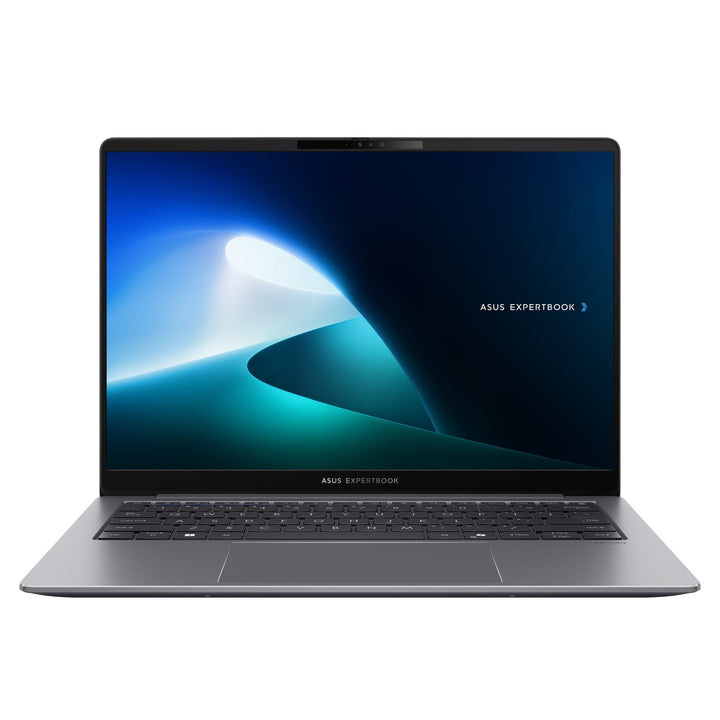


ASUS ExpertBook P5 P5405CSA-NZ1440X U7-258V/ 32GB/ 1TB SSD
Currently out of stock. Request a quote and
our team will confirm the latest price, availability and lead time.
PRODUCT DESCRIPTION
ASUS ExpertBook P5 P5405CSA-NZ1440X (90NX0861-M01XV0) - 3 Years International Warranty
A Copilot+ Business Laptop Built on Intel's Lunar Lake Platform
The ASUS ExpertBook P5 P5405CSA-NZ1440X pairs the Intel Core Ultra 7-258V processor with 32GB of LPDDR5X memory and a 1TB PCIe 4.0 NVMe SSD, on a 14-inch WQXGA (2560 x 1600, 16:10) non-touch display. It ships with Windows 11 Pro preinstalled and qualifies as a Copilot+ PC, meaning it meets Microsoft's on-device NPU performance bar for the newer Copilot+ Windows features. At a starting weight of 1.20 kg, it sits between the ultra-light ExpertBook Ultra B9406 range and the heavier ExpertBook B-series in our catalogue.
The Core Ultra 7-258V is Intel's "Lunar Lake" architecture — a genuinely different chip generation from the Core i7/i5-13xxx processors used in the ExpertBook P1403/P1503/P3405 ranges, and from the Core Ultra 7-255H used in our ExpertBook B5405/B3405 listings. It moves the memory controller and a large NPU onto the same package as the CPU, which is what gets this laptop its Copilot+ certification and its strong battery efficiency.
14-Inch WQXGA Display at 16:10
The panel is a 14-inch IPS display at 2560 x 1600 resolution (WQXGA, 16:10), non-touch, anti-glare, with a 90% screen-to-body ratio. The 16:10 aspect ratio shows more vertical content than a standard 16:9 Full HD panel before you need to scroll — genuinely useful in a spreadsheet, a long document or a browser tab most of the working day — at a materially sharper pixel density than the 1920 x 1200 panels used in our ExpertBook B3405/P3405 listings.
Intel Core Ultra 7-258V: 8 Cores, 47 TOPS NPU
The Core Ultra 7-258V runs at 2.2 GHz base, up to 4.8 GHz, with 12MB cache across 8 cores and 8 threads, and an Intel AI Boost NPU rated up to 47 TOPS — a materially larger NPU than the 13 TOPS chip in our ExpertBook B5405/B3405 listings, which is the figure Microsoft's Copilot+ PC certification is built around. Graphics run on the integrated Intel Arc 140V GPU built into the same package. Because the memory is soldered on-package rather than routed through the motherboard, Lunar Lake also delivers noticeably better battery efficiency at idle and light load than the previous-generation Core i7/i5-13xxx platform in our older ExpertBook P-series listings.
32GB Memory and 1TB SSD, With an Expansion Slot
32GB of LPDDR5X memory is integrated on-package — soldered, like the rest of the Lunar Lake platform, so it cannot be upgraded after purchase. Storage is a 1TB M.2 2280 NVMe PCIe 4.0 SSD, with a second M.2 2230 PCIe 4.0 x4 slot free for additional storage if you need to expand later — a genuine advantage over chassis with no spare slot at all.
Thunderbolt 4, HDMI 2.1 and Wi-Fi 6E
Ports are 2 x Thunderbolt 4, 2 x USB 3.2 Gen 2 Type-A, 1 x HDMI 2.1 and a 3.5mm combo audio jack, with Wi-Fi 6E and Bluetooth 5.4 for wireless. ASUS does not list a built-in RJ45 Ethernet port for this chassis, so a wired connection needs a USB-C to Ethernet adapter or a Thunderbolt dock, which we can supply if your office relies on wired LAN.
Dual Biometrics and Microsoft Pluton
Security covers a fingerprint sensor and an IR camera for Windows Hello, either of which can be used for sign-in, alongside TPM 2.0 and the Microsoft Pluton security processor built into the chip — a hardware root of trust that keeps credentials and encryption keys isolated even if the operating system is compromised. A physical camera shutter blocks the 1080p webcam mechanically when not in use.
Supplied Locally, with GST Invoice and Singapore Warranty
SourceIT supplies the ASUS ExpertBook P5 P5405CSA-NZ1440X with a full GST invoice and local Singapore support. ASUS backs this model with a 3-year international warranty including local carry-in and onsite service in Singapore, so most hardware issues are resolved locally rather than by shipping the unit overseas.
Comparing this against the older-generation ExpertBook P1403/P1503/P3405 range, or against the RJ45-equipped ExpertBook B5405/B3405 range, in our catalogue? Email sales@sourceit.com.sg with your workload and we will help you pick the right generation.
ASUS P5405CSA-NZ1440X Datasheet — Technical Specifications
General
| ASUS Product Name | ASUS ExpertBook P5 P5405CSA-NZ1440X |
| Part Number (PN) | P5405CSA-NZ1440X |
| Internal Item Code | 90NX0861-M01XV0 |
| Range | ASUS ExpertBook P5, P5405 chassis, Intel Core Ultra ("Lunar Lake") generation, Copilot+ PC |
| Form Factor | 14-inch business laptop |
| Operating System | Windows 11 Pro (preinstalled) |
| Manufacturer Warranty | 3 Years International Warranty with Local Carry-in & Onsite Service (ASUS) |
| Local Warranty (Singapore) | Included with every unit supplied by SourceIT, together with a GST invoice |
Display
| Screen Size | 14.0-inch, 16:10 |
| Resolution | WQXGA, 2560 x 1600 |
| Panel Type | IPS, anti-glare |
| Screen-to-Body Ratio | 90% |
| Touch | Not touch-enabled |
Processor & Graphics
| Processor | Intel Core Ultra 7-258V, 2.2 GHz base, up to 4.8 GHz, 12MB cache, 8 cores, 8 threads, Intel AI Boost NPU up to 47 TOPS |
| Graphics | Intel Arc 140V integrated graphics |
| Chipset | Integrated (SoC platform) |
Memory & Storage
| Memory Installed | 32GB LPDDR5X, integrated on-package |
| Memory Upgradeable | No — soldered on-package on the Lunar Lake platform |
| Primary Storage | 1TB M.2 2280 NVMe PCIe 4.0 SSD |
| Storage Expansion | 1 x free M.2 2230 PCIe 4.0 x4 slot |
Keyboard & Trackpad
| Keyboard | Backlit chiclet keyboard, 1.5mm key travel, spill-resistant |
| Trackpad | Clickpad with multi-touch gesture support |
Ports & Connectivity
| USB Type-C | 2 x Thunderbolt 4, DisplayPort & Power Delivery |
| USB Type-A | 2 x USB 3.2 Gen 2 Type-A |
| Video Output | 1 x HDMI 2.1 |
| Wired LAN | Not listed by ASUS for this chassis |
| Audio | 1 x 3.5mm combo audio jack |
| Wireless LAN | Wi-Fi 6E (802.11ax) |
| Bluetooth | Bluetooth 5.4 |
| Webcam | 1080p FHD camera with IR for Windows Hello, plus privacy shutter |
Battery & Power
| Battery | 63WHrs, 3S1P, 3-cell lithium-ion |
| Power Adapter | USB-C charging via Thunderbolt 4 port |
Physical & Build
| Dimensions (W x D x H) | 31.20 x 22.32 x 1.49-1.64 cm |
| Net Weight | Starting from 1.20 kg |
Security
| TPM | TPM 2.0, plus Microsoft Pluton security processor |
| Biometric | Fingerprint sensor and IR camera for Windows Hello (dual biometric) |
| Webcam Privacy | Physical camera shutter |
| Package Contents | Laptop, USB-C power adapter, quick-start user documentation, warranty card |
Connectivity & Setup / Security Features
Connecting Peripherals and Displays
Both Thunderbolt 4 ports support DisplayPort output, Power Delivery charging and up to 40 Gbps of data transfer, so either port can run a dock, an external monitor or a charger interchangeably. The USB 3.2 Gen 2 Type-A ports and HDMI 2.1 output handle direct peripheral and monitor connections without a dock.
No Built-In Ethernet on This Chassis
ASUS does not list an RJ45 port for the P5405 chassis, unlike the ExpertBook B3405/B5405 range we also carry. A USB-C to Gigabit Ethernet adapter or a Thunderbolt dock with an Ethernet port is the standard fix for an office that needs wired LAN — ask us to include one with your order.
Copilot+ PC Certification and the NPU
The Intel AI Boost NPU rated up to 47 TOPS is what qualifies this laptop as a Copilot+ PC under Microsoft's current certification bar, enabling the newer on-device Windows 11 AI features (Recall, Click to Do, Cocreator and similar tools as Microsoft rolls them out) to run locally rather than needing a cloud round-trip. It also offloads supported video-call effects and Copilot acceleration from the CPU cores.
Dual Biometrics, TPM 2.0 and Microsoft Pluton
Both a fingerprint sensor and an IR camera are fitted for Windows Hello, so users can pick whichever sign-in method suits them. The Microsoft Pluton security processor, built into the Lunar Lake chip itself rather than added as a separate component, works alongside TPM 2.0 to keep cryptographic keys and credentials isolated from the operating system — a step up in hardware security over chips without an integrated Pluton processor. A physical shutter mechanically blocks the webcam lens when not in use.
Package Contents & Ordering Information
In the Box
ASUS ExpertBook P5405CSA-NZ1440X laptop, USB-C power adapter, quick-start user documentation, warranty card. No mouse is included as standard.
Related ExpertBook P-Series Models in Our Catalogue
SourceIT carries several other ExpertBook P-series configurations alongside this one, spanning two processor generations. Email sales@sourceit.com.sg quoting the part number to check stock and lead time.
| P5405CSA-NZ1440X (this listing) | Intel Core Ultra 7-258V — 32GB LPDDR5X / 1TB SSD — 14" WQXGA — Copilot+ PC |
| P3405CVA-LY0092X | Intel Core i7-13620H — 16GB DDR5 / 1TB SSD — 14" WUXGA |
| P3405CVA-LY0097X | Intel Core i7-13620H — 32GB DDR5 / 1TB SSD — 14" WUXGA |
| P1403CVA-S60490X | Intel Core i5-13420H — 16GB DDR5 / 512GB SSD — 14" FHD |
| P1403CVA-S60250X | Intel Core i7-13620H — 16GB DDR5 / 512GB SSD — 14" FHD |
| P1503CVA-S71084X | Intel Core i7-13620H — 16GB DDR5 / 1TB SSD — 15.6" FHD |
| P1503CVA-S71085X | Intel Core i7-13620H — 16GB DDR5 / 512GB SSD — 15.6" FHD |
Choosing Between the Older and Newer ExpertBook P Ranges
The P1403, P1503 and P3405 ranges use 13th Gen Intel Core i5/i7 processors — proven, well-priced, no NPU. The P5405 range uses the newer Intel Core Ultra ("Lunar Lake") platform, with a large on-package NPU, Copilot+ PC certification, dual biometric sign-in and generally better battery efficiency, at a higher price point. If on-device AI features and Copilot+ certification matter for your fleet, the P5405 is the range to buy into; if they do not, the older platform remains a sound, lower-cost choice.
Datasheet & Downloads
ASUS hosts the official product and specification pages for this model family. The links below are ASUS's current pages for the P5405 chassis.
| ASUS product page | ASUS ExpertBook P5 (P5405) — Overview |
| ASUS specifications page | ASUS ExpertBook P5 (P5405) — Full Specifications |
For the PDF datasheet, user manual or driver downloads specific to the P5405CSA-NZ1440X configuration, email sales@sourceit.com.sg quoting P5405CSA-NZ1440X (internal code 90NX0861-M01XV0) and we will send you the current files directly.
Frequently Asked Questions — ASUS P5405CSA-NZ1440X
What does "Copilot+ PC" mean for this laptop specifically?
It means the NPU inside the Core Ultra 7-258V (rated up to 47 TOPS) clears the performance bar Microsoft set for its Copilot+ Windows 11 features, so features that require significant on-device AI processing run locally on this machine rather than being unavailable or requiring a cloud round-trip.
Is the memory or storage upgradeable?
Memory is not — the 32GB of LPDDR5X is integrated on-package on the Lunar Lake platform and cannot be changed after purchase. Storage can be expanded: the 1TB primary SSD sits in the M.2 2280 slot with a second M.2 2230 slot free for an additional drive.
How is this different from your P3405CVA and P1403/P1503 listings?
Different processor generation entirely. The P1403, P1503 and P3405 ranges use 13th Gen Intel Core i5/i7 chips with no NPU; this P5405 uses the newer Intel Core Ultra ("Lunar Lake") platform with a large on-package NPU, Copilot+ certification and dual biometric sign-in, at a sharper WQXGA display resolution and a higher price point.
Does it have Ethernet built in?
No — ASUS does not list an RJ45 port for this chassis. A USB-C to Ethernet adapter or a Thunderbolt dock solves this for offices needing wired LAN.
Does it have a discrete graphics card?
No — graphics run on the integrated Intel Arc 140V GPU built into the processor, sufficient for office, video-conferencing and multi-monitor use but not gaming or GPU-accelerated rendering.
What are the two biometric sign-in options, and do I need to choose one?
Both a fingerprint sensor and an IR camera for Windows Hello are fitted, and either can be enrolled and used independently — most users pick one, but having both fitted gives flexibility for shared or hot-desked machines.
What is Microsoft Pluton, and why does it matter?
It is a security processor built directly into the Intel chip rather than added as a separate component, working alongside TPM 2.0 to keep encryption keys and credentials isolated even if the operating system itself is compromised — a genuine hardware security upgrade over a TPM-only platform.
Is this a suitable laptop for a standard corporate fleet deployment?
Yes — Windows 11 Pro out of the box, TPM 2.0, Microsoft Pluton and dual biometric sign-in cover standard corporate security policy, and ASUS backs it with a 3-year international warranty including local carry-in and onsite service.
Does it come with a Singapore warranty and a GST invoice?
Yes. Every ASUS ExpertBook P5 P5405CSA-NZ1440X sold by SourceIT comes with local Singapore support and a GST invoice; ASUS backs this model with a 3-year international warranty including local carry-in and onsite service.
Product Video
We Also Recommend


ASUS Ascent GX10 Ultra-Small AI Supercomputer NVIDIA GB10 - 128GB / 4TB


ASUSTOR Lockerstor 24R Pro Gen2 AS7224RDX 24-Bay Rackmount NAS


ASUS ProArt P16 H7607BA-SE049W 16" 4K OLED Touch RTX Spark N1X 128GB 1TB Windows 11 Home AI Creator Laptop


ASUS Ascent GX10 Ultra-Small AI Supercomputer NVIDIA GB10 - 128GB / 2TB