
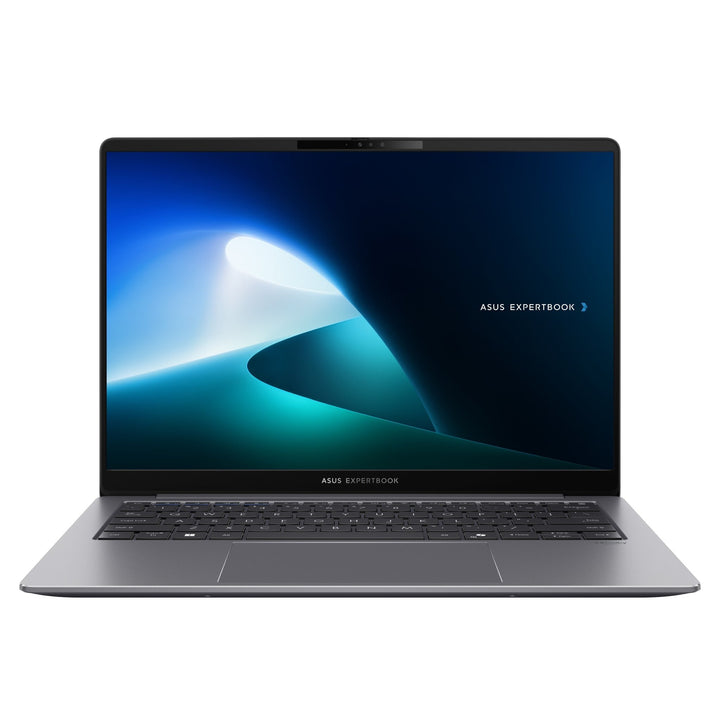


ASUS ExpertBook P1 P1403CVA-S60250X i7/16GB/512GB SSD
PRODUCT DESCRIPTION
ASUS ExpertBook P1 P1403CVA-S60250X (90NX0871-M00910) - 3 Years International Warranty
A 14-Inch Business Laptop for Everyday Office Work
The ASUS ExpertBook P1 P1403CVA-S60250X is a 14-inch business laptop built for the everyday work of a Singapore office fleet: documents, spreadsheets, video calls and line-of-business web apps, running reliably on a machine priced for volume deployment rather than as a flagship. It pairs an Intel Core i7-13620H processor with 16 GB of DDR5 memory and a 512GB PCIe 4.0 NVMe SSD, and ships with Windows 11 Pro preinstalled, so an IT team can image it and hand it to a user the same day.
At under 1.5 kg and finished in Misty Grey, it is light enough for daily commuting between home and office, and US MIL-STD 810H testing gives it a genuine durability margin over a consumer laptop at a similar price — useful for staff who travel between sites or work outside a controlled office environment.
14-Inch Full HD Display, 87% Screen-to-Body Ratio
The panel is a 14-inch Full HD (1920 x 1080) IPS display with an anti-glare coating, rated at 300 nits with 45% NTSC colour coverage in a slim bezel that gives an 87% screen-to-body ratio. This is a mainstream office panel matched to the price point and to the job the P1403CVA is bought for — document and browser work — rather than colour-critical photo or video editing. The anti-glare coating and 300-nit brightness keep the screen usable under office fluorescent lighting and near a window without a distracting mirror image.
Intel Core i7-13620H: More Headroom for Power Users
The Core i7-13620H is a 2.4 GHz base, up to 4.9 GHz, 24 MB cache, 10 cores (6P+4E), 16 threads, built on Intel's hybrid performance/efficiency architecture. Graphics are handled by the integrated Intel UHD Graphics, sufficient for office productivity, video conferencing and general multi-monitor use, but not intended for gaming or GPU-accelerated creative work.
16 GB DDR5 Memory and 512GB PCIe 4.0 SSD, with Room to Grow
16 GB of DDR5 memory is installed as standard across two SO-DIMM slots, comfortably ahead of the 8 GB that many entry business laptops still ship with, and both slots are user-accessible for an upgrade to a documented maximum of 64 GB if a role later needs more headroom. Storage is a 512GB M.2 NVMe PCIe 4.0 SSD in the primary M.2 2280 slot, with a second M.2 2230 slot free for additional storage rather than a drive replacement.
Fingerprint Reader, TPM 2.0 and a Physically Shuttered Webcam
Security on the P1403CVA covers the basics that matter for a corporate fleet: a fingerprint sensor integrated into the trackpad for Windows Hello login, a TPM 2.0 chip for hardware-backed encryption keys (required for BitLocker and Windows 11's own security baseline), and a physical camera privacy shutter that mechanically blocks the 720p webcam when not in use — a genuine control rather than a software toggle malware can re-enable. A Kensington Nano Security Slot lets the unit be cable-locked to a desk in an open-plan office.
Supplied Locally, with GST Invoice and Singapore Warranty
SourceIT supplies the ASUS ExpertBook P1403CVA P1403CVA-S60250X with a full GST invoice and local Singapore support. ASUS backs this model with a 3-year international warranty that includes local carry-in and onsite service in Singapore, so a hardware fault is generally resolved without shipping the unit overseas.
Comparing this against the Intel Core i5-13420H configuration (P1403CVA-S60490X) in the same P1403 chassis, or the larger 15.6-inch ExpertBook P1503CVA in our catalogue? Email sales@sourceit.com.sg with your budget and fleet size and we will help you pick the right configuration.
ASUS P1403CVA-S60250X Datasheet — Technical Specifications
General
| ASUS Product Name | ASUS ExpertBook P1 P1403CVA-S60250X |
| Part Number (PN) | P1403CVA-S60250X |
| Internal Item Code | 90NX0871-M00910 |
| Range | ASUS ExpertBook P1-series, P1403 chassis, 13th Gen Intel |
| Form Factor | 14-inch business laptop |
| Operating System | Windows 11 Pro (preinstalled) |
| Manufacturer Warranty | 3 Years International Warranty with Local Carry-in & Onsite Service (ASUS) |
| Local Warranty (Singapore) | Included with every unit supplied by SourceIT, together with a GST invoice |
Display
| Screen Size | 14.0-inch, 16:9 |
| Resolution | Full HD, 1920 x 1080 |
| Panel Type | IPS, anti-glare LED-backlit |
| Brightness | 300 nits |
| Colour Gamut | 45% NTSC |
| Screen-to-Body Ratio | 87% |
| Touch | Not touch-enabled |
Processor & Graphics
| Processor | Intel Core i7-13620H, 2.4 GHz base, up to 4.9 GHz, 24 MB cache, 10 cores (6P+4E), 16 threads |
| Graphics | Intel UHD Graphics (integrated) |
| Chipset | Integrated (SoC platform) |
Memory & Storage
| Memory Installed | 16 GB DDR5 SO-DIMM |
| Memory Upgradeable | Yes — 2 x SO-DIMM slots, up to 64 GB total |
| Primary Storage | 512GB M.2 2280 NVMe PCIe 4.0 SSD |
| Storage Expansion | 1 x free M.2 2230 PCIe 4.0 slot |
Keyboard & Trackpad
| Keyboard | Backlit chiclet keyboard, 1.35mm key travel, spill-resistant |
| Trackpad | Clickpad with multi-touch gesture support, fingerprint sensor integrated |
Ports & Connectivity
| USB Type-C | 2 x USB 3.2 Gen 2 Type-C, DisplayPort & Power Delivery |
| USB Type-A | 2 x USB 3.2 Gen 1 Type-A |
| Video Output | 1 x HDMI 1.4 |
| Wired LAN | 1 x RJ45 Gigabit Ethernet |
| Audio | 1 x 3.5 mm combo audio jack |
| Wireless LAN | Wi-Fi 6 (802.11ax), dual band, 2x2 |
| Bluetooth | Bluetooth 5.4 |
| Webcam | 720p HD camera with privacy shutter |
Battery & Power
| Battery | 50 WHrs, 3-cell lithium-ion |
| Power Adapter | 65 W USB-C AC adapter (20V DC, 3.25A) |
Physical & Build
| Dimensions (W x D x H) | 32.45 x 21.44 x 1.97 cm |
| Net Weight | Starting from 1.40 kg |
| Durability | US MIL-STD 810H military-grade testing (shock, vibration, temperature, humidity, altitude) |
| Colour | Misty Grey |
Security
| TPM | TPM 2.0, discrete/firmware |
| Biometric | Fingerprint sensor for Windows Hello |
| Webcam Privacy | Physical camera shutter |
| Physical Lock | Kensington Nano Security Slot |
| Package Contents | Laptop, AC power adapter, power cord, user documentation, warranty card |
Connectivity & Setup / Security Features
Connecting Peripherals and Displays
Both USB 3.2 Gen 2 Type-C ports on the P1403CVA support DisplayPort and Power Delivery, so either port can charge the laptop from a compatible USB-C charger or dock, and either can drive an external display — a genuine advantage over chassis with only one capable Type-C port. The two USB 3.2 Gen 1 Type-A ports and single HDMI 1.4 output round out the set for mice, USB drives, docking hubs and a second monitor.
Wired and Wireless Networking
A Gigabit Ethernet (RJ45) port is built into the chassis, so a wired connection does not need a USB dongle — a genuine convenience for meeting rooms and desks where Wi-Fi is congested or restricted by policy. Wireless is Wi-Fi 6 (802.11ax), dual band, 2x2, paired with Bluetooth 5.4 for headsets, mice and other peripherals.
Setting Up Windows Hello and BitLocker
The fingerprint sensor, integrated into the trackpad, and the TPM 2.0 chip work together for a fast, secure login: enrol a fingerprint once in Windows Hello and users can unlock the laptop without typing a password each time, while the TPM stores BitLocker recovery keys in hardware rather than software, meeting the security baseline most Singapore corporate IT policies require before a device is allowed to hold company data. IT teams managing a fleet of these can push a standard BitLocker and Windows Hello policy through Intune or Group Policy at enrolment.
Webcam Privacy and Physical Security
The camera privacy shutter is a mechanical slide, not a software toggle — it physically blocks the 720p webcam lens, so no malware or misconfigured app can activate the camera without the user's knowledge. The Kensington Nano Security Slot accepts a standard cable lock, appropriate for hot-desking environments or exhibition and demo use where the laptop is left unattended briefly.
Package Contents & Ordering Information
In the Box
ASUS ExpertBook P1403CVA-S60250X laptop, 65 W USB-C AC power adapter and power cord, quick-start user documentation, warranty card. No mouse is included as standard.
Related ExpertBook P1 and P-Series Models in Our Catalogue
SourceIT carries several other ExpertBook P-series configurations alongside this one. All are current commercial ASUS ExpertBook laptops for the Singapore market — email sales@sourceit.com.sg quoting the part number to check stock and lead time.
| P1403CVA-S60250X (this listing) | Core i7-13620H — 16GB DDR5 / 512GB SSD — 14" FHD |
| P1403CVA-S60490X | Intel Core i5-13420H — 16GB DDR5 / 512GB SSD — 14" FHD |
| P1503CVA-S71084X | Intel Core i7-13620H — 16GB DDR5 / 1TB SSD — 15.6" FHD |
| P1503CVA-S71085X | Intel Core i7-13620H — 16GB DDR5 / 512GB SSD — 15.6" FHD |
| P3405CVA-LY0092X | Intel Core i7-13620H — 16GB DDR5 / 1TB SSD — 14" WUXGA |
| P3405CVA-LY0097X | Intel Core i7-13620H — 32GB DDR5 / 1TB SSD — 14" WUXGA |
| P5405CSA-NZ0212X | Intel Core Ultra 5 226V — 16GB LPDDR5X / 512GB SSD — 14" WQXGA |
| P5405CSA-NZ0211X | Intel Core Ultra 7 258V — 32GB LPDDR5X / 1TB SSD — 14" WQXGA |
Choosing Between the P1403, P1503, P3405 and P5405 Ranges
All four ranges share the ExpertBook P-series' MIL-STD 810H durability testing, TPM 2.0 and fingerprint login. The P1403 and P1503 are the same 13th Gen Intel platform in 14-inch and 15.6-inch chassis; the P3405 steps up to a higher-resolution 16:10 WUXGA panel and up to 32 GB of memory on the same generation of Intel processor; the P5405 is a newer generation again, built on Intel Core Ultra (Series 2, "Lunar Lake") processors with an NPU for on-device AI and a sharper WQXGA display, at a higher price point. Email us your budget and use case and we will match you to the right range.
Datasheet & Downloads
ASUS hosts the official product and specification pages for this model family. The links below are ASUS's current Singapore pages for the P1403 chassis.
| ASUS Singapore product page | ASUS ExpertBook P1 (P1403) — Overview |
| ASUS Singapore specifications page | ASUS ExpertBook P1 (P1403) — Full Specifications |
For the PDF datasheet, user manual or driver downloads specific to the P1403CVA-S60250X configuration, email sales@sourceit.com.sg quoting P1403CVA-S60250X (internal code 90NX0871-M00910) and we will send you the current files directly.
Frequently Asked Questions — ASUS P1403CVA-S60250X
Is this suitable for a standard office fleet deployment?
Yes. It is aimed at exactly that use case — Windows 11 Pro out of the box, TPM 2.0 and a fingerprint reader for corporate security policy compliance, and an ASUS 3-year international warranty with local carry-in and onsite service so fleet-wide support does not depend on couriering units overseas.
Can the RAM or storage be upgraded after purchase?
Yes on this chassis — the P1403CVA uses two DDR5 SO-DIMM slots rather than soldered memory, upgradeable to a documented maximum of 64 GB, and a second M.2 2230 slot is free alongside the 512GB primary drive for additional storage.
What is the difference between the i5 and i7 versions of the P1403CVA in your range?
This listing (P1403CVA-S60250X) runs the Core i7-13620H; the P1403CVA-S60490X configuration runs the Intel Core i5-13420H. Chassis, display, ports and battery are identical between the two — the difference is processor performance for heavier multitasking.
Does it have a discrete graphics card?
No — graphics are handled by the integrated Intel UHD Graphics built into the processor, sufficient for office productivity, video conferencing and general multi-monitor use but not intended for gaming or GPU-accelerated rendering.
How does the physical webcam shutter work?
It is a mechanical slide built into the lid above the screen that physically covers the 720p webcam lens. Because it is a physical mechanism rather than a software setting, it cannot be bypassed by malware or an app requesting camera access without the user's knowledge.
Is Ethernet built in, or do I need a dongle?
A Gigabit RJ45 Ethernet port is built into the chassis, so no USB dongle is needed for a wired connection.
What durability testing has this laptop passed?
ASUS tests the ExpertBook P1403 chassis to the US MIL-STD 810H military standard, covering shock, vibration, extreme temperature, humidity and altitude — a genuine step up from consumer-grade laptops in this price bracket, useful for staff who travel between sites or work in less controlled environments.
Can I charge it and use an external display from the same port?
Yes — both USB 3.2 Gen 2 Type-C ports support DisplayPort and Power Delivery, so either port can be used to charge the laptop or connect an external display, and either can be used for both if your dock supports pass-through charging.
Does it come with a Singapore warranty and a GST invoice?
Yes. Every ASUS ExpertBook P1403CVA-S60250X sold by SourceIT comes with local Singapore support and a GST invoice; ASUS backs this model with a 3-year international warranty including local carry-in and onsite service.


