
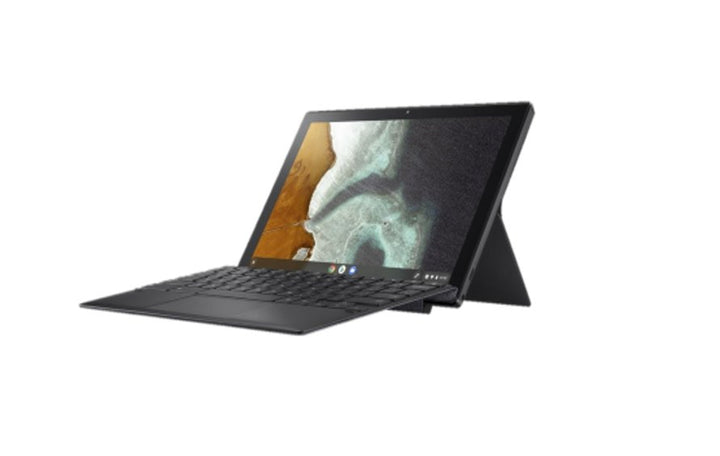


ASUS Chromebook Detachable CM3
PRODUCT DESCRIPTION
ASUS Chromebook Detachable CM3 (CM3000DVA-HT0006) - 1 Year Local Warranty
A 2-in-1 ChromeOS Tablet with a Detachable Keyboard
The ASUS Chromebook Detachable CM3 (CM3000DVA-HT0006) is a compact 10.5-inch ChromeOS tablet with a magnetically attached keyboard, aimed at classrooms, front-desk and light field-work roles where a device needs to switch quickly between typing and touch use. It runs Google's ChromeOS rather than Windows, and is built around the MediaTek Kompanio 500 chipset rather than an Intel or AMD processor — a genuinely different platform from the Windows ExpertBook laptops in our catalogue, so the sections below are written specifically for what a ChromeOS device does and does not offer.
MediaTek Kompanio 500: An ARM-Based ChromeOS Chipset
The Kompanio 500 is an 8-core ARM-based system-on-chip built for ChromeOS specifically, paired with 4GB of LPDDR4X memory soldered to the board. This is not a Windows-class processor and should not be compared against Intel Core or AMD Ryzen figures directly — ChromeOS is a lighter operating system built around the Chrome browser, Google's own apps and Android apps from the Play Store, and the Kompanio 500 is sized for that workload rather than for running desktop Windows software. Graphics are handled by the integrated Arm Mali-G72 MP3 GPU, adequate for ChromeOS's own interface, web content and light Android apps.
10.5-Inch WUXGA Touchscreen with Stylus Support
The display is a 10.5-inch WUXGA (1920 x 1200) touchscreen in a 16:10 aspect ratio, rated at 320 nits brightness with a 75% screen-to-body ratio. It supports a USI 1.0 stylus, and ASUS includes a garaged USI stylus in the box that stores and charges inside the tablet body itself — useful for handwritten notes, annotating documents or sketching directly on the ChromeOS interface without a separate charging cable to lose.
Detachable Keyboard and Integrated Kickstand
The keyboard attaches and detaches magnetically, letting the CM3 switch between a laptop-style typing setup and a bare tablet for reading, presenting or handwriting with the stylus. A built-in kickstand supports both portrait and landscape orientations. At a starting weight of roughly 510 grams for the tablet body, it is genuinely light enough to hand to a student or hold in one hand as a clipboard replacement.
ChromeOS: Google Play Store, Automatic Updates and No Antivirus to Manage
ChromeOS is Google's own operating system, built around the Chrome browser and Google's web apps (Docs, Sheets, Slides, Gmail, Drive), with access to Android apps through the Google Play Store for additional software. Updates are pushed automatically by Google in the background — there is no separate antivirus subscription to buy or patch cycle for IT to manage, which is a large part of why ChromeOS devices are popular for school and shared-device fleets. Every ChromeOS device has a published Auto Update Expiration (AUE) date after which Google stops shipping OS and security updates; ASUS does not print this date on the CM3000DVA's own specification page, so we do not state one here — the exact AUE date for this unit is visible directly on the device under Settings > About ChromeOS once it is set up, and Google also publishes the current AUE list on its own support site.
Supplied Locally, with GST Invoice and Singapore Warranty
SourceIT supplies the ASUS Chromebook Detachable CM3 (CM3000DVA-HT0006) with a full GST invoice and local Singapore warranty support, covering the tablet body, the detachable keyboard and the garaged stylus.
Comparing this against our clamshell C424MA or CX1 Chromebooks, or the convertible Chromebook Vibe CX34 Flip? Email sales@sourceit.com.sg with your use case — classroom, front desk, field work — and we will help you match the right form factor.
ASUS CM3000DVA-HT0006 Datasheet — Technical Specifications
General
| ASUS Product Name | ASUS Chromebook Detachable CM3 |
| Part Number (PN) | CM3000DVA-HT0006 |
| Range | ASUS Chromebook Detachable CM3, CM3000 chassis |
| Form Factor | 10.5-inch 2-in-1 detachable ChromeOS tablet |
| Operating System | ChromeOS, with Google Play Store for Android apps |
| Local Warranty (Singapore) | 1 Year, included with every unit supplied by SourceIT, together with a GST invoice |
Processor & Graphics
| Processor | MediaTek Kompanio 500, up to 2.0 GHz, 8 cores, ARM-based ChromeOS chipset |
| Graphics | Arm Mali-G72 MP3 (integrated) |
Display
| Screen Size | 10.5-inch, 16:10 |
| Resolution | WUXGA, 1920 x 1200 |
| Touch | Touchscreen, with USI 1.0 stylus support |
| Brightness | 320 nits |
| Screen-to-Body Ratio | 75% |
Memory & Storage
| Memory Installed | 4GB LPDDR4X, soldered (not user-upgradeable) |
| Storage | 128GB eMMC |
Keyboard & Stylus
| Keyboard | Detachable magnetic keyboard, soft-touch keys, 1.5mm key travel |
| Stylus | USI 1.0 garaged stylus included, stores and charges in the tablet body |
| Kickstand | Integrated, supports portrait and landscape orientation |
Ports & Connectivity
| USB Type-C | 1 x USB 2.0 Type-C, supports display output and Power Delivery charging |
| Audio | 1 x 3.5 mm audio jack |
| Wireless LAN | Wi-Fi 5 (802.11ac), dual band, 2x2 |
| Bluetooth | Bluetooth 5.0 |
| Cameras | 2MP front-facing, 8MP rear-facing |
Battery & Power
| Battery | 27 WHrs, 2-cell lithium-ion |
| Power Adapter | 45 W USB Type-C charger |
Physical & Build
| Dimensions (tablet body) | 25.54 x 16.72 x 0.79–00.80 cm |
| Net Weight (tablet body) | Starting from 510 g |
| Colour | Mineral Grey |
| Package Contents | Chromebook Detachable CM3 tablet, detachable keyboard, garaged USI stylus, 45 W USB Type-C power adapter, user documentation |
Connectivity & Setup
Single USB-C Port: Charging, Data and an External Display
The CM3 has one USB 2.0 Type-C port, which carries charging via Power Delivery and can drive an external display, alongside a 3.5mm audio jack. There is no full-size USB-A or HDMI port on the tablet body itself, which is typical for a device this compact — if you need to connect a USB peripheral or a second display regularly, a USB-C hub is the practical way to add those ports.
Wi-Fi and Bluetooth
Wireless is Wi-Fi 5 (802.11ac), dual band, 2x2, with Bluetooth 5.0 for a mouse, keyboard or headset. There is no wired Ethernet option on this model — for a fixed desk deployment needing wired networking, our clamshell Chromebooks with a full port selection are a better fit.
Signing In with a Google Account and Managing the Device
ChromeOS is set up against a Google Account at first boot — a personal Gmail account for individual use, or a Google Workspace for Education or Google Workspace managed account for a school or organisation fleet. A managed Google Workspace account lets an IT administrator push apps, restrict settings and enrol the device centrally through the Google Admin console, which is the normal way a school or company deploys more than a handful of Chromebooks at once.
Using the Detachable Keyboard and Stylus
The keyboard attaches magnetically to the base of the tablet with no separate pairing step — align it and it connects. The garaged USI stylus similarly needs no Bluetooth pairing; it charges by sitting in its garage slot in the tablet body and works immediately with any ChromeOS app that accepts stylus input, including the built-in Google Keep and any Android note-taking app installed from the Play Store.
Package Contents & Ordering Information
In the Box
ASUS Chromebook Detachable CM3 tablet, detachable magnetic keyboard, garaged USI stylus, 45 W USB Type-C power adapter, user documentation.
Related ASUS Chromebooks in Our Catalogue
SourceIT carries several ASUS ChromeOS devices covering different form factors and budgets. Email sales@sourceit.com.sg quoting the part number to check current stock and lead time.
| CM3000DVA-HT0006 (this listing) | 2-in-1 detachable tablet — 10.5" WUXGA touch — MediaTek Kompanio 500 — 4GB / 128GB |
| CX1102CKA-N00045 | Clamshell — 11.6" HD — Intel Celeron N4500 — 4GB / 64GB |
| C424MA-EB0162 | Clamshell — 14" Full HD — Intel Celeron N4020 — 8GB / 64GB |
| CX3401FBA-N90274 | 2-in-1 convertible — 14" WUXGA touch, 144Hz — Intel Core i7-1255U — 16GB / 256GB |
Choosing Between a Detachable, a Clamshell and a Convertible
The CM3 is a true detachable — the screen fully separates from the keyboard for use as a standalone tablet, which the C424MA and CX1 clamshells cannot do and the CX34 Flip convertible (which folds but keeps the keyboard permanently attached) cannot fully replicate either. If the primary use case is tablet-first with occasional typing — reading, annotating, presenting — the CM3's detachable design is the better fit; if typing is the primary activity, a clamshell like the C424MA or CX1 gives a sturdier, permanently attached keyboard deck for less money.
Datasheet & Downloads
ASUS's current Singapore website no longer carries a live product or specification page for the Chromebook Detachable CM3 — this model has been superseded in ASUS's current Singapore consumer and education lineup by newer Chromebook and Chromebook Plus detachable models. The specifications in this listing are drawn from ASUS's published CM3000DVA documentation for this chassis.
For the PDF datasheet, user manual or driver downloads for the CM3000DVA-HT0006, email sales@sourceit.com.sg quoting CM3000DVA-HT0006 and we will send you the current files directly.
Frequently Asked Questions — ASUS CM3000DVA-HT0006
Is this a Windows laptop or a ChromeOS device?
It runs ChromeOS, Google's own operating system, not Windows. It is built around a MediaTek ARM chipset rather than an Intel or AMD processor, and runs Chrome browser tabs, Google's web apps and Android apps from the Google Play Store rather than Windows desktop software.
Can I run Microsoft Office or other Windows software on it?
Not as installed desktop software. The web versions of Microsoft 365 (Word, Excel, PowerPoint online) work fine in the Chrome browser, and Android versions of some Office apps are available through the Google Play Store, but this device cannot install and run traditional Windows .exe programs.
Does the keyboard need to be paired separately?
No — it attaches magnetically and connects automatically with no Bluetooth pairing step required.
Is the stylus included, and does it need charging separately?
A USI 1.0 stylus is included in the box and garages inside the tablet body, where it charges automatically while stored — there is no separate stylus charging cable to manage.
When will this device stop receiving ChromeOS updates?
ASUS does not print an Auto Update Expiration (AUE) date on the CM3000DVA's own specification sheet. The exact date is shown on the device itself under Settings > About ChromeOS once it is set up, and Google also maintains a current published AUE list for all ChromeOS devices.
Can I connect an external monitor or a USB mouse?
The single USB-C port supports external display output, so a monitor can be connected directly or through a USB-C hub. A USB mouse needs either a USB-C hub (no full-size USB-A port on the tablet) or a Bluetooth mouse paired over Bluetooth 5.0.
Is this suitable for a school fleet deployment?
Yes — ChromeOS devices are widely used in education because they can be centrally enrolled and managed through Google Workspace for Education's Admin console, with automatic background updates and no antivirus software to install or maintain.
How much memory and storage does it have, and can they be upgraded?
4GB of LPDDR4X memory and 128GB of eMMC storage, both soldered to the board and not user-upgradeable. ChromeOS is designed to run comfortably within 4GB for typical browser and Android-app workloads, but this is not a device for heavy local storage or memory-intensive tasks.
Does it come with a Singapore warranty and a GST invoice?
Yes. Every ASUS Chromebook Detachable CM3 (CM3000DVA-HT0006) sold by SourceIT comes with local Singapore warranty support and a GST invoice, covering the tablet, keyboard and stylus.


