
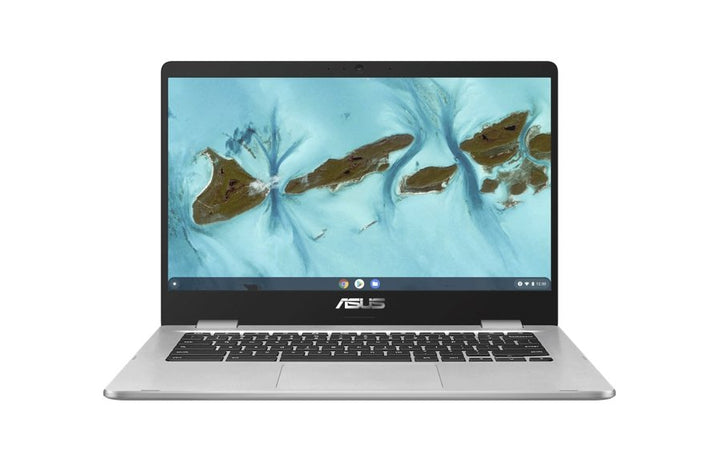


ASUS Chromebook C424MA-EB0162
Currently out of stock. Request a quote and
our team will confirm the latest price, availability and lead time.
PRODUCT DESCRIPTION
ASUS Chromebook C424MA-EB0162 (90NX02C2-M000L0) - 1 Year Local Warranty
A 14-Inch Clamshell Chromebook for Education and Budget Fleets
The ASUS Chromebook C424MA-EB0162 is a 14-inch clamshell ChromeOS laptop built for education, front-desk and everyday web-based computing where the priority is a low total cost of ownership across a large number of units rather than raw processing power. It runs ChromeOS, not Windows, and is built around an Intel Celeron N4020 processor with 8GB of memory and 64GB of eMMC storage — a genuinely different platform from the Windows ExpertBook laptops we also carry, so the specifications and setup guidance below are written specifically for what a ChromeOS device offers.
Intel Celeron N4020: Sized for ChromeOS, Not Windows
The Celeron N4020 is a dual-core processor, 1.1 GHz base, up to 2.6 GHz burst, with 4MB cache — a low-power chip built for ChromeOS's lighter workload rather than for running Windows desktop applications. ChromeOS itself is designed to stay responsive on modest hardware because most of the work happens in the Chrome browser and in Google's own lightweight web apps rather than in large locally-installed programs, which is why a processor this modest can still deliver a usable day-to-day experience for browsing, Google Docs, video calls and streaming video.
14-Inch Full HD Display in a Slim, Light Chassis
The display is a 14-inch Full HD panel, wide-view and anti-glare, in a narrow-bezel design with a 78% screen-to-body ratio. It is not a touchscreen. At this size and resolution it comfortably fits a browser window, a Google Docs page or a video call without feeling cramped, while keeping the overall chassis light enough for a student to carry in a backpack all day.
8GB Memory and 64GB eMMC Storage
This configuration is fitted with 8GB of LPDDR4 memory, soldered to the board and not user-upgradeable, alongside 64GB of eMMC storage. 8GB is comfortably above the 4GB fitted to entry ChromeOS devices and gives more headroom for running several browser tabs and an Android app or two at once. ChromeOS itself, and most of the applications a student or front-desk user runs on it, live primarily in the cloud through Google Drive, so 64GB of local storage is intended for cached files and downloaded apps rather than as a primary document store.
ChromeOS: Google Play Store, Automatic Updates and No Antivirus to Manage
ChromeOS updates itself automatically in the background with no antivirus subscription or manual patch cycle for IT to manage, and the Google Play Store gives access to Android apps for additional software beyond the Chrome browser and Google's own web apps. Every ChromeOS device has a published Auto Update Expiration (AUE) date after which Google stops shipping OS and security updates; ASUS does not print this date on the C424MA's own specification page, so we do not state one here — it is visible directly on the device under Settings > About ChromeOS once it is set up, and Google publishes the current AUE list on its own support site.
Supplied Locally, with GST Invoice and Singapore Warranty
SourceIT supplies the ASUS Chromebook C424MA-EB0162 with a full GST invoice and local Singapore warranty support, which matters for a school or organisation deploying a batch of these units where a fast, local repair path keeps downtime to a minimum.
Comparing this against our smaller CX1 Chromebook or the 2-in-1 Chromebook Detachable CM3 and Chromebook Vibe CX34 Flip? Email sales@sourceit.com.sg with your fleet size and budget and we will help you pick the right model.
ASUS C424MA-EB0162 Datasheet — Technical Specifications
General
| ASUS Product Name | ASUS Chromebook C424MA-EB0162 |
| Part Number (PN) | C424MA-EB0162 |
| Internal Item Code | 90NX02C2-M000L0 |
| Range | ASUS Chromebook C424, clamshell |
| Form Factor | 14-inch clamshell Chromebook |
| Operating System | ChromeOS, with Google Play Store for Android apps |
| Local Warranty (Singapore) | 1 Year, included with every unit supplied by SourceIT, together with a GST invoice |
Processor & Graphics
| Processor | Intel Celeron N4020, 1.1 GHz base, up to 2.6 GHz, 4MB cache, 2 cores |
| Graphics | Intel UHD Graphics 600 (integrated) |
Display
| Screen Size | 14.0-inch |
| Resolution | Full HD, 1920 x 1080 |
| Panel Type | Wide-view, anti-glare, LED-backlit |
| Screen-to-Body Ratio | 78% |
| Touch | Not touch-enabled |
Memory & Storage
| Memory Installed | 8GB LPDDR4, soldered (not user-upgradeable) |
| Storage | 64GB eMMC |
Keyboard & Trackpad
| Keyboard | Chiclet keyboard, spill-resistant |
| Trackpad | Clickpad with multi-touch gesture support |
Ports & Connectivity
| USB Type-A | 2 x USB 3.2 Gen 1 Type-A |
| Audio | 1 x 3.5 mm combo audio jack |
| Card Reader | 2-in-1 card reader (SD / MMC) |
| Wireless LAN | Wi-Fi 5 (802.11ac), dual band, 2x2 |
| Bluetooth | Bluetooth 5.1 |
Battery & Power
| Battery | 42 WHrs, 3-cell lithium-ion polymer |
Physical & Build
| Dimensions (W x D x H) | 32.26 x 22.80 x 1.80 cm |
| Colour | Silver |
| Package Contents | Chromebook C424MA laptop, AC power adapter, user documentation |
Connectivity & Setup
Ports for Peripherals and Storage
Two USB 3.2 Gen 1 Type-A ports handle a mouse, USB drive or other standard peripheral, and the built-in SD/MMC card reader lets a memory card be read directly without an adapter — useful in a classroom where students may bring photos or files on an SD card. There is no dedicated video output on this model, so an external monitor needs a USB-A to HDMI or VGA adapter if one is required.
Wi-Fi and Bluetooth
Wireless is Wi-Fi 5 (802.11ac), dual band, 2x2, with Bluetooth 5.1 for a mouse, keyboard or headset. There is no wired Ethernet port on this model — for a fixed classroom or desk deployment needing wired networking, check with us on USB-A to Ethernet adapters or consider a docking accessory.
Signing In with a Google Account and Managing a Fleet
ChromeOS is set up against a Google Account at first boot — a personal Gmail account for individual use, or a Google Workspace for Education account for a school fleet. A managed Google Workspace account lets an IT administrator enrol every device centrally, push apps and browser policies, and restrict settings through the Google Admin console, which is the standard way schools deploy dozens or hundreds of these units at once without touching each one individually.
Everyday Maintenance
ChromeOS updates itself automatically over Wi-Fi with no IT action required, and there is no antivirus software to install or renew. Battery and storage health can both be checked from ChromeOS Settings, and a factory reset (Powerwash) is available directly in Settings if a unit needs to be wiped and reassigned to a new student or staff member.
Package Contents & Ordering Information
In the Box
ASUS Chromebook C424MA-EB0162 laptop, AC power adapter, user documentation.
Related ASUS Chromebooks in Our Catalogue
SourceIT carries several ASUS ChromeOS devices at different price points and form factors, which suits schools and organisations mixing device tiers across grade levels or roles. Email sales@sourceit.com.sg quoting the part number to check current stock and lead time, and ask about volume pricing for fleet orders.
| C424MA-EB0162 (this listing) | Clamshell — 14" Full HD — Intel Celeron N4020 — 8GB / 64GB |
| CX1102CKA-N00045 | Clamshell — 11.6" HD — Intel Celeron N4500 — 4GB / 64GB |
| CM3000DVA-HT0006 | 2-in-1 detachable tablet — 10.5" WUXGA touch — MediaTek Kompanio 500 — 4GB / 128GB |
| CX3401FBA-N90274 | 2-in-1 convertible — 14" WUXGA touch, 144Hz — Intel Core i7-1255U — 16GB / 256GB |
Choosing Between the C424MA and CX1
Both are clamshell Chromebooks aimed at budget and education deployments. The C424MA steps up with a larger 14-inch display and 8GB of memory in this configuration against the CX1's smaller 11.6-inch screen and 4GB, at a correspondingly higher price — the right choice depends on whether screen size and multitasking headroom or the lowest possible per-unit cost matters more for your fleet.
Datasheet & Downloads
ASUS's current Singapore website no longer carries a live product or specification page for the Chromebook C424MA — this model has been superseded in ASUS's current Singapore lineup by newer Chromebook generations. The specifications in this listing are drawn from ASUS's published C424MA documentation for this chassis.
For the PDF datasheet, user manual or driver downloads for the C424MA-EB0162, email sales@sourceit.com.sg quoting C424MA-EB0162 (internal code 90NX02C2-M000L0) and we will send you the current files directly.
Frequently Asked Questions — ASUS C424MA-EB0162
Is this a Windows laptop or a ChromeOS device?
It runs ChromeOS, Google's own operating system, not Windows. It uses the Chrome browser, Google's web apps and Android apps from the Google Play Store rather than installed Windows software.
Is this fast enough for classroom or office use?
Yes, within the scope ChromeOS is built for. The Celeron N4020 and 8GB of memory handle browser-based work, Google Docs, video calls and streaming comfortably; it is not intended for locally-installed heavy software, video editing or gaming.
Can I run Microsoft Office on it?
Not as installed desktop software. Microsoft 365's web apps work fine in the Chrome browser, and Android versions of some Office apps are available through the Google Play Store.
Does it have Ethernet or an HDMI port?
No wired Ethernet or HDMI port is built in. Wireless is Wi-Fi 5 with Bluetooth 5.1, and an external display would need a USB-A adapter, since there is no dedicated video output on this model.
Can the memory or storage be upgraded?
No — 8GB of memory and 64GB of eMMC storage are soldered to the board on this configuration and are not user-upgradeable.
When will this device stop receiving ChromeOS updates?
ASUS does not print an Auto Update Expiration (AUE) date on the C424MA's own specification sheet. The exact date is shown on the device itself under Settings > About ChromeOS once it is set up, and Google also maintains a current published AUE list for all ChromeOS devices.
Is this suitable for a school fleet deployment?
Yes — this is a common use case for the C424MA. ChromeOS devices can be centrally enrolled and managed through Google Workspace for Education's Admin console, with automatic background updates and no antivirus software to install or maintain across a large fleet.
Does it come with a Singapore warranty and a GST invoice?
Yes. Every ASUS Chromebook C424MA-EB0162 sold by SourceIT comes with local Singapore warranty support and a GST invoice.
We Also Recommend


ASUS Ascent GX10 Ultra-Small AI Supercomputer NVIDIA GB10 - 128GB / 4TB


ASUSTOR Lockerstor 24R Pro Gen2 AS7224RDX 24-Bay Rackmount NAS


ASUS ProArt P16 H7607BA-SE049W 16" 4K OLED Touch RTX Spark N1X 128GB 1TB Windows 11 Home AI Creator Laptop


ASUS Ascent GX10 Ultra-Small AI Supercomputer NVIDIA GB10 - 128GB / 2TB